Sickchill: Symbolic Links or UNC path not working in windows.
SickChill Configuration
SickChill Info:
Branch: master
Commit: f8f5e604429802b21b6e6364f60e17619d84a253
Version: v2020.09.08-1
Database Version: 44.2
Python Version:
3.8.5 (tags/v3.8.5:580fbb0, Jul 20 2020, 15:57:54) [MSC v.1924 64 bit (AMD64)]
SSL Version:
OpenSSL 1.1.1g 21 Apr 2020
OS:
Windows-10-10.0.19041-SP0
Locale:
en_US.cp1252
Browser: FireFox
What you did: Install a fresh copy of SickChill into new folder. Restore database from previous version that used Python v2.x.
What happened: UNC path names or Symbolic links no longer work which is a must as show reside on a different PC
What you expected: UNC Paths or Symbolic links to work
Logs:
PASTE LOGS HERE
 dd30fragbait
All 7 comments
Issue-Label Bot is automatically applying the label Bug / Issue to this issue, with a confidence of 0.96. Please mark this comment with :thumbsup: or :thumbsdown: to give our bot feedback!
Links: app homepage, dashboard and code for this bot.
![issue-label-bot[bot] picture](https://avatars2.githubusercontent.com/in/27079?v=4&s=40) issue-label-bot[bot]
on 8 Sep 2020
issue-label-bot[bot]
on 8 Sep 2020
Hi, thanks for the report. Please use search to make sure your issue has not been reported yet, and someone will try to help you as soon as possible.
![github-actions[bot] picture](https://avatars2.githubusercontent.com/in/15368?v=4&s=40) github-actions[bot]
on 8 Sep 2020
github-actions[bot]
on 8 Sep 2020
I am running in to the same issue. I have sym links set up that worked with my old version (latest python 2) then after uninstalling/installing latest installer, it can no longer use the sym link.
Since I am using a pre-Py3 config, the directory was populated. If I try to use the UI to pick that folder again, it fails as soon as it hits the sym link.
This is what shows in the log file when I try to scan:
2020-09-08 22:44:03 DEBUG :: POSTPROCESSOR :: Starting new thread: POSTPROCESSOR
2020-09-08 22:44:03 INFO :: POSTPROCESSOR :: Auto post processing task for C:\E-Drive\Incoming Files was added to the queue
2020-09-08 22:44:06 INFO :: POSTPROCESSOR-AUTO :: Beginning auto post processing task: C:\E-Drive\Incoming Files
2020-09-08 22:44:06 DEBUG :: POSTPROCESSOR-AUTO :: Unable to figure out what folder to process. If your downloader and SickChill aren't on the same PC make sure you fill out your TV download dir in the config.
2020-09-08 22:44:06 INFO :: POSTPROCESSOR-AUTO :: Auto post processing task for C:\E-Drive\Incoming Files completed
 Smokey23
on 9 Sep 2020
Smokey23
on 9 Sep 2020
I feel like both of you are not describing your issue accurately.
UNC paths are network paths that require the user account that is running SC to have permissions for the share ///servername/sharename/path/to/file
Symbolic links (really a junction on windows) are USER mounts, so the SC service needs to be ran as the same user who has created the junction.
@Smokey23 yours seems like a junction directly to a UNC network path.
SC should work by using a unc path directly (if it doesn't, it will eventually) because of python3. I will be testing it soon and switching a ton of code over to pathlib, but there is a "bug" in python3.8 about unc paths that do not use pathlib. previously os.path.realpath(x:\blah) where x:\ is a drive mapped to ///server/blah would return x:\blah, now it returns ///server/blah
 miigotu
on 10 Sep 2020
miigotu
on 10 Sep 2020
I do have to admit that it has been such a long time since I originally set up SC that I do not recall if I changed the Service to use my USER acct vs the System one. When uninstalling/reinstalling to get Py3, the service was removed and recreated clearing out what had bee there.
However, after updating the Service to use my User account, the junction I had (your correct assumption) now works correctly. I noticed that when the POSTPROCESSOR runs now, it uses the UNC name rather than the one specified in the settings (the SYM/junction).
For me, it seems like a PEBKAC issue. I should have just changed the Service user rather then assume it was a changed code issue.
I appreciate all the work you are doing and hope I have not wasted too much of your time. Keep up the great work!!
Smokey23
on 10 Sep 2020
I plan on making it use the new python3 Pathlib in the near future so hopefully it works even better then, regardless if it is mapped or not =P
This might be gibberish if you don't know python, but its great: https://realpython.com/python-pathlib/
I just need to be careful when doing so: https://github.com/conan-io/conan/issues/6173 (this is why you see the UNC path in the log rather than the mount)
miigotu
on 10 Sep 2020
Miigotu,
My apologies. I had the exact same scenario that Smokey23 had. My previous version of SC service was running under a different user account that has correct permissions to access the UNC path and Symlink.
I just have to change the service type to run with an account that has the correct permissions and all is good now.
Sorry to have bothered you with this issue. you can mark it closed.
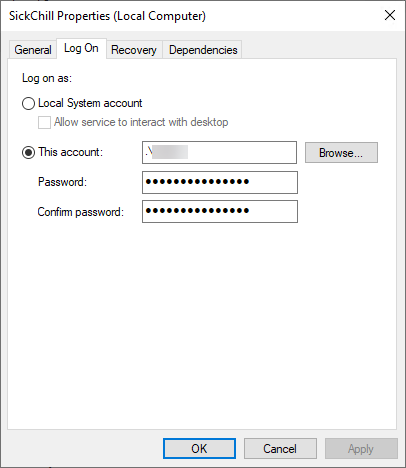
dd30fragbait
on 10 Sep 2020
Related issues
 Hydrog3n
·
4Comments
Hydrog3n
·
4Comments
 spiddeer
·
5Comments
spiddeer
·
5Comments
 heymoe
·
3Comments
heymoe
·
3Comments
 nopoz
·
4Comments
nopoz
·
4Comments
 Rouzax
·
3Comments
Rouzax
·
3Comments