Sickchill: Local branch is ahead of master. Automatic update not possible.
Branch/Commit: master/99336df163c7e776c7931d864e84d1f0f83afe4d
OS: Raspibian
Browser: Safari
What you did: Try to update
What happened: Local branch is ahead of master. Automatic update not possible.
What you expected: update
Logs:
2020-09-05 19:36:01 WARNING WEBSERVER-HOME :: Local branch is ahead of master. Automatic update not possible. 2020-09-05 19:35:58 INFO WEBSERVER-HOME :: Checking for updates using GIT
 rafaelrosars
All 80 comments
Issue-Label Bot is automatically applying the label Bug / Issue to this issue, with a confidence of 0.89. Please mark this comment with :thumbsup: or :thumbsdown: to give our bot feedback!
Links: app homepage, dashboard and code for this bot.
![issue-label-bot[bot] picture](https://avatars2.githubusercontent.com/in/27079?v=4&s=40) issue-label-bot[bot]
on 6 Sep 2020
issue-label-bot[bot]
on 6 Sep 2020
Have you tried reading the news in the past week?
 miigotu
on 6 Sep 2020
miigotu
on 6 Sep 2020
Python3 code has been merged into master. I intentionally created a continuity break in the commit history with a force push so that users would not be automatically updated to python3 code while their service files were pointing to python2 (which would cause it to not even start up)
The python2 code still works, but will receive no more updates.
This way, users can stay on python2 until they manually intervene and get everything working on python3 because the updater will refuse to update.
This also gives time for 3rd party maintainers to update their respective apps for specific devices.
Synology is being updated as we speak, there is a new Windows installer already, git will still work (but it is no longer the preferred install method)
Ideally we can get all users switched over to a pure pip install or using docker and eliminate a ton of issues, because everyone will have a system operating the same way.
If someone needs some specific help feel free to ask.
If anyone would like to help updating the wiki with new information, as well as a new page specifically for this situation that would be appreciated.
miigotu
on 6 Sep 2020
Also, please forgive me if I seem short over the next few days. I will be helping hundreds of users and trying to get all of our packages updated while taking care of a 1 month old baby :neckbeard:
miigotu
on 6 Sep 2020
Well I hadn't run SickChill in a week and imagine my surprise when it failed to work and I found your pointer to the news with an age of 48mins. As glad as I am for the move to python 3 I did not have a straightforward upgrade using the SickChillInstaller you just posted, I'll post about the issues there. I hope the errors were of my own making and as daft as it sounds I couldn't find the discord url anywhere, not even in the Wiki or FAQ.
PS congratulations on the baby.
 augur42
on 6 Sep 2020
augur42
on 6 Sep 2020
current window installer downloads a portable version of git and installs to a temp folder then tries to run from C:\SickChill\git and fails with file not found. using installer .55
 snapperhead
on 6 Sep 2020
snapperhead
on 6 Sep 2020
@snapperhead windows installer is fixed 0.5.7
miigotu
on 6 Sep 2020
@snapperhead windows installer is fixed 0.5.7
wont start after install i dont think python install is ending up in sickchill dir as it looks like thats where its expected to be.
snapperhead
on 6 Sep 2020
@snapperhead windows installer is fixed 0.5.7
wont start after install i dont think python install is ending up in sickchill dir as it looks like thats where its expected to be.
Have a look here.
https://github.com/SickChill/SickChillInstaller/issues/27
This was for the first updated installer I 'used' 0.5.4
It might be the python path or it might be that the nssm service needs editing.
W̶h̶e̶n̶ ̶y̶o̶u̶ ̶f̶i̶g̶u̶r̶e̶ ̶o̶u̶t̶ ̶w̶h̶i̶c̶h̶ ̶i̶t̶ ̶i̶s̶ ̶p̶l̶e̶a̶s̶e̶ ̶p̶o̶s̶t̶ ̶a̶n̶ ̶i̶s̶s̶u̶e̶ ̶o̶n̶ ̶t̶h̶e̶ ̶S̶i̶c̶k̶C̶h̶i̶l̶l̶I̶n̶s̶t̶a̶l̶l̶e̶r̶ ̶p̶a̶g̶e̶ ̶
̶h̶t̶t̶p̶s̶:̶/̶/̶g̶i̶t̶h̶u̶b̶.̶c̶o̶m̶/̶S̶i̶c̶k̶C̶h̶i̶l̶l̶/̶S̶i̶c̶k̶C̶h̶i̶l̶l̶I̶n̶s̶t̶a̶l̶l̶e̶r̶
0.5.7 works 100% (so long as you haven't installed python3 manually, if so uninstall python3 first).
augur42
on 6 Sep 2020
It might be the python path or it might be that the nssm service needs editing.
When you figure out which it is please post an issue on the SickChillInstaller page
https://github.com/SickChill/SickChillInstaller
turns out it didn't like my existing install of python3 once i uninstalled python3 and re-ran installer everything is up and running now.
snapperhead
on 6 Sep 2020
Just wanted to confirm that Installer v0.5.7 worked for me no problems. I am running on Windows 10 v2004
Here is my full process.
- Stop SickChill service.
- Backup everything in C:\SickChill to C:\SickChill.old
- Add / Remove Programs and uninstall SickChill (Do not delete your database and settings)
- I confirmed the only thing remaining in C:\SickChill was my Data folder
- Run SickChillInstaller.exe v0.5.7
The installer restarted my service and I confirmed it is running again, and I confirmed that embedded Git and Python are in C:\SickChill
 havoc77
on 6 Sep 2020
havoc77
on 6 Sep 2020
I've been testing 0.5.7 with miigotu on discord and I too failed to uninstall my existing python 3 which causing the install to fail. I then doubled down and uninstalled SickChill which broke python so I had to run a repair before uninstalling.
Also there is one current gotcha wrt the image cache location changing (posters and banners and backgrounds).
old location was
C:\SickChill\Data\gui\slick\cache\images
new location is
C:\SickChill\SickChillsickchill\gui\slick\cache\images
The solution is to either copy the contents of \images and \images\thumbnails to the new location or run a Mass Update on all shows to redownload them.
augur42
on 6 Sep 2020
Also there is one current gotcha wrt the image cache location changing (posters and banners and backgrounds).
Thanks for this I had not noticed it yet.
It made more sense to me to have this in the old Data folder and not under the repository folder.... I will move mine, but can any of the Devs confirm if this is intentional?
havoc77
on 6 Sep 2020
No it is supposed to be symlinked into the data folder, but I'm exhausted so I'll get to it when I can lol
miigotu
on 6 Sep 2020
A baby always comes first! Enjoy him or her, sleep (if you are allowed) and SC comes last ...
 bartmans
on 6 Sep 2020
bartmans
on 6 Sep 2020
Just wanted to confirm that Installer v0.5.7 worked for me no problems. I am running on Windows 10 v2004
Here is my full process.
- Stop SickChill service.
- Backup everything in C:\SickChill to C:\SickChill.old
- Add / Remove Programs and uninstall SickChill (Do not delete your database and settings)
- I confirmed the only thing remaining in C:\SickChill was my Data folder
- Run SickChillInstaller.exe v0.5.7
The installer restarted my service and I confirmed it is running again, and I confirmed that embedded Git and Python are in C:\SickChill
Just followed those steps but no folder C:\SickChill\Python3 was created, because I already have Python 3.8 installed on my system (I think) and I cannot uninstall it since I have other things that rely on this default installation. I had to copy the folder from C:\Python38 to C:\SickChill\ and rename it to C:\SickChill\Python3 to get the service to start.
 waltermaldonado
on 6 Sep 2020
waltermaldonado
on 6 Sep 2020
when you say synology is being updated as we speak, do you mean Docker? And will it be as simple as updating docker itself or is there more we need to do with linuxserver-sickrage? Please help those like myself with Docker/linuxserver-sickrage and what we need to do instructions wise somewhere. I myself have python3 installed on my synology but not sure what else needs to be done. thank you!
 ebaydan777
on 7 Sep 2020
ebaydan777
on 7 Sep 2020
@ebaydan777 https://github.com/SickChill/SickChill/wiki/Docker
https://github.com/SynoCommunity/spksrc/pull/4161
miigotu
on 7 Sep 2020
Love your work @miigotu
Get some sleep!!!
havoc77
on 7 Sep 2020
@miigotu FYI - I tried the windows installer yesterday, but it failed because I already had SC installed. There was no uninstaller. Just wanted to mention it since you're referring to the installer earlier.
 Tiwas
on 7 Sep 2020
Tiwas
on 7 Sep 2020
@Tiwas You did not have it in your Windows Settings -> Apps -> Apps & Features list?
I can find it there and click the Uninstall button.
On my current system I have only ever installed via some form of the SickChillInstaller.exe - maybe you are different.
havoc77
on 7 Sep 2020
@Tiwas You did not have it in your Windows Settings -> Apps -> Apps & Features list?
I can find it there and click the Uninstall button.On my current system I have only ever installed via some form of the SickChillInstaller.exe - maybe you are different.
@havoc77 It's in the list, but it refers to an uninstall executable that doesn't exist.
Tiwas
on 7 Sep 2020
having issues getting the new installer to work:
pip install sickchill
Defaulting to user installation because normal site-packages is not writeable
ERROR: Could not find a version that satisfies the requirement sickchill (from versions: none)
ERROR: No matching distribution found for sickchill
I checked my python3 version and it set to 3.5.2 which should work...
 FGOD1983
on 7 Sep 2020
FGOD1983
on 7 Sep 2020
I have no idea about Python version compatibility and have never used pip... but but in the news page of my SickChill server from 2020-08-06 it says:
Make sure you have python3.5+ installed on your system. There are tons of changes already, all for the better.
A newer post from 2020-08-31 says
I am going to do my best to wait a week from today before I merge develop to master.
When this happens, if you are using docker, pip, etc everything will be seemless.For everyone else, make a backup first, as you may need to restore the backup after manually updating and you do not want to lose any data.
If you are using git install, your updater is going to fail/error and you will need to make sure you have python3.6+
installed and manually update your service file to use python3, and then do a git pull.
Source installs will need to have python3.6+ installed and update your service file, and copy in the new source manually.
A windows installer update will be released, that uses pip as the base install. Windows will need to uninstall and reinstall with the new installer.
The newer post does mention python3.6+ though, if that helps?
havoc77
on 7 Sep 2020
updated to python3 to 3.8.5, and still not working
FGOD1983
on 7 Sep 2020
@FGOD1983 your pip is still using python2.7 (pip -V will show this)
Check pip3 -V
pip3 install -U sickchill
@Manfred73 BenJV took the python3 package down to fix it. You don't do anything manually on syno
https://github.com/SickChill/SickChill/issues/6697
miigotu
on 7 Sep 2020
@Manfred73 BenJV took the python3 package down to fix it. You don't do anything manually on syno
6697
So when this is fixed, all I need to do is install the package? And this will then install new version of sickchill with Python3 and also convert the old db?
 Manfred73
on 7 Sep 2020
Manfred73
on 7 Sep 2020
The db does not need converted. It will install SC with python3 and use your existing data (make a backup just in case of your db and config.ini ALWAYS)
You might need to uninstall the old package and install the new one
miigotu
on 8 Sep 2020
@cbinder4 you can move them, it is a bit different on windows and I was tired. Either you copy them or they will be re-cached in 24 hours.
miigotu
on 8 Sep 2020
miigotu
on 10 Sep 2020
The message is just telling you that I intentionally made the updater error that way so that it did not automatically update you and break your install all by itself.
For SickChill on Synology sickbeard-custom is no longer a viable package. We run strictly under python3.6+ now.
Stay with the current version you have until the new syno package is made/merged, directly on synocommunity.
https://github.com/SynoCommunity/spksrc/pull/4161
If that package is not merged soon, I will again provide a package right in our Org.
You could go there and like/comment on the PR, or contact Synology maintainers by other means (forums?) And ask for it to me merged.
miigotu
on 10 Sep 2020
The message is just telling you that I intentionally made the updater error that way so that it did not automatically update you and break your install all by itself.
For SickChill on Synology sickbeard-custom is no longer a viable package. We run strictly under python3.6+ now.
Stay with the current version you have until the new syno package is made/merged, directly on synocommunity.
SynoCommunity/spksrc#4161If that package is not merged soon, I will again provide a package right in our Org.
You could go there and like/comment on the PR, or contact Synology maintainers by other means (forums?) And ask for it to me merged.
Thank you so much @miigotu . So I do nothing and I wait and I update the SickBeard Custom Package whenever it is available on Synocommunity. Crystal Clear !
 richarda123
on 10 Sep 2020
richarda123
on 10 Sep 2020
Thank you so much @miigotu . So I do nothing and I wait and I update the SickBeard Custom Package whenever it is available on Synocommunity. Crystal Clear !
You will install the "sickchill" package by Nyaran once it is merged.
Make sure you make a backup from the old install, and restore it in the new install.
miigotu
on 10 Sep 2020
@Manfred73 no, it is not a replacement for SC. It is a different fork and we do not talk about competing forks here.
miigotu
on 11 Sep 2020
Thank you so much @miigotu . So I do nothing and I wait and I update the SickBeard Custom Package whenever it is available on Synocommunity. Crystal Clear !
You will install the "sickchill" package by Nyaran once it is merged.
Make sure you make a backup from the old install, and restore it in the new install.
OK clear, thanks.
By The Way, could you please tell me how to backup the Settings (I believe the Config.ini). Where do I find this file ?
richarda123
on 11 Sep 2020
OK clear, thanks.
By The Way, could you please tell me how to backup the Settings (I believe the Config.ini). Where do I find this file ?
Use Sickchill backup function under settings.
 BKSteve
on 11 Sep 2020
BKSteve
on 11 Sep 2020
OK clear, thanks.
By The Way, could you please tell me how to backup the Settings (I believe the Config.ini). Where do I find this file ?Use Sickchill backup function under settings.
I understand this saves the DB but we need to save the setting too don't we ?
richarda123
on 11 Sep 2020
I understand this saves the DB but we need to save the setting too don't we ?
It backs up the DB yes. It also backs up the
sickchill.db
config.ini
failed.db
cache.db
And lots of image files.
BKSteve
on 11 Sep 2020
And movies.db if you have it =P
miigotu
on 11 Sep 2020
Syno package built for testing: https://github.com/SynoCommunity/spksrc/pull/4161#issuecomment-690940177
miigotu
on 11 Sep 2020
@FGOD1983 your pip is still using python2.7 (
pip -Vwill show this)Check
pip3 -Vpip3 install -U sickchillthanks for this I upgraded without issues
htpc@htpc-media-server:/opt/sickchill$ sudo service sickchill status
● sickchill.service - SickChill Daemon
     Loaded: loaded (/etc/systemd/system/sickchill.service; enabled; vendor preset: enabled)
     Active: active (running) since Sat 2020-09-12 20:08:43 EDT; 5s ago
    Process: 2841513 ExecStart=/usr/bin/python3.8 /home/htpc/.local/bin/SickChill.py --daemon --nolaunch --datadir=/opt/sickchill (code=exited, status=0/SUCCESS)
      Tasks: 15 (limit: 9451)
     Memory: 108.3M
     CGroup: /system.slice/sickchill.service
             └─2841520 /usr/bin/python3.8 /home/htpc/.local/bin/SickChill.py --daemon --nolaunch --datadir=/opt/sickchill

Sep 12 20:08:40 htpc-media-server systemd[1]: Starting SickChill Daemon...
Sep 12 20:08:43 htpc-media-server systemd[1]: Started SickChill Daemon.
Sep 12 20:08:43 htpc-media-server python3.8[2841520]: /home/htpc/.local/lib/python3.8/site-packages/sickchill/locale
Sep 12 20:08:43 htpc-media-server python3.8[2841520]: /home/htpc/.local/lib/python3.8/site-packages/sickchill/locale
Sep 12 20:08:43 htpc-media-server python3.8[2841520]: /home/htpc/.local/lib/python3.8/site-packages/sickchill/locale
 danyboy666
on 13 Sep 2020
danyboy666
on 13 Sep 2020
ok so I will have to find out how I installed sickchill on Syno and then do it again once you awesome guys complete it. thank you :)
I did the BenjV install last time and then again for dsm 6 (I had lost everything and had to do it again) I will look for the tutorial again.
 FaiqH
on 13 Sep 2020
FaiqH
on 13 Sep 2020
ok so I will have to find out how I installed sickchill on Syno and then do it again once you awesome guys complete it. thank you :)
I did the BenjV install last time and then again for dsm 6 (I had lost everything and had to do it again) I will look for the tutorial again.
Oh I see the new spk, i will install that after the I update my python. Thank you.
FaiqH
on 13 Sep 2020
ok so I will have to find out how I installed sickchill on Syno and then do it again once you awesome guys complete it. thank you :)
I did the BenjV install last time and then again for dsm 6 (I had lost everything and had to do it again) I will look for the tutorial again.Oh I see the new spk, i will install that after the I update my python. Thank you.
Backup it up.
deleted older Chill
used spk mentioned above.
install and run (took time)
restored
profit
???
Thank you you guys, too this slow guy some time but I got it.
And congrats on the baby, I have a pandemic baby too. having kids in this time is tough. respect.
FaiqH
on 14 Sep 2020
oke, to fix my issues with python I took the easy way and reinstalled my whole server.
I'm getting to the point now that the install worked of sickchill and it is now installed in .local/lib/python3.8/site-packages/sickchill (?) after doing the pip3 install -U sickchill command... but I can't seem to find the service yet and what files do I need to take from my old install and move to the new location in order to get everything back to the old state?
FGOD1983
on 14 Sep 2020
When you install with pip you have to edit one of the service files in contrib and install the service. It is not automatically set as a service (pip support is brand new for us)
miigotu
on 14 Sep 2020
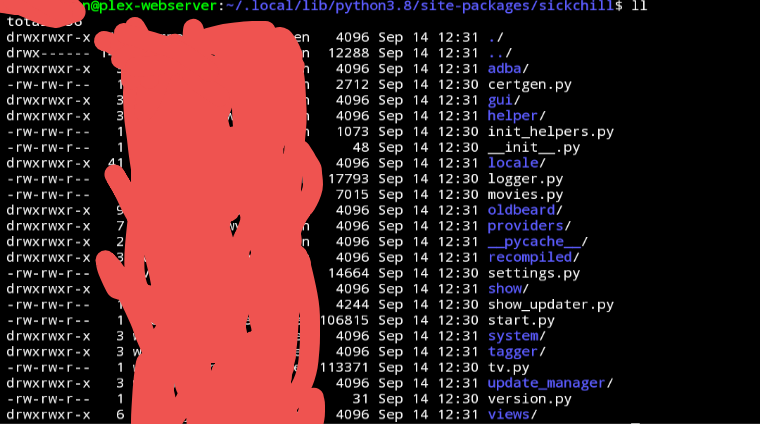
That was what i was thinking, as that is the normal way, but there is no contrib folder in the SickChill folder under .local/lib/python3.8/site-packages/sickchill
FGOD1983
on 14 Sep 2020
@FGOD1983 Download it from https://github.com/SickChill/SickChill/tree/master/contrib/runscripts
miigotu
on 14 Sep 2020
Thx, maybe I'm a bit slow here, but I still miss a lot of files in this folder... Should the whole thing still run from my old /opt/sickchill folder? Or from the new folder under the python directory? Because in the python directory I don't have the db files and SickChill.py as you can see in my picture...
Am I missing something? Should I copy over my old folder to the new python location?
FGOD1983
on 15 Sep 2020
Oke, got it working again from the /opt/SickChill directory and restored my setup from there.
But pure out of curiosity, what is the python SickChill folder used for, if the main data dir that still updates and holds the program/data files is used by the systemd service?
Thx for the help and your patience btw 🙂
FGOD1983
on 15 Sep 2020
You need to edit the systemd service to work with a pip install. By default SC uses a datadir in the home dir of the user running it (~/sickchill)
miigotu
on 15 Sep 2020
I saw this zip https://github.com/SynoCommunity/spksrc/files/5213640/sickchill_noarch-all_20200913-0.zip
But this is not the finished version yet? Or is this one safe to install already? I didn't see any update in the Syno Community yet. Better to wait for that one?
_UPDATE 1:_
I notice a new 1.0 version from BenJV so backed up with a script I use: it creates a tar.gz file with all the content from SICKCHILL_FILES_TO_BACKUP.
APPSTORE_LOCATION='/volume1/@appstore'
BACKUP_LOCATION="/volume7/Backup/SYNOLOGY"

SICKCHILL_PATH="$APPSTORE_LOCATION/sickchill/var"
SICKCHILL_BACKUP_PATH="$BACKUP_LOCATION/SickChill"
SICKCHILL_PREFIX="SickChill"
SICKCHILL_FILES_TO_BACKUP=("$SICKCHILL_PATH/config.ini" "$SICKCHILL_PATH/cache.db" "$SICKCHILL_PATH/sickbeard.db" "$SICKCHILL_PATH/cache" "$SICKCHILL_PATH/failed.db")
Then uninstalled the old 1.2 package, reinstalled the new 1.0 with Python 3.
After that I ran the restore script which extracts everyting from the backup tar.gz file to the same locations.
Then started SickChill, but it didn't start. The sickchill.log shows the following:
2020-09-25 21:46:56 ERROR :: MAIN :: Fatal error executing query with db.action in database /volume1/@appstore/sickchill/var/cache.db: near "?": syntax error`
So I restarted the Synology, now SickChill starts, and the config seems to have been restored from the backup, but all the shows are gone.
What am I missing here? I noticed in the previous version of sickchill 1.2 it was named sickbeard.db, but the new version is named sickchill.db. Can I just rename my old sickbeard.db to sickchill.db? What about the cache.db (that's what the error message complains about).
_UPDATE 2:_
I guess I just answered my own question ;-) Renaming sickbeard.db to sickchill.db: and there are my shows again. Not sure why it complained about cache.db though. Also, what is sickchill.db.v44 used for?
Manfred73
on 25 Sep 2020
@Manfred73 https://github.com/SynoCommunity/spksrc/pull/4161 is done they just haven't merged it yet.
miigotu
on 25 Sep 2020
For those interested in a generic update/restore script for some of these applications like SickChill that you have running on your Synology: https://github.com/Manfred73/SynologyBackupRestoreScripts.
Manfred73
on 26 Sep 2020
@miigotu So we need the new package available (merged) in SynoCommunity repo or can it be installed already manually? Thanks!
 anb0s
on 28 Sep 2020
anb0s
on 28 Sep 2020
You can wait until de package is available on SynoCommunity, or install manually the package. Is provided on PR's first post.
 Nyaran
on 28 Sep 2020
Nyaran
on 28 Sep 2020
I did the upgrade now as average user ;) and may be it helps:
- create backup file with SickBeard Custom UI
- uninstall SickBeard Custom app with DSM UI
- download version from PR#4161 by @Nyaran (sickchill_noarch-all_20200920-0.tar.gz)
- extract sickchill_noarch-all_20200920-0.spk from above .tar.gz
- install spk with DSM UI (manual install) with no changes to the options
- open SickChill UI with provided link after SickChill was automatically started (port 8081)
- restore the backup file with SickChill UI
- [optional] verify with SSH that files where copied to
/volume1/@appstore/sickchill/var/data/restore - restart SickChill --> it shows shutdown succeeded, but stuck at start
- open the link with port 8083 (like was in the previous config.ini) and SickChill is there :)
- change the port to 8081 to have the valid link from DSM
- the database was restored with new name
sickchill.db--> no need to rename from sickbeard.db manually
Now i see all the shows in SickChill but the posters (images) are not there, only this sickchill image instead:

How can i solve this? Thanks!
anb0s
on 28 Sep 2020
@miigotu So we need the new package available (merged) in SynoCommunity repo or can it be installed already manually? Thanks!
I did it manually last week. Got the spk from BenjV
Do not use benjv package, or promote it here. We have an official package ready to be merged into synocommunity with real commit and change history.
miigotu
on 28 Sep 2020
@anb0s force refresh on all shows or wait for the show updater to run. All images will be back within 24 hours.
miigotu
on 28 Sep 2020
@miigotu thanks, "Mass update"--> select "Update" for all shows --> "Submit" and now images are updated :)
anb0s
on 28 Sep 2020
Is there a documented procedure for properly updating from git? I'm on master right now and still seeing the update message.
 patdavid
on 2 Oct 2020
patdavid
on 2 Oct 2020
I had this problem; I went the manual method because I'm installed directly into Linux (Ubuntu) My process was simply:
- backup system using WebUI backup method
- stop SickChill
- uninstall SickChill using method documented in Wiki (moved install folder for additional backup in case of stuff going sideways)
- installed using manual method (also in Wiki)
- once started, restore from backup (SickChill required a restart)
- small exception: restart failed from web - sickchill restarted, but webUI was not responsive, required restarting again from Command line (SSH in my case).
- mass update meta data
Afterwards, everything is working normally and as expected.
I'll note that I did this because the old version I was running would not update metadata for new episodes; this has been an ongoing problem that I haven't found time to do a root-cause analysis on; however, once updated, one of the problematic series, that never seemed to update metadata automatically, was able to update metadata; though it was manual in this case, it's a good sign.
Thanks everyone who posted in this bug, I hope my comment helps someone else moving forward.
 MystikIncarnate
on 3 Oct 2020
MystikIncarnate
on 3 Oct 2020
I apparently lost my previous post somewhere, trying again.
I wanted to chime in and thank @MystikIncarnate for the nudge in the right direction.
In the end, backup all of my settings and just pulling a fresh version from git solved my problems.
Luckily the restore process is easy-peasy so once I had the new install using Python 3 I just had to restore my old settings.
Thanks again for all the work!
patdavid
on 8 Oct 2020
@anb0s @miigotu I noticed the files are actually part of the backup, just probably not where SickChill expects them (in /SickBeard/gui/slick/cache/). I restored them manually and they immediately appeared in the UI.
 DidierLoiseau
on 9 Oct 2020
DidierLoiseau
on 9 Oct 2020
Hi, did the upgrade fine on synology by manually installing the package but getting this error on the logs: 2020-10-15 11:47:03 Unable to open /root: PermissionError(13, 'Permission denied') / [Errno 13] Permission denied: '/root'
Despite the fact that I have sc-download with read/write everywhere
Thanks
 jonaspaulo
on 15 Oct 2020
jonaspaulo
on 15 Oct 2020
Hi, did the upgrade fine on synology by manually installing the package but getting this error on the logs: 2020-10-15 11:47:03 Unable to open /root: PermissionError(13, 'Permission denied') / [Errno 13] Permission denied: '/root'
Despite the fact that I have sc-download with read/write everywhere
Thanks
Maybe you installed the wrong package? Did you use the one from the Nyarans's PR on synocommunity, right?
miigotu
on 15 Oct 2020
Yep I used the one from https://github.com/SynoCommunity/spksrc/pull/4161
Everything seems to be working ok even with that warning.
I cleared and it didn't appear again
jonaspaulo
on 15 Oct 2020
Branch/Commit: master/99336df163c7e776c7931d864e84d1f0f83afe4d
OS: Raspibian
Browser: Safari
What you did: Try to update
What happened: Local branch is ahead of master. Automatic update not possible.
What you expected: update
Logs:2020-09-05 19:36:01 WARNING WEBSERVER-HOME :: Local branch is ahead of master. Automatic update not possible. 2020-09-05 19:35:58 INFO WEBSERVER-HOME :: Checking for updates using GIT
Sorry for my lack of knowledge. I researched before posting here but I didn't find a solution. I'm using Raspbian and I don't know how to update to use python3. I already looked and python is installed on my system, I just don't know how to make it work with sickchill
rafaelrosars
on 25 Oct 2020
@rafaelrosars - You can backup your current settings/db, remove SickChill, then re-install from scratch (and restore your backup).
Once you're on Py3, you should be able to use the updater again.
patdavid
on 25 Oct 2020
@rafaelrosars : installing python3 on Raspbian is pretty easy, you can google a guide, that's the only prerequisite you really need. for the sake of having things in once space, it should be as easy as running "sudo apt install python3", and the package manager should take care of the rest. The command "python --version" should tell you what is currently default.
When you have python sorted, you can follow my procedure above and that will do the trick; in summary, back up your config from the sickchill web ui (configure (gear icon), backup) then rebase your sickchill install (wipe it first for cleanliness), then perform the initial setup and restore from backup. It's pretty easy overall. The fellows at sickchill have made it relatively painless to get done. Good luck.
to be fair, I'm just restating what pat said, but more verbose for clarity.
MystikIncarnate
on 25 Oct 2020
As someone who has read up on the subject, the above confuses me. It's my understanding that a git installation of SickChill is recommended against by the maintainers and as such unsupported. It's not even listed as an installation method on the wiki anymore, only Docker and pip installs. So I would like the SickChill maintainers to clarity on this please.
 rmbleeker
on 25 Oct 2020
rmbleeker
on 25 Oct 2020
As someone who has read up on the subject, the above confuses me. It's my understanding that a git installation of SickChill is recommended against by the maintainers and as such unsupported. It's not even listed as an installation method on the wiki anymore, only Docker and pip installs. So I would like the SickChill maintainers to clarity on this please.
Huh? Git or pip is the preferred method. Docker uses the git method anyway. SOURCE installs are discouraged.
miigotu
on 26 Oct 2020
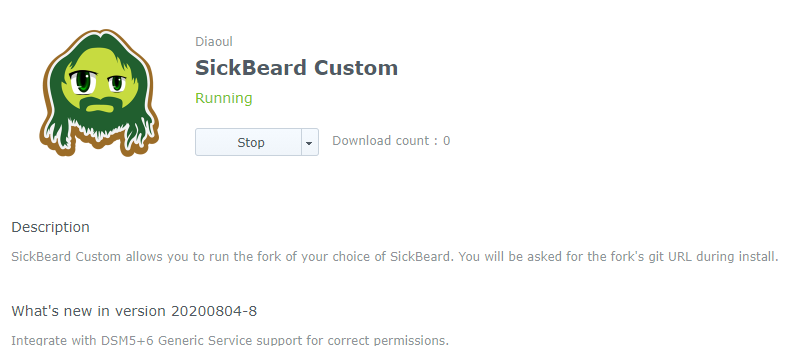
What's the procedure to update SickChill on a Synology NAS.
I'm using this package:
 TimKras
on 26 Oct 2020
TimKras
on 26 Oct 2020
What's the procedure to update SickChill on a Synology NAS.
I'm using this package:
miigotu
on 26 Oct 2020
Huh? Git or pip is the preferred method. Docker uses the git method anyway. SOURCE installs are discouraged.
Then I completely misunderstood that part. I guess I'll use git then, but without Docker. Thanks for clarifying.
rmbleeker
on 26 Oct 2020
I had this problem; I went the manual method because I'm installed directly into Linux (Ubuntu) My process was simply:
* backup system using WebUI backup method

* stop SickChill

* uninstall SickChill using method documented in Wiki (moved install folder for additional backup in case of stuff going sideways)

* installed using manual method (also in Wiki)

* once started, restore from backup (SickChill required a restart)

* small exception: restart failed from web - sickchill restarted, but webUI was not responsive, required restarting again from Command line (SSH in my case).

* mass update meta data
Afterwards, everything is working normally and as expected.
I'll note that I did this because the old version I was running would not update metadata for new episodes; this has been an ongoing problem that I haven't found time to do a root-cause analysis on; however, once updated, one of the problematic series, that never seemed to update metadata automatically, was able to update metadata; though it was manual in this case, it's a good sign.
Thanks everyone who posted in this bug, I hope my comment helps someone else moving forward.
Thank you so much - this worked perfectly! I've been holding off on updating for so long but finally gave in. Following these steps made it straight forward and simple. Props!
 enormouspoon
on 12 Nov 2020
enormouspoon
on 12 Nov 2020
Trying to upgrade to the latest version, running into problems.
I moved the old version of Sickchill and installed the new version in /opt/sickchill using:
pip3 install -t /opt/sickchill sickchill
The install went fine, but when I try and run /opt/sickchill/bin/SickChill.py, I get the following error:
Traceback (most recent call last):
  File "/opt/sickchill/bin/SickChill.py", line 14, in <module>
    import sickchill.start
ModuleNotFoundError: No module named 'sickchill'
I've tried futzing around with PYTHONPATH but was unable to resolve. Any hints?
 gniting
on 15 Nov 2020
gniting
on 15 Nov 2020
Trying to upgrade to the latest version, running into problems.
I moved the old version of Sickchill and installed the new version in
/opt/sickchillusing:
pip3 install -t /opt/sickchill sickchillThe install went fine, but when I try and run
/opt/sickchill/bin/SickChill.py, I get the following error:Traceback (most recent call last): File "/opt/sickchill/bin/SickChill.py", line 14, in <module> import sickchill.start ModuleNotFoundError: No module named 'sickchill'I've tried futzing around with
PYTHONPATHbut was unable to resolve. Any hints?
You don't set a target that way or the wrapper doesn't work. Use the default path or set up a virtualenv instead.
<set up virtualenv, set WORKON_HOME in bashrc>

mkvirtualenv -p python3.8 sickchill
workon sickchill
pip3 install sickchill
Trying to upgrade to the latest version, running into problems.
I moved the old version of Sickchill and installed the new version in/opt/sickchillusing:
pip3 install -t /opt/sickchill sickchill
The install went fine, but when I try and run/opt/sickchill/bin/SickChill.py, I get the following error:Traceback (most recent call last): File "/opt/sickchill/bin/SickChill.py", line 14, in <module> import sickchill.start ModuleNotFoundError: No module named 'sickchill'I've tried futzing around with
PYTHONPATHbut was unable to resolve. Any hints?You don't set a target that way or the wrapper doesn't work. Use the default path or set up a virtualenv instead.
<set up virtualenv, set WORKON_HOME in bashrc>

mkvirtualenv -p python3.8 sickchill
workon sickchill
pip3 install sickchill
Thanks for the hint. If I am using a startup script to get SickChill going and SickChill is running as a special user sickchill with no home directory, is there a diff set of recommendations?
gniting
on 16 Nov 2020
Related issues
 SimonHova
·
3Comments
SimonHova
·
3Comments
 CaptainConsternant
·
4Comments
CaptainConsternant
·
4Comments
 dilruwan7
·
3Comments
dilruwan7
·
3Comments
 jkjkrules
·
3Comments
jkjkrules
·
3Comments
 heymoe
·
4Comments
heymoe
·
4Comments
Most helpful comment
Also, please forgive me if I seem short over the next few days. I will be helping hundreds of users and trying to get all of our packages updated while taking care of a 1 month old baby :neckbeard: