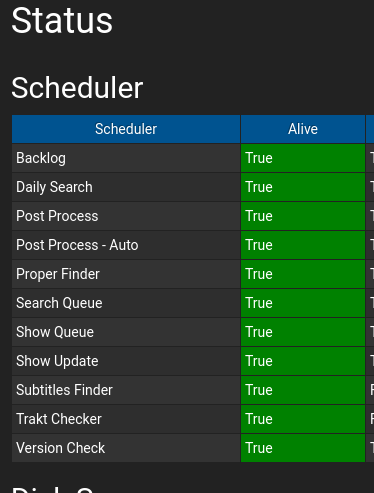
Sickchill: scheduler "alive" statuses all red
Reported by @GTunney a few hours ago on the QNAP forum. This is a very recent clone from the develop branch :

How do we get these to go green again?
Thank you.
 OneCDOnly
All 23 comments
Issue-Label Bot is automatically applying the label Bug / Issue to this issue, with a confidence of 0.65. Please mark this comment with :thumbsup: or :thumbsdown: to give our bot feedback!
Links: app homepage, dashboard and code for this bot.
![issue-label-bot[bot] picture](https://avatars2.githubusercontent.com/in/27079?v=4&s=40) issue-label-bot[bot]
on 13 Aug 2020
issue-label-bot[bot]
on 13 Aug 2020
Cannot reproduce this:
 miigotu
on 13 Aug 2020
miigotu
on 13 Aug 2020
Is that on python 3.8??
miigotu
on 13 Aug 2020
I'm not sure about @GTunney's version, but as it's installed via sherpa, it will be either Python 3.8.3 or Python 3.7.4
My Debian 10.5 installation running the same SickChill (from develop source branch) with Python 3.7.3 is also showing all red. :disappointed:
OneCDOnly
on 14 Aug 2020
Update from the develop branch and see if #6638 fixes it.
miigotu
on 14 Aug 2020
Update from the develop branch and see if #6638 fixes it.
Nope, no change: Still all red.
Not sure if this is relevant, but these services still seem to be running fine. The last run times for each are updated when they should be. :confused:
Also, the daily search and backlog search times are both shown as 0:00:00

OneCDOnly
on 14 Aug 2020
update: just did a quick check by reverting back to a master branch install. All green alive statuses. daily search and backlog search times appear normal:

OneCDOnly
on 14 Aug 2020
@miigotu what does the alive status actually mean? Might help track-down the issue.
OneCDOnly
on 14 Aug 2020
It's built into python, it's the function to check if a thread is running.
It doesn't make sense that it's not showing correctly if the threads are actually running.
miigotu
on 14 Aug 2020
OK, let me know if there's anything I can check that'll help.
OneCDOnly
on 14 Aug 2020
Sorry chaps only just morning here.
Yes I’m running python 3.7.4 via Sherpa.sh
 GTunney
on 14 Aug 2020
GTunney
on 14 Aug 2020
Good work @miigotu - a fresh clone finally shows some green. :grin:

... although, not in the alive column yet.
OneCDOnly
on 16 Aug 2020
I'm gonna make a test app to see if it shows you dead threads in that. I'm feeling like y'all have a python that is patched by your distro or custom compiled with the incorrect options and that's causing the big, because the code is good on this side.
I will post it later.
miigotu
on 17 Aug 2020
I'm gonna make a test app to see if it shows you dead threads in that. I'm feeling like y'all have a python that is patched by your distro or custom compiled with the incorrect options and that's causing the big, because the code is good on this side.
Oh, then you're not going to like this. :wink:
I get the same problem on 2 different Linux platforms:
- Debian 10.5 with Python 3.7.3 from the Debian repos
- QTS 4.2.6 with Python 3.8.3 from OpenWRT
If I was to guess a common element between these two (other than I installed SickChill on both), it's that way-back-when, QTS was originally derived from Ubuntu (so, Debian after Canonical have fcsk'd with it). But the Pythons come from different sources.
As this worked on Python 2.7.16, maybe there's some extra module needed for SickChill to work in Python 3? (I know - not a lot of help, but my own Python experience is quite limited).
OneCDOnly
on 17 Aug 2020
It works fine here on Ubuntu Eoan in 3.7 and 3.8
miigotu
on 17 Aug 2020
Well, this is embarrassing. I tried a new install on my workstation - and installed everything in requirements.txt (which I hadn't been doing). Works fine. 👍🏽
My bad. 😞
@miigotu I'll address this in sherpa now, and my sincere apologies for stuffing you around.
OneCDOnly
on 17 Aug 2020
BTW: this is what I see after having ensured everything in requirements.txt is installed:

OneCDOnly
on 17 Aug 2020
what wasnt installed? because it is all supposed to be in lib3 also
miigotu
on 17 Aug 2020
I hadn't specifically installed everything shown in the develop branch requirements.txt file. I was still working off my old list of pips that worked with the Python 2 version of SickChill.
After installing with pip3 install -r requirements.txt, the alive column works as expected. 😄
OneCDOnly
on 17 Aug 2020
lol
miigotu
on 17 Aug 2020
hmmm... looks like I'm not out of the woods yet. No joy on QNAP: https://github.com/OneCDOnly/sherpa/issues/76
That fix also didn't work on my production server (Debian 10.5), and it's now giving me a mako error on the show list page. I've just finished reinstalling Python 3 from scratch (no-small-feat), and it's still there. Cleared my browser cache too and tried another browser. 😞
Mako Error

A mako error has occurred.
If this happened during an update a simple page refresh may be the solution.
Mako errors that happen during updates may be a one time error if there were significant ui changes.
May I ask: any idea if this error is something wrong with my config or database?
File /opt/SickChill/sickchill/gui/slick/views/inc_home_show_list.mako:206, in render_body:
data-src="${static_url(curShow.networknetwork_image_url)}"
AttributeError: 'TVShow' object has no attribute 'networknetwork_image_url'
That networknetwork almost looks like a typo.
OneCDOnly
on 17 Aug 2020
Sure looks like a typo to me.
miigotu
on 17 Aug 2020
Fixed
miigotu
on 17 Aug 2020
Related issues
 jkjkrules
·
3Comments
jkjkrules
·
3Comments
 proctophage
·
3Comments
proctophage
·
3Comments
 knyllers
·
4Comments
knyllers
·
4Comments
 nopoz
·
4Comments
nopoz
·
4Comments
 heymoe
·
3Comments
heymoe
·
3Comments