Before submitting your issue:
Enable debug logging in SickChill settings, reproduce the error (be sure to disable after the bug is fixed)
Branch/Commit: Recently updated
OS: Windows 10 Pro
Browser: Edge / Chrome
What you did: tried to start by navigating to http://localhost:8081/home/ as I usually do
What happened: Browser Error Edge: "Hmmm...can’t reach this page" /Chrome: ERR_CONNECTION_REFUSED
What you expected: Sickchill to open as usual
Logs: (most recent set of entries)
2020-02-13 06:40:09 ERROR    MAIN :: Unable to setup GitHub properly. GitHub will not be available. Error: [Errno 11001] getaddrinfo failed
Traceback (most recent call last):
  File "C:\SickChill\SickChill\sickchill\helper\common.py", line 379, in setup_github
    sickbeard.gh.get_organization(sickbeard.GIT_ORG)
  File "C:\SickChill\SickChill\lib\github\MainClass.py", line 198, in get_organization
    "/orgs/" + login
  File "C:\SickChill\SickChill\lib\github\Requester.py", line 169, in requestJsonAndCheck
    return self.__check(*self.requestJson(verb, url, parameters, headers, input, cnx))
  File "C:\SickChill\SickChill\lib\github\Requester.py", line 215, in requestJson
    return self.__requestEncode(cnx, verb, url, parameters, headers, input, encode)
  File "C:\SickChill\SickChill\lib\github\Requester.py", line 268, in __requestEncode
    status, responseHeaders, output = self.__requestRaw(cnx, verb, url, requestHeaders, encoded_input)
  File "C:\SickChill\SickChill\lib\github\Requester.py", line 293, in __requestRaw
    requestHeaders
  File "C:\SickChill\Python\lib\httplib.py", line 1042, in request
    self._send_request(method, url, body, headers)
  File "C:\SickChill\Python\lib\httplib.py", line 1082, in _send_request
    self.endheaders(body)
  File "C:\SickChill\Python\lib\httplib.py", line 1038, in endheaders
    self._send_output(message_body)
  File "C:\SickChill\Python\lib\httplib.py", line 882, in _send_output
    self.send(msg)
  File "C:\SickChill\Python\lib\httplib.py", line 844, in send
    self.connect()
  File "C:\SickChill\Python\lib\httplib.py", line 1255, in connect
    HTTPConnection.connect(self)
  File "C:\SickChill\Python\lib\httplib.py", line 821, in connect
    self.timeout, self.source_address)
  File "C:\SickChill\Python\lib\socket.py", line 557, in create_connection
    for res in getaddrinfo(host, port, 0, SOCK_STREAM):
  File "C:\SickChill\SickChill\sickbeard\helpers.py", line 92, in getaddrinfo_wrapper
    return orig_getaddrinfo(host, port, family, socktype, proto, flags)
gaierror: [Errno 11001] getaddrinfo failed
Just started today.
- I checked that the Sickchill service was running (services.msc) -- It was
- I restarted the service
I rebooted my computer.
I executed:
net stop sickchill
cd C:\SickChill\SickChill
C:\SickChill\Git\bin\git pull
net start sickchill
But still got the same results in trying to access SickChill.
 ronrosenfeld
All 21 comments
I have the same issue
 tvblock
on 13 Feb 2020
tvblock
on 13 Feb 2020
I have the same issue as well
 crewone
on 13 Feb 2020
crewone
on 13 Feb 2020
Same here :(
 marduk6666
on 13 Feb 2020
marduk6666
on 13 Feb 2020
Is there maybe a Windows update that happened? That error is saying it cannot connect to github
 miigotu
on 14 Feb 2020
miigotu
on 14 Feb 2020
Hmm. I wasn't notified of one (and I should have been). Today is Thursday; Windows updates usually occur on Tuesday and it was working OK yesterday.
Also, I was able to do the git pull and get what appeared to be valid responses in the command window.
Looking at my logs, things were OK at 2020-02-13 01:25:26 and the error first appeared at 2020-02-13 01:54:28. That would be EST (UTC-5)
But why should a failure to connect to GitHub result in not being able to even connect to the UI on the local computer?
What can I do to track this down further?
Thanks.
ronrosenfeld
on 14 Feb 2020
Well, I uninstalled SickChill (preserving the database, after backing up the Backups folder) and then re-installed it using the SickChill Installer and (https://github.com/SickChill/SickChillInstaller/releases/tag/v0.5.3).
The installation seemed to go OK.
Unfortunately, the UI still did not open.
Could there be something corrupt in my config.ini or .db files?
Do I need to rebuild the whole thing?
ronrosenfeld
on 14 Feb 2020
I'll fire up a VM and see soon as I can.
miigotu
on 14 Feb 2020
I first changed the path in the config.ini but that did not fix it.
After that I removed several empty cache maps and the cache.db and now SickChill is starting again.
I'm seeing the schedule page and the episodes are found and send to my nzbget but when opening the series list I get a MAKO error
"File C:\SickRage\Python\lib\encodingscp1252.py:12, in encode:
return codecs.charmap_encode(input,errors,encoding_table)
UnicodeEncodeError: 'charmap' codec can't encode characters in position 0-5: character maps to"
tvblock
on 14 Feb 2020
Weird goings-on.
- I reinstalled preserving the database
- The UI did not open
- I reinstalled without preserving the database
- The UI did not open
- Checked that service WAS running
- Started Sickchill from the start shortcut in the Start menu
- Sickchill started and showed the "no providers configured" message
- Restored the previous DB (and other files0
- Sickchill UI did not show up on the programmed restart
- Started Sickchill from the Start Menu shortcut
- Sickchill started up!!
- Did a mass update and all seemed OK
- BUT just now did a reboot of my computer and can no longer get Sickchill UI, even with trying to manually start it from the Start Menu shortcut, or by stopping and starting the service.
It seems something has happened to affect the interaction between Sickchill and Windows.
ronrosenfeld
on 14 Feb 2020
It's annoying that this happens while I got a ton of other coding problems going on haha. I was also working on new Kat and demonoid providers. The past couple days 😩
miigotu
on 14 Feb 2020
I sure do appreciate the time you've devoted to this project.
ronrosenfeld
on 14 Feb 2020
Is there maybe a Windows update that happened? That error is saying it cannot connect to github
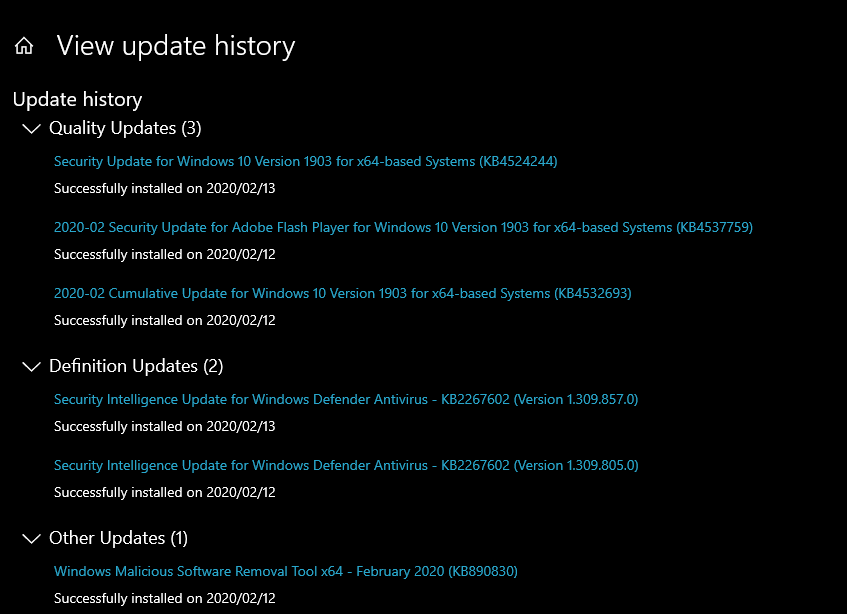
this is the list of the updates i ad in my system when it stoped
now i have this update "Feature update to Windows 10, version 1909", will do it and see if it fixes
The update didnt fix it
marduk6666
on 14 Feb 2020
Checked the event viewer and there were some updates installed around the time. But un-installing the updates done on and after the 12th did not correct the problem.
ronrosenfeld
on 15 Feb 2020
Ok, I havent gotten around to spinning up a windows VM, but I mostly finished kat and demonoid and also made some forceful changes to the cache dir and log dir. It is now hard coded to gui/slick/cache for the cache (it wont work properly outside of the gui/slick folder anyway) and hard coded Logs to be relative to the DATA_DIR (next to config.ini/sickbeard.db there will be the Logs folder)
Could you switch to develop and see if it starts?
net stop sickchill
cd C:\SickChill\SickChill
C:\SickChill\Git\bin\git checkout develop
C:\SickChill\Git\bin\git pull
net start sickchill
2020-02-12 21:47:44 INFO POSTPROCESSOR-AUTO :: Successfully processed
2020-02-12 21:47:44 INFO POSTPROCESSOR-AUTO :: Auto post processing task for L:\u Incoming\SickRage completed
2020-02-12 21:51:55 INFO CHECKVERSION :: Checking for updates using GIT
2020-02-12 21:51:56 ERROR CHECKVERSION :: [fab851f] git symbolic-ref -q HEAD returned code -1073741502, treating as error : None
None
2020-02-12 21:51:56 ERROR CHECKVERSION :: [fab851f] git symbolic-ref -q HEAD returned code -1073741502, treating as error : None
None
2020-02-12 21:57:40 INFO POSTPROCESSOR :: Auto post processing task for L:\u Incoming\SickRage was added to the queue
2020-02-12 21:57:42 INFO POSTPROCESSOR-AUTO :: Beginning auto post processing task: L:\u Incoming\SickRage
2020-02-12 21:57:42 INFO POSTPROCESSOR-AUTO :: Processing L:\u Incoming\SickRage
2020-02-12 21:57:42 INFO POSTPROCESSOR-AUTO :: Successfully processed
2020-02-12 21:57:42 INFO POSTPROCESSOR-AUTO :: Auto post processing task for L:\u Incoming\SickRage completed
2020-02-12 22:29:00 WARNING MAIN :: Unable to setup GitHub properly, You are currently being throttled by rate limiting for too many requests - Try adding an access token. Error: 403 {u'documentation_url': u'https://developer.github.com/v3/#rate-limiting', u'message': u"API rate limit exceeded for (my IP) (But here's the good news: Authenticated requests get a higher rate limit. Check out the documentation for more details.)"}
2020-02-12 22:29:22 WARNING MAIN :: Unable to setup GitHub properly, You are currently being throttled by rate limiting for too many requests - Try adding an access token. Error: 403 {u'documentation_url': u'https://developer.github.com/v3/#rate-limiting', u'message': u"API rate limit exceeded for (my IP) (But here's the good news: Authenticated requests get a higher rate limit. Check out the documentation for more details.)"}
2020-02-12 22:29:44 WARNING MAIN :: Unable to setup GitHub properly, You are currently being throttled by rate limiting for too many requests - Try adding an access token. Error: 403 {u'documentation_url': u'https://developer.github.com/v3/#rate-limiting', u'message': u"API rate limit exceeded for (my IP) (But here's the good news: Authenticated requests get a higher rate limit. Check out the documentation for more details.)"}
this the the last part of my logs, the last error is in loop for 3 days till I shutdown the sickchill service
marduk6666
on 15 Feb 2020
@marduk6666 you need to create a personal access token for github
(config/general/advancedsettings tab)
 Wally73
on 15 Feb 2020
Wally73
on 15 Feb 2020
I'm on develop now, sickchill is starting now but no images are shown.
the log shows this:
2020-02-15 13:41:06 DEBUG SHOWQUEUE-REFRESH :: 263283: Loading all episodes from the show directory A:\Opruimen\Nzb\Jack Irish
2020-02-15 13:41:06 DEBUG SHOWQUEUE-REFRESH :: 263283: Loading all episodes with a location from the database
2020-02-15 13:41:07 DEBUG SHOWQUEUE-REFRESH :: 263283: Writing NFOs for show
2020-02-15 13:41:07 DEBUG SHOWQUEUE-REFRESH :: 263283: Writing NFOs for all episodes
2020-02-15 13:41:07 INFO SHOWQUEUE-REFRESH :: 263283: Updating NFOs for show with new indexer info
2020-02-15 13:41:07 DEBUG SHOWQUEUE-REFRESH :: Checking & filling cache for show Jack Irish
2020-02-15 13:41:07 DEBUG SHOWQUEUE-REFRESH :: Checking if we need any cache images for show 263283
2020-02-15 13:41:07 DEBUG SHOWQUEUE-REFRESH :: Checking if file C:\SickRage\SickRage\gui\slickcache\images\263283.poster.jpg exists
2020-02-15 13:41:07 DEBUG SHOWQUEUE-REFRESH :: Checking if file C:\SickRage\SickRage\gui\slickcache\images\263283.banner.jpg exists
2020-02-15 13:41:07 DEBUG SHOWQUEUE-REFRESH :: Checking if file C:\SickRage\SickRage\gui\slickcache\images\thumbnails\263283.poster.jpg exists
2020-02-15 13:41:07 DEBUG SHOWQUEUE-REFRESH :: Checking if file C:\SickRage\SickRage\gui\slickcache\images\thumbnails\263283.banner.jpg exists
2020-02-15 13:41:07 DEBUG SHOWQUEUE-REFRESH :: Checking if file C:\SickRage\SickRage\gui\slickcache\images\263283.fanart.jpg exists
2020-02-15 13:41:07 DEBUG SHOWQUEUE-REFRESH :: No new cache images needed, not retrieving new ones
I'm doing a refresh now.
tvblock
on 15 Feb 2020
@miigotu
I changed to the develop branch and it started up with blank posters. However, the program executed a REFRESH following which all was well.
2020-02-15 07:53:02 INFO     SHOWQUEUE-REFRESH :: Performing refresh on xxxxxxxxx
2020-02-15 07:53:02 INFO     SHOWQUEUE-REFRESH :: 332331: Updating NFOs for show with new indexer info
...
I then both rebooted my computer, and stopped and restarted Sickchill from the UI, and all seems to be functioning OK.
Thanks. Hopefully this improvement will be permanent!
I'll leave it on develop branch for now.
Ron
ronrosenfeld
on 15 Feb 2020
@marduk6666 you need to create a personal access token for github
(config/general/advancedsettings tab)
I can't acees the UI, I tried to switch to develop but didn't work. I made a token how can I manualy update it? (opened config.ini and got the token here "git_token_password = " ) is that the right place cause it not working
marduk6666
on 15 Feb 2020
managed to switch to develop mode restarted pc still not working
on log: 2020-02-15 17:08:39 INFO MAIN :: Signal 2 caught, saving and exiting...
got it working found out that the pull was not working after enabling develop mode cause was not able to overwrite a few files after I removed them it updated correctly, restarted pc and is working ty xd
marduk6666
on 15 Feb 2020
it should work on master now, I merged it to main
miigotu
on 15 Feb 2020
Related issues
 Hydrog3n
·
4Comments
Hydrog3n
·
4Comments
 jkjkrules
·
3Comments
jkjkrules
·
3Comments
 mofman
·
4Comments
mofman
·
4Comments
 Tankyspanky
·
4Comments
Tankyspanky
·
4Comments
 knyllers
·
4Comments
knyllers
·
4Comments