Sickchill: TEMPORARY FIX: Local Branch is ahead of master. Automatic update not possible.
Read more on the issue here.
_Updated with Windows, OSX and QNAP suggestions, see bottom of post._
_Updated with new official repo._ - SickChill
A temporary fix is: (Worked for me, YMMV)
- Shutdown Sickrage
- Edit config.ini
- Replace "git_remote_url = https://github.com/SickRage/SickRage.git" with "git_remote_url = https://github.com/SickChill/SickChill.git"
- Save config.ini
- Restart Sickrage
You may also need to change the git remote for updating to work correctly but I didn't take a long look at the update code so I'm not sure. (I had to change them as I stupidly just ran the git commands to synchronise the repos.)
Change to your sickrage directory then the commands to run are:
git remote -v
to check the current remotes (Useful for reversing these commands) and then
git remote set-url origin https://github.com/SickChill/SickChill.git
to change it.
Finally, I'd like to thank all of the contributors to this fine piece of software for your work.
QNAP Users: Check out this
Windows users:
If you try this and get "fatal: not a git repository (or any of the parent directories): .git" just make the config.ini changes.
OSX Users:
Config.ini is in sickrage dir under applications folder. (Thanks to snapperhead47)
 Solbot
All 127 comments
:pray::+1:
 WebSpider
on 9 Oct 2018
WebSpider
on 9 Oct 2018
This helps, thanks. I've contacted github because their redirection system is broken and he has exploited it.
 miigotu
on 9 Oct 2018
miigotu
on 9 Oct 2018
What a class prick. 'NuffSaid.
Anyway, I'm trying to use this temp fix, and have managed to edit the config.ini as described but I am still getting the local branch ahead of master message displayed... Am I just a moron, or is there more to it?
 DrDrewZA
on 9 Oct 2018
DrDrewZA
on 9 Oct 2018
Make sure SickRage isnt running
WebSpider
on 9 Oct 2018
yep - that part I did right - it did save the change successfully - now that SR is running again, the line is still saved as updated... But the error remains.
DrDrewZA
on 9 Oct 2018
Crisis - nm - lets just go with the original moron defence… Im sorted thanks
DrDrewZA
on 9 Oct 2018
This worked for me.
Sick-Rage on Synology NAS.
 LapinFou
on 9 Oct 2018
LapinFou
on 9 Oct 2018
Thanks for the fix.
used it on a xbian distro, update worked like a charm.
 d2lu
on 9 Oct 2018
d2lu
on 9 Oct 2018
I had also tried to update manually before figuring out what was going on. I ended up doing this to fix all the messed up files:
git reset --hard origin/master
 key134
on 10 Oct 2018
key134
on 10 Oct 2018
@key134 just doing a git reset doesnt fix it, you have to change the remote also.
miigotu
on 10 Oct 2018
@miigotu Yep, I did change the remote and then had to reset. Sorry, that wasn't clear.
key134
on 10 Oct 2018
Woot!! thanks for the Post all, updated in OSX and alls well again.
 snapperhead
on 10 Oct 2018
snapperhead
on 10 Oct 2018
I am on a windows 10 machine and applied the temp fix. I got the "fatal: not a git repository (or any of the parent directories): .git", so I stopped there.
I no longer get the "Local Branch is ahead of master. Automatic update not possible." error, but I am still on Branch: master Commit: 61a763d303f7337709e03a76b01d9592e2dce14d Version: v2018.10.06-2 Database Version: 44.0 and it says no update is available. Is this correct or do I have more work to do?
 mitch71h
on 10 Oct 2018
mitch71h
on 10 Oct 2018
@mitch71h that is the correct commit so far.
miigotu
on 10 Oct 2018
if, like me, you tried to fix this yourself before finding this issue and ended up trying to do a git pull to "fix" things and then you got a huge merge conflict. Here is how to deal with that:
How to break things:
- see the message "Local Branch is ahead of master. Automatic update not possible."
- Figure some git update went astray. Checked my git repo and the redirection points to me to the other repo. Think, "Hmm, ok some commits in the last few days - probably needs an update"
- git pull...
- massive merge conflicts and borking
How to fix things:
- git reset --merge // undo the mess from git pull
- git remote -v // see where the repo points
origin https://github.com/SickRage/SickRage.git (fetch)
origin https://github.com/SickRage/SickRage.git (push)
- git remote set-url origin https://github.com/SickChill/SickChill.git // the correct repo
- git fetch // grab the correct commits
- git status // check if there are any commits ahead (I had none, so no need to do a pull / merge)
On branch master
Your branch is up-to-date with 'origin/master'. - I also edited the config.ini file as directed above
- restarted sickrage service and waited a min for it to come up all good.
last steps; curse echelon and post my fix for others =)
 rcross
on 10 Oct 2018
rcross
on 10 Oct 2018
Any help for those of us on FreeBSD/FreeNAS? I have no idea how to translate these commands.
 2fst4u
on 10 Oct 2018
2fst4u
on 10 Oct 2018
Ah man! I saw the error then stupidly went ahead and reinstalled using the sickrage.ca github, restored my old config. I noticed the difference in the UI and figured I was behind, but also found the sign on unusual (and slow). In fact, it stopped working reliably so I found this thread.
Anyhow, my config included my Plex token and other tokens -- are these compromised now? Anyone know if the other installation uploaded this data (ie can anyone see the code to tell if it does this?).
 SteveW25561
on 10 Oct 2018
SteveW25561
on 10 Oct 2018
I saw this message today:
There is a newer version available (you're 4 commits behind) — Update Now
Is it normal?
I'm just wondering if I've done or not the good fix in my _config.ini_...
I don't want switch to sickrage.ca
LapinFou
on 10 Oct 2018
Answering myself, the latest commit 6d04e48280212de63227c7fb16145c3be9678dbe does match the latest modification push in the Sick-Rage git.
So, to me, the _new version available_ is correct.
Thanks to the dev team.
If you go in the _Help & Info_ menu ( [YOU_SICKRAGE_URL]/config/ ), you can check yout Git setup in the SickRage info.
LapinFou
on 10 Oct 2018
Here is a snapshot to show you how to check if your SickRage is correctly switched to the new Git repo after the update:

I you click on the Branch: master link, you should be redirected to this GitHub project.
LapinFou
on 10 Oct 2018
I have the same problem as @mitch71h so I will try the solution provided by @rcross and I will put a comment to say if it works or not
 pipopop
on 10 Oct 2018
pipopop
on 10 Oct 2018
I juste see that the repo change for SickChill. I will try with this one.
pipopop
on 10 Oct 2018
Yep, the name change is official, but the Sick-Rage url will also work and redirect.
miigotu
on 10 Oct 2018
Ok. I had another problem about the local git path. All is good now
pipopop
on 10 Oct 2018
@LennyM8472
I cant successfully update it on Qnap
Changed config.ini git_remote_url = https://github.com/SickChill/SickChill.git
But when click update it download from http://github.com/SickRage/SickRage/
```2018-10-10 17:51:49 INFO Thread-16 :: Config backup in progress...
2018-10-10 17:51:49 INFO Thread-16 :: Config backup successful, updating...
2018-10-10 17:51:52 INFO Thread-16 :: Creating update folder /share/CACHEDEV1_DATA/.qpkg/QSickRage/SickRage-master/sr-update before extracting
2018-10-10 17:51:52 INFO Thread-16 :: Downloading update from http://github.com/SickRage/SickRage/tarball/master
2018-10-10 17:52:20 INFO Thread-16 :: Extracting file /share/CACHEDEV1_DATA/.qpkg/QSickRage/SickRage-master/sr-update/sr-update.tar
2018-10-10 17:52:22 INFO Thread-16 :: Deleting file /share/CACHEDEV1_DATA/.qpkg/QSickRage/SickRage-master/sr-update/sr-update.tar
2018-10-10 17:52:22 INFO Thread-16 :: Moving files from /share/CACHEDEV1_DATA/.qpkg/QSickRage/SickRage-master/sr-update/SiCKRAGE-SiCKRAGE-ea0e19e to /share/CACHEDEV1_DATA/.qpkg/QSickRage/SickRage-master
2018-10-10 17:52:22 INFO EVENT-QUEUE :: Aborting all threads
2018-10-10 17:52:22 INFO EVENT-QUEUE :: Waiting for the DAILYSEARCHER thread to exit
2018-10-10 17:52:23 INFO EVENT-QUEUE :: Waiting for the BACKLOG thread to exit
2018-10-10 17:52:23 INFO EVENT-QUEUE :: Waiting for the SHOWUPDATER thread to exit
2018-10-10 17:52:23 INFO EVENT-QUEUE :: Waiting for the CHECKVERSION thread to exit
2018-10-10 17:52:23 INFO EVENT-QUEUE :: Waiting for the SHOWQUEUE thread to exit
2018-10-10 17:52:23 INFO EVENT-QUEUE :: Waiting for the SEARCHQUEUE thread to exit
2018-10-10 17:52:23 INFO EVENT-QUEUE :: Waiting for the POSTPROCESSOR thread to exit
2018-10-10 17:52:23 INFO EVENT-QUEUE :: Waiting for the POSTPROCESSOR thread to exit
2018-10-10 17:52:23 INFO EVENT-QUEUE :: Waiting for the TRAKTCHECKER thread to exit
2018-10-10 17:52:23 INFO EVENT-QUEUE :: Waiting for the FINDPROPERS thread to exit
2018-10-10 17:52:23 INFO EVENT-QUEUE :: Waiting for the FINDSUBTITLES thread to exit
2018-10-10 17:52:23 INFO EVENT-QUEUE :: Waiting for the EVENT-QUEUE thread to exit
2018-10-10 17:52:23 INFO EVENT-QUEUE :: Saving all shows to the database
2018-10-10 17:52:23 INFO EVENT-QUEUE :: Saving config file to disk
2018-10-10 17:52:23 INFO EVENT-QUEUE :: Shutting down Tornado
2018-10-10 17:52:23 INFO EVENT-QUEUE :: Restarting SickRage with ['/share/CACHEDEV1_DATA/.qpkg/QSickRage/bin/python', u'/share/CACHEDEV1_DATA/.qpkg/QSickRage/SickRage-master/SickBeard.py', '-p', '29989', '--daemon', u'--nolaunch']
When try to check branch gives me:
2018-10-10 18:11:59 INFO Thread-16 :: Request failed: 404 Client Error: Not Found for url: https://cdn.rawgit.com/SickRage/SickRage/ea0e19e2575ba4186d9ffc423d63a0faa0ad0ff9/sickbeard/databases/mainDB.py
2018-10-10 18:11:59 ERROR Thread-16 :: Checkout branch couldn't compare DB version.
And at start it gives:
2018-10-10 18:14:38 INFO CHECKVERSION :: Checking for updates using SOURCE
2018-10-10 18:14:42 INFO CHECKVERSION :: Request failed: 404 Client Error: Not Found for url: https://sickrage.github.io/sickrage-news/news.md
```
 papampi
on 10 Oct 2018
papampi
on 10 Oct 2018
@papampi try rcross solution. It works for me.
pipopop
on 10 Oct 2018
@pipopop Cant run git commands on Qnap
git reset --merge
fatal: Not a git repository (or any parent up to mount point /share)
Stopping at filesystem boundary (GIT_DISCOVERY_ACROSS_FILESYSTEM not set).
Stop SR first, then cd to /share/CACHEDEV1_DATA/.qpkg/QSickRage/SickRage-master/ and do the git commands there
miigotu
on 10 Oct 2018
Thanks mate.
Will install and try it out again.
A crazy throws a rock in a well, now hundred sane people are trying to it take out ...
papampi
on 10 Oct 2018
it looks like, that there is no git repo inside the QSickRage package. I informed package maintainer about that the repo has changed.
 LennyM8472
on 10 Oct 2018
LennyM8472
on 10 Oct 2018
Tried the dropbox qpkg from wiki and set the custom path to SickChill.git, with no luck.
papampi
on 10 Oct 2018
Workaround for Qnap:
install and stop QSickrage
Get to QSickrage installed directory mine was here:
/share/CACHEDEV1_DATA/.qpkg/QSickRage
Edit QSickRage.sh and change
export SICK=$QPKG_ROOT/SickRage-master
To:
export SICK=$QPKG_ROOT/SickChill
Clone SickChill inside Qsickrage directory:
git clone https://github.com/SickChill/SickChill.git
Get back to your Qnap web page and start Qsickrage
Help & Info Shows:
Branch: master
Commit: 6d04e48280212de63227c7fb16145c3be9678dbe
Version: v2018.10.10-2
Database Version: 44.0
Edit:
When I try to check for update I get this:
2018-10-10 20:30:55 ThreadPoolExecutor-0_0 :: git fetch origin --prune returned : (128) fatal: unable to access 'https://github.com/SickRage/SickRage.git/': error setting certificate verify locations:
CAfile: /etc/ssl/certs/ca-certificates.crt
CApath: none
2018-10-10 20:30:55 ThreadPoolExecutor-0_0 :: Unable to contact github, can't check for update
I'll update the QSickChill installer when I get home, I just did the windows installer but Im waiting for the build to finish and I have stuff I need to leave the house for.
miigotu
on 10 Oct 2018
I think it is also needed to change sickbeard/__init__.py :
GIT_ORG = 'SickRage'    -->   GIT_ORG = 'SickChill'
GIT_REPO = 'SickRage'   -->  GIT_REPO = 'SickChill'
As this is used by sickbeard/versionChecker.py to construct the download URL:
tar_download_url = 'http://github.com/' + sickbeard.GIT_ORG + '/' + sickbeard.GIT_REPO + '/tarball/' + self.branch
 id2test2
on 10 Oct 2018
id2test2
on 10 Oct 2018
@id2test2 That is already fixed on the develop branch:
https://github.com/SickChill/SickChill/commit/e92ab82a9fe8106132170c3a7113905788a08530#diff-ca8b2565f5e99e9c38ee2c2a4a56b64fL145
 Arcanemagus
on 10 Oct 2018
Arcanemagus
on 10 Oct 2018
@id2test2 That is already fixed on the
developbranch:
e92ab82#diff-ca8b2565f5e99e9c38ee2c2a4a56b64fL145
Great :-)
So it's best to wait until all changes have been completed and copied to the 'master' branch?
id2test2
on 10 Oct 2018
Workaround for Qnap:
install and stop QSickrage
Get to QSickrage installed directory mine was here:
/share/CACHEDEV1_DATA/.qpkg/QSickRage
Edit QSickRage.sh and change
export SICK=$QPKG_ROOT/SickRage-master
To:
export SICK=$QPKG_ROOT/SickChill
Clone SickChill inside Qsickrage directory:
git clone https://github.com/SickChill/SickChill.git
Get back to your Qnap web page and start Qsickrage
Help & Info Shows:Branch: master Commit: 6d04e48280212de63227c7fb16145c3be9678dbe Version: v2018.10.10-2 Database Version: 44.0Edit:
When I try to check for update I get this:2018-10-10 20:30:55 ThreadPoolExecutor-0_0 :: git fetch origin --prune returned : (128) fatal: unable to access 'https://github.com/SickRage/SickRage.git/': error setting certificate verify locations: CAfile: /etc/ssl/certs/ca-certificates.crt CApath: none 2018-10-10 20:30:55 ThreadPoolExecutor-0_0 :: Unable to contact github, can't check for update
Walkaround
If you install QPearl and CaCert warning about cert will disappear.
 taktlos79
on 10 Oct 2018
taktlos79
on 10 Oct 2018
Workaround for Qnap:
install and stop QSickrage
Get to QSickrage installed directory mine was here:
/share/CACHEDEV1_DATA/.qpkg/QSickRage
Edit QSickRage.sh and change
export SICK=$QPKG_ROOT/SickRage-master
To:
export SICK=$QPKG_ROOT/SickChill
Clone SickChill inside Qsickrage directory:
git clone https://github.com/SickChill/SickChill.git
Get back to your Qnap web page and start Qsickrage
Help & Info Shows:Branch: master Commit: 6d04e48280212de63227c7fb16145c3be9678dbe Version: v2018.10.10-2 Database Version: 44.0Edit:
When I try to check for update I get this:2018-10-10 20:30:55 ThreadPoolExecutor-0_0 :: git fetch origin --prune returned : (128) fatal: unable to access 'https://github.com/SickRage/SickRage.git/': error setting certificate verify locations: CAfile: /etc/ssl/certs/ca-certificates.crt CApath: none 2018-10-10 20:30:55 ThreadPoolExecutor-0_0 :: Unable to contact github, can't check for update
I know this is an idiotic comment for most of you, but how do I do this bit:
git clone https://github.com/SickChill/SickChill.git ? Thank you!
Edit: So I have downloaded the repository and added the 'SickChill-master' folder inside there (instead of 'git clone' command as I do not know where to perform that), followed your steps and it works. However, once I check for updates, the app becomes inaccessible again - I guess that is what is supposed to happen at this point.
 greentrancer
on 10 Oct 2018
greentrancer
on 10 Oct 2018
I've never seen the message about "Local branch is ahead of master. Automatic update not possible." Yesterday I saw I was 8 commits behind so I clicked on update as I have many times before. I got all the sickrage.ca crap and everything was broken.
I tried all sorts of things (see below), but fixed it simply just now by start from scratch:
git clone https://github.com/Sick-Rage/Sick-Rage.git /opt/sickrage
Then I copied in my config.ini and sickbeard.db and all is well. I have commit d04e48280212de63227c7fb16145c3be9678dbe
Here are several failed attempts from yesterday and today, before I did the simple steps above that finally worked. I had already typed up the following so I'll include it in case it's of any interest or maybe I was close and with little effort some might tell me where I went wrong. But, it's OK if everybody ignores it!
--- snip ---
I grabbed the latest zip file Sick-Rage-master.zip (from early yesterday), and ran all the commands above:
config.ini update to git_remote_url = https://github.com/Sick-Rage/Sick-Rage.git
git remote -v
git remote set-url origin https://github.com/Sick-Rage/Sick-Rage.git
git reset --hard origin/master
I copied in my config.ini and sickbeard.db and all seems well, except I have the message "Unknown current version number: If you've never used the SickRage upgrade system before then current version is not set. — Update Now".
I copied a version.txt file from an old backup but that didn't help.
If I click Update Now it breaks again (daemon gets an error "ImportError: cannot import name FeedParserDict" when I try to start it). I have a backup and simply revert to it.
SickRage Info:
Branch: master
Commit: 51328d1fb61ebc9704934e3cf14425453196790d
Database Version: 44.0
I tried to run these:
git fetch // grab the correct commits
git status // check if there are any commits ahead (I had none, so no need to do a pull / merge)
"fetch" told me I was behind and to run "pull", and now I have a ton of conflicts.
So then I set all that aside and downloaded the new SickChill-master.zip file from 13 hours ago, and copied in config.ini and sickbeard.db. The daemon starts and I see commit: 51328d1fb61ebc9704934e3cf14425453196790d
It still says "Unknown version number" so I clicked Update Now, and it breaks again with the error "ImportError: cannot import name FeedParserDict".
So I tried this:
/opt/SickChill-master# git remote -v
fatal: Not a git repository (or any of the parent directories): .git
At this stage I'm going in circles and obviously I don't know how to use git. I really thought the latest zip file would work.
 gitrickm
on 10 Oct 2018
gitrickm
on 10 Oct 2018
Thank you @rcross your instructions saved my bacon. I was able to get my docker image switched over and all working well again.
 GldRush98
on 10 Oct 2018
GldRush98
on 10 Oct 2018
After repo has been moved and working correctly, people might also want to run: git gc --aggressive to re-compress the local git database and prune all of that other stuff from the hijacked repo from their local repository.
 NoAgendaIT
on 11 Oct 2018
NoAgendaIT
on 11 Oct 2018
Read more on the issue here.
_Updated with Windows, OSX and QNAP suggestions, see bottom of post._
_Updated with new official repo._ - SickChillA temporary fix is: (Worked for me, YMMV)
- Shutdown Sickrage
Edit config.ini
- Replace "git_remote_url = https://github.com/SickRage/SickRage.git" with "git_remote_url = https://github.com/SickChill/SickChill.git"
- Save config.ini
- Restart Sickrage
You may also need to change the git remote for updating to work correctly but I didn't take a long look at the update code so I'm not sure. (I had to change them as I stupidly just ran the git commands to synchronise the repos.)
Change to your sickrage directory then the commands to run are:
git remote -vto check the current remotes (Useful for reversing these commands) and then
git remote set-url origin https://github.com/SickChill/SickChill.gitto change it.
Finally, I'd like to thank all of the contributors to this fine piece of software for your work.
QNAP Users: Check out this
Windows users:
If you try this and get "fatal: not a git repository (or any of the parent directories): .git" just make the config.ini changes.OSX Users:
Config.ini is in sickrage dir under applications folder. (Thanks to snapperhead47)
@Solbot @miigotu Can you guys tell where to go to update the git remote? ive updated the config.ini. but not sure which directory to go to to run the git commands. when i run the update in the web gui. the logs show the following. I'm using FreeNas with SickRage
shell
2018-10-10 22:58:32 INFO     Thread-14 :: Moving files from /usr/pbi/sickrage-amd64/share/sickrage/SickRage/sr-update/SiCKRAGE-SiCKRAGE-ea0e19e to /usr/pbi/sickrage-amd64/share/sickrage/SickRage
2018-10-10 22:58:32 INFO     Thread-14 :: Deleting file /usr/pbi/sickrage-amd64/share/sickrage/SickRage/sr-update/sr-update.tar
2018-10-10 22:58:31 INFO     Thread-14 :: Extracting file /usr/pbi/sickrage-amd64/share/sickrage/SickRage/sr-update/sr-update.tar
2018-10-10 22:58:28 INFO     Thread-14 :: Downloading update from 'http://github.com/SickRage/SickRage/tarball/master'
2018-10-10 22:58:28 INFO     Thread-14 :: Creating update folder /usr/pbi/sickrage-amd64/share/sickrage/SickRage/sr-update before extracting
2018-10-10 22:58:28 INFO     Thread-14 :: Config backup successful, updating...
2018-10-10 22:58:28 INFO     Thread-14 :: Config backup in progress...
2018-10-10 22:58:24 INFO     Thread-15 :: Checking for updates using SOURCE
 vslice24
on 11 Oct 2018
vslice24
on 11 Oct 2018
Sorry @vslice24 , I run SickChill on Linux and am not a SickChill dev though I do develop elsewhere.
I have the ability to test it on Windows & OSX but I have no way of testing on other hardware.
Best I can suggest is keep checking here till the devs get it updated to repair echel0ns shenanigans.
Solbot
on 11 Oct 2018
@vslice24 - from the web gui, look under config > help & info. Then look for the "Program Folder". Its also most likely to be the same folder your config.ini file is in.
rcross
on 11 Oct 2018
So I tried do do this
rm -r /usr/pbi/sickrage-amd64/share/sickrage/SickRage
fetch --no-verify-peer "https://github.com/SickChill/SickChill/archive/master.tar.gz"
tar xzf master.tar.gz
mv SickChill-master /usr/pbi/sickrage-amd64/share/sickrage/SickRage
chown -R media:media /usr/pbi/sickrage-amd64/share/sickrage/SickRage
rm master.tar.gz
This seemed to work but it still said Unknown current version number. When I go to update it, it doesn't restart. This is what i get when i try to do service sickrage start
Starting sickrage.
Traceback (most recent call last):
  File "/usr/pbi/sickrage-amd64/share/sickrage/SickRage/SickBeard.py", line 69,                 in <module>
    import sickbeard
  File "/usr/pbi/sickrage-amd64/share/sickrage/SickRage/sickbeard/__init__.py",                 line 46, in <module>
    from sickbeard import (auto_postprocessor, dailysearcher, db, helpers, logge                r, metadata, naming, post_processing_queue, properFinder, providers, scheduler,
  File "/usr/pbi/sickrage-amd64/share/sickrage/SickRage/sickbeard/naming.py", li                ne 27, in <module>
    from sickbeard import common, logger, tv
  File "/usr/pbi/sickrage-amd64/share/sickrage/SickRage/sickbeard/tv.py", line 3                6, in <module>
    from sickbeard import db, helpers, image_cache, logger, network_timezones, n                otifiers, postProcessor, subtitles
  File "/usr/pbi/sickrage-amd64/share/sickrage/SickRage/sickbeard/subtitles.py",                 line 50, in <module>
    provider_manager.register('itasa = sickrage.providers.subtitle.itasa:ItaSAPr                ovider')
  File "/usr/pbi/sickrage-amd64/share/sickrage/SickRage/lib/subliminal/extension                s.py", line 64, in register
    ext = self._load_one_plugin(ep, False, (), {}, False)
  File "/usr/pbi/sickrage-amd64/share/sickrage/SickRage/lib/stevedore/extension.                py", line 225, in _load_one_plugin
    plugin = ep.load(require=verify_requirements)
  File "/usr/pbi/sickrage-amd64/share/sickrage/SickRage/lib/pkg_resources.py", l                ine 1958, in load
    entry = __import__(self.module_name, globals(),globals(), ['__name__'])
  File "/usr/pbi/sickrage-amd64/share/sickrage/SickRage/sickrage/providers/__ini                t__.py", line 35, in <module>
    from feedparser import FeedParserDict
ImportError: cannot import name FeedParserDict
/usr/local/etc/rc.d/sickrage: WARNING: failed to start sickrage
Fix don't work for me
I'm just download a new repo
git clone https://github.com/SickChill/SickChill
Copy config.ini sickbeard.db sickbeard.vXX in new folder SickChill and run
 skillfr
on 11 Oct 2018
skillfr
on 11 Oct 2018
@skillfr that works =P
miigotu
on 11 Oct 2018
The fix doesn't work because rawgit.com stopped working, and doesn't work with the new repo.
WARNING CHECKVERSION :: We can't proceed with the update. Unable to check remote DB version. Error: AssertionError(u'Empty response from http://cdn.rawgit.com/SickRage/SickRage/ea0e19e2575ba4186d9ffc423d63a0faa0ad0ff9/sickbeard/databases/mainDB.py',)
INFO CHECKVERSION :: Request failed: 404 Client Error: Not Found for url: https://cdn.rawgit.com/SickRage/SickRage/ea0e19e2575ba4186d9ffc423d63a0faa0ad0ff9/sickbeard/databases/mainDB.py
INFO CHECKVERSION :: New update found for SickRage, starting auto-updater ...
 shadowcode0
on 11 Oct 2018
shadowcode0
on 11 Oct 2018
You are checking the wrong URL, it is SickChill these days :)
WebSpider
on 11 Oct 2018
Just a thought - if @skillfr is downloading a new repo, then copying his old config.ini across, is he not just pointing the git_remote_url back to the old repo?
DrDrewZA
on 11 Oct 2018
Thanks! This worked fine on my Synology NAS!
 Smiggel
on 11 Oct 2018
Smiggel
on 11 Oct 2018
@DrDrewZA I hope he changed it in his config.ini as well.
miigotu
on 11 Oct 2018
Fix don't work for me
I'm just download a new repo
git clone https://github.com/SickChill/SickChill
Copy config.ini sickbeard.db sickbeard.vXX in new folder SickChill and run
Thanks @skillfr the hotfix didn't work for me either.
@DrDrewZA good tought!! Mine was already edited because i tried the fix. But good to note for those who skip this and only follow the method skillfr posted.
 W13N3N
on 11 Oct 2018
W13N3N
on 11 Oct 2018
Hi everyone , fixed on my synology nas =>
1) Stop sickrage service
2) change the config.ini file
replace "git_remote_url = https://github.com/SickRage/SickRage.git"
by
"git_remote_url =https://github.com/SickChill/SickChill.git"
At this point don"t run Sickrage beacause it will replace your config.ini by the old value
3) I installed git server from synology package to be able to use git commands
4) go in the following directory => /usr/local/sickbeard-custom/var/SickBeard
5) execute the folowing commands =>
             git remote set-url origin https://github.com/SickChill/SickChill.git
             git fetch // grab the correct commits
             git pull
Your branch is up-to-date with 'origin/master'.
Thanks a lot for your work Miigotu and others!!!!!!!!!
 fly320
on 11 Oct 2018
fly320
on 11 Oct 2018
Fix don't work for me
I'm just download a new repo
git clone https://github.com/SickChill/SickChill
Copy config.ini sickbeard.db sickbeard.vXX in new folder SickChill and runThanks @skillfr the hotfix didn't work for me either.
@DrDrewZA good tought!! Mine was already edited because i tried the fix. But good to note for those who skip this and only follow the method skillfr posted.
don't forget to change your old value in yor config.ini "git_remote_url =https://github.com/SickChill/SickChill.git"
fly320
on 11 Oct 2018
You are checking the wrong URL, it is SickChill these days :)
I know, maybe someone should update the globals and versionChecker.py
However, https://rawgit.com/ is shutting down.
shadowcode0
on 11 Oct 2018
Hi All. Thanks for everyone's work on these issues. I tried the temporary fix here, and got errors such as "Request failed: 404 Client Error: Not Found for url: http://sickrage.github.io/scene_exceptions/scene_exceptions.json". So just for grins, I thought I'd see if sickchill.github.io might work. This took me to a "SickRage" website. Is this site legit or is it more Echel0n shenanigans? Thanks.
 junkit
on 12 Oct 2018
junkit
on 12 Oct 2018
https://sickchill.github.io is the correct domain
miigotu
on 12 Oct 2018
I updated with a Docker install on my Synology NAS and changed config.ini as directed above
The version number is correct, and when I click on the Branch: master link, I am directed to SickChill,
But:
I have a Version error showing
Version: fatal: No tags can describe '61a763d303f7337709e03a76b01d9592e2dce14d'. Try --always, or create some tags.
I also have a There is a newer version available (you're 8 commits behind) — Update Now
message within Sickrage.
With a Docker, I do the updates through Docker and not the automatic one's through SickRage. If I try the Sickrage update link, my log fills with error messages:
Could not open static file u'/app/sickrage/gui/slick/images/sickchill.png'
Not sure where that might be in a Docker install
EDIT:
OK for those who are interested, to rename sickrage.png to sickchill.png in a Synology Docker Install, after SSH'ing into the Synology NAS with something like Putty,
admin@DS718:~$ sudo -i
#at the password: prompt, use the same password as you used to login
#note that you are now logged in as `root`

root@DS718:~# docker exec -it sickrageRage bash

#You can use cp (copy) or mv (move).  cp leaves the original, mv does not
root@sickRage:/$ cd /app/sickrage/gui/slick/images
root@sickRage: cp sickrage.png sickchill.png

root@DS718:~# exit

admin@DS718:~$ exit
Oh, and the version number error disappeared. Now showing
Commit: 42048adc775140a99dbc348c6ea66b0d63643b7e
Version: v2018.10.12-1
 ronrosenfeld
on 12 Oct 2018
ronrosenfeld
on 12 Oct 2018
sickchill.png hasnt been created yet ^, you can ignore the message for now
miigotu
on 12 Oct 2018
Tried to fix my SickRage without success on Synology, DSM 6. There's the last thing I tried :
Removed SickRage package
Installed sickbeard-custom pointing to https://github.com/SickChill/SickChill.git
Didn't started it, instead tried restoring my earliest backup (from april sic) :
cp sickbeard.db /volume1/@appstore/sickbeard-custom/var/sickbeard.db
cp config.ini /volume1/@appstore/sickbeard-custom/var/config.ini
sudo chown sc-sickbeard-custom:sickbeard-custom /var/packages/sickbeard-custom/target/var/sickbeard.db
sudo chown sc-sickbeard-custom:sickbeard-custom /var/packages/sickbeard-custom/target/var/config.ini
then started it, login page appears, but I'm stuck on login page loading forever after entering login/password. I see Sickbear.py using 100% cpu
 Adelscott
on 13 Oct 2018
Adelscott
on 13 Oct 2018
Hi,
for all QNAP users:
QNAP Stephane created a SickChill Package for QNAP.
https://www.forum-nas.fr/viewtopic.php?f=21&t=10136&sid=bf7959614e5d88562ced39ee12d79711
FYI: My Backup restored database but only a few settings. So you might have to transfer some settings manually.
Please share to other threads if necessary.
Best regards
Lenny
LennyM8472
on 13 Oct 2018
I just wanted to say that this echelon guys is a real piece of shit.
I'd also like to take this opportunity to suggest a better update system. Users don't need a full 600+MB copy of of the .git folder with the entire git history taking up space on their system in the first place. And then using git as an updater can lead to this clusterfuck when something goes wrong. :(
 giantpune
on 14 Oct 2018
giantpune
on 14 Oct 2018
Lol @giantpune agreed, but 600MB is the last thing we are worried about right now.
miigotu
on 14 Oct 2018
@miigotu which files/database contain all my settings and information? I think at this point, git has completely trashed this directory on my system with the 2 fighting repos. It'd be better to blow it all away and start fresh. I just dont want to have to go through and set all my settings and show up from scratch.
And does anybody have echelon's address? He needs a https://poopsenders.com/ megapack.
giantpune
on 14 Oct 2018
@giantpune
config.ini and sickbeard.db
Stop sickchill and copy those into the new install location, you might have a backup of them in your install dir
If your sickbeard.db doesnt work, stop sickchill and rename sickbeard.db, and copy sickbeard.db.v44 (if you have that) to sickbeard.db and try, if that doesnt work copy sickbeard.db.v43 to sickbeard.db.
miigotu
on 14 Oct 2018
Poopsenders.com... HAHAHAHAHAHAHAHAHAHAHA I have never seen something so wrong yet so awesome in my life! Only in the states :-D
DrDrewZA
on 14 Oct 2018
They only ship in US lol...
miigotu
on 14 Oct 2018
I think Canada also.
ronrosenfeld
on 14 Oct 2018
@miigotu
I was able to find an old config.ini and sickboard.db* files in an old backup and copy those over.
I did
git remote set-url  origin https://github.com/SickChill/SickChill.git
git fetch
git pull
git status
And it pulled in the new repo and got synced. Then as soon as I started it up, it read the old url from the config.ini and switched to that repo and shat the bed again. So we have to edit the ini and change the git url before reusing the old config.
So now what I'm seeing is it knows the shows and settings. But there's no show posters and the history is showing the show list from a year ago. If I leave it running long enough, will it eventually pick up the posters for the shows and update the episode lists and the video files on the server?
giantpune
on 14 Oct 2018
Yes, it will update data/images within 24 hours, or you can go to the mass edit page and check the box for update and it will download new info/posters.
miigotu
on 14 Oct 2018
If the sickbeard.db you refer to as 'old' was a year old, then that is why you are seeing history etc from a year ago...
You'll have to do an update to add your new shows (Select Shows-->Add Shows-->Add Existing Shows)
That'll get your shows list up to date. Now you need to do a mass update on all shows (Select Manage-->Mass Update-->Select all in Rescan column and run it). That'll send it off updating the episode lists for each show, and pulling in all downloaded episodes already on your drive. As long as the default action for new episode is set to wanted, it will start downloading all new episodes again. Also, this has the side effect of pulling in the posters, etc you wanted as well.
Should sort you out methinks?
DrDrewZA
on 14 Oct 2018
Thanks a lot i use this on my Synology now and it solved the issue :)
But i take it there is still alot of updates to happen as NEWS, CHANGELOGS, ETC... is still all broken
 HPMSGEN8
on 14 Oct 2018
HPMSGEN8
on 14 Oct 2018
@HPMSGEN8 Nope, news, changelog, etc is working.
miigotu
on 14 Oct 2018
Hi all,
Firstly sorry I'm a noob to this git hub stuff.
I also fell into the update killing my Sickrage on Synology (latest DSM) now I cannot start the service.
Error pop-up "Failed to run the package service"
so I download WINSCP and edited the config.ini as shown above to:-
git_remote_url = https://github.com/SickChill/SickChill.git"
However, I could not restart Sickrage as I still get the above "package error"
Using PUTTY I logged in as the Admin and moved to the sickrage folder (/volume1/@appstore/sickrage)
and typed:-
git remote -v
Then I get this:-
-sh: git: command not found
Any help would be great.
Thanks in advance :)
Cheers,
 mikesolo101
on 14 Oct 2018
mikesolo101
on 14 Oct 2018
I am busy building a new Synology package called SickChill.
It wil migrate the config and databases from an existing package changing the github location "on the fly" and also migrate the databases.
It will also will detect if those are corrupted by Echel0n version and then not use that config and database.
I have finished the package but I need to find some time to do some more testing, so be patient.
I will post here when it is finished and were to find it.
 BenjV
on 14 Oct 2018
BenjV
on 14 Oct 2018
@BenjV please let me know when it's ready, or if you need any help. I will host it on the main repo via fork or whatever and add you to the team. For my OCD, could you name the repo synology-sickchill ? lol... The built package doesnt need named that way though.
miigotu
on 15 Oct 2018
@miigotu Was there an update now ?
As i changed everything but still i am getting this - https://github.com/SickRage/SickRage/compare/61a763d303f7337709e03a76b01d9592e2dce14d...13bbd46fc7b59190c0507ec0d2d601d77c947106
HPMSGEN8
on 15 Oct 2018
The latest commit of SickChill is 13bbd46 at the moment
WebSpider
on 15 Oct 2018
that is interesting as i changed all my paths urls etc.. but it did not update the Location
EDIT:
Issue Solved :)
I shut it down again and ran this again and finally it updated and shows SickChill.
git remote set-url origin https://github.com/SickChill/SickChill.git
git fetch --all
git reset --hard origin/master
HPMSGEN8
on 15 Oct 2018
Hello, I'm trying to fix this issue on my OMV install.
I can't change this line : https://github.com/SickRage/SickRage.git in OMV-Extras Options
I have only choice for other forks like : https://github.com/cytec/Sick-Beard.git
I've tried using putty but I don't find config.ini file in /opt/sickbeard
I've only this files in this folder :
root@nas: /opt/sickbeard# ls
bower.json           Dockerfile    nose.cfg      setup.cfg     tests
contrib              Gruntfile.js  package.json  setup.py      tox.ini
COPYING.txt          gui           readme.md     sickbeard     yarn.lock
crowdin.yaml         lib           requirements  SickBeard.py
docker-compose.yaml  locale        runscripts    sickrage
Can anyone help me please ?
--- EDIT ---
I've find how to repair this issue. I've modified Sickbeard plugin options by adding a fork with this repo : https://github.com/SickChill/SickChill.git and then I've selected this repo in "General Settings".
 thomvey
on 15 Oct 2018
thomvey
on 15 Oct 2018
Any idea on how to fix on Raspbian (RPI)?
 rafaelrosars
on 16 Oct 2018
rafaelrosars
on 16 Oct 2018
On your SickRage installation go to /config, then note the path to your Config File, SSH to your raspbian, sudo nano /path/to/config.ini file, look for the git_remote_url line and follow the instructions on the first post
 marcoruval
on 17 Oct 2018
marcoruval
on 17 Oct 2018
For those of you with Synology NAS use this recipe:
- Backup Sickrage, Shutdown Sickrage, Log on to NAS, Enable SSH.
- Use a client to SSH to NAS:
SSH admin@"IP-adress" - When logged in as admin use:
sudo -icommand switches you to root user. - Find where sickrage is located. Most likely:
/volume1/@appstore/sickbeard-custom/var/SickBeard/ - When inside SickBeard folder run commands:
/volume1/@appstore/git/bin/git remote add upstream https://github.com/SickChill/SickChill.git
/volume1/@appstore/git/bin/git fetch upstream
/volume1/@appstore/git/bin/git checkout master
/volume1/@appstore/git/bin/git branch -u upstream/master
/volume1/@appstore/git/bin/git reset --hard upstream/master
/volume1/@appstore/git/bin/git pull
- Done. Run sickrage again and you'll be on the new fork :)
 Paradoxx2015
on 17 Oct 2018
Paradoxx2015
on 17 Oct 2018
That looks great :)
However, I cannot start my SR since the update what files do I need to backup manually?
mikesolo101
on 17 Oct 2018
Read this and have a little patience.
https://github.com/SickChill/SickChill/issues/5022#issuecomment-429666201
BenjV
on 17 Oct 2018
I am on a windows 10 machine and applied the temp fix. I got the "fatal: not a git repository (or any of the parent directories): .git", so I stopped there.
I got the same error but that's because I was in the wrong directory:
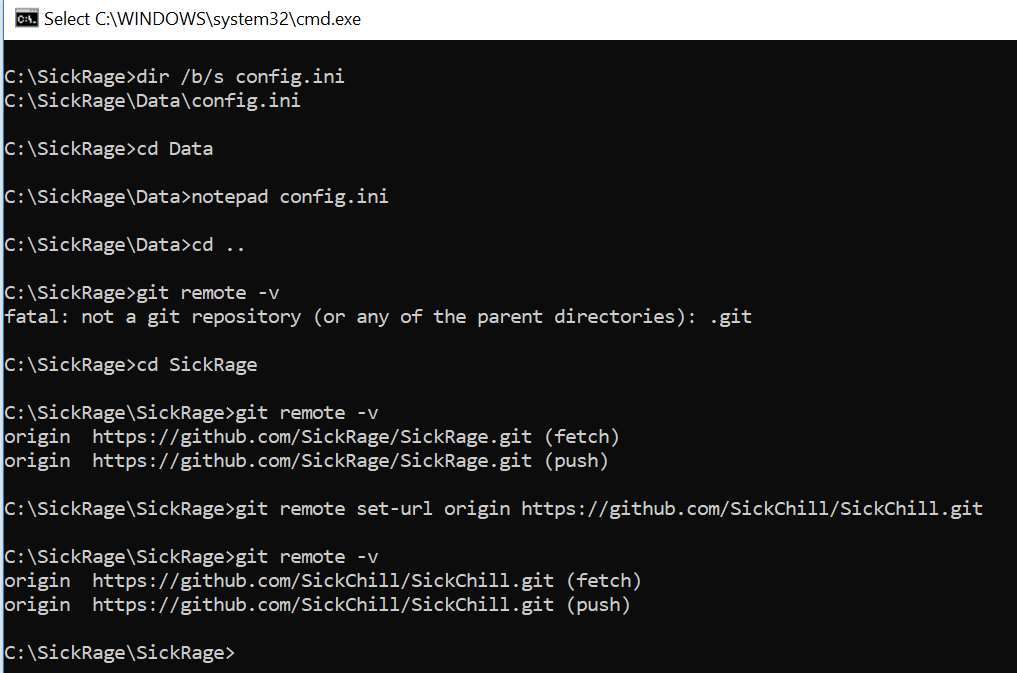
 sanchezjei
on 17 Oct 2018
sanchezjei
on 17 Oct 2018
It seems the config file is (over)written on exit, so in order for the fix to actually work, you need to stop sickrage before editing the files, otherwise the repo origin is overwritten on next update.
This worked for me (Ubuntiu 16.04) from the SickRage folder:
sudo systemctl stop sickrage.service
git remote set-url  origin https://github.com/SickChill/SickChill.git
git fetch --all
git reset --hard origin/master
Replace
git_remote_urlwith the new one in config.ini as per the first post here, and run:sudo systemctl start sickrage.service
Many Thanks for this. The details you provided worked for me.
 papaxris
on 17 Oct 2018
papaxris
on 17 Oct 2018
Thanks for the update. Ridiculous ... situation.
 jessequinn
on 17 Oct 2018
jessequinn
on 17 Oct 2018
I have finished the new package for the installation of SickChill on Synology Nasses.
As before the prerequisite is that the following packages from the SynoCommunity are installed
Git
Python 2.7
If you have and older installation of SickRage or sickbeard-custom, you should stop that package before installing SickChill.
If during installation the SickChill packages detects the presents of one of those packages it will import the databases and config on the fly.
It will also change the used port to 8899 and will make sure the config points to the correct GitHub.
The package is to be found here:
https://github.com/BenjV/SYNO-packages/raw/master/SickChill%20noarch%20V1.0.spk
Download it and do a manual install (make sure your package center accepts packages from evry source).
If you get a message that the port is in use, go to the commandline and unlink that port with the following command:
sudo servicetool --remove-configure-file --package sickrage.sc
@miigotu Maybe you can add this text to the wiki of SickChill, so every body can find it.
BenjV
on 18 Oct 2018
Thanks @BenjV it works like a charm ! 👍
 Pikoulol
on 18 Oct 2018
Pikoulol
on 18 Oct 2018
@BenjV I invited you to moderators so you can edit the wiki
miigotu
on 19 Oct 2018
Installs and run great :)
However, it doesn't seem to have permissions to create folders on my NAS. What group does it come under to raise permissions?
SR used to come under sc-media & sc-downloads.
Thanks @BenjV
mikesolo101
on 19 Oct 2018
Its either sr-media/sr-downloads or sc-media/sr-downloads
@BenjV where is the source?
miigotu
on 19 Oct 2018
I plan on setting up docker very advanced for SR, to automatically generate both docker images and packages for all of our supported platforms on every update.
We already have sickchill/sickchill which is automatically updated on every commit. I want to package up a fresh package for every platform automatically on commit.
miigotu
on 19 Oct 2018
Just download the package, that is the source in a tarball format.
It is a tar with the extension renamed to .spk used by Synology.
But my package downloads the source from the SickChill GitHub at installation and so it is always up-to-date on that moment and further updates will be done from SickChill itself so the package nerver has to be updated (except when Echon0n succeed with new hijack).
And the group to use for permission setting is sc-download, so if the permission for the old package were set correct then there should not be any problem.
That's one of the reasons we use a group and not the hidden user of the package itself.
One of the other reasons is that downloaders like Nzbget or Transmission are usesing this group to get permissions.
BenjV
on 19 Oct 2018
Thanks a lot! this really helped me! Luckily I only needed to change the config and then update from the web interface. This also changed the git remote servers and updated fine :)
 FGOD1983
on 30 Oct 2018
FGOD1983
on 30 Oct 2018
For those of you with Synology NAS use this recipe:
- Backup Sickrage, Shutdown Sickrage, Log on to NAS, Enable SSH.
- Use a client to SSH to NAS:
SSH admin@"IP-adress"- When logged in as admin use:
sudo -icommand switches you to root user.- Find where sickrage is located. Most likely:
/volume1/@appstore/sickbeard-custom/var/SickBeard/- When inside SickBeard folder run commands:
/volume1/@appstore/git/bin/git remote add upstream https://github.com/SickChill/SickChill.git
/volume1/@appstore/git/bin/git fetch upstream
/volume1/@appstore/git/bin/git checkout master
/volume1/@appstore/git/bin/git branch -u upstream/master
/volume1/@appstore/git/bin/git reset --hard upstream/master
/volume1/@appstore/git/bin/git pull
- Done. Run sickrage again and you'll be on the new fork :)
This worked great (I think).
What a mess though...
 Trefex
on 31 Oct 2018
Trefex
on 31 Oct 2018
No better install my Synology package for SickChill.
It will do all that is needed.
Just don't remove the old SickRage before the instllation, but afterwards.
The package can be found here.
https://github.com/BenjV/SYNO-packages/blob/master/SickChill%20noarch%20V1.1.spk
BenjV
on 31 Oct 2018
@BenjV so what i did is wrong? I have custom permissions and don't want to touch so much.
Trefex
on 31 Oct 2018
@BenjV my fix applied will not works?
Trefex
on 31 Oct 2018
No this does not change the config.ini, so you end up with the same problem.
And custom permissions are either correct or wrong and in the latter case you have to fix it.
If you are using a pre DSM 6 package with hackings to run it as root then you should be glad to be able to get rid of that hack.
My package is very straight forward and permissions are granted via the groups sc-download.
BenjV
on 1 Nov 2018
@BenjV SickChill automatically corrects the config.ini after it is updated once with git pull.
https://github.com/SickChill/SickChill/blob/2a535e05f961cfe397acce00004634c9772b9f12/sickbeard/__init__.py#L801
miigotu
on 1 Nov 2018
OK i use the BenjV package it's seem to work but i loose all the tv show image
 Jean-Mercier
on 7 Nov 2018
Jean-Mercier
on 7 Nov 2018
@Jean-Mercier Just go to the Manage menu and click Mass Update, then check the column for Refresh and click submit. It will redownload your cached images.
miigotu
on 7 Nov 2018
If you have used my package this is not possible.
The V1.1 package also copies the image cache.
So you have either used the V1.0 version or something else is wrong.
BenjV
on 8 Nov 2018
@BenjV he might not have had the image cache backed up, and only copied out the config and db manually
miigotu
on 8 Nov 2018
i confirm i use the 1.1 and i do noting manually
juste stop sickbeard custom and manually installl v1.1
The mass update fix the probleme
Jean-Mercier
on 8 Nov 2018
That's not possible unless you have removed sickbeard-custom before you installed SickChill.
But leave it at this, your problem is fixed.
BenjV
on 8 Nov 2018
Hey Team - thought I seen this answer already, but couldn't find it. Got the QNAP config edit done and clone new pgk - but get a cert error:
git fetch origin --prune returned : (128) fatal: unable to access 'https://github.com/SickChill/SickChill.git/': error setting certificate verify locations:
CAfile: /etc/ssl/certs/ca-certificates.crt
Any help fixing would be appreciated.
 Wizerd
on 12 Nov 2018
Wizerd
on 12 Nov 2018
git config --global http.sslverify "false"
miigotu
on 12 Nov 2018
on my synology with DSM6, running through sickbeard custom I did the following:
- stop the service
- edit config.ini:
vim /volume1/@appstore/sickbeard-custom/var/config.ini - start service
- go to the source dir:
cd /volume1/@appstore/sickbeard-custom/var/SickBeard - check if remote is updated:
/volume1/@appstore/git/bin/git remote -v - do a pull with the app's user/group:
sudo su -s /bin/bash -g sickbeard-custom sc-sickbeard-custom -c "/volume1/@appstore/git/bin/git pull" - restart service
 ctrl-f5
on 16 Nov 2018
ctrl-f5
on 16 Nov 2018
No better install my Synology package for SickChill.
It will do all that is needed.
Just don't remove the old SickRage before the instllation, but afterwards.
The package can be found here.
https://github.com/BenjV/SYNO-packages/blob/master/SickChill%20noarch%20V1.1.spk
I stopped SickRage on my Synology and installed the SickChill SPK.
Once installed successfully, will SickChill copy over all my config and db from the sickbeard-custom application and can I then remove sickbeard-custom after that?
 Manfred73
on 25 Nov 2018
Manfred73
on 25 Nov 2018
No better install my Synology package for SickChill.
It will do all that is needed.
Just don't remove the old SickRage before the instllation, but afterwards.
The package can be found here.
https://github.com/BenjV/SYNO-packages/blob/master/SickChill%20noarch%20V1.1.spkI stopped SickRage on my Synology and installed the SickChill SPK.
Once installed successfully, will SickChill copy over all my config and db from the sickbeard-custom application and can I then remove sickbeard-custom after that?
I used the wrong IP address :-) Can access SickChill now. Seems it didn't copy over config and db from old sickrage custom, but after stopping it and uninstalling and reinstalling SickChill, it seems it did copy over the config and db.
Manfred73
on 25 Nov 2018
Unfortunately I have only just found this thread after updating my SickRage using the Synology supplied update and getting the other SickRage.
I discovered SickChill but before I found this thread I had already removed SickRage and installed V1.1, as posted earlier, but now I cannot access SickChill even after doing a restart. The link in the browser is pointing to port 8899, which was the link to SickRage.
I am a "dummy" so most of the posts about editing stuff goes right over my head.
Can anyone give me some "Instructions for Dummies" that can assist in getting SickChill running.
I know I will have to re-link all of my shows, and there are many thousands of them, but at the moment all I want to do is get SickChill going and put a hit out on the other guy for hijacking my installation (joking).
 MSP85D
on 2 Dec 2018
MSP85D
on 2 Dec 2018
Not sure what your problem is.
My SickChill package is using port 8899 and that is different from older SickRage package so what is your problem?
BenjV
on 2 Dec 2018
I cannot believe what just happened. I had attempted to connect to SickChill many times before and after the restart, including one literally 2 minutes before my post, and the link was rejected. After receiving your post I tried it again, so to get a screenshot, and SickChill is now running and has all of my shows already in it.
I had been trying to get SickChill going for 24 hours before I made my post.
My apologies for wasting your time.
MSP85D
on 2 Dec 2018
Not sure what happened, most likely you tried a link with the old port instead of the new 8899 port.
The whole purpose of my package was to import the database and config from the corrupted old package so als shows and all settings and all the cached items got imported.
But I am glad it is ok now.
Don't forget to uninstall the corrupte old package of SickRage.
BenjV
on 2 Dec 2018
On my Synology it keeps changing the config.ini file back to sickrage.git repo after i restart the app.
My steps:
Edit file: /volume1/@appstore/sickbeard-custom/config.ini
change line: git_remote_url = https://github.com/SickChill/SickChill.git
Save file and restart package.
What am i missing or doing wrong?
 forza11
on 3 Dec 2018
forza11
on 3 Dec 2018
You are trying to do things you just don't understand.
Just changing the config won't help at all.
I have created a package for Synology to fix the problem.
Steps to take.
Download the package from this location:
https://github.com/BenjV/SYNO-packages/blob/master/SickChill%20noarch%20V1.1.spk
Stop SickRage (if still running)
Do a manual install of the downloaded package.
Open the new SickChil to see if everthing is ok.
If so uninstall the old Sickrage package.
BenjV
on 3 Dec 2018
Correct, i just followed the steps.. but your package works great, wish i found that ealier. thanks!
forza11
on 4 Dec 2018
This issue has been automatically marked as stale because it has not had activity in 60 days. It will be closed in 7 days if no further activity occurs. Thank you for your contributions.
![stale[bot] picture](https://avatars3.githubusercontent.com/in/1724?v=4&s=40) stale[bot]
on 2 Feb 2019
stale[bot]
on 2 Feb 2019
This issue has been closed due to inactivity in the last 67 days.
stale[bot]
on 9 Feb 2019
I just got this error today:
2020-09-06 14:37:31 WEBSERVER-HOME :: Local branch is ahead of master. Automatic update not possible.
2020-09-06 14:05:46 CHECKVERSION :: We can't proceed with the update. Unable to check remote DB version. Error: AssertionError(u'Empty response from https://raw.githubusercontent.com/{0}/{1}/{2}/sickbeard/databases/mainDB.py',)
 lgordon
on 6 Sep 2020
lgordon
on 6 Sep 2020
Yes, it is intentional. Master now requires python3 and if it was allowed to manually update every single install would have failed to start.
Check the news and the open issues.
miigotu
on 7 Sep 2020
Synology just updated SickChill package and now I'm also seeing this message about Local branch is ahead of master.
Manfred73
on 7 Sep 2020
6681
miigotu
on 7 Sep 2020
Related issues
 d9001089
·
4Comments
d9001089
·
4Comments
 nopoz
·
4Comments
nopoz
·
4Comments
 Tankyspanky
·
4Comments
Tankyspanky
·
4Comments
 proctophage
·
3Comments
proctophage
·
3Comments
 Rouzax
·
3Comments
Rouzax
·
3Comments
Most helpful comment
I am busy building a new Synology package called SickChill.
It wil migrate the config and databases from an existing package changing the github location "on the fly" and also migrate the databases.
It will also will detect if those are corrupted by Echel0n version and then not use that config and database.
I have finished the package but I need to find some time to do some more testing, so be patient.
I will post here when it is finished and were to find it.