Shrine: Discarded image extension, validate_extension_inclusion fails
Hi Janko,
I am checking validate_extension_inclusion for my image uploads but with 2.8.0 it fails as the image file has no extension whatsoever. My uploaded images have extensions, but as soon as they are uploaded to Shrine cache dir, it disappears and I get validation error:
ActiveRecord::RecordInvalid: Validation failed: Image Must be JPEG, PNG or GIF
Please see screenshots.
image_uploader:
  Attacher.validate do
    validate_min_size 10*1024
    validate_max_size 5.megabytes, message: 'is too big'
    validate_extension_inclusion %w[jpg jpeg png gif]
    validate_mime_type_inclusion %w[image/jpeg image/jpg image/png image/gif]
  end
I run this in my seeds.rb to populate my galleries with test pics
# upload random images to newly created galleries
def pupulate_galleries(castle)
  castle.galleries.each do |g|
    rand(1..MAX_IMAGES).times do
      g.images.create!(
        # work around delete_raw plugin
        image:          StringIO.new(File.binread("test/images/#{rand(1...30)}.jpg")),
        user_id:        rand(1..@max_users),
        title:          Faker::Lorem.words(2..5).join(' '),
        description:    Faker::Lorem.words(5..15).join(' '),
        tags:           Faker::Lorem.words(1..5).join(' ')
      )
    end
  end
end
This used to work with older Shrine on Rails on 5.0.0.1. I upgraded to 2.8.0 (Rails 5.1.4) and now it fails. I ran it through the debugger and there is indeed no extension for files in cache. I have there older files uploaded through Shrine before Shrine+Rails upgrade and those have proper image extensions (.jpg).
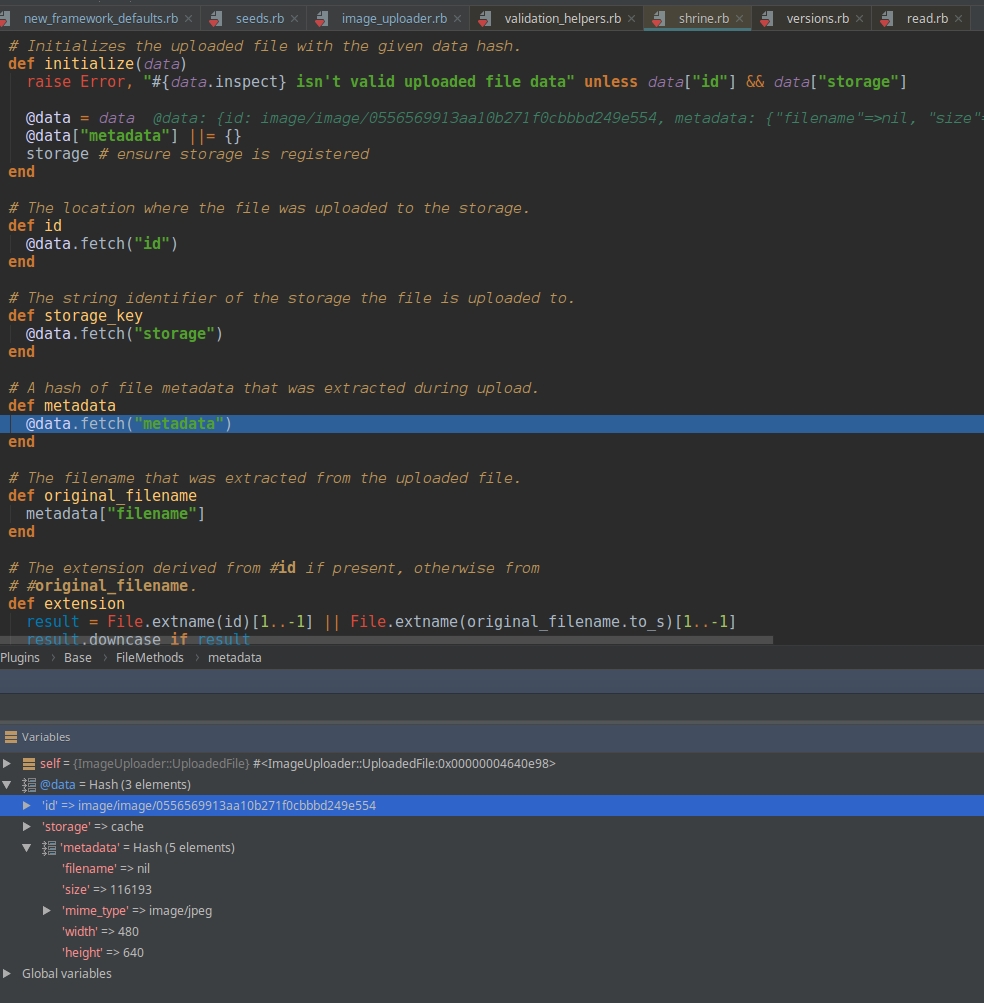
and

Did something change or am I doing something wrong here?
Thank you kindly for your help.
EDIT I have just noticed even uploaded images have no extension in the HTML code after I view them in my Rails app in the browser. I am buffled.
<div class="grid-item">
<img src="/uploads/store/image/782/image/thumb-7daad8f038ec994fb83ea68234d095a5">
</div>
images table from DB has no extensions either:
{
  "thumb":{
    "id":"image\/1\/image\/thumb-63eaa931ce27b7b2ee147b5d74a7b2cc",
    "storage":"store",
    "metadata":{
      "size":44890,
      "width":200,
      "height":133,
      "filename":"mini_magick20171119-28298-dd3g0p",
      "mime_type":"image\/jpeg"
    }
  },
  "medium":{
    "id":"image\/1\/image\/medium-d26b6cbc077248826d52b3f105657859",
    "storage":"store",
    "metadata":{
      "size":65833,
      "width":300,
      "height":199,
      "filename":"shrine20171119-28298-1j4bix.",
      "mime_type":"image\/jpeg"
    }
  },
  "original":{
    "id":"image\/1\/image\/original-87be321ee2b978bbb285ae6b44b9e626",
    "storage":"store",
    "metadata":{
      "size":292995,
      "width":800,
      "height":531,
      "filename":null,
      "mime_type":"image\/jpeg"
    }
  }
}
 technodrome
All 4 comments
Hi @technodrome.
I'm unable to reproduce your issue of missing extension in Shrine v2.8.0 in my test code. Perhaps the issue may lie in other sections of your code or maybe you have an edge case - unsure at this point.
Here's my test code for your reference:
# frozen_string_literal: true

require 'active_record'
require 'shrine'
require 'shrine/storage/file_system.rb'

file = File.new("../test/fixtures/image.jpg")

ActiveRecord::Base.establish_connection(adapter: "sqlite3", database: ":memory:")
ActiveRecord::Base.logger = Logger.new(STDOUT)
ActiveRecord::Migration.verbose = true
ActiveRecord::Migration.create_table(:documents) { |t| t.text :file_data }

Shrine.storages = {
  cache: Shrine::Storage::FileSystem.new("uploads/cache"),
  store: Shrine::Storage::FileSystem.new("uploads/store"),
}

Shrine.plugin :activerecord
Shrine.plugin :validation_helpers
Shrine.plugin :versions
Shrine.plugin :processing

class FileUploader < Shrine
  Attacher.validate do
    validate_max_size 10*1024*1024
    validate_extension_inclusion %w[jpg jpeg png gif]
  end
  process(:store) do |io, context|
    file = io.download
    { original: io, small: file }
  end
end

class Document < ActiveRecord::Base
  include FileUploader[:file]
end

document = Document.new(file: file)
document.save
 hmistry
on 19 Nov 2017
hmistry
on 19 Nov 2017
Hi @hmistry,
I found the problem. Your code ran without problems because you used
file = File.new("../test/fixtures/image.jpg")
instead of my code
image: StringIO.new(File.binread("test/images/#{rand(1...30)}.jpg")),
But I cannot use File.open as delete_raw plugin would remove my source image file. So I used StringIO as per @janko-m's advice in this thread to work around a problem, where delete_raw plugin was removing poster's source files after upload. In that thread, Janko commented:
The delete_raw plugin is deleting your test file. The reason why this happens on version 2.7.0 and not before is that the delete_raw plugin was recently fixed to also work on File objects in addition to Tempfile objects [...] Another solution is to provide a StringIO object in your factory definition.
So I used StringIO in my seeds.rb but as it takes the file as an in-memory object, it probably just reads the binary content of the file and does not care about the extension, then makes that data available to Shrine which does not add an extension back based on mimetype when it saves that StringIO object to the permanent storage. At least I guess this is the case.
So what is the proper way to pass image file to Shrine when using delete_raw plugin without deleting my source image files? Needless to say I want to keep them for next time when I reseed the DB.
Thank you for your help.
technodrome
on 20 Nov 2017
I don't think this is related to the Shrine upgrade, were you using a StringIO before the upgrade as well? A StringIO doesn't have information about the file extension, so Shrine will leave it out, which means that my suggestion to use a StringIO was flawed, sorry. You should create Tempfile objects instead:
def pupulate_galleries(castle)
  castle.galleries.each do |g|
    rand(1..MAX_IMAGES).times do
      Tempfile.create(["image", ".jpg"], binmode: true) do |tempfile|
        tempfile.write File.binread("test/images/#{rand(1...30)}.jpg")
        tempfile.open # reopen the tempfile to rewind it and flush the written content

        g.images.create!(
          # work around delete_raw plugin
          image:          tempfile,
          user_id:        rand(1..@max_users),
          title:          Faker::Lorem.words(2..5).join(' '),
          description:    Faker::Lorem.words(5..15).join(' '),
          tags:           Faker::Lorem.words(1..5).join(' ')
        )
      end
    end
  end
end
 janko
on 20 Nov 2017
janko
on 20 Nov 2017
To make it work, I had to use tempfile.rewind instead of tempfile.open as when using tempfile.open I got an error NoMethodError: private method "open" called for #<File:/tmp/image20171120-27620-1xotn7j.jpg (closed)>
Thank you very much for clearing that up and for the excellent support 👍
technodrome
on 20 Nov 2017
Related issues
 Sohair63
·
3Comments
Sohair63
·
3Comments
 printercu
·
10Comments
printercu
·
10Comments
 pmackay
·
4Comments
pmackay
·
4Comments
 brunowego
·
4Comments
brunowego
·
4Comments
 bmedici
·
3Comments
bmedici
·
3Comments
Most helpful comment
To make it work, I had to use
tempfile.rewindinstead oftempfile.openas when usingtempfile.openI got an errorNoMethodError: private method "open" called for #<File:/tmp/image20171120-27620-1xotn7j.jpg (closed)>Thank you very much for clearing that up and for the excellent support 👍