Shoelace: Text-only enlargement causes text to fall out of controls
Describe the bug
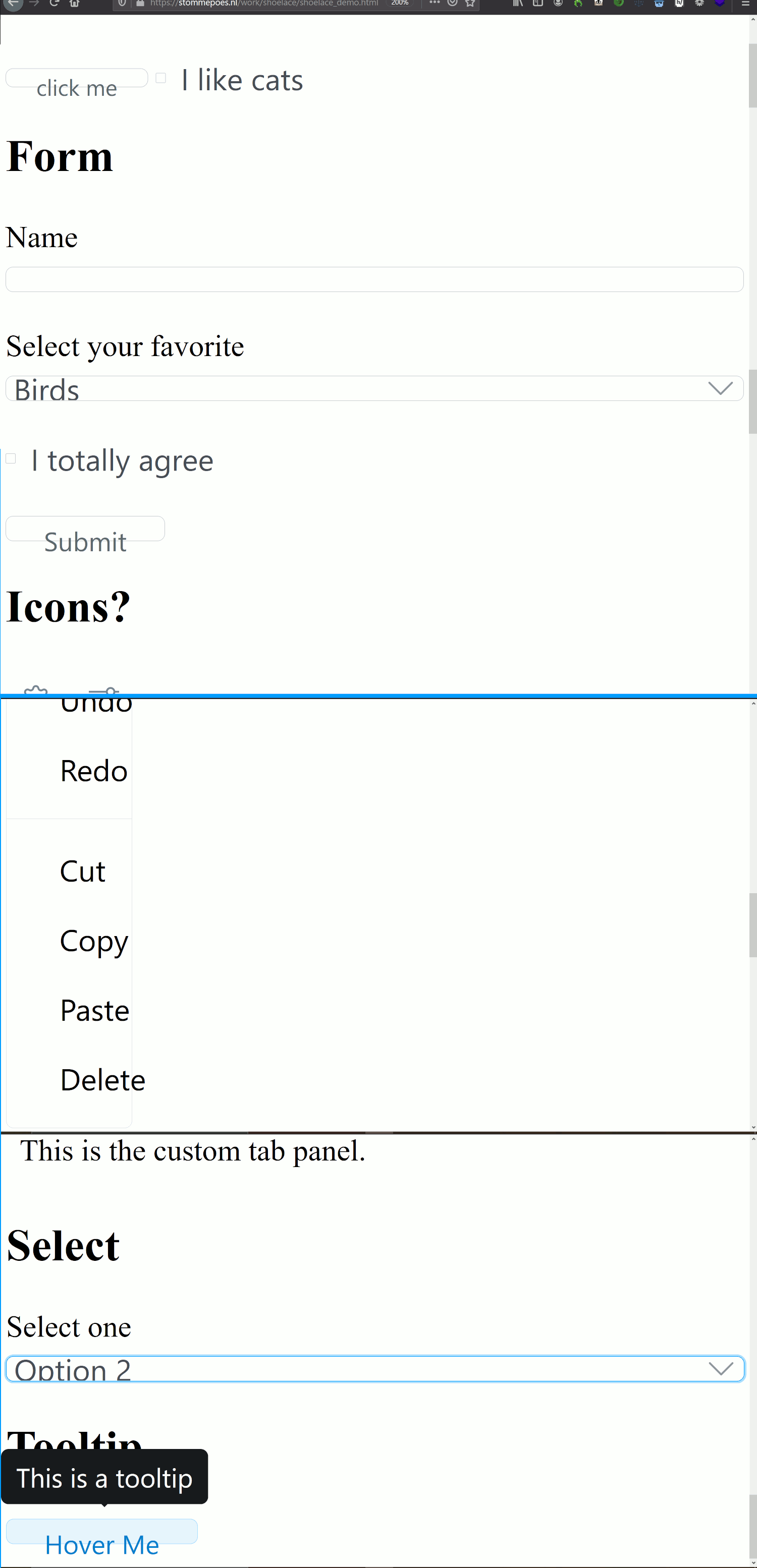
Users who enlarge text alone up to 200% find the text overflowing the controls.
To Reproduce
Steps to reproduce the behavior:
- Open Firefox and go to test page https://stommepoes.nl/work/shoelace/shoelace_demo.html
- Choose View→Zoom→Zoom Text Only in the browser menu.
- Press Ctrl++ until the zoom level is 200%.
- Observe the controls.
Expected behavior
Controls grow to accommodate any font size. The test steps above are based on in-browser font sizes, however users can increase text size via their OS settings as well. This is not the same as browser zoom, where everything continues to scale.
Screenshots
Desktop:
- OS: Windows 10
- Browser: Firefox latest (80)
The CSS for the button used in the test page has --sl-input-height-small: 30px;. What I do when accommodating text-enlarge is choose an em- (or percent) based unit and check the browser's Computed Styles tab until the pixel units it reflects are the number I'm going for (so using whatever ems gets the "30px"). This allows the current styles to remain, but will grow if users make fonts larger.
Note: this is a low-prio bug. Most developers build websites in pixels, and most set font sizes in pixels (which completely breaks/overrides users' own font-size settings in their browser. Try setting the font size in Chrome to Very Large and then visit a page where the fonts are set in px. No change :( ). For these reasons, most users either use browser zoom or, like me, rely on OS font and make-everything-yuge settings, or resort to screen magnification for broken sites like LinkedIn or Slack.
There are reasons to want just the text to be made bigger, so I consider this an "accessibility nice-to-have".
 StommePoes
All 3 comments
The trouble with em units is that they're relative to the current font size. This can have unintended side effects when a component is placed inside an element that alters font size. Users rarely want to change the size of a form control based on the current text size — mostly they want them to be consistent and size changes are expected to be done through an opt-in means such as size="large" or class="input-large".
Do you know if rem units will also fix this?
I've been unsuccessful in finding a way to increase the default font size in macOS. Most suggestions are to go into the display settings and adjust the resolution. (I vaguely recall Windows having this option, but I haven't used it in over a decade.) I wish I could test this myself.
 claviska
on 23 Oct 2020
claviska
on 23 Oct 2020
Hi,
I can't answer the how-to for Macs, because I've successfully avoided using iThings so far :P But it wouldn't surprise me if font settings are set under "Accessibility" somewhere even though many people don't consider text enlarge as an accessibility thing.
rems will give you the same benefits/problems as ems although unlike ems they won't stack their relativeness (ems will stack based on ancestors, rems will always base on the user's default font setting). Feel free to play with rems, but when I say I set things to ems, I'm already in a page where everything is set to ems, and never on containers.
Since these are components meant to be thrown up on J Random Dev's pages, you'll never be able to know how they've set their pages up, and they will likely be using px units anyway.
Another thing you can try, actually, for the inputs, is instead of height, use min-height. That should let them grow IF the font has grown, while otherwise mostly remaining at your px-based height. It won't fixe some of the width-based issues but will probably cover a lot of the vertical-container problems.
To enlarge fonts in Firefox: Alt key to show the menu, Arrow over to View, down to Zoom, choose Zoom Text Only. This enlarges text without zooming at all. In Chrome, under Settings, search for Fonts and somewhere in there is the choice of Small, Medium/Recommended, Large and Very Large. These only enlarge fonts on websites which have been set in % or (r)em, but not px.
In Windows, hit Windows+U to open the Settings, and Display is the default first area shown. There's a slider for enlarging text in general (this is system-wide, so in theory should hit all applications though be aware it tends to miss apps which do not fully integrate with Windows correctly), and then below there's a section called Make Everything Bigger, which is more like an OS-level Zoom function. This enlarges the "chrome" of applications (toolbars and whatnot), the Task Bar, etc.
StommePoes
on 25 Oct 2020
Thanks for pointing me in the right direction here. The "Zoom Text Only" option in Firefox is awesome, and converting input heights and spacing to rem seems to resolve this nicely. 🙌
claviska
on 27 Oct 2020
Related issues
 jaredcwhite
·
6Comments
jaredcwhite
·
6Comments
 SheepFromHeaven
·
7Comments
SheepFromHeaven
·
7Comments
 crutchcorn
·
7Comments
crutchcorn
·
7Comments
 NullVoxPopuli
·
6Comments
NullVoxPopuli
·
6Comments
 mcjazzyfunky
·
7Comments
mcjazzyfunky
·
7Comments
Most helpful comment
Thanks for pointing me in the right direction here. The "Zoom Text Only" option in Firefox is awesome, and converting input heights and spacing to
remseems to resolve this nicely. 🙌