Shields: Extension-less URLs are aren't correctly cached by CloudFlare
So I started looking at cache headers and...
If I request a badge with an extension and then request the same badge again a few second later, everything works as epxected. I get a cache miss first time, then a hit the second time:
$ curl -I "https://img.shields.io/appveyor/build/gruntjs/grunt.svg" | grep cf-cache-status

cf-cache-status: MISS


$ curl -I "https://img.shields.io/appveyor/build/gruntjs/grunt.svg" | grep cf-cache-status

cf-cache-status: HIT
All is well in the world.
..but then if do the same thing with the extension-less version of the same badge then on both requests I get cf-cache-status: DYNAMIC:
$ curl -I "https://img.shields.io/appveyor/build/gruntjs/grunt" | grep cf-cache-status

cf-cache-status: DYNAMIC


$ curl -I "https://img.shields.io/appveyor/build/gruntjs/grunt" | grep cf-cache-status

cf-cache-status: DYNAMIC
As far as I can tell, the meaning of cf-cache-status: DYNAMIC is:
This resource is not cached by default and there are no explicit settings configured to cache it. You will see this frequently when Cloudflare is handling a POST request. This request will always go to the origin.
so for the extension-less routes, my reading of that is that we're always hitting heroku for every request :scream:
Both versions (with and without extension) get served with the same cache control header:
$ curl -I https://img.shields.io/appveyor/build/gruntjs/grunt.svg | grep cache-control

cache-control: max-age=30, s-maxage=30


$ curl -I https://img.shields.io/appveyor/build/gruntjs/grunt | grep cache-control

cache-control: max-age=30, s-maxage=30
Before I start worrying about how to solve this, can someone else just double-check and make sure my assessment of this is right?
Looking at the graph, we are definitely serving a decent amount of requests from cache, but I suspect we should be serving more.
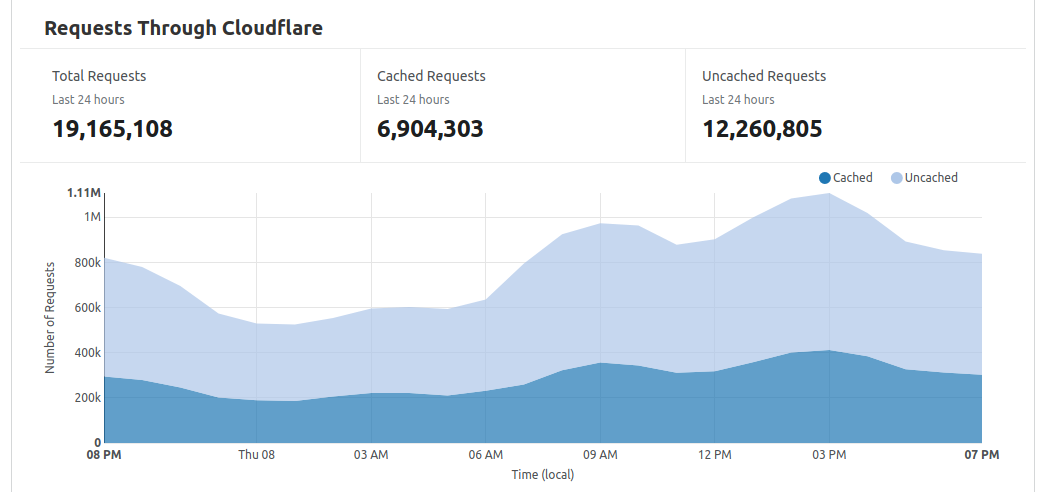
Also, side note: apparently we are serving ~20 million requests per day at the moment :open_mouth:
y'know - as you do
 chris48s
All 15 comments
Welp. Yep, your analysis sounds right to me. 💣
Traffic is definitely way up over the last year. And way up over a few years ago, especially given that since we started using the CDN downstream and setting cache headers, badges are also cached by the browser.
I thought our page rules were ignoring extensions, though I guess it is using some default logic instead.
https://community.cloudflare.com/t/cache-by-file-extension-and-cf-cache-status-dynamic/138666
On a quick search I found this post though it's about extensions and caching in general, not about how to cache _extensionless_ content.
 paulmelnikow
on 8 Oct 2020
paulmelnikow
on 8 Oct 2020
Relevant articles:
https://support.cloudflare.com/hc/en-us/articles/200172516
https://support.cloudflare.com/hc/en-us/articles/218411427
Having done a bit of reading/poking about, my instinct is there are 2 things worth trying:
- Explicitly send a
Cache-Control: publicheader (but maybe put it behind a flag which is off by default for self-hosting users - refs discussion in https://github.com/badges/shields/pull/5046 ) - Change our page rule from "Cache Level: Standard" to "Cache Level: Cache Everything".
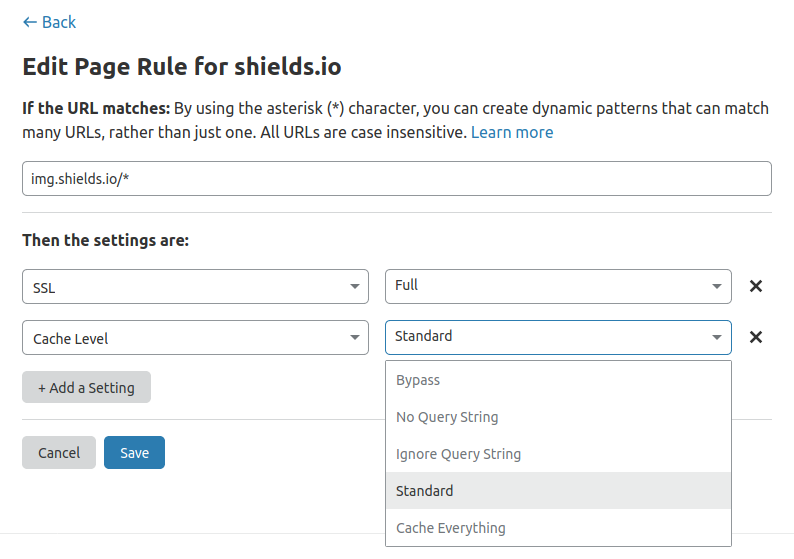
Can you think of any reason why Cache Everything would be a bad idea for us? Obviously if you have a site which does server-side scripting, sends cookies, has content which is restricted to logged in users, etc you definitely don't want to do this but I _think_ it is OK for us to just treat _everything_ shields.io serves as being static/cache-able? (if I'm failing to think of important examples, please shout)
chris48s
on 12 Oct 2020
This is the definition of Cache Everything:
Cache Everything - Treats all content as static and caches all file types beyond the Cloudflare default cached content. Respects cache headers from the origin web server unless Edge Cache TTL is also set in the Page Rule. When combined with an Edge Cache TTL > 0, Cache Everything removes cookies from the origin web server response.
I agree that is what we want (the key being, "respects cache headers from the origin web server.")
The things that shouldn't be cached are the posts for the github auth workflow, and maybe the suggest endpoint (since it depends on the post body). Maybe it's worth checking a couple of the suggest calls after turning this on, to make sure they aren't being cached.
paulmelnikow
on 12 Oct 2020
Right, yes. These are good points. When you say
posts for the github auth workflow
am I right that what happens here is the user hits https://img.shields.io/github-auth which just redirects them to github, but then at the end of that transaction, github sends a POST back to us?
and maybe the suggest endpoint (since it depends on the post body)
From what I've read, CloudFlare does not ordinarily consider a POST request to be cache-able so neither of these should be a problem. I can't find anywhere that really explicitly confirms that turning on "cache everything" doesn't change that but from reading https://blog.cloudflare.com/introducing-the-workers-cache-api-giving-you-control-over-how-your-content-is-cached/ for example it does seem like you have to jump through some hoops if you actually _want_ to cache POSTs so I would assume that POSTS are non-cachable even with "cache everything" on (which would seem sensible).
So long story short, I think it the 2 things we're concerned about are POSTs, then its fine.
If we turn that on we do also have to be very conscious of the impact on any features we introduce in future. I guess if we ever want to introduce something non-cacheable it needs to live on nocache.shields.io or whatever. Possibly worth thinking about in the context of the discussion in https://github.com/badges/shields/issues/5014#issuecomment-699114560
Do you favour going straight to that option rather than adding the public header to badges first to see what happens?
chris48s
on 13 Oct 2020
Just thinking about this issue again in the context of https://github.com/badges/sc/pull/3
@paulmelnikow Do we still have staging set up so it is behind CloudFlare from when you were debugging https://github.com/badges/shields/pull/5712 ? If we do, we could try setting up staging to deploy off a branch where we are sending the public header and see it that works..
chris48s
on 25 Oct 2020
I've just switched this over to "cache everything" and that seems to have resolved the issue. I can't see anything wrong, but I'll continue to monitor this evening. If anyone else spots something that seems to have gone wrong
- Change cache level back to Standard in Page Rules and
- Purge the cache under Caching
chris48s
on 29 Oct 2020
In terms of the long game on this, I am still curious whether we could correct this with headers. At the moment, I don't think there is any issue with setting "cache everything" and probably our design goals for the service won't change in the near future, but it feels like a workaround. People build applications that have a mix of cache-able and non-cacheable content on extension-less URLs all the time. It feels like we should be able to instruct CloudFlare which content is and is not cacheable at the application level by sending the correct headers.
chris48s
on 29 Oct 2020
It feels like we should be able to instruct CloudFlare which content is and is not cacheable at the application level by sending the correct headers.
Yes – and I think that is what our cache headers are already doing.
This is my interpretation of Cloudflare's options:
- Standard: Only cache certain file extensions, while respecting cache headers
- Cache Everything: Cache all file extensions, while respecting cache headers
I can't off hand think of any content we serve that isn't cached. (Maybe something like https://img.shields.io/this-is-bogus.svg?)
paulmelnikow
on 29 Oct 2020
Well, looks like nothing has broken so that's good. Interestingly, the proportion of cached vs uncached traffic hasn't gone up very much since doing that, which I think implies very few users are actually using the extension-less URLs in the wild.
One thing I'm still slightly unclear about with the Cache Everything setting is: if we wanted to have some non-cacheable content in future (for whatever reason), is the only way to deal with that by using CF page rules, or would it respect private if we set that on some content? I guess we can test that if we need it..
I can't off hand think of any content we serve that isn't cached. (Maybe something like https://img.shields.io/this-is-bogus.svg ?)
Nope. 404s do get cached (at least now). We are choosing to serve it without explicitly setting a max-age on it (lets not get back into that), so CloudFlare assumes a default:
$ curl -I "https://img.shields.io/this-is-bogus.svg"
HTTP/2 404
cf-cache-status: MISS

$ curl -I "https://img.shields.io/this-is-bogus.svg"
HTTP/2 404
cf-cache-status: HIT
I think the default 3 min or 5 min for the 404.
chris48s
on 30 Oct 2020
Sounds like things are in pretty good shape. I'm surprised that there aren't more extensionless URLs in the wild, though I guess most of our traffic probably comes from badges that were added a long time ago.
Is it worth deploying something to the staging branch and setting private or no-cache to resolve your question?
paulmelnikow
on 3 Nov 2020
Yeah. As I say, I think "everything on shields.io can be cached downstream" is actually quite a good design goal for us to stick to, but I would quite like to try deploying a test so that we can have a play with the headers just to understand exactly how this setup works and what our options/constraints are with it moving forwards. How did you go about doing that when you were debugging the requireCloudflare() PRs?
chris48s
on 3 Nov 2020
Once you push the draft branch to the remote, in the Heroku dashboard, you can pick any branch to deploy:

It'll get re-deployed on the next commit to master so it can get bumped out from under you, but it still works well for a few minutes of testing.
paulmelnikow
on 3 Nov 2020
What URL do I need to proxy through CloudFlare?
If I request http://shields-staging.herokuapp.com/ I think I'm hitting the staging env directly, not going through CF?
chris48s
on 3 Nov 2020
Ah, right, it's https://staging.shields.io/.
paulmelnikow
on 3 Nov 2020
sneaky :rofl:
I set this up and had a play. Even with "cache everything" on, if we serve a response with private or no-store, we get cf-cache-status: BYPASS so if there are response we want to explicitly instruct CloudFlare to not cache, we can do that with headers - so that seems pretty sensible :)
Just FYI, I created a page rule in CloudFlare turning on "Cache Everything" for staging.shields.io to test this. I haven't deleted it - I'm going to leave it for now. I figure it is useful if the staging setup works the same as prod, but simultaneously we are limited on the number of page rules we get (without additional charges) so we might want to reclaim it at some point. We probably need to review the page rules when we move the frontend to heroku anyway.
Either way, I think this issue is done. We've fixed the issue and the setup we are now on is sensible :tada:
chris48s
on 4 Nov 2020
Related issues
 irgolic
·
3Comments
irgolic
·
3Comments
 bruno-garcia
·
3Comments
bruno-garcia
·
3Comments
 PyvesB
·
3Comments
PyvesB
·
3Comments
 chadwhitacre
·
4Comments
chadwhitacre
·
4Comments
 techtonik
·
3Comments
techtonik
·
3Comments
Most helpful comment
sneaky :rofl:
I set this up and had a play. Even with "cache everything" on, if we serve a response with
privateorno-store, we getcf-cache-status: BYPASSso if there are response we want to explicitly instruct CloudFlare to not cache, we can do that with headers - so that seems pretty sensible :)Just FYI, I created a page rule in CloudFlare turning on "Cache Everything" for staging.shields.io to test this. I haven't deleted it - I'm going to leave it for now. I figure it is useful if the staging setup works the same as prod, but simultaneously we are limited on the number of page rules we get (without additional charges) so we might want to reclaim it at some point. We probably need to review the page rules when we move the frontend to heroku anyway.
Either way, I think this issue is done. We've fixed the issue and the setup we are now on is sensible :tada: