:question: Question : Support languages on badges
Actual output : Arabic
https://img.shields.io/badge/يسار-يمين-green

Expected output :
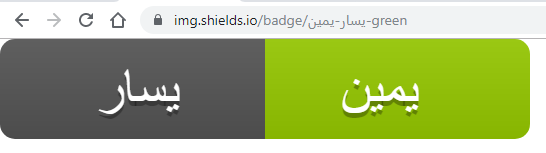
 Aissaoui-Ahmed
All 13 comments
Hi! Thanks for opening this. I'd definitely like to support this in Shields.
Broadly speaking there are two issues here:
- Text-width computation for Arabic text.
- Handling RTL text direction.
First issue: text width. The Shields badge design specifies the amount of padding around the text. Ideally we'd want the boxes to be just as tight to the Arabic text as they are for any other text.
An inconvenience in rendering SVG is that all the dimensions must be precomputed on the server. The reason the badge you linked looks so strange is twofold:
- The computed width is much longer than the correct width.
- The SVG template is designed to spread out the characters across the computed space. This comes from setting
textWidthandlengthAdjust="spacing"which dates back to #1132 and #1161. These were the changes that fixed some long-standing issues #746, related to rendering in Windows, and #848. In addition, this _usually_ does a nice job of glossing over tiny imperfections in the text-width computation.
The width computation is pretty highly optimized using a lookup table. It was implemented in #2311. It is not perfect, though it works well enough that this is the first issue raised about it 😁The code and data live in a dependency called anafanafo. A definite next step is to open an issue there, to document the bug, if nothing else.
I think there are two possible ways forward.
One is to patch anafanafo so it correctly computes text width for Arabic text. I'm not sure if this is means expanding the list of characters we precompute, adding some new kerning adjustments, or both. The idea is to make anafanafo('some arabic text') return the correct result.
The other is to consider some flags in the URL that let the user either override the width, or prevent textLength from being set, which therefore wouldn't stretch the text out across the whole rectangle. We could set up a web page that made it easy to measure the input text yourself. It might not work well in Windows Firefox (#746) though it would work fine in many cases.
Second issue: text direction. I'm not completely clear on the expected behavior. Length issues aside, do you have an SVG snippet that produces the right visual?
I've tried adding direction="rtl" to the <svg> element, though I'm still not getting the glyphs to render in the order of your "expected" image (they're backwards):

This page has some possibly relevant advice including that the text should be encoded in logical order, not visual order. That makes me think the order of the characters in the URL should be encoded in a visually reversed order (i.e. with the rightmost character first).
Also, the URL pattern for the static badge is label-message-color. The label is the gray part on the left, and the message is the green part on the right. I think you've got those swapped in your "expected" example. Is that deliberate?
Regardless of language, I think the URL pattern probably should retain its current logical order label-message-color, though I wonder: are you suggesting that the whole _badge_ should be flipped for an Arabic-language badge, with the label (gray part) on the right, instead?
 paulmelnikow
on 5 Oct 2019
paulmelnikow
on 5 Oct 2019
Hi @paulmelnikow !
Thank you for your response.
I've been working on it, and AFAICT it is not text-width computation nor RTL related issue.
I successfully made a "nice working output" as excepted :smile_cat: with a simple hack.
The hack works as follows:
groping text tags that share the same attributes. and move the attributes to the parent tag <g>
...
<g xmlns="http://www.w3.org/2000/svg" fill="#fff" text-anchor="middle" font-family="DejaVu Sans,Verdana,Geneva,sans-serif" font-size="110">
    <g fill="#010101" fill-opacity=".3" transform="scale(.1)" textLength="430">
        <text x="275" y="150" >يسار</text>
        <text x="785" y="150" >يمين</text>
    </g>
    <g transform="scale(.1)" textLength="430">
        <text x="275" y="140" >يسار</text>
        <text x="785" y="140" >يمين</text>
    </g>
</g>
...
Aissaoui-Ahmed
on 6 Oct 2019
Doesn't moving textLength to the g have the same effect as removing it? I do think this is length-related. The correct lengths are around 161 and 192; 430 is much too high.
paulmelnikow
on 6 Oct 2019
Its safe to say this is way outside my wheelhouse and I'm really feeling around in the dark here, but I found this explanation quite helpful to give a really really high level overview: https://www.youtube.com/watch?v=qOcxwRc2Epg&t=0m40s
It seems like the first issue here is to get Arabic text rendering correctly as _words_ rather than as a individual characters. I _think_ that's probably what is achieved by putting the text in a <g> (is that right, @Aissaoui-Ahmed ?)
The second is to get that happening _with the desired spacing_ .
In terms of spacing, I think the problem we've got is that in anafanafo we are mapping a width to a character (is that right?) but in some languages (including but not limited to arabic), the "width" of a character is context dependent. Characters can take up a different amount of horizontal space depending on where they are in a word. In order to get the spacing right, the concept that we can assign one character a single width is too simplistic.
I think if using a <g> gets the characters to form into words (accepting that that spacing we compute for it is going to be way off), that's probably an improvement worth making on its own as a first step?
 chris48s
on 7 Oct 2019
chris48s
on 7 Oct 2019
Reasonably minimal example (could make a good test case).. here are some characters with a space inbetween them:
జ్ ఞా
now the same characters with the space removed:
జ్ఞా
the widths change drastically depending on context.
chris48s
on 7 Oct 2019
There's some code that is helpful for computing that:
Currently these kerning adjustments are not being used, though. This was mostly because many of them don't matter much, and also because they take a long time to compute. In Arabic clearly they are very important 😁
There are a couple Latin test cases here, though they are subtle:
This is the correct kerning for B-, produced by removing textLength=130 from https://img.shields.io/badge/grade-B---blue:
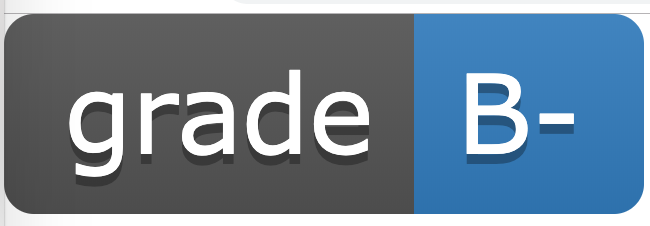
This is how we render it:

paulmelnikow
on 7 Oct 2019
This is a version with textLength that is looking pretty good:
<svg xmlns="http://www.w3.org/2000/svg"
    xmlns:xlink="http://www.w3.org/1999/xlink" width="56" height="20">
    <linearGradient id="b" x2="0" y2="100%">
        <stop offset="0" stop-color="#bbb" stop-opacity=".1"/>
        <stop offset="1" stop-opacity=".1"/>
    </linearGradient>
    <clipPath id="a">
        <rect width="56" height="20" rx="3" fill="#fff"/>
    </clipPath>
    <g clip-path="url(#a)">
        <path fill="#555" d="M0 0h29v20H0z"/>
        <path fill="#97ca00" d="M29 0h27v20H29z"/>
        <path fill="url(#b)" d="M0 0h56v20H0z"/>
    </g>
    <g fill="#fff" text-anchor="middle" font-family="DejaVu Sans,Verdana,Geneva,sans-serif" font-size="110">
        <text x="155" y="150" fill="#010101" fill-opacity=".3" transform="scale(.1)" textLength="190" lengthAdjust="spacingAndGlyphs">يسار</text>
        <text x="155" y="140" transform="scale(.1)" textLength="190" lengthAdjust="spacingAndGlyphs">يسار</text>
        <text x="415" y="150" fill="#010101" fill-opacity=".3" transform="scale(.1)" textLength="170" lengthAdjust="spacingAndGlyphs">يمين</text>
        <text x="415" y="140" transform="scale(.1)" textLength="170" lengthAdjust="spacingAndGlyphs">يمين</text>
    </g>
</svg>
With Arabic text, textLength doesn't work correctly with lengthAdjust="spacing"; it needs to be lengthAdjust="spacingAndGlyphs".
This is a version without textLength, which works fine, too.
<svg xmlns="http://www.w3.org/2000/svg"
    xmlns:xlink="http://www.w3.org/1999/xlink" width="56" height="20">
    <linearGradient id="b" x2="0" y2="100%">
        <stop offset="0" stop-color="#bbb" stop-opacity=".1"/>
        <stop offset="1" stop-opacity=".1"/>
    </linearGradient>
    <clipPath id="a">
        <rect width="56" height="20" rx="3" fill="#fff"/>
    </clipPath>
    <g clip-path="url(#a)">
        <path fill="#555" d="M0 0h29v20H0z"/>
        <path fill="#97ca00" d="M29 0h27v20H29z"/>
        <path fill="url(#b)" d="M0 0h56v20H0z"/>
    </g>
    <g fill="#fff" text-anchor="middle" font-family="DejaVu Sans,Verdana,Geneva,sans-serif" font-size="110">
        <text x="155" y="150" fill="#010101" fill-opacity=".3" transform="scale(.1)">يسار</text>
        <text x="155" y="140" transform="scale(.1)">يسار</text>
        <text x="415" y="150" fill="#010101" fill-opacity=".3" transform="scale(.1)">يمين</text>
        <text x="415" y="140" transform="scale(.1)">يمين</text>
    </g>
</svg>
Both of these are rendering with subtle differences in Chrome and Firefox. The reason the Chrome badges look the same is that I used text lengths computed in Chrome.
| | Chrome | Firefox |
| -- | -- | -- |
| With textLength |  |
| 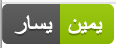 |
|
| Without textLength |  |
| 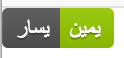 |
|
These are different typefaces. Firefox is using Arial and Chrome is using Verdana. I've no idea why that is, though…
paulmelnikow
on 7 Oct 2019
Almost forgot. Something that makes debugging this tricky is that live edits made in Developer Tools which _should_ trigger reflowing the letters don't always seem to do so. So, for a less frustrating experience working on this, I'd suggest saving the svg in a file and refreshing the browser. 😝
paulmelnikow
on 7 Oct 2019
Hi @chris48s !
as native speaker Arabic you are right and good example:
Reasonably minimal example (could make a good test case).. here are some characters with a space inbetween them:
జ్ ఞా
now the same characters with the space removed:
జ్ఞా
the widths change drastically depending on context.
@paulmelnikow great work but for English there is any conflict ?
Aissaoui-Ahmed
on 9 Oct 2019
Yea, unfortunately this isn’t a solution yet. Rendering the badge still requires knowing the correct approximate text length, probably meaning adapting the kerning code to handle it correctly.
Which are the most important character codes to put onto a badge? The whole Arabic code point range is large. If we can narrow it down it’ll make the job easier.
In addition we’d need to drop the textLength constraint or use lengthAdjust=spacingAndGlyphs when we detect Arabic text. Though that wouldn’t be so hard.
There are some other possible solutions though this is the most straightforward way to go.
paulmelnikow
on 9 Oct 2019
I will try with this way but IMO its better than the previous version
Aissaoui-Ahmed
on 10 Oct 2019
I opened metabolize/anafanafo#114 about computing text width. Let's continue that part of the discussion there.
The remaining questions:
- Why is my example badge rendering in Arial in Firefox? Can we get it to use Verdana?
- When we detect Arabic text, should we use
lengthAdjust=spacingAndGlyphsor should we omit thetextLength? - How can we detect Arabic text in Shields?
paulmelnikow
on 10 Oct 2019
4147 proposed a workaround for Arabic text, which involved replacing lengthAdjust="spacing" with lengthAdjust="spacingAndGlyphs". This caused glyphs to be stretched for Arabic text on Windows, and also on any badge where the computed and actual text length differed. For this reason, I don't think lengthAdjust="spacingAndGlyphs" is a good solution.
An alternative that comes to mind is that we could withhold both textLength and lengthAdjust when Arabic characters are detected in the text. Though the widths will still be way off, I think this will produce good-looking badges most of the time, and will have no effect on badges without Arabic characters.
paulmelnikow
on 15 Oct 2020
Related issues
 PyvesB
·
3Comments
PyvesB
·
3Comments
 Fazendaaa
·
3Comments
Fazendaaa
·
3Comments
 irgolic
·
3Comments
irgolic
·
3Comments
 stclairdaniel
·
3Comments
stclairdaniel
·
3Comments
 korenyoni
·
3Comments
korenyoni
·
3Comments
Most helpful comment
I opened metabolize/anafanafo#114 about computing text width. Let's continue that part of the discussion there.
The remaining questions:
lengthAdjust=spacingAndGlyphsor should we omit thetextLength?