Shields: Is your main page capable of utilizing OAuth2?
Hellooooo!!! So I love your badge page, and use it in conjunction with our smarthome actiontiles.com page for multiple projects. You guys would love it :) However, most of our google api projects are using simple api queries, not utilizing oauth2. For the project I'm working on now, google fit, I'm needing to utilize oauth2 authentication, but I'm unsure how to do this with your website nor am I sure how to do this 'automatically' with google's api (so that I don't have to be there to authenticate every time a new query is made).
Can someone help me out with this? Is your main website able to do something like this?
 Maalarius
All 20 comments
Hi! I'm afraid I don't understand your question. How do you want to use OAuth2 with Shields?
 paulmelnikow
on 23 Sep 2019
paulmelnikow
on 23 Sep 2019
Hi! I'm afraid I don't understand your question. How do you want to use OAuth2 with Shields?
Sure thing. I want to use google's OAuth2 connection with Shields so that I can display certain numbers a person has met with Google Fit.
Here's an example of us using Shields with ActionTiles (https://support.actiontiles.com/communities/12/topics/2707-live-traffic-travel-time-tile-image-from-query-text-using-shieldsio). The difference between that project and the project I'm wanting to do is that the project I want to do requires OAuth2 authorization to have the api pull data (since it's about that person individually and not a general public question such as using google map's distance matrix api.
I would like for Shields to be able to display the following 'badges' from Google Fit:
- Steps Walked
- Step Goal
- Calorie Intake Goal
- Calories Ingested
- Calories Burned
- Current Weight
- Weight Goal
- Heartrate
- HeartPoints
By looking at the link I've provided above you will see how we intend to utilize Shields to our benefit. By using Shields we are able to make 'dynamic media tiles' for our ActionTiles smarthome display web app. Here's a screenshot of me doing so for my route to and from work:
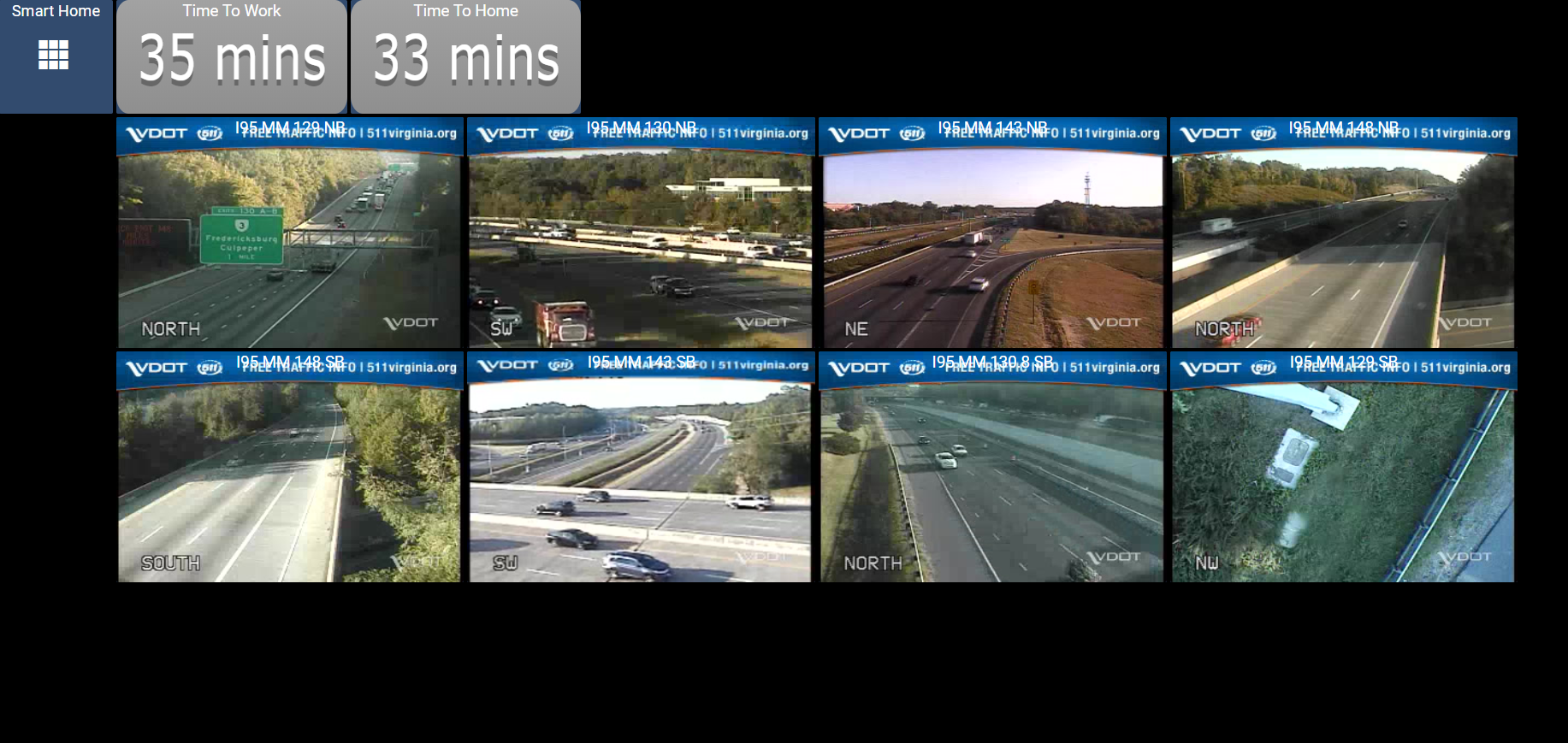
The images are VDOT videos of traffic, and above them are two Shields.io dynamic badges telling me how much time it'll take to get from home to work, and from work to home.
I hope this explains my goals, what I'm trying to do, how we intend to implement Shields.io, and what OAuth2 requirements we need to meet. I just need to know how to actually get there using your software, as I am confident that it is possible.
Maalarius
on 24 Sep 2019
If you want to use Shields for rendering behind an API that is authenticated with OAuth what I’d suggest is to put the badge endpoint on your server, and have your endpoint redirect to a static badge URL like https://img.shields.io/static/v1?label=foo&message=bar&color=blue.
Alternatively if you’re using Node, you could use our npm module and perform the SVG rendering right on your server.
paulmelnikow
on 24 Sep 2019
Paul, I'm somewhat confused. Apologies for that, I'm not a developer and api is very new to me (I'll conduct more research on my own of course, I'm not lazy).
Is it just the endpoint that I need to host on my server? How involved is that and how many resources would that take up? Is that something I can host on github itself, or will I need a whole host of prerequisites in order to function properly? Or, is this an endpoint that can be added to shields.io itself for others to us? I do not intend to use this solely for myself, but intend to spread this out to others who use our website. As you may or may not be aware, Google has taken down it's Google Fit website and is now solely using their mobile app. Using the endpoint with shields.io and google fit's api would absolutely resolve this for MANY users, and I'm quite confident it would drive up shields.io's userbase, so, win win for you guys ;)
Maalarius
on 24 Sep 2019
I'm a little confused as well so thought I'd chime in with a few comments and questions 😄
@shawneric - can you share some details/documentation/etc. about the Google APIs that provide the Google Fit data points you articulated above?
There's a lot of different ways that Shields functionality can be leveraged, and once we know some more about the data-providing API we can offer some suggestions.
 calebcartwright
on 24 Sep 2019
calebcartwright
on 24 Sep 2019
I'll do my best. As noted before, I'm no programmer and I know little about APIs (or for that matter OAuth2). I'm doing my best though. I do have ADHD, so it's difficult for me to focus long enough to fully understand complicated tasks and functions such as this. Nevertheless, here's my best shot :)
So, from what I've gathered, once you've made authorization with OAuth2, you can process then your API requests to given scopes in the web-app's API database. As far as Shields.io is concerned, the API usage itself is just done in the "message" portion of the request. The problem I've been getting is that the API won't work if OAuth2 hasn't been done, which is difficult to do directly through Shields.io.
Here's the example of a solution we used with Shields.io that did NOT use OAuth2, and it works wonderfully.
In order for this to work, we first had to grab an API key from google for the google maps distance matrix.
- Go here: https://console.developers.google.com/apis/library/distance-matrix-backend.googleapis.com
- Enable and Generate an API key for your project.
- Copy your API key and save for later.
- Go to https://shields.io/ and scroll to the bottom of the page to "Dynamic" and enter the following:
- Data Type: JSON
- Label 'spacebar' (empty)
- Data URL: https://maps.googleapis.com/maps/api/directions/json?units=imperial&departure_time=now&origin=[ENTER YOUR ORIGIN]&destination=[ENTER YOUR DESTINATION]&key=[ENTER YOUR API KEY]
- Qyery: $..duration_in_traffic.text
- Color: Whatever you want
- Prefix and Suffix leave blank
And VIOLA!! There's your travel time to work badge, done!
This only works with google's API because the google maps distance matrix api does not require authentication. Google FIT on the other hand DOES require authentication, so even if you get your api query correct, if it's not doing so with an authorization code, it'll error.
Here's an example of an api request I'm trying to push that is not giving results back:
https://www.googleapis.com/fitness/v1/users/me/dataSources/derived:com.google.height:com.google.android.gms:merge_height/datasets/
I unfortunately, as I said earlier, am not an expert with google's API coding. I'm unsure if this will work at all. From what I've gathered from others attempting to use google FIT's api in their own software, these are the kinds of API requests they make. Assuming authentication with OAuth2 has been made, an image such as this:
https://img.shields.io/badge/dynamic/json.svg?label=&query=I_HAVE_NO_IDEA_WHAT_THIS_IS_SUPPOSED_TO_BE&url=https://www.googleapis.com/fitness/v1/users/me/dataSources/derived:com.google.height:com.google.android.gms:merge_height/datasets/&key=YOUAPIKEY
I think that's right. Anyway, if it IS right, you should see something like this as a response:
5 ft 5in
Obviously we wouldn't run a height query because really though, who's gonna get shorter? But we will use a weight query, steps query, etc. as I noted above.
Again, the issue I'm having is getting the query for the API to work at all because it has no valid authorization code from OAuth2. If a user could submit authorization for Shields.io to access their Google Fit data, then the api should work as intended.
Is what I'm asking for considered a "Service Badge Request"? If so, then yes, I'd like to request a service badge for Google Fit. If not, then I definitely need some help. I haven't got a clue what I'm doing here :(
Maalarius
on 24 Sep 2019
calebcartwright
on 24 Sep 2019
Yes, I've read that; however, as stated before, in order for Shields.io to get the information requested, an authorization code must be provided from shields.io. It is better for shields.io to do such authorization before hand and run the request on site, as it is impossible to get it to shields.io without shields itself making the authorization request.
Maalarius
on 24 Sep 2019
The main page at https://shields.io/ is there to help you browse the badge URLs we provide. It does not authenticate users or store login state. The service at https://img.shields.io/ is also stateless. It doesn't know or care who you are; it just responds to the badge URL it's given. So the four ways to use it with any kind of authentication are:
- Embed the authentication in the URL
- Put Shields in front of an endpoint which has the authentication configured internally
- Run your own copy of Shields that has the authentication configured internally
- Put an authenticated service in front of Shields
We generally don't allow embedding secret tokens in the badge URL unless the service has designed the tokens to be read-only and narrowly scoped to provide status information. When a badge is embedded in a web page and that badge has a secret token, the token is leaked to anyone looking at the web page, creating a security risk. With the dynamic and endpoint badges we can't enforce this, though we definitely recommend against it!
I like the idea of providing a service that lets you render badges out of authenticated Google endpoints. However, I think this use case will require option 4 above: a frontend or server application which sits in front of Shields and completes the OAuth process. That application can keep track of whether or not a user is signed in, and if they are, the token.
Option 1 won't work because our servers don't handle login state. The options for internal configuration options would only support a single OAuth account per server.
With option 4, I see three ways the badge could be rendered:
- The application generates a URL for the Shields dynamic badge and passes in the token (as in the example above). The OAuth token is sent to Shields.
- The application fetches the data directly from the authenticated JSON endpoint, and sends only the values to Shields using the static badge URL. The OAuth token is not sent to Shields.
- The application fetches the data, and then uses our gh-badges library to render the badges within the application itself.
paulmelnikow
on 24 Sep 2019
Thanks @shawneric!
For a little context, the main Shields.io service is a public facing service that provides badges (svgs, etc.). Shields integrates with hundreds of upstream platforms/services/APIs to retrieve data points, and then creates and returns badges with those data points. If you click on some of the categories (like build, coverage, etc.) you can browse the various platforms/services Shields directly integrates with:
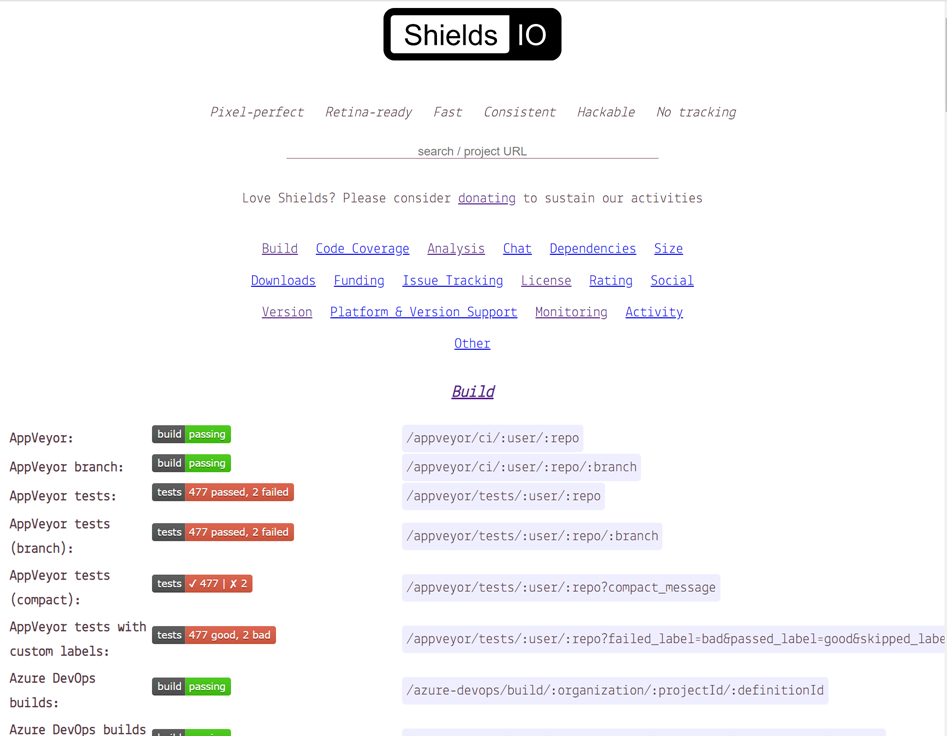
The _vast_ majority of these upstream platforms/services provide read-only access to the data points anonymously, so Shields is able to get the data without having to explicitly authenticate, or be explicitly authorized.
If a platform/service requires authentication, then the main Shields.io service may or may not be able to to provide badges for that service. If the authentication/authorization is user or account specific, then the main Shields.io service cannot integrate with that service. We can only work with services that support anonymous access, or allow us to authenticate with a global, read-only token, that can be used to retrieve data for any user/account/project.
As it relates to your specific inquiry, the data points required for your use case come from the Google Fit APIs which, as you've noted, require authentication. Whether it's possible to use the Shields.io service to provide badges with Google Fit data will depend on whether it is possible for Shields to actually get that data from the Google Fit APIs.
I've not read the Google API documentation, but my guess is that the API will require user/account specific authorization (no global, read-only access for all users) which would result in this not being possible via the main Shields.io service.
Few other side notes:
- In addition to the explicit platforms/services (like GitHub, npmjs, pypi, etc.) that Shields integrates with, Shields also supports retrieving data from an arbitrary endpoint via the dynamic badge endpoints (it sounds like the dynamic json endpoint is the one you've worked with before) where you can specify a URL endpoint to json, xml, or yaml, and specify a query to extract your desired data point
- As Paul mentioned, Shields also supports the endpoint badge which allows you to develop and deploy your own API endpoint that the Shields service can pull data from
- You can also deploy your own instance of the Shields application. This is commonly done in instances where you want badges from services/tools/platforms that are not publically accessible (for example a GitHub Enterprise instance deployed on a private corporate network) or require user/account/project specific authentication/authorization.
calebcartwright
on 24 Sep 2019
Lol, @paulmelnikow and I responding simultaneously 😄
calebcartwright
on 24 Sep 2019
Sort of an aside: we should turn all this content into some developer documentation about the ways auth is handled in Shields 😁
paulmelnikow
on 24 Sep 2019
Sort of an aside: we should turn all this content into some developer documentation about the ways auth is handled in Shields 😁
+1000000
calebcartwright
on 24 Sep 2019
Wow guys thanks for the response! I'm still reading up and trying to play with google's fit api. I'm kind of getting a hang of it, but, yep, it definitely requires authorization login to gain access to the data.
@paulmelnikow I would like to go further in detail with Option 4 you discussed earlier. As I am not a developer, I'm definitely going to need help developing this, but wonder if it might be possible to be able to generate a script for this, host it on github, and point users to that script.
I would assume google fit is not the only api I would like to implement with shields.io. For example: automatic.com is a good one as well, but it also requires OAuth2 authentication. I'm trying to start up a project right now where we can work together as a team to create 'authentication-bridges' for various OAuth2 services (google fit, automatic.com, ifttt.com, etc.) and provide the scripts those users will need in order to utilize Shields with an OAuth2 service.
I'm thinking we can write the script, and then an individual user can host it up on say scripts.google.com or something, and then provide the details to Shields to generate the image with information in it.
I'm not sure if you guys want to continue discussing this here on this conversation, or if we want to go aside to a different conversation area and discuss separately apart from Shields. Whichever works for me. I'm hoping some of you folks would be willing to assist, as I think this could open a great deal of doors for Shields. :)
Maalarius
on 24 Sep 2019
I'm not sure if you guys want to continue discussing this here on this conversation, or if we want to go aside to a different conversation area and discuss separately apart from Shields
We can chat on this thread and/or in Discord (https://discord.gg/HjJCwm5) too
calebcartwright
on 24 Sep 2019
I'm not sure if you guys want to continue discussing this here on this conversation, or if we want to go aside to a different conversation area and discuss separately apart from Shields
We can chat on this thread and/or in Discord (https://discord.gg/HjJCwm5) too
Unfortunately I can't access Discord from work. So let's just chill here then :P
So, so far I've kind of got a gist of google's API stuff, but all I'm getting back are answers like this:
{
 "dataStreamId": "derived:com.google.calories.expended:com.google.android.gms:from_activities",
 "dataStreamName": "from_activities",
 "type": "derived",
 "dataType": {
  "name": "com.google.calories.expended",
  "field": [
   {
    "name": "calories",
    "format": "floatPoint"
   }
  ]
 },
 "application": {
  "packageName": "com.google.android.gms"
 },
 "dataQualityStandard": []
}
It's not telling me a number, rather, information about the number. Perhaps I need to compile the information somehow?? I don't know. Either way, I think I can at the very least get information from google's fit api.
On to the matter at hand though. I suppose let's first make the authorization script for google fit api to shields. What language do you think would work best? I'll try and find me some examples of OAuth2 for google in that language.
Maalarius
on 24 Sep 2019
Here's an example code given to me from google. In order to use it you need to go to developers.google.com and enable fitness api and oauth2, make an oauth2 app and get a client key.
<script src="https://apis.google.com/js/api.js"></script>
<script>
  /**
   * Sample JavaScript code for fitness.users.dataSources.get
   * See instructions for running APIs Explorer code samples locally:
   * https://developers.google.com/explorer-help/guides/code_samples#javascript
   */

  function authenticate() {
    return gapi.auth2.getAuthInstance()
        .signIn({scope: "https://www.googleapis.com/auth/fitness.activity.read https://www.googleapis.com/auth/fitness.activity.write https://www.googleapis.com/auth/fitness.blood_glucose.read https://www.googleapis.com/auth/fitness.blood_glucose.write https://www.googleapis.com/auth/fitness.blood_pressure.read https://www.googleapis.com/auth/fitness.blood_pressure.write https://www.googleapis.com/auth/fitness.body.read https://www.googleapis.com/auth/fitness.body.write https://www.googleapis.com/auth/fitness.body_temperature.read https://www.googleapis.com/auth/fitness.body_temperature.write https://www.googleapis.com/auth/fitness.location.read https://www.googleapis.com/auth/fitness.location.write https://www.googleapis.com/auth/fitness.nutrition.read https://www.googleapis.com/auth/fitness.nutrition.write https://www.googleapis.com/auth/fitness.oxygen_saturation.read https://www.googleapis.com/auth/fitness.oxygen_saturation.write https://www.googleapis.com/auth/fitness.reproductive_health.read https://www.googleapis.com/auth/fitness.reproductive_health.write"})
        .then(function() { console.log("Sign-in successful"); },
              function(err) { console.error("Error signing in", err); });
  }
  function loadClient() {
    gapi.client.setApiKey("YOUR_API_KEY");
    return gapi.client.load("https://content.googleapis.com/discovery/v1/apis/fitness/v1/rest")
        .then(function() { console.log("GAPI client loaded for API"); },
              function(err) { console.error("Error loading GAPI client for API", err); });
  }
  // Make sure the client is loaded and sign-in is complete before calling this method.
  function execute() {
    return gapi.client.fitness.users.dataSources.get({
      "userId": "me",
      "dataSourceId": "derived:com.google.step_count.delta:com.google.android.gms:estimated_steps"
    })
        .then(function(response) {
                // Handle the results here (response.result has the parsed body).
                console.log("Response", response);
              },
              function(err) { console.error("Execute error", err); });
  }
  gapi.load("client:auth2", function() {
    gapi.auth2.init({client_id: "YOUR_CLIENT_ID"});
  });
</script>
<button onclick="authenticate().then(loadClient)">authorize and load</button>
<button onclick="execute()">execute</button>
This seems to do the authorization. Then I found this website here where someone was asking questions, and I'm thinking it might be possible to use some of their code to make more detailed requests (such as the 'bucket time' has listed for 24 hours) and such a script would also allow for submitting the request to Shields...I think.
https://stackoverflow.com/questions/52233038/how-to-get-weight-data-from-google-fitness-api
Maalarius
on 24 Sep 2019
Hey Shawn, it's a cool-sounding project, though I don't think I have the bandwidth to provide guidance along the lines of what you need. It's a bit out of scope of what I can do as a maintainer, so I'm gonna have to duck out. Keep at it and best of luck! Let us know if we can help with more specific things about Shields and the Shields architecture.
Maybe there are some other forums where you could get some mentorship on your project!
paulmelnikow
on 24 Sep 2019
Yeah. This is definitely above my head man. I kinda wish someone else was as interested as I am who knew what they were doing. I've almost exhausted my research ability at this point.
Let's talk about from the Shields.io perspective. When you were talking about Option 4, you said I could go to an app of my own, and then forward the information to Shields.
I'm contemplating the flow of how this would work. Just getting the flow of OAUTH2 from google and incorporating it into this project:
- Submit request to authorize API scope.
- Aquire Authorization Code
- Exchange authorization code for Access Token
- Submit request for API query.
- Receive Response
And this is where I'm a bit off. As far as we're concerned, the response should be a JSON response. Depending on how we manage the script, we may have to do some math or whatnot to get the response in a number or text format applicable with our needs.
So, from the script I could render the url for Shields, something like this:
https://img.shields.io/badge/ + {RETURNEDENTRY} + -blue = https://img.shields.io/badge/187lbs-blue
Maalarius
on 24 Sep 2019
Depending on how we manage the script, we may have to do some math or whatnot to get the response in a number or text format applicable with our needs.
Yea, this is the way to go about it. The script should take care of the formatting and send the formatted value to Shields.
Say you want to send "187 lbs". The easiest way to do that in code is to use a percent-encoding function from whatever language you are using. In JavaScript it's encodeURIComponent(). encodeURIComponent("187 lbs") is "187%20lbs" – the space gets turned into a %20. Then combine that with the label and the color you want, and send it like this:
https://img.shields.io/static/v1?label=weight&message=187%20lbs&color=blue
 paulmelnikow
on 24 Sep 2019
paulmelnikow
on 24 Sep 2019
Related issues
 bruno-garcia
·
3Comments
bruno-garcia
·
3Comments
 Fazendaaa
·
3Comments
Fazendaaa
·
3Comments
 korenyoni
·
3Comments
korenyoni
·
3Comments
 salaros
·
3Comments
salaros
·
3Comments
 techtonik
·
3Comments
techtonik
·
3Comments