Shields: Only seeing "invalid" test badge for Azure Devops Test Results badge url
Are you experiencing an issue with...
- [ x] [shields.io](https://shields.io/#/)
- [ ] My own instance
- [ ] [gh-badges NPM package](https://www.npmjs.com/package/gh-badges)
:beetle: Description
I'm attempting to use the Azure Devops Test Results badge for a specific build definition on my organizations main project, but the badge that is returned after acquiring the documented necessary information I only see a gray badge that says "Tests"|"Invalid"
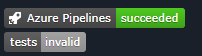
:link: *
https://img.shields.io/azure-devops/tests/:organization/:project/:definitionId.svg?compact_message
*
:bulb: Possible Solution
 JGCreator
All 12 comments
thanks @JGCreator.
Does the pipeline you're attempting to use for the badges reside in a public Azure DevOps project?
The main shields.io service can only provide badges for Public Azure DevOps projects, whereas a self-hosted Shields instance would be required to connect to private projects.
Assuming you are working with a public project/pipeline, can you please provide the link to your pipeline and/or a screenshot of the test results view for your pipeline?
For example something like this

 calebcartwright
on 10 Dec 2018
calebcartwright
on 10 Dec 2018
It is in fact a private project, but how then would I be able to see an expected result from a different badge?

JGCreator
on 10 Dec 2018
The first badge looks like the native badge provided directly by Azure Pipelines (not by Shields). I cannot tell from your screenshot what the badge in the middle (build | passing) is pointed to, but i'll assume it is from your Azure Pipeline. The reason that works is that Microsoft does make the build status available publicly, even for private projects. As such Shields.io is able to access that data and provide status badges for build/release pipelines from both Public and Private Azure DevOps projects.
However, test results and code coverage from private projects are not available publicly.
calebcartwright
on 10 Dec 2018
Just as something to consider @JGCreator, hosting your own shields instance is pretty easy (runnable via Docker).
I run my own shields instance at my day job where we have it connected to private projects/tools, including our private Azure DevOps projects. If you decide to go that route and have any questions (how to plug in your Azure DevOps PAT, etc.) let me know and I'd be happy to help!
calebcartwright
on 10 Dec 2018
@calebcartwright
Thank you for the response! I think I will end up going this rout with Docker. It gives me an excuse to tool around with Docker before we move test / prod services to the container model.
Do you know of a good place for a Docker 101 kind of walk-through with shields?
Thanks,
JGCreator
on 18 Dec 2018
The best place to start is probably the Docker section of the self-hosting guide. This will get you through spinning up your own shields instance as a first step. Once you've got that up and running you can take the next step of plugging in the secrets/tokens that you'll need to connect to private services/endpoints (like private Azure DevOps projects).
calebcartwright
on 18 Dec 2018
If you've never worked with Docker before at all then you may also find these guides helpful:
- https://docs.docker.com/install/#supported-platforms
- https://www.digitalocean.com/community/tutorials/how-to-install-and-use-docker-on-ubuntu-18-04
- I haven't used DO in a while but I've found their documentation is usually pretty good, regardless of what platform you target
calebcartwright
on 18 Dec 2018
Just as something to consider @JGCreator, hosting your own shields instance is pretty easy (runnable via Docker).
I run my own shields instance at my day job where we have it connected to private projects/tools, including our private Azure DevOps projects. If you decide to go that route and have any questions (how to plug in your Azure DevOps PAT, etc.) let me know and I'd be happy to help!
HI! I would like that kind of help :) !! I already have a docker container running a shields instance but I can t figure out how to connect it to my private project and get badges ie for code coverage por tests?
Can you help me with that?
BTW I already have Azure DevOps PAT set up on a file called shields.env that I use to start docker with the following command:
docker run --rm -p 8080:80 --env-file shields.env --name shields shields
Thanks
 robertoalfonso
on 24 Oct 2019
robertoalfonso
on 24 Oct 2019
I can t figure out how to connect it to my private project and get badges ie for code coverage por tests?
Can you help me with that?
Hello. You can use env vars or config/local.yml to set credentials for some services to access private projects. See these docs https://github.com/badges/shields/blob/master/doc/server-secrets.md
 chris48s
on 24 Oct 2019
chris48s
on 24 Oct 2019
@robertoalfonso - happy to help, though it's difficult to offer much insight without knowing more. Feel free to open up a new issue too
calebcartwright
on 25 Oct 2019
@calebcartwright Should I open it as a support question?
I ll be focusing all day on this and will try what
@chris48s suggested
robertoalfonso
on 29 Oct 2019
Sure, and/or drop us a note in Discord
calebcartwright
on 29 Oct 2019
Related issues
 kerolloz
·
3Comments
kerolloz
·
3Comments
 najeeb-ur-rehman
·
3Comments
najeeb-ur-rehman
·
3Comments
 stclairdaniel
·
3Comments
stclairdaniel
·
3Comments
 lukeeey
·
3Comments
lukeeey
·
3Comments
 bruno-garcia
·
3Comments
bruno-garcia
·
3Comments
Most helpful comment
If you've never worked with Docker before at all then you may also find these guides helpful: