Shellyforhass: [BUG] Devices not added over CoAP but mDNS even though CoAP messages are present
Environment
- ShellyForHASS release with the issue: Any I could find 0.1.9, 0.2.0. 0.2.1 and latest beta
- Last working ShellyForHASS release (if known): No idea :(
- Home Assistant Core release with the issue: All lastest releases for the last weeks
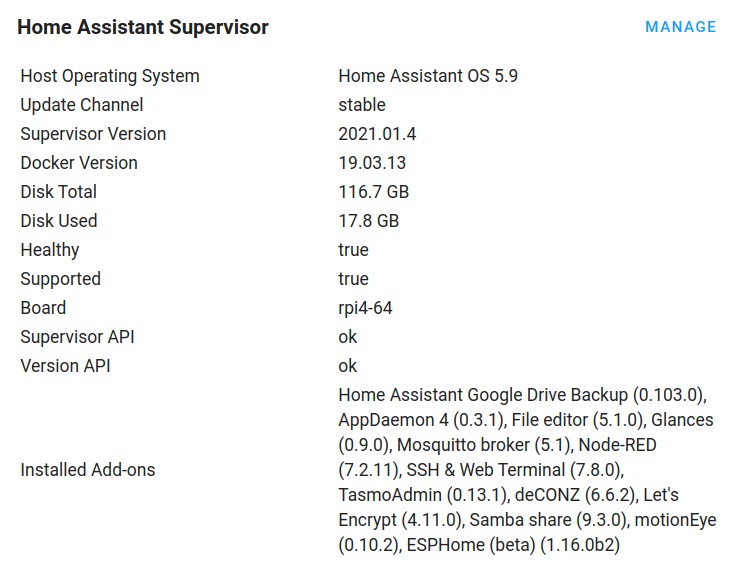
- Operating environment (Home Assistant/Supervised/Docker/venv):
Raspberry 4
Describe the bug
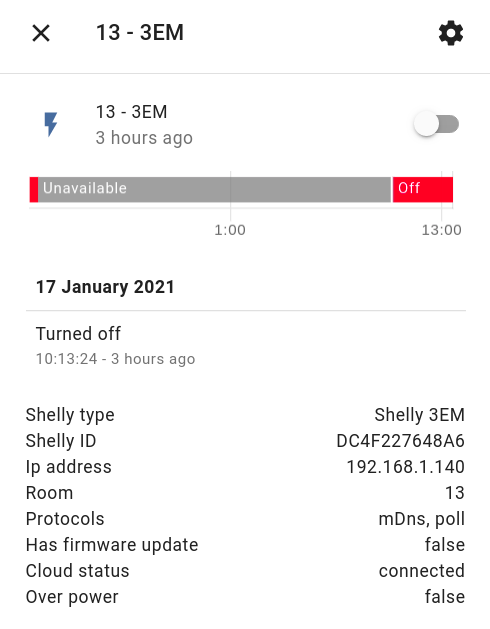
I removed all entities, and they are readded by the system, but it seems they are added via mDNS even though CoAP is present, as you can see from all the logs.
I also removed the AddOn and reinstalled it. Maybe some residues are left that hinder the AddOn to add all devices correctly.
Steps to Reproduce
No idea how to reproduce. I struggle with slow state update for weeks now, and deinstalled and installed many different S4H versions. I used configuration.yaml as well as internal DB of Shelly.
Expected behavior
All devices should be added via CoAP so fast update is working
Screenshots
Traceback/Error logs
Additional context
This is my configuration.yaml entry: Anything I should ADD or REMOVE?

 iz3man
All 54 comments
Maybe this really isn't a bug a bad configuration from my side.
What is the config entry to PREFER CoAP discovery over mDNS?
`2021-01-18 09:39:48 INFO (MainThread) [pyShelly] Init 0.1.27
2021-01-18 09:39:48 DEBUG (Cloud) [pyShelly] Update from cloud
2021-01-18 09:39:48 DEBUG (Poll) [pyShelly] Start update loop, 0:01:00 sec
2021-01-18 09:39:48 DEBUG (Poll) [pyShelly] Sending CoAP discover UDP
2021-01-18 09:39:48 DEBUG (MainThread) [pyShelly] Sending CoAP discover UDP
2021-01-18 09:39:48 DEBUG (zeroconf-ServiceBrowser__http._tcp.local._308) [pyShelly] Add device by host 192.168.1.164 mDns
2021-01-18 09:39:48 DEBUG (zeroconf-ServiceBrowser__http._tcp.local._308) [pyShelly] Add device by host 192.168.1.142 mDns
2021-01-18 09:39:48 DEBUG (zeroconf-ServiceBrowser__http._tcp.local._308) [pyShelly] Add device by host 192.168.1.163 mDns
2021-01-18 09:39:48 DEBUG (zeroconf-ServiceBrowser__http._tcp.local._308) [pyShelly] Add device by host 192.168.1.160 mDns`
iz3man
on 18 Jan 2021
Does NOONE have this issue as well? Is this even considered a BUG?
iz3man
on 21 Jan 2021
I struggle with the same. tcpdump shows me that Coap messages arrive. Integration insists on using polling.
 kongo09
on 26 Jan 2021
kongo09
on 26 Jan 2021
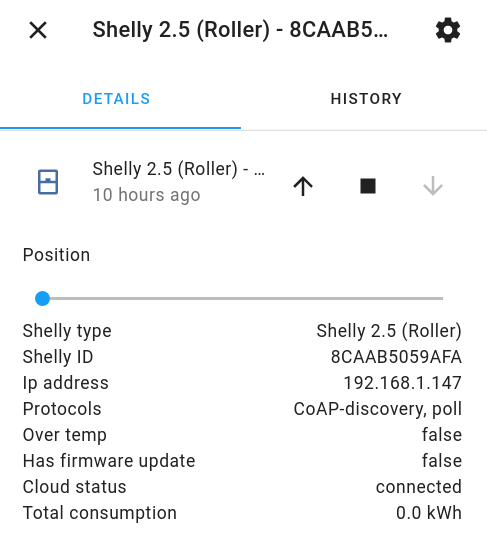
At least it now SHOWS CoAP, but seems to ignore it for updates and uses polling instead.
iz3man
on 26 Jan 2021
@iz3man What did you do to get to CoAP-discovery?
kongo09
on 26 Jan 2021
Good question. First of all I checked with the python script that I received the CoAP messages, which you confirmed as well.
I tried different S4H versions, and also removed shelly: from configuration.yaml. I tried to get rid of as much Shelly stuff as possible, but this seems impossbile w/o directly altering HA's database.
So I removed the components as such, rebooted, installed 0.2.1 and after some minutes all of the Shellys reappeared. Even with the old names. This makes me believe there were still some residues left in the system which you won't be able to remove, and this makes reinstalling the AddOn so hard to reinstall in case it get's stuck somewhere I guess.
iz3man
on 26 Jan 2021
Sounds similar to my process. I've removed the built-in Shelly integration and everything in the configuration.yaml. Then reboot, then S4H installation. Then adding the integration to the UI. So far only one of two devices popped up and it is with mDns, poll. The Python script inside my docker container prints cryptic stuff so I assume that the CoAP messages arrive. tcpdump on the hosting raspi 4 also prints CoAP messages and there I see both devices.
kongo09
on 26 Jan 2021
Try to set host_ip in config.
 hakana
on 26 Jan 2021
hakana
on 26 Jan 2021
Try to set host_ip in config.
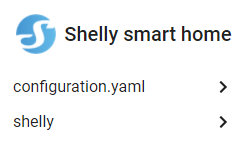
Directly in configuration.yaml? Or from the GUI? I now got two integrations:
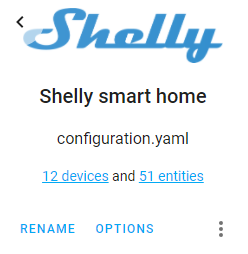
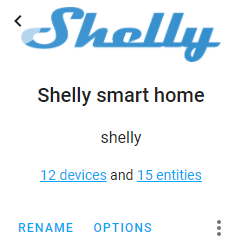
At the moment I'm a little "afraid" to change anything, as it at least works somehow now.
iz3man
on 26 Jan 2021
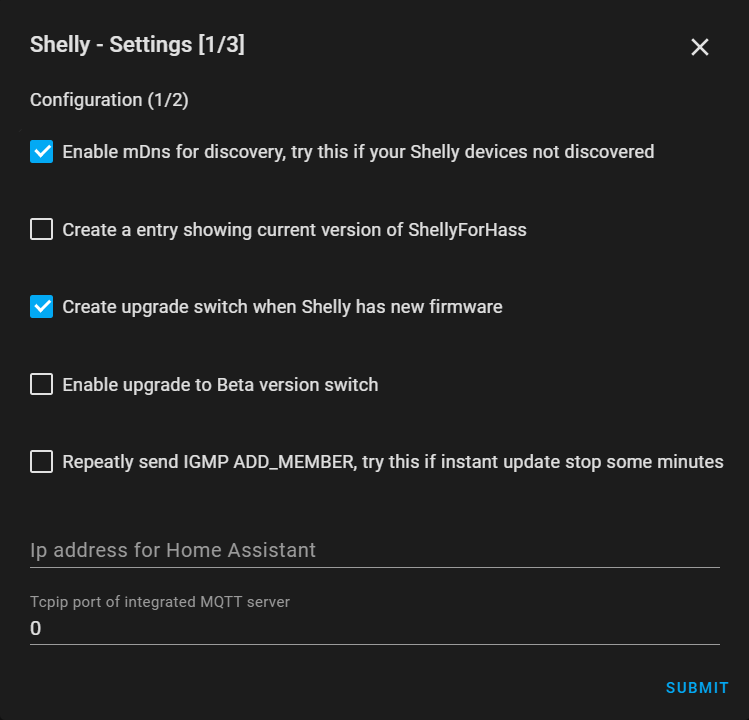
Are you talking about this field here?
The raspi has several IP addresses. ifconfig shows data for:
- docker0
- eth0
- eth0.2
- eth0.3
- hassio
- lo
- veth0cb113b
- veth28f4fb7
- veth37dd6bf
- veth3bb841b
- veth47c9a27
- veth51b1141
- veth54201d6
- veth8e440ea
- veth8ef13e4
- wlan0
The eth0 is connected to the router and has access to the internet. The eth0.2 is a VLAN guest network also with internet access. The eth0.3 is a VLAN network just for the shellies without internet access. eth0.3 is switched but there is no router between the raspi and the shellies. The raspi is part of all the networks.
The CoAP messages from tcpdump come from eth0.3
kongo09
on 26 Jan 2021
To experiment, I entered the host IP in the eth0.3 VLAN where the Shellies are and did a restart. The dimmer now says:
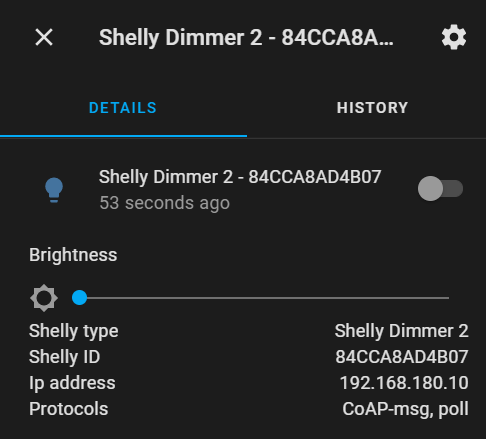
So does that mean, CoAP is working?
The Shelly 1L is still not showing up (but sitting on the same network). I'll wait a bit and report back.
kongo09
on 26 Jan 2021
Making progress here. I've taken the plunge and upgraded to the beta version 2.2.beta1 and the Shelly 1L popped up after a restart, also apparently CoAP enabled:
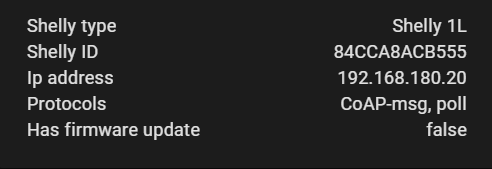
What I'm missing now is the second channel of the 1L which is detached from the relay. But this is probably a different case and off-topic here. The host configuration seems to be the key to get CoAP going. Maybe it's worth mentioning this in the documentation or troubleshooting guide. Does that work for you as well @iz3man ?
kongo09
on 26 Jan 2021
Are you talking about this field here?
Yes, the field "IP address for Home Assistant". This is used to select the right interface.
hakana
on 26 Jan 2021
To experiment, I entered the host IP in the eth0.3 VLAN where the Shellies are and did a restart. The dimmer now says:
So does that mean, CoAP is working?The Shelly 1L is still not showing up (but sitting on the same network). I'll wait a bit and report back.
Yes, that means CoAP is working when you see CoAP-msg under the protocol.
You need to enable the switch sensor under sensors config to see the (detached) switch
hakana
on 26 Jan 2021
I still don't get why, now that CoAP seems to work I still have to wait 60s for state update in HA. Any why we need "polling" when "CoAP" is there to receive instant updates anyway?!?
iz3man
on 26 Jan 2021
I still have to wait 60s for state update in HA.
For me the update is instant now. Seems to work.
The second switch for the Shelly 1L however is still not visible. I'll open a fresh ticket for this. Admittedly, it was this second detached switch that brought me into checking CoAP in the first place, as the built-in integration was too slow to update on the switch event to be useful for anything. So the real CoAP prove for me is really getting this second switch working instantly.
kongo09
on 26 Jan 2021
I still don't get why, now that CoAP seems to work I still have to wait 60s for state update in HA. Any why we need "polling" when "CoAP" is there to receive instant updates anyway?!?
Polling get more info than CoAP, RSSI level, etc.
hakana
on 26 Jan 2021
Ok, makes sense. Thanks.
Any idea where to look for the "instant update" issue? It's really annoying. Changing % of lights and cover works instantly, and the slider stays where I set it, but hitting the POWER ON/OFF button in HA lovelace needs 60s to reflect the change.
iz3man
on 26 Jan 2021
Ok, makes sense. Thanks.
Any idea where to look for the "instant update" issue? It's really annoying. Changing % of lights and cover works instantly, and the slider stays where I set it, but hitting the POWER ON/OFF button in HA lovelace needs 60s to reflect the change.
Can you see CoAP-msg under protocols? If not CoAP is not working for staus updates.
hakana
on 26 Jan 2021
Pretty sure yes, but please see those two logs, they should be more meaningful to you than to me :)
You can see CoAP messages, polling updates, and some errors.
iz3man
on 26 Jan 2021
Can you see another error in the beginning. Normally some other error causing these errors.
hakana
on 26 Jan 2021
I DO SEE errors, but they mean nothing for to as end-user. I was hoping that you could help. Is this "your code"?
Anything I can do (log etc ...) to make you debug this? Maybe this is a similar error all the other guys with update issues have as well, and we were just looking into the wrong place till now?
iz3man
on 26 Jan 2021
Yes, I'm the developer of this plugin.
The errors you showing is of type "assert self.hass is not None"
That type of error saying there are some errors before that causing this.
Try to restart HA and see what errors you got from start before "assert self.hass is not None" errors
hakana
on 26 Jan 2021
Does this help? If not I'll try to ssh into the machine and see if can get more logs:
https://pastebin.com/vCD97XED
iz3man
on 26 Jan 2021
Yes, I think the problem is that you probably have two instances of the plugin installed. They have same prefix both generate entities with same id. Please remove one of them or use different prefix.
hakana
on 26 Jan 2021
One difference I can spot between @iz3man and myself is that @iz3man is using configuration.yaml while I only use the UI. Maybe this is a source of confusion for the system? To play with this, I've also introduced a configuration in yaml and set the Shelly 1L from switch to light and now I also see two entries on my integration screen:
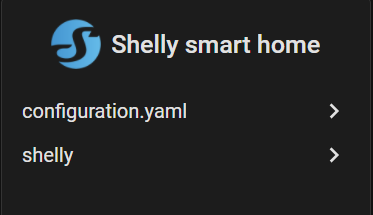
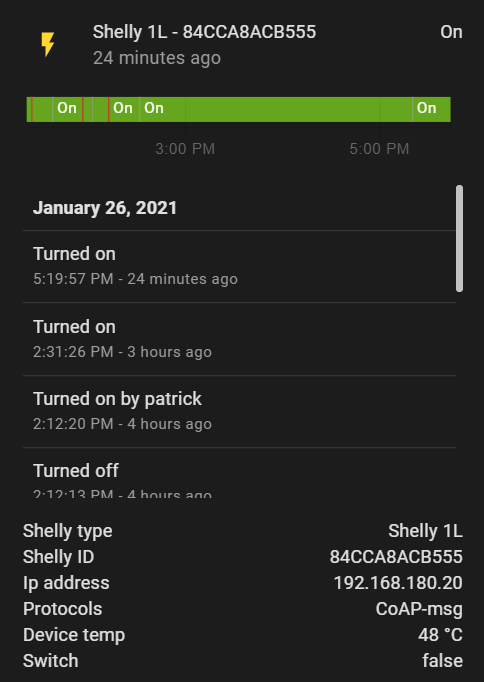
In my entities, I see two entries for the Shelly 1L: both, a switch and a light (I was expecting only a light). Interestingly, they show different protocols, one being only CoAP-msg and the other one also polling:
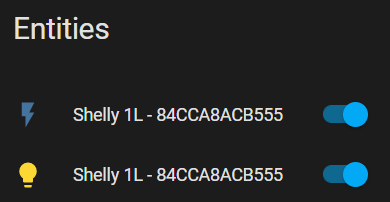
Switch | Light
----- | ----
 |
| 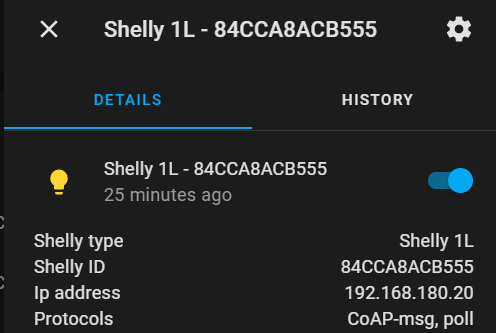
Not sure if this is intended or not - or even related or not. Just guessing around and looking for differences to @iz3man
kongo09
on 26 Jan 2021
Yes, I think the problem is that you probably have two instances of the plugin installed. They have same prefix both generate entities with same id. Please remove one of them or use different prefix.
That's what I tried several times now. As mentioned there always remain some residues. How can I make sure that EVERYTHING is removed, and I can start from scratch?
iz3man
on 26 Jan 2021
sorry for plugin in here:
- go to integration page and remove the integration (all shelly)
- delete your config for shelly in yaml
- go to HACS and uninstall shelly (all) integration
- double check if you don't have any integration of shelly in .\config\custom_components\
- double checck and delete every shelly related entry in \your ha instance ip\config.storage\core.entity_registry (take care! may install over supervisor the samba share addon to access these folder via your pc)
- reboot ha
- install one shelly integration via hacs, config this one via integration UI
 thecem
on 26 Jan 2021
thecem
on 26 Jan 2021
Just delete the two Shelly integrations you have. Then restart HA. If you have shelly: in config.yaml that one will be recreated after restart. Do not add the second one.
hakana
on 26 Jan 2021
Just delete the two Shelly integrations you have. Then restart HA. If you have shelly: in config.yaml that one will be recreated after restart. Do not add the second one.
This just didn't do it. Did that several time. I guess this step may be necessary in my case as well:
_
double check and delete every shelly related entry in \your ha instance ip\config.storage\core.entity_registry (may install over supervisor the samba share addon to access these folder via your pc)
_
iz3man
on 26 Jan 2021
If you add in UI and config.yaml you will get two instances. That will work but you need to have different prefix for them. But normaly you should use just one.
hakana
on 26 Jan 2021
Sounds lika a bug in HA if it not delete all entities when delete an integration.
hakana
on 26 Jan 2021
I don't know if this a bug, but sometime a zombie entity will stay in "core.entity_registry", if you double check all point you could sure you don't have one in. That helped me at least 2 times.
thecem
on 26 Jan 2021
Did everything now, removed the configuration, removed the integration, removed all residues from core.entity_registry, but just found some leftovers from other integrations:
Then reinstalled from scratch, and here it becomes strange.
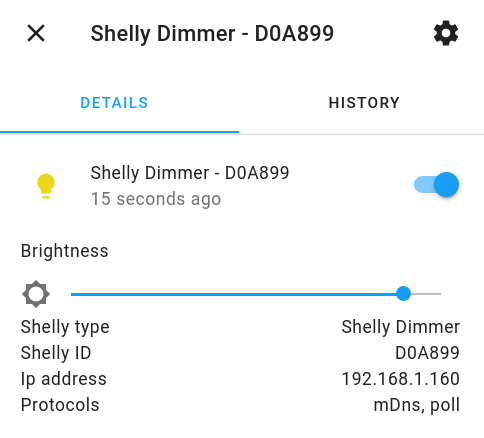
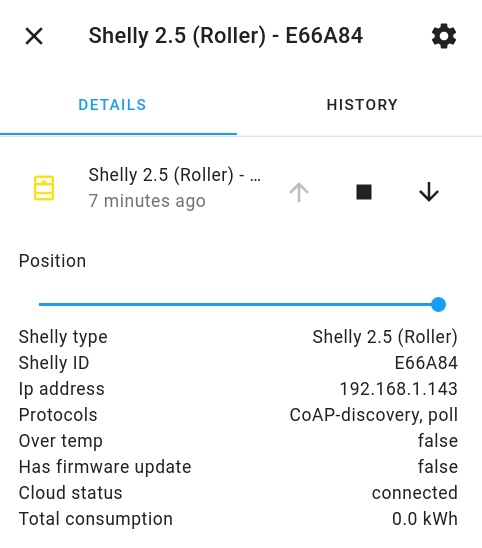
All Shelly 2.5 are connected by CoAP, all Shelly dimmers by mDNS.
I will now make changes to the integration and add IP address
iz3man
on 26 Jan 2021
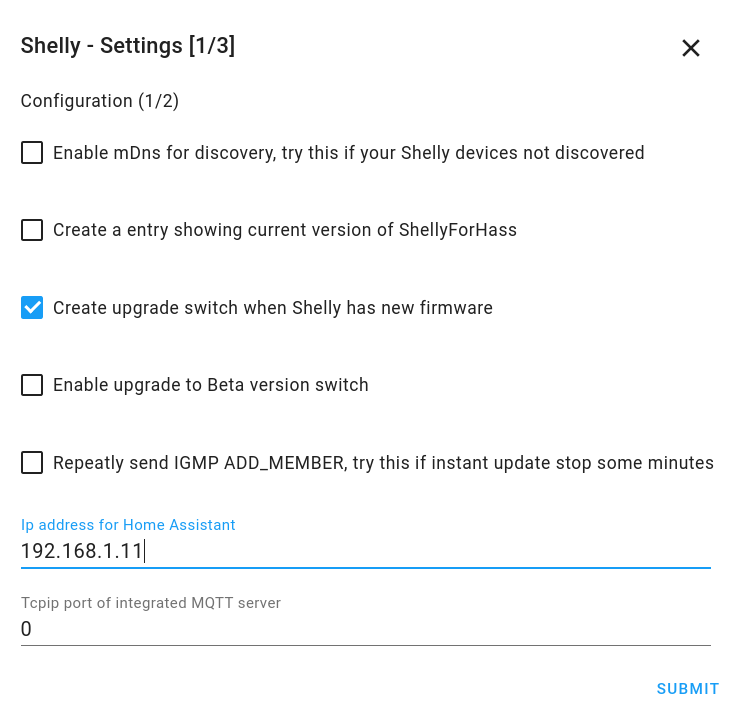
That does look ok?
iz3man
on 26 Jan 2021
Now with the above setting NO DIMMERS reappear. They all became UNAVAILABLE.
iz3man
on 26 Jan 2021
Yes if that is the ip of the interface that have access to Shellies. You can use the test.py and run in ssh under HA to test.
hakana
on 26 Jan 2021
What they are discovered by does not matter. But you miss CoAP-msg under protocols that is needed for real time updates. Next release will have support for mqtt if CoAP not work for you.
hakana
on 26 Jan 2021
What they are discovered by does not matter. But you miss CoAP-msg under protocols that is needed for real time updates. Next release will have support for mqtt if CoAP not work for you.
You can see that the Shelly 2.5 ARE running with CoAP, but dimmers are not seen. They are in the same room, connected to the same access point. Nothing different but the type of device.
iz3man
on 26 Jan 2021
for the 2.5 I have following: CoAP-msg, poll, CoAP-discovery
So what is the difference for
poll
CoAP-discovery
May CoAP-msg is missing on your setup.
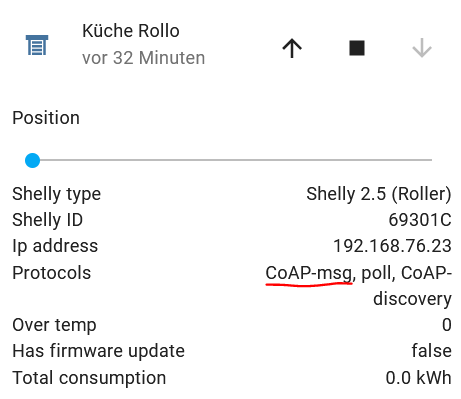
thecem
on 26 Jan 2021
@hakana It would be nice if you could address the differences between:
CoAP-msg
poll
CoAP-discovery
Thanks a lot!
thecem
on 26 Jan 2021
CoAP-msg
poll
CoAP-discovery
As far as I understand:
- CoAP-msg: the integration listens to the CoAP messages sent by the devices in regular intervals and at events. This is pretty much realtime. However, these messages are not very data rich, so not all attributes are transmitted all the time
- poll: the integration polls the devices asking for the state. This is not event driven and therefore feels like lagging, as the integration only polls in certain time intervals. However, polling allows to retrieve more data, so it is sometimes needed depending on what data the sensors and attributes are showing. I understood the polling can also happen as a response of a CoAP message to get potentially changed data
- CoAP-discovery: discover the devices in the first place by listening to the CoAP messages sent to a broadcast address. This is where discovery sometimes goes wrong when the switch or router don't allow broadcasts to avoid network flooding. IGMP snooping seems to be the solution for some.
kongo09
on 26 Jan 2021
THX! Only for my understanding:
So CoAP-msg is only shown in entity Protocols if the integration has received a CoAP-msg?
thecem
on 26 Jan 2021
Yes, and the CoAP-msg contains device data in realtime, like state, power, etc.
hakana
on 26 Jan 2021
So, if you don’t see this under protocols so the instance haven’t received a CoAP-msg?
thecem
on 27 Jan 2021
Can someone explain to me how this is even possible? How can:
.) one device be detected by CoAP-discovery
.) a second one next to it by mDNS
.) none of them receiving CoAP-msg
Could this be Shelly FW related? They are all up2date though.
iz3man
on 27 Jan 2021
That one is discovered by mDns and the other by CoAP is not a problem. Just how it is found.
Why CoAP-msg not working is ether because ShellyForHass use wrong network interface or that router/AP not support igmp routing.
Network interface can be selected by config host_ip / Home Assistant IP.
If router you maybe can turn on igmp in settings.
hakana
on 27 Jan 2021
Can you give me access to your HA, I can have a look
hakana
on 27 Jan 2021
@hakana : BTW: I DO receive CoAP-msg. Please check the log is put on pastebin and you can see. Those MSG just seem to be ignored ...
2021-01-26 19:30:31 DEBUG (CoAP) [pyShelly] CoAP msg: 69 192.168.1.146 bytearray(b'PE\x00\n\xed\x0b\xf7\tSHSW-25#BCDDC2775276#2\xff{"blk":[{"I":1,"D":"relay_0"},{"I":2,"D":"relay_1"},{"I":3,"D":"roller_0"},{"I":4,"D":"device"}],"sen":[{"I":9103,"T":"EVC","D":"cfgChanged","R":"U16","L":4},{"I":1102,"T":"S","D":"roller","R":"open/close/stop","L":3},{"I":1103,"T":"S","D":"rollerPos","R":["0/100","-1"],"L":3},{"I":2101,"T":"S","D":"input","R":"0/1","L":1},{"I":2102,"T":"EV","D":"inputEvent","R":["S/L",""],"L":1},{"I":2103,"T":"EVC","D":"inputEventCnt","R":"U16","L":1},{"I":2201,"T":"S","D":"input","R":"0/1","L":2},{"I":2202,"T":"EV","D":"inputEvent","R":["S/L",""],"L":2},{"I":2203,"T":"EVC","D":"inputEventCnt","R":"U16","L":2},{"I":4102,"T":"P","D":"rollerPower","U":"W","R":["0/2300","-1"],"L":3},{"I":4104,"T":"E","D":"rollerEnergy","U":"Wmin","R":["U32","-1"],"L":3},{"I":6103,"T":"A","D":"rollerStopReason","R":"normal/safety_switch/obstacle/overpower","L":3},{"I":3104,"T":"T","D":"deviceTemp","U":"C","R":["-40/300","999"],"L":4},{"I":6101,"T":"A","D":"overtemp","R":["0/1","-1"],"L":4},{"I":9101,"T":"S","D":"mo')
2021-01-26 19:30:31 DEBUG (CoAP) [pyShelly] CoAP Code: 69, Type SHSW-25, Id BCDDC2775276, Payload *{"blk":[{"I":1,"D":"relay_0"},{"I":2,"D":"relay_1"},{"I":3,"D":"roller_0"},{"I":4,"D":"device"}],"sen":[{"I":9103,"T":"EVC","D":"cfgChanged","R":"U16","L":4},{"I":1102,"T":"S","D":"roller","R":"open/close/stop","L":3},{"I":1103,"T":"S","D":"rollerPos","R":["0/100","-1"],"L":3},{"I":2101,"T":"S","D":"input","R":"0/1","L":1},{"I":2102,"T":"EV","D":"inputEvent","R":["S/L",""],"L":1},{"I":2103,"T":"EVC","D":"inputEventCnt","R":"U16","L":1},{"I":2201,"T":"S","D":"input","R":"0/1","L":2},{"I":2202,"T":"EV","D":"inputEvent","R":["S/L",""],"L":2},{"I":2203,"T":"EVC","D":"inputEventCnt","R":"U16","L":2},{"I":4102,"T":"P","D":"rollerPower","U":"W","R":["0/2300","-1"],"L":3},{"I":4104,"T":"E","D":"rollerEnergy","U":"Wmin","R":["U32","-1"],"L":3},{"I":6103,"T":"A","D":"rollerStopReason","R":"normal/safety_switch/obstacle/overpower","L":3},{"I":3104,"T":"T","D":"deviceTemp","U":"C","R":["-40/300","999"],"L":4},{"I":6101,"T":"A","D":"overtemp","R":["0/1","-1"],"L":4},{"I":9101,"T":"S","D":"mo*
iz3man
on 28 Jan 2021
That is CoAP discovery messages
CoAP messages with data look like this:
{"G":[[0,9103,0],[0,3108,0],[0,3109,91],[0,6110,1],[0,3106,33],[0,3110,"dark"],[0,3101,22.60],[0,3102,72.68],[0,3115,0],[0,3111,98],[0,9102,["sensor"]]]}
hakana
on 28 Jan 2021
Can you give me access to your HA, I can have a look
If sent a mail with access data. Thanks!
iz3man
on 28 Jan 2021
I got this enabled, but it didn't help (I got NO vLANs in my network, and NO Unifi USG at all):

I now I also enabled:

and now I receive:
root@fileserver:~# tcpdump -i eno1 -A udp port 5683 -s 65535 -vv
tcpdump: listening on eno1, link-type EN10MB (Ethernet), capture size 65535 bytes
14:57:43.829431 IP (tos 0x0, ttl 10, id 34118, offset 0, flags [DF], proto UDP (17), length 39)
    homeassistant.5683 > 224.0.1.187.5683: [udp sum ok] UDP, length 11
E..'.F@.
.H..........3.3....P..
.cit.d........
14:58:05.216173 IP (tos 0x0, ttl 255, id 42938, offset 0, flags [none], proto UDP (17), length 303)
    192.168.1.164.5683 > 224.0.1.187.5683: [udp sum ok] UDP, length 275
E../......n..........3.3....P.dI.cit.s....SHDM-1#D3EEA3#2.C...
.{"G":[[0,9103,0],[0,1101,0],[0,5101,100],[0,2101,0],[0,2102,"S"],[0,2103,8],[0,2201,0],[0,2202,"S"],[0,2203,57],[0,4101,0.00],[0,4103,103719],[0,6102,0],[0,6109,0.00],[0,6104,0],[0,3104,51.81],[0,3105,125.26],[0,6101,0],[0,9101,"white"]]}
14:58:05.219830 IP (tos 0x0, ttl 255, id 47026, offset 0, flags [none], proto UDP (17), length 298)
192.168.1.160.5683 > 224.0.1.187.5683: [udp sum ok] UDP, length 270
E........_..........3.3....P....cit.s....SHDM-1#D0A899#2.C...._.{"G":[[0,9103,1],[0,1101,0],[0,5101,1],[0,2101,0],[0,2102,""],[0,2103,0],[0,2201,0],[0,2202,"S"],[0,2203,24],[0,4101,0.04],[0,4103,4592],[0,6102,0],[0,6109,0.00],[0,6104,0],[0,3104,45.36],[0,3105,113.64],[0,6101,0],[0,9101,"white"]]}
14:58:05.255882 IP (tos 0x0, ttl 255, id 38460, offset 0, flags [none], proto UDP (17), length 298)
192.168.1.162.5683 > 224.0.1.187.5683: [udp sum ok] UDP, length 270
E...<...............3.3....P....cit.s....SHDM-1#D0B10A#2.C...+_.{"G":[[0,9103,0],[0,1101,0],[0,5101,70],[0,2101,0],[0,2102,"S"],[0,2103,4],[0,2201,0],[0,2202,"S"],[0,2203,5],[0,4101,0.00],[0,4103,249],[0,6102,0],[0,6109,0.00],[0,6104,0],[0,3104,51.62],[0,3105,124.91],[0,6101,0],[0,9101,"white"]]}
14:58:05.216173 IP (tos 0x0, ttl 255, id 42938, offset 0, flags [none], proto UDP (17), length 303)
192.168.1.164.5683 > 224.0.1.187.5683: [udp sum ok] UDP, length 275`
Are those the correct CoAP message? I guess so?! :)
iz3man
on 1 Feb 2021
Yes, that is CoAP msg with status info
From: iz3man notifications@github.com
Sent: Monday, February 1, 2021 3:05:03 PM
To: StyraHem/ShellyForHASS ShellyForHASS@noreply.github.com
Cc: Håkan Åkerberg hakan@tarra.se; Mention mention@noreply.github.com
Subject: Re: [StyraHem/ShellyForHASS] [BUG] Devices not added over CoAP but mDNS even though CoAP messages are present (#516)
I got this enabled, but it didn't help (I got NO vLANs in my network, and NO Unifi USG at all):
I now I also enabled:
and now I receive:
root@fileserver:~# tcpdump -i eno1 -A udp port 5683 -s 65535 -vv tcpdump: listening on eno1, link-type EN10MB (Ethernet), capture size 65535 bytes 14:57:43.829431 IP (tos 0x0, ttl 10, id 34118, offset 0, flags [DF], proto UDP (17), length 39) homeassistant.5683 > 224.0.1.187.5683: [udp sum ok] UDP, length 11 E..'.F@. .H..........3.3....P.. .cit.d........ 14:58:05.216173 IP (tos 0x0, ttl 255, id 42938, offset 0, flags [none], proto UDP (17), length 303) 192.168.1.164.5683 > 224.0.1.187.5683: [udp sum ok] UDP, length 275 E../......n..........3.3....P.dI.cit.s....SHDM-1#D3EEA3#2.C... .{"G":[[0,9103,0],[0,1101,0],[0,5101,100],[0,2101,0],[0,2102,"S"],[0,2103,8],[0,2201,0],[0,2202,"S"],[0,2203,57],[0,4101,0.00],[0,4103,103719],[0,6102,0],[0,6109,0.00],[0,6104,0],[0,3104,51.81],[0,3105,125.26],[0,6101,0],[0,9101,"white"]]}
14:58:05.219830 IP (tos 0x0, ttl 255, id 47026, offset 0, flags [none], proto UDP (17), length 298)
192.168.1.160.5683 > 224.0.1.187.5683: [udp sum ok] UDP, length 270
E..................3.3....P....cit.s....SHDM-1#D0A899#2.C.....{"G":[[0,9103,1],[0,1101,0],[0,5101,1],[0,2101,0],[0,2102,""],[0,2103,0],[0,2201,0],[0,2202,"S"],[0,2203,24],[0,4101,0.04],[0,4103,4592],[0,6102,0],[0,6109,0.00],[0,6104,0],[0,3104,45.36],[0,3105,113.64],[0,6101,0],[0,9101,"white"]]}
14:58:05.255882 IP (tos 0x0, ttl 255, id 38460, offset 0, flags [none], proto UDP (17), length 298)
192.168.1.162.5683 > 224.0.1.187.5683: [udp sum ok] UDP, length 270
E...<...............3.3....P....cit.s....SHDM-1#D0B10A#2.C...+_.{"G":[[0,9103,0],[0,1101,0],[0,5101,70],[0,2101,0],[0,2102,"S"],[0,2103,4],[0,2201,0],[0,2202,"S"],[0,2203,5],[0,4101,0.00],[0,4103,249],[0,6102,0],[0,6109,0.00],[0,6104,0],[0,3104,51.62],[0,3105,124.91],[0,6101,0],[0,9101,"white"]]}
14:58:05.216173 IP (tos 0x0, ttl 255, id 42938, offset 0, flags [none], proto UDP (17), length 303)
192.168.1.164.5683 > 224.0.1.187.5683: [udp sum ok] UDP, length 275`
Are those the correct CoAP message? I guess so?! :)
—
You are receiving this because you were mentioned.
Reply to this email directly, view it on GitHubhttps://github.com/StyraHem/ShellyForHASS/issues/516#issuecomment-770880601, or unsubscribehttps://github.com/notifications/unsubscribe-auth/AAI5KDR7YIU7K3YHHPJEH23S42YI7ANCNFSM4WGCPK6A.
hakana
on 1 Feb 2021
Interestingly I restarted HA, then restarted TCPDump and NOTHING is received. This is really strange.
iz3man
on 1 Feb 2021
Related issues
 PeteHassio
·
10Comments
PeteHassio
·
10Comments
 Misiu
·
11Comments
Misiu
·
11Comments
 david-kalbermatten
·
8Comments
david-kalbermatten
·
8Comments
 GrtDlks
·
11Comments
GrtDlks
·
11Comments
 balloob
·
3Comments
balloob
·
3Comments