Shellyforhass: Wrong Shelly HT Temperature and Humidity
Hello I have 2 Shelly HT's. After adding this to Hassio the devices appear but have incorrect readings for Temp and Humidity.

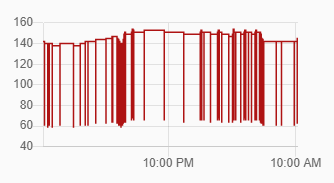
Its definitely not 154 degrees F in my house :)
Shows correctly in the shelly cloud app.
Did I configure something incorrectly?
Thanks!
 fictitiousexistence
All 12 comments
Please check http://device_ip_address/status and http://device_ip_address/settings are report back.
Simone
 chemelli74
on 26 Apr 2020
chemelli74
on 26 Apr 2020
Hi all, just to inform that after 3 weeks of inactivities on thread, I'll proceed to close them.
If later one someone verify that the issue is still there, a new issue need to be opened.
Thank you,
Simone
chemelli74
on 1 May 2020
Sorry for the late response.
Status:
{"wifi_sta":{"connected":true,"ssid":"WifiName","ip":"10.0.10.3","rssi":-69},"cloud":{"enabled":false,"connected":false},"mqtt":{"connected":true},"time":"13:53","unixtime":1588600408,"serial":1,"has_update":false,"mac":"008565656585","is_valid":true,"tmp":{"value":74.53,"units":"F","tC":23.62,"tF":74.53, "is_valid":true},"hum":{"value":47.5, "is_valid":true},"bat":{"value":96,"voltage":2.92},"act_reasons":["button"],"connect_retries":0,"update":{"status":"idle","has_update":false,"new_version":"20200309-104344/v1.6.0@43056d58","old_version":"20200309-104344/v1.6.0@43056d58"},"ram_total":50432,"ram_free":39852,"fs_size":233681,"fs_free":155118,"uptime":46}
Settings:
{"device":{"type":"SHHT-1","mac":"008565656585","hostname":"shellyht-E01ABC","sleep_mode":true},"wifi_ap":{"enabled":false,"ssid":"shellyht-E01ABC","key":""},"wifi_sta":{"enabled":true,"ssid":"WifiName","ipv4_method":"static","ip":"10.0.10.3","gw":"10.0.0.1","mask":"255.255.0.0","dns":"10.0.0.1"},"wifi_sta1":{"enabled":false,"ssid":null,"ipv4_method":"dhcp","ip":null,"gw":null,"mask":null,"dns":null},"mqtt": {"enable":true,"server":"10.0.0.254:1883","user":"mqttUser","id":"shellyht-E01ABC","reconnect_timeout_max":60.000000,"reconnect_timeout_min":2.000000,"clean_session":true,"keep_alive":60,"max_qos":0,"retain":true,"update_period":30},"coiot": {"update_period":15},"sntp":{"server":"time.google.com","enabled":true},"login":{"enabled":false,"unprotected":false,"username":"admin","password":"admin"},"pin_code":"uhnJk)!","name":"","fw":"20200309-104344/v1.6.0@43056d58","discoverable":false,"build_info":{"build_id":"20200309-104344/v1.6.0@43056d58","build_timestamp":"2020-03-09T10:43:44Z","build_version":"1.0"},"cloud":{"enabled":false,"connected":false},"timezone":"America/New_York","lat":40.273201,"lng":-76.886703,"tzautodetect":true,"tz_utc_offset":-14400,"tz_dst":true,"tz_dst_auto":true,"time":"13:53","unixtime":1588600435,"sensors":{"temperature_threshold":1.0,"temperature_unit":"F","humidity_threshold":5.0},"sleep_mode":{"period":12,"unit":"h"},"report_url":"","external_power":0,"temperature_offset":0.0,"humidity_offset":0.0}
fictitiousexistence
on 4 May 2020
You can see from status reading that the values are:
"value":74.53,"units":"F","tC":23.62,"tF":74.53
and
"hum":{"value":47.5
are those working fine ? And while you get those values from status, what was the UI in HA showing ?
Simone
chemelli74
on 4 May 2020
The Humidity looks correct. Temp is correct under status but not HA.
Status::
tmp":{"value":70.25,"units":"F","tC":21.25,"tF":70.25, "is_valid":true},"hum":{"value":44.5, "is_valid":true}
HA:

fictitiousexistence
on 6 May 2020
A few hours before I posted the last message, the temp was correct. Then it went to 158°. Now its correctly at 66°
In the HA graph above it shows that it keeps fluctuating between correct and incorrect temperatures.
fictitiousexistence
on 6 May 2020
I'm also having this issue with the same symptoms - the device json reports the correct temperature but HA fluctuates.
"time": "10:11",
  "serial": 3,
  "has_update": true,
  "mac": "98F4ABF3AD58",
  "is_valid": true,
  "tmp": {
    "value": 62.83,
    "units": "F",
    "tC": 17.12,
    "tF": 62.83,
    "is_valid": true
  },
 Shwaunk
on 7 May 2020
Shwaunk
on 7 May 2020
Yes, it is an issue with Fahrenheit, I will check this soon.
 hakana
on 7 May 2020
hakana
on 7 May 2020
If you set the unit to Celsius on your Shelly it will work. It will be fixed in next release.
hakana
on 7 May 2020
Please update to latest beta (0.1.9.b1) and recheck.
Simone
chemelli74
on 8 May 2020
I've just switched both my Shelly HTs back to Fahrenheit. The initial temp reading is correct. I'll report back in a few hours if it remmains that way. Thank you.
fictitiousexistence
on 8 May 2020
Appears to be working properly now. Thanks!
fictitiousexistence
on 9 May 2020
Related issues
 vistalba
·
9Comments
vistalba
·
9Comments
 balloob
·
3Comments
balloob
·
3Comments
 LucaGT78
·
8Comments
LucaGT78
·
8Comments
 nalajcie
·
11Comments
nalajcie
·
11Comments
 JonahKr
·
7Comments
JonahKr
·
7Comments
Most helpful comment
Please update to latest beta (0.1.9.b1) and recheck.
Simone