Shellyforhass: Suspected incompatibility between HA 0.107.x and plugin 0.1.7 (all betas)
HA Version 107.0 and 107.1
Shelly Versions 0.1.7-beta.2 and 0.1.7-beta.3
Following an upgrade from HA 106.6 to 107.0 then to 107.1 Shelly devices are no longer detected by HA. They show the status unavailable for all devices. The devices are available to Shelly Cloud, but not to HA. The integration broke on the initial upgrade to 107.0.
I have tried downgrading the beta and re-installing the latest beta version, but they no longer can be connected.
I will remove the integration and add them back to see if that resolves the issue, but I wanted to check if it only me having the problem or it is a bug that other people are experiencing.
 craigrallen
All 32 comments
Please share debug log before changing anything in the config so we can investigate.
Simone
 chemelli74
on 19 Mar 2020
chemelli74
on 19 Mar 2020
Logger: homeassistant.config_entries
Source: custom_components/shelly/__init__.py:74
First occurred: 4:56:05 PM (1 occurrences)
Last logged: 4:56:05 PM
Error setting up entry configuration.yaml for shelly
Traceback (most recent call last):
File "/usr/local/lib/python3.7/site-packages/voluptuous/schema_builder.py", line 272, in __call__
return self._compiled([], data)
File "/usr/local/lib/python3.7/site-packages/voluptuous/schema_builder.py", line 560, in validate_dict
raise er.DictInvalid('expected a dictionary', path)
voluptuous.error.DictInvalid: expected a dictionary
During handling of the above exception, another exception occurred:
Traceback (most recent call last):
File "/usr/src/homeassistant/homeassistant/config_entries.py", line 216, in async_setup
hass, self
File "/config/custom_components/shelly/__init__.py", line 74, in async_setup_entry
conf = CONFIG_SCHEMA_ROOT(data)
File "/usr/local/lib/python3.7/site-packages/voluptuous/schema_builder.py", line 276, in __call__
raise er.MultipleInvalid([e])
voluptuous.error.MultipleInvalid: expected a dictionary
craigrallen
on 19 Mar 2020
Can you please post your config as well ?
Simone
chemelli74
on 19 Mar 2020
Have same issue rolled back 0.1.6 and all works - all 0.1.7 betas fail
config
shelly:
cloud_auth_key: "######"
cloud_server: "shelly-13-eu.shelly.cloud"
sensors:
- rssi
- uptime
- device_temp
- over_temp
- cloud
- switch
 suds32
on 20 Mar 2020
suds32
on 20 Mar 2020
spacing is completly wrong.
Anyway, please try using only
shelly:
and report back.
Simone
chemelli74
on 20 Mar 2020
So remove all other options including auth key etc
suds32
on 20 Mar 2020
So remove all other options including auth key etc
Exactly, we need to narrow down what fails for you.
You are the first reporting such issue, for all the others b2 and b3 are working fine.
Simone
chemelli74
on 20 Mar 2020
tested and got the same error, also craigrallen was first so currently 2 off us
Error
Logger: homeassistant.config_entries
Source: custom_components/shelly/__init__.py:74
First occurred: 12:11:40 PM (1 occurrences)
Last logged: 12:11:40 PM
Error setting up entry configuration.yaml for shelly
Traceback (most recent call last):
File "/usr/local/lib/python3.7/site-packages/voluptuous/schema_builder.py", line 272, in __call__
return self._compiled([], data)
File "/usr/local/lib/python3.7/site-packages/voluptuous/schema_builder.py", line 560, in validate_dict
raise er.DictInvalid('expected a dictionary', path)
voluptuous.error.DictInvalid: expected a dictionary
During handling of the above exception, another exception occurred:
Traceback (most recent call last):
File "/usr/src/homeassistant/homeassistant/config_entries.py", line 216, in async_setup
hass, self
File "/config/custom_components/shelly/__init__.py", line 74, in async_setup_entry
conf = CONFIG_SCHEMA_ROOT(data)
File "/usr/local/lib/python3.7/site-packages/voluptuous/schema_builder.py", line 276, in __call__
raise er.MultipleInvalid([e])
voluptuous.error.MultipleInvalid: expected a dictionary
suds32
on 20 Mar 2020
Can you try to disable auto discovery and configure your devices one by one ?
So we can understand if it's a specific device causing the issue.
Simone
chemelli74
on 20 Mar 2020
will look into in the weekend as that will be quite a bit of work and they are all part of my automation
suds32
on 20 Mar 2020
Same here. I also have a open ticket maybe it is the problem related to HA.
Guys for you in the integration, can you open the page for the setup? Mine is in loop loading.
 catalinbordan
on 20 Mar 2020
catalinbordan
on 20 Mar 2020
@catalinbordan, I start to think that there is an incompatibility somehow between latest HA and latest build of the plugin.
Let's do some test like suggested in #207 first.
Simone
chemelli74
on 20 Mar 2020
I have the integration settings page not loading and just hangs while waiting to load.
My yaml settings
shelly:
craigrallen
on 20 Mar 2020
I have the integration settings page not loading and just hangs while waiting to load.
My yaml settings
shelly:
I see.
We need to narrow it down in your own environment: what happen with latest b3 of the plugin and HA 0.106.6 ?
Simone
chemelli74
on 20 Mar 2020
I'll need time to test that because I'll need to rollback, but b2 was working fine on 106.6, but b2 doesn't work for me on 107.0 or 107.1
craigrallen
on 20 Mar 2020
Confirmed.
Upgraded from 0.106.6 / 0.1.7b3 to 0.107.1 / 0.1.7b3:
2020-03-20 14:22:00 ERROR (MainThread) [homeassistant.config_entries] Error setting up entry configuration.yaml for shelly
Traceback (most recent call last):
  File "/usr/local/lib/python3.7/site-packages/voluptuous/schema_builder.py", line 272, in __call__
    return self._compiled([], data)
  File "/usr/local/lib/python3.7/site-packages/voluptuous/schema_builder.py", line 560, in validate_dict
    raise er.DictInvalid('expected a dictionary', path)
voluptuous.error.DictInvalid: expected a dictionary

During handling of the above exception, another exception occurred:

Traceback (most recent call last):
  File "/usr/src/homeassistant/homeassistant/config_entries.py", line 216, in async_setup
    hass, self
  File "/config/custom_components/shelly/__init__.py", line 74, in async_setup_entry
    conf = CONFIG_SCHEMA_ROOT(data)
  File "/usr/local/lib/python3.7/site-packages/voluptuous/schema_builder.py", line 276, in __call__
    raise er.MultipleInvalid([e])
voluptuous.error.MultipleInvalid: expected a dictionary
But seems a more wide issue, I have similar log entry also for smartthings native integration.
Simone
chemelli74
on 20 Mar 2020
To be on the right side, I logged a issue with HA itself: Upgrading from 0.106.6 to 0.107.1 shows many errors in log
Simone
chemelli74
on 20 Mar 2020
Please try to remove the integration from UI and restart.
Seems that a duplicate config ( configuration.yaml and UI ) is the root cause of this issue.
Simone
chemelli74
on 23 Mar 2020
I rolled back to 0.1.6 and it started working without configuration changes on 107.x.
I can remove the integration via the ui, but seems to be fine in older versions of the plugin.
craigrallen
on 23 Mar 2020
I rolled back to 0.1.6 and it started working without configuration changes on 107.x.
I can remove the integration via the ui, but seems to be fine in older versions of the plugin.
0.1.7b1 note: Support convert config.yaml to GUI integration
So 0.1.6 use only configuration.yaml, 0.1.7b1 or newer can use both.
This is why with 0.1.7 you need to remove it from GUI if you integrated on first run, in order to clean the duplicate data.
Simone
chemelli74
on 23 Mar 2020
So 0.1.6 use only configuration.yaml, 0.1.7b1 or newer can use both.
This is why with 0.1.7 you need to remove it from GUI if you integrated on first run, in order to clean the duplicate data.Simone
I don't quite understand, what to remove/how? What it will be the steps to do it?(keep in mind that we are on 0.1.6)
Thanks
catalinbordan
on 23 Mar 2020
Select the configuration menu in HA and then integrations. Select "Shelly smart home: config.yaml" and click on the recycle bin up to the right. Then restart HA and it will recreate this item.
 hakana
on 23 Mar 2020
hakana
on 23 Mar 2020
Yes getting some where, followed steps to remove integration as above for 0.1.7 beta 3 HA 0.107.5 and She;;y was working again.
If you then go into the integration and select "Check this if you want to move your configuration to the database for shelly. If you do this you can change the settings here and settings in config.yaml will be ignored and you can remove them."
Shelly is all working, but if you then restart all shelly's go back to unavailable
Repeated this twice and go the same results.
If you leave the config in yaml all works ok
suds32
on 23 Mar 2020
If you then go into the integration and select "Check this if you want to move your configuration to the database for shelly. If you do this you can change the settings here and settings in config.yaml will be ignored and you can remove them."
Shelly is all working, but if you then restart all shelly's go back to unavailable
Seems like if configration is moved to the DB, configuration.yaml is not ignored.
This is why we get a "voluptuous.error.DictInvalid: expected a dictionary" error. Config is not unique.
Simone
chemelli74
on 24 Mar 2020
Fixed in 0.1.7.b4
hakana
on 24 Mar 2020
Great thanks all working again
suds32
on 24 Mar 2020
Hello,
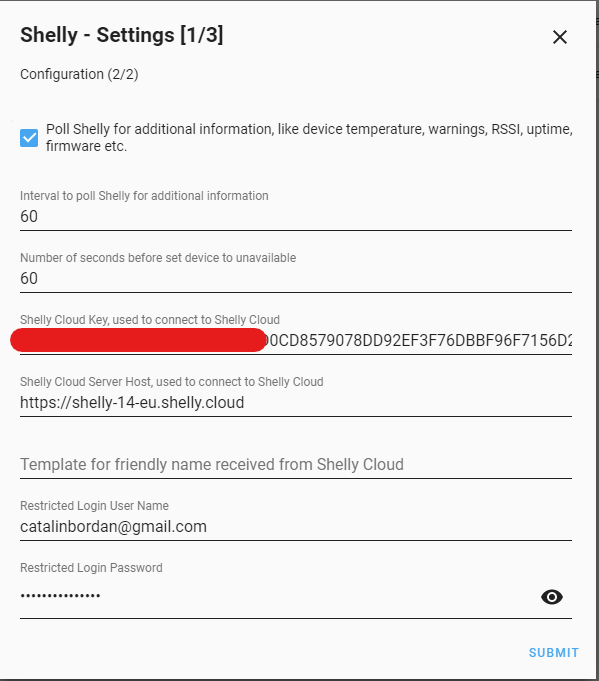
now works. first I did an upgrade to last beta and the menu and entities are online. change a little bit the setups in integrations and then I observed that entities are unavailable at each 1 minute for a fraction of a second. then I did what @hakana suggested and I delete the integration and start all over from beginning(integration is asking to migrate the settings) and then I made the setup again without checking any marks in first page (IGMP, ip of host, mDns). then after a restart now it working and I think also fixed the issues of update the status per each minute. Now I am trying for the first time to put my credential from cloud because I can see if you remove the integration you will loose all the names of shellys and maybe cloud integration it will help to get the names again. But I can see give me a lot of erros in logs. something I did not put it right. What it could be? I must dig more :)
Thank you for hard work and time!
catalinbordan
on 24 Mar 2020
Fix it also the cloud integration. I just deleted the restricted login and pass and restart.
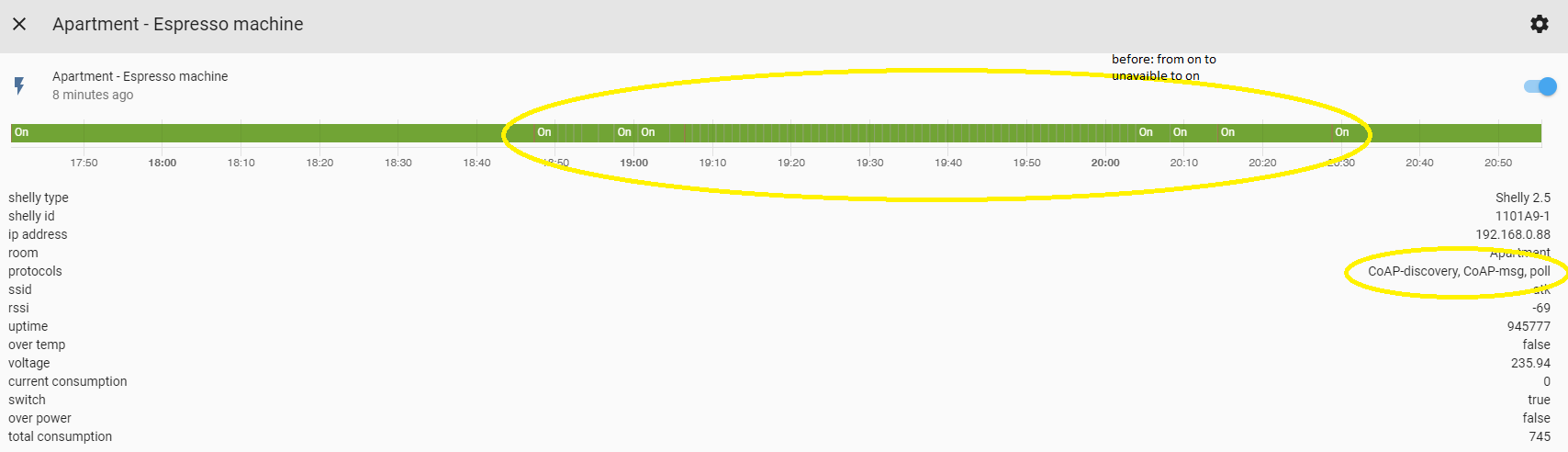
Now for the first time shelly show: protocols: CoAP-discovery, CoAP-msg, poll :) Yepy!!!
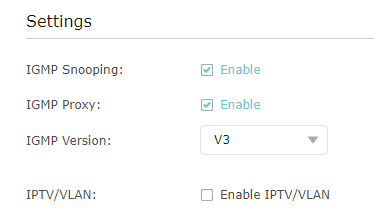
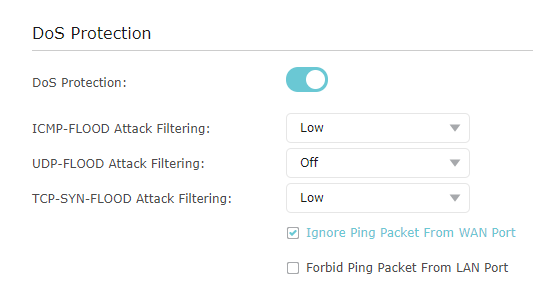
I don't know if it is related but I also activate in my router setting(tplink) the IGMP snooping and I deactivated the udp antiflood
catalinbordan
on 24 Mar 2020
@craigrallen , @suds32, @catalinbordan please confirm 0.1.7b4 works for you so we can close the issue.
Simone
chemelli74
on 25 Mar 2020
@craigrallen , @suds32, @catalinbordan please confirm 0.1.7b4 works for you so we can close the issue.
Simone
Hi,
Is working. Even better with right setup
catalinbordan
on 25 Mar 2020
All working good for me
suds32
on 25 Mar 2020
Beta 5 is fully working for me (HA 0.107.5)
 rufik
on 26 Mar 2020
rufik
on 26 Mar 2020
Related issues
 vistalba
·
5Comments
vistalba
·
5Comments
 LucaGT78
·
8Comments
LucaGT78
·
8Comments
 PeteHassio
·
10Comments
PeteHassio
·
10Comments
 JonahKr
·
7Comments
JonahKr
·
7Comments
 filmgarage
·
7Comments
filmgarage
·
7Comments
Most helpful comment
Select the configuration menu in HA and then integrations. Select "Shelly smart home: config.yaml" and click on the recycle bin up to the right. Then restart HA and it will recreate this item.