Shellyforhass: Can't edit settings in the integrations menu in 0.1.7 beta 1
When adding ShellyForHass via Integration panel I can't update the setting (using cog icon in top right)

After putting new values and hitting Submit the values aren't getting saved.
 Misiu
Misiu
All 13 comments
Please update to latest beta (0.1.7.b2) and recheck.
Simone
 chemelli74
on 14 Mar 2020
chemelli74
on 14 Mar 2020
Sadly this still isn't working.
I've updated to the latest beta (0.1.7.b2), restarted Home Assistant couple of times, cleared the cache in the browser, even tried in Incognito mode, but I always get the same results.
Misiu
on 14 Mar 2020
Have you checked if you can see any error in log?
 hakana
on 16 Mar 2020
hakana
on 16 Mar 2020
@hakana I have this in my config:
logger:
  default: critical
  logs:
    custom_components.shelly: debug
    pyShelly: debug
    shelly: debug
nothing unusual in logs.
I've noticed this behavior:
when I edit settings (using gear icon) I get a success message:
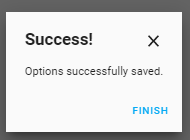
when I click the same edit button I get old values (it looks like they didn't save),
but after a restart, the settings are stored.
The setting button is saving the config, but we must restart Home Assistant to have them applied.
Edit settings fo shelly (gear icon) is always showing the old config.
Could you check that on your side?
Misiu
on 16 Mar 2020
Same with 0.1.7-beta.3
Misiu
on 18 Mar 2020
You need to restart HA after changing settings. What is not working?
hakana
on 18 Mar 2020
@hakana I was thinking that I don't need to restart HA.
It would be awesome if integration could reload with new config, but I think that's a feature request for HA.
Misiu
on 18 Mar 2020
Yes I agree, it can be fixed in the component also but it is a big change because it not build for that from the beginning.
hakana
on 18 Mar 2020
So maybe let's leave this as a feature request? Or I can create a new issue for that.
That's not very important, but would be a great addition.
For now, I think this should be documented that changing integration settings requires HA restart to apply them.
Misiu
on 18 Mar 2020
I have that on my todo but never wrong to put an FR on it.
hakana
on 18 Mar 2020
For now, I think this should be documented that changing integration settings requires HA restart to apply them.
I would say we can add to the "Option successfully saved" also a "Remember to restart HA to make the changes active" or something similar.
Simone
chemelli74
on 18 Mar 2020
I would say we can add to the "Option successfully saved" also a "Remember to restart HA to make the changes active" or something similar.
Unfortunately we cannot edit the message from HA, it's embedded.
Simone
chemelli74
on 24 Mar 2020
Nothing we can do more than documenting the need of restart.
Closing.
Simone
chemelli74
on 24 Mar 2020
Related issues
 balloob
·
3Comments
chemelli74
·
8Comments
balloob
·
3Comments
chemelli74
·
8Comments
 JonahKr
·
7Comments
Misiu
·
11Comments
chemelli74
·
9Comments
JonahKr
·
7Comments
Misiu
·
11Comments
chemelli74
·
9Comments