Shellyforhass: Use as light switch in integration
Hi.
Is it possible to get an option in the integration page to use shelly plugs as lights ?
I know I can do this by using light_switch: true i yaml but it would be rather nice having it in the integrations page :)
Thanks for all the great work !!
 dodg3r
All 39 comments
I will check this
 hakana
on 16 Jan 2020
hakana
on 16 Jan 2020
Would getting the type from cloud work ? You can set socket or light in Shelly app.
This is the way Alexa skill works.
Simone
 chemelli74
on 20 Feb 2020
chemelli74
on 20 Feb 2020
Hi.
Yes, good idea..
dodg3r
on 25 Feb 2020
Hi guys,
Any workaround to change the Shelly entities from switch to light? By default all my shellies (1 PM and 2.5) are saw as switches not as lights. As i'm using them all to toggle house lights I would really like to have the Lovelace icons lit up when the lights are turned on.
 ValiEne
on 26 Mar 2020
ValiEne
on 26 Mar 2020
You can set that in config.yaml. see readme file.
hakana
on 26 Mar 2020
Thanks a lot @hakana
ValiEne
on 26 Mar 2020
You can set that in config.yaml. see readme file.
I think the guy was talking about the integration way, wich shall ignore configuration.yaml when activated.
 SuperCocov9
on 10 Apr 2020
SuperCocov9
on 10 Apr 2020
You can set that in config.yaml. see readme file.
I think the guy was talking about the integration way, wich shall ignore configuration.yaml when activated.
It is not possible to set as light when using integration way. It will be possible in 0.1.8
hakana
on 10 Apr 2020
That's nice
You can set that in config.yaml. see readme file.
I think the guy was talking about the integration way, wich shall ignore configuration.yaml when activated.
It is not possible to set as light when using integration way. It will be possible in 0.1.8
That's nice, thank you hakana.
SuperCocov9
on 10 Apr 2020
I have the following in my configuration.yaml, which has worked fine previously, but now I'm just getting switches..
shelly:
  discovery: true
  devices:
    - id: "7AE262"
      light_switch: true
Can't find anything in the log either.
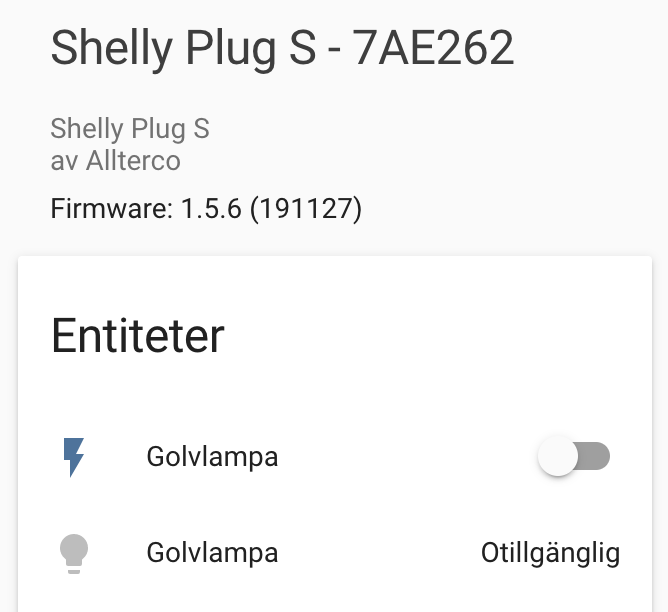
 oscar-b
on 21 Apr 2020
oscar-b
on 21 Apr 2020
Can you please see if this work in the latest release 0.1.8
hakana
on 4 May 2020
I also had same issue earlier.
Tested 0.1.8 earlier today. Still had same problem.
 mandelflanders
on 4 May 2020
mandelflanders
on 4 May 2020
Are you running to integrations of ShellyForHass, one in config.yaml and on in UI?
hakana
on 4 May 2020
Using config.yaml with 0.16 (reverted to that because of this and issues with entity renaming on restart)
First tried conversion to UI setup for 0.17 a few weeks ago. (reverted back to 0.16 then aswell)
When updating to 0.18 today, appears that setting was already "fixed" as UI-config. Could be that I missed something about the light-toggle in the swiching between different releases.
Any tips on how can I revert from UI setup to config-setup? Perhaps that would solve my issue?
mandelflanders
on 4 May 2020
I am using the integration ui, still seeing them as switch and cant see the option to make them appear as a light.
SuperCocov9
on 4 May 2020
@SuperCocov9 The option to change them to light is only available when using config.yaml
In the next release, it will check if you have set them to light in the app and use this setting and show them as light in HA.
hakana
on 4 May 2020
@SuperCocov9 The option to change them to light is only available when using config.yaml
In the next release, it will check if you have set them to light in the app and use this setting and show them as light in HA.
I also found this works as expected with the integration ui vetsion 0.16, and not anymore with 0.17 or 0.18. Using 0.16 you still have to define the light entity in the config.yaml.
 denniswham
on 7 May 2020
denniswham
on 7 May 2020
Added in 0.1.9-b1
hakana
on 7 May 2020
Please update to latest beta (0.1.9.b1) and recheck.
Simone
chemelli74
on 8 May 2020
At first sight, works like a charm! Many thanks!
denniswham
on 8 May 2020
Don't take this the wrong way, but IMHO using the cloud setting is not a solution for the issue, just a "dirty" workaround.
Considering that in future HA integrations for devices are moving away from yaml config, a proper solution should be found.
 d3m3trius
on 8 May 2020
d3m3trius
on 8 May 2020
@d3m3trius I don't get your point, what do you think is wrong with using the settings from the Shelly app? I nether see how this is related to moving from config.yaml.
We are moving from config.yaml but the GUI options for a integration in HA are very limited so there is no good way to configure device settings there. We work on a solution with a configuration page for Shelly where all options will be available.
hakana
on 8 May 2020
At first sight, works like a charm! Many thanks!
Same here. Nice
SuperCocov9
on 8 May 2020
@d3m3trius I don't get your point, what do you think is wrong with using the settings from the Shelly app?
I for one don't use any of the Shelly cloud functionality, and don't plan to. Only reason for using this integration is that the Shelly Plug S can't be flashed with custom firmware, which is the only way to guarantee devices are local only. Is this setting stored in "cloud", or on the device?
oscar-b
on 8 May 2020
@oscar-b For the users using the app it is a nice function as you see on the comments above. If you don't want to use the cloud you can configure that in the config.yaml or do your own light_switch templates.
I don't agree that the only reason to use this is that Shelly Plug S not flashable for you. Majority using Shellys out of the box without flashing.
So the option is still there for running 100% locally!
BTW, why can't you flash your Shelly Plug S?
hakana
on 8 May 2020
@oscar-b For the users using the app it is a nice function as you see on the comments above. If you don't want to use the cloud you can configure that in the config.yaml or do your own light_switch templates.
The "problem" and confusion here is that functionality was removed; previously it was possible to setup a switch to be exposed as a light without using the Shelly app or using a template.
I don't agree that the only reason to use this is that Shelly Plug S not flashable for you. Majority using Shellys out of the box without flashing.
No of course not, but for me it is :) I prefer to know exactly what's running on my IoT devices, especially hardware. But this addon is really nice!
BTW, why can't you flash your Shelly Plug S?
There are no exposed headers, and the shell seemed quite hard to open without breaking it. Running ESPHome on all my Shelly 1/2/2.5 otherwise :)
oscar-b
on 8 May 2020
BTW, why can't you flash your Shelly Plug S?
There are no exposed headers, and the shell seemed quite hard to open without breaking it. Running ESPHome on all my Shelly 1/2/2.5 otherwise :)
Looked it up again, seems it is possible after all, will give it a try :) (ah now I remember, I needed the energy monitor support which ESPHome didn't have at the time at least).
oscar-b
on 9 May 2020
@hakana, good one; works really fine.
Just one small improvement: can you delete the old "switch" when creating the new one as light ?
Simone
chemelli74
on 9 May 2020
Im not sure if it good to do that automaticly and loose statistics etc. But I will have a look on that.
hakana
on 9 May 2020
@hakana One of the main use of HA (for me) is to avoid proprietary apps and cloud.
By the way, integrations GUI is more practical but it is not a problem to continue using the configuration yaml at the moment.
However, I think the issue should be keep open until a proper (cloud-less) solution is implemented.
d3m3trius
on 9 May 2020
@hakana One of the main use of HA (for me) is to avoid proprietary apps and cloud.
Take care that this is your view, not mandatory for all other users.
However, I think the issue should be keep open until a proper (cloud-less) solution is implemented.
Solution is already there: you need to configure each switch manually as light.
Device itself has no info about the load type.
Simone
chemelli74
on 10 May 2020
I've just tried the 0.19b1 but this doesn't work for me. I checked and the lights (on Shelly 1 devices) are set as lights but when I remove the integration and re-add they come back as switches :(
 inforsgit
on 17 May 2020
inforsgit
on 17 May 2020
I've just tried the 0.19b1 but this doesn't work for me. I checked and the lights (on Shelly 1 devices) are set as lights but when I remove the integration and re-add they come back as switches :(
Did you set your cloud key and server of shelly cloud on the integration?
SuperCocov9
on 17 May 2020
I hadn't and that fixes it perfectly...thank you!!
inforsgit
on 17 May 2020
Hi, I just found out this great integration. But I see too that shelly 1 devices will be set as 'switch' and cannot be changed to 'light' through the UI.
I use the UI integrat version 0.1.8 and I don't use the shelly app.
Do I understand the above information correctly hat it will possible to change devices from 'switch' to 'light' in an upcoming update? I hope so :) Thanks!
 MMMM78
on 9 Jun 2020
MMMM78
on 9 Jun 2020
You can do that if you use config.yaml setting up ShellyForHass. We will add that in GUI shortly.
hakana
on 10 Jun 2020
and if you use Cloud, type can be loaded from Shelly App config ;-)
Simone
chemelli74
on 10 Jun 2020
We will add that in GUI shortly.
I’ll wait for it :) Thanks! Any rough idea about when this will be available?
MMMM78
on 10 Jun 2020
and if you use Cloud
Nooo :) No cloud for me if it’s not necessary haha
MMMM78
on 10 Jun 2020
Related issues
 nalajcie
·
11Comments
nalajcie
·
11Comments
 LucaGT78
·
8Comments
LucaGT78
·
8Comments
 LupoCri
·
3Comments
chemelli74
·
9Comments
LupoCri
·
3Comments
chemelli74
·
9Comments
 vistalba
·
5Comments
vistalba
·
5Comments
Most helpful comment
@hakana One of the main use of HA (for me) is to avoid proprietary apps and cloud.
By the way, integrations GUI is more practical but it is not a problem to continue using the configuration yaml at the moment.
However, I think the issue should be keep open until a proper (cloud-less) solution is implemented.