Shelly-homekit: Add option to reset AutoOff Delay every time an ON command is received
Hi
I use this great firmware as a hallway light switch.
I would like the option of resetting the auto-off timer every time the switch is gets a turn ON command.
ie: auto-off 5 minutes after Last trigger (and not after First trigger)
Use case:
- A person walks down the hall and triggers the motion sensor. The auto-off timer starts with 5min to run.
- 2 minutes pass. The auto-off still has 3 minutes to run.
- Another person triggers the motion sensor.
- The auto-off is reset and now has 5 minutes to run.
- The light stays on the whole time
 jsiegenthaler
All 24 comments
this makes total sense, i don't think we even need an option, it should just be like that.
 rojer
on 16 Oct 2020
rojer
on 16 Oct 2020
This would only work in detached mode
 andyblac
on 16 Oct 2020
andyblac
on 16 Oct 2020
how so?
rojer
on 17 Oct 2020
how so?
ATM we don’t support sensors do we ?
andyblac
on 17 Oct 2020
Oh I get it you mean wired sensors ?
andyblac
on 17 Oct 2020
basically, restart auto-off timer any time we get an on command, via whatever means (hap, web ui). this makes sense.
rojer
on 17 Oct 2020
Can’t be switch as next press would be OFF in momentary, and same with rocker
andyblac
on 17 Oct 2020
but could be with automation.
although it's a good point, @jsiegenthaler did you mean triggering with a physical input?
rojer
on 17 Oct 2020
@rojer:
No, not physical.
I mean reset the auto-off timer over the Homekit system via a MotionSensor telling it to go ON again when new motion is detected.
My real world use case in my apartment is as follows:
Kitchen with Philips Hue motion sensor
Kitchen Lights are fluorescent, switched by Shelly1 using wall switch connected to SW input, SW input in Edge mode.
Either motion sensor, Homekit app, or wall switch can turn lights on and off. This keeps the entire family happy.
When person A enters the kitchen, the lights come on, and delay timer starts
Person A leaves and person B goes into the kitchen, delay timer is still counting down, and the chance exists that the lights will go off while person B is cooking. That creates family friction.
The only way I have to prevent this at the moment is to disable the Shelly1 autooff, and use a Homebridge DelaySwitch plugin.
The DelaySwitch has it's delay timer reset at every MotionSensor trigger from the Hue motion sensor.
Thus we achieve the goal of "delay starts after Last motion was sensed", and not "after First motion was sensed".
I was hoping the delay timer reset could be built in to the Shelly1 (mongoose)
That would allow me to save a switch and an automation, and increase reliability, as sometimes the delay timer automation does not fire for unknown Apple reasons.
PS: I am not familiar with the HAP protocol, but I assume that a "turn a light ON" command still gets sent, regardless of the light's current power-state status.
jsiegenthaler
on 17 Oct 2020
ok, done, will be in the next release.
rojer
on 17 Oct 2020
Thanks
jsiegenthaler
on 17 Oct 2020
I don't find this function in the last release
 lucaspinelli85
on 16 Nov 2020
lucaspinelli85
on 16 Nov 2020
I don't find this function in the last release
iirc it is just enabled by default. no toggle to turn on / off
andyblac
on 16 Nov 2020
I don't find this function in the last release
iirc it is just enabled by default. no toggle to turn on / off
I don't understand, if my toggle put on the switch, then start the auto off, but while auto off running the toggle go off, the auto off stop and light off.
What I need is this: toggle go on, light on, when toggle go to off I need the switch keep on for "x" time (auto off after...).
How can I do this?
Thanks
lucaspinelli85
on 16 Nov 2020
I don't find this function in the last release
iirc it is just enabled by default. no toggle to turn on / off
I don't understand, if my toggle put on the switch, then start the auto off, but while auto off running the toggle go off, the auto off stop and light off.
What I need is this: toggle go on, light on, when toggle go to off I need the switch keep on for "x" time (auto off after...).
How can I do this?
Thanks
you can't, why turn it off, why not just let auto off turn it off, thats the purpose of it.
andyblac
on 16 Nov 2020
In specific this is my situation: I have a rain sensor (toggle), when toggle is active it stop irrigation and grass cutting. When toggle disactivated (sun!) it immediately don't stop more the irrigation and cutting, but the grass is still wet! I want the toggle is for 24 more hours activated after off, so dries grass!
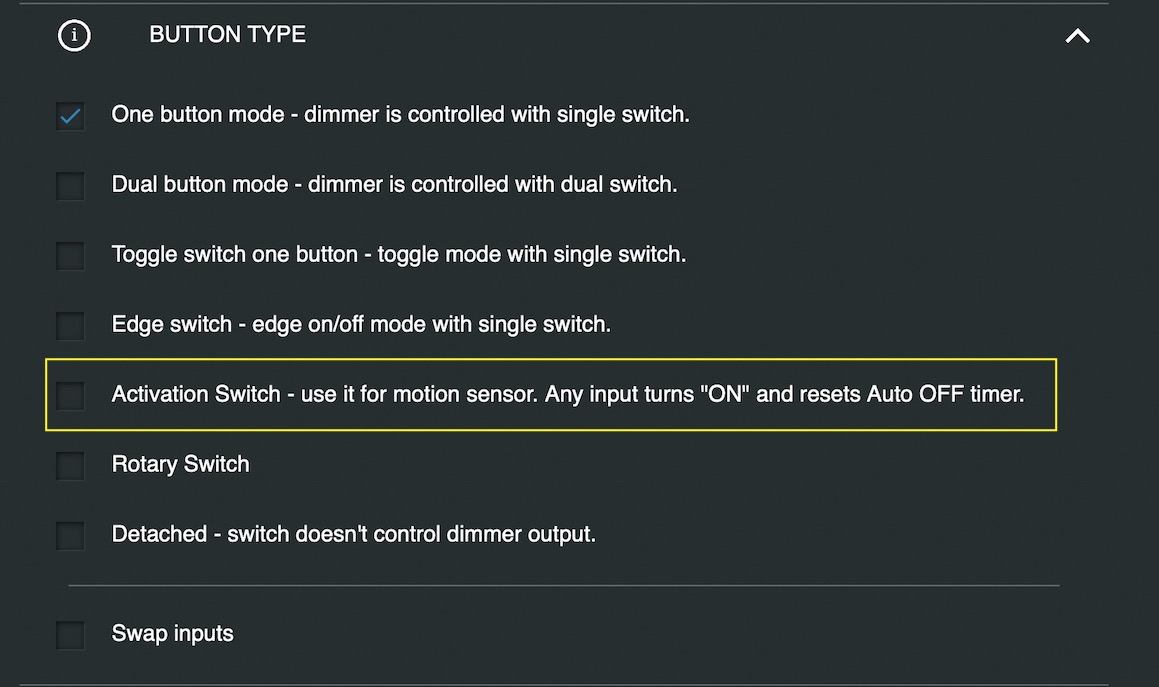
In original firmware there is "Activation switch" mode that used for motion sensor, any inputs turn ON an resets auto off timer
lucaspinelli85
on 16 Nov 2020
In specific this is my situation: I have a rain sensor (toggle), when toggle is active it stop irrigation and grass cutting. When toggle disactivated (sun!) it immediately don't stop more the irrigation and cutting, but the grass is still wet! I want the toggle is for 24 more hours activated after off, so dries grass!
In original firmware there is "Activation switch" mode that used for motion sensor, any inputs turn ON an resets auto off timer
ok, so you need a new Switch Mode, "Sensor" -> On Only. so the switch on the device only actives with ON. iirc stock shelly has this mode, @rojer could you add this option ?
andyblac
on 16 Nov 2020
@lucaspinelli85 create a new ticket for this.
andyblac
on 16 Nov 2020
ie
andyblac
on 16 Nov 2020
Almost... or rather, in the original firmware auto off start when input on, and it's perfect for motion sensor. In my case I want the auto off start when toggle go off, practically shelly keep on the output after switch off (otherwise, after "24h" from start raining it go to off tough it's still raining..). I hope you understand me...
lucaspinelli85
on 16 Nov 2020
You cloud add both, the mode "sensor" at ON (restart auto off when input) and at OFF (keep on for...)...
lucaspinelli85
on 16 Nov 2020
anyway open a new ticket.
andyblac
on 16 Nov 2020
anyway open a new ticket.
Sorry, how can do a new ticket? You mean new issues or new pull request? Thx
lucaspinelli85
on 16 Nov 2020
goto to "Issues" click on "New Issue"
andyblac
on 16 Nov 2020
Related issues
 italoc
·
3Comments
italoc
·
3Comments
 BlancoDeMallloca
·
3Comments
andyblac
·
5Comments
rojer
·
13Comments
BlancoDeMallloca
·
3Comments
andyblac
·
5Comments
rojer
·
13Comments
 miamilabs
·
8Comments
miamilabs
·
8Comments
Most helpful comment
ok, done, will be in the next release.