Shelly-homekit: hostname change
is it possible to edit the hostname, like you did you switch names ?

 andyblac
All 24 comments
yes, it is possible. it is specified in device.id config variable
 rojer
on 28 Apr 2020
rojer
on 28 Apr 2020
and will it be accessible from config gui?
 MilanBacaCz
on 31 Jul 2020
MilanBacaCz
on 31 Jul 2020
@rojer could this be added, be handy when you have multiple shelly's for the script to quickly see which is which.
andyblac
on 19 Sep 2020
@rojer does this look correct ?, if so I'll create a pull request
https://github.com/andyblac/shelly-homekit/commit/eb66793be77a97ac83190a3c8278659fd6318b66
how can I test such things locally ?
oops used wrong save button. think this one is correct
https://github.com/andyblac/shelly-homekit/commit/b2bc18101c4dfb64461aa738561eb765862c5573
andyblac
on 19 Sep 2020
@schemhad if you have time could take a look at this ?
andyblac
on 19 Sep 2020
That's why i've set the pagetitle dynamically in the recent pull request. 😉
But i would place it in the wifi container.
 schemhad
on 19 Sep 2020
schemhad
on 19 Sep 2020
does my change look correct (just move to wifi), I'm new to JS, just trying to understand from existing code.
andyblac
on 19 Sep 2020
@rojer does this look correct ?, if so I'll create a pull request
not quite. this needs to be sent to the device as Device.SetConfig RPC, and the device needs to apply it to the config.
a small code change is needed.
how can I test such things locally ?
there's a way to iterate on web changes without reflashing the device.
1) make the changes to fs_src/index.html
2) compress it:
[rojer@nbd ~/allterco/shelly-homekit master]$ make fs/index.html.gz
gzip -9 -c fs_src/index.html > fs/index.html.gz
3) upload to the device using the mos tool:
$ mos --port ws://shelly1-68b743.local/rpc put fs/index.html.gz
4) refresh the webpage in the browser, test the changes
rojer
on 19 Sep 2020
https://github.com/mongoose-os-apps/shelly-homekit/commit/95c21e455b836f81bdf320ce28ddbec400484d9e adds the API feature, @schemhad please add GUI when you have the time.
rojer
on 25 Sep 2020
i was adding system settings section for roller-shutter and added hostname item to it.
rojer
on 27 Sep 2020
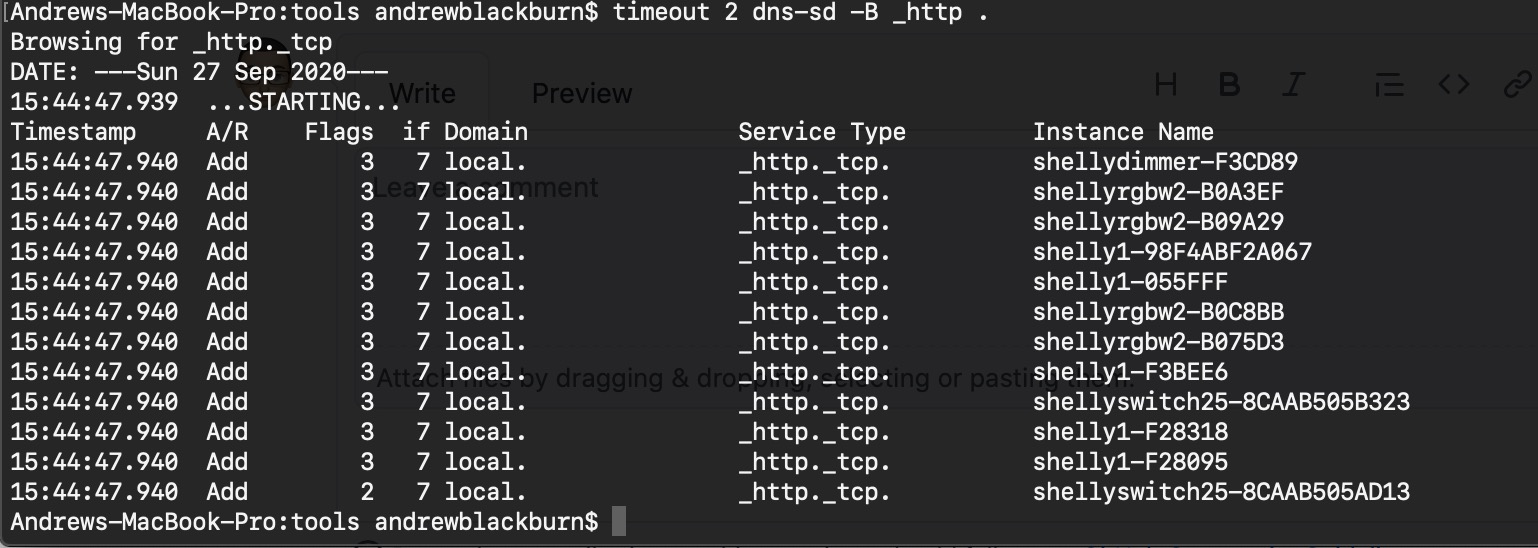
@rojer just tested 2.2.0-beta1 for this, after changing the host name, you can indeed access the webUI via the new hostname, But the hostname does change when scanning via DNS-SD. can you check your are getting same result ?
as a result the flash_script no longer sees the device with changed hostname, as it still see's the old hostname and reports Could not resolve host: shelly1-F3BEE6
andyblac
on 27 Sep 2020
there's a slight issue there, yes. while _hap._tcp name does get fully updated, _http._tcp does not until the device is rebooted.
it remains in a half-updated state:
=;wlp0s20f3;IPv4;shelly25-1;_hap._tcp;local;shelly25-1.local;192.168.11.75;9000;"ci=14" "sf=0" "s#=1" "pv=1.1" "md=Shelly2.5" "id=85:54:60:AE:B7:6D" "ff=0" "c#=36"
=;wlp0s20f3;IPv4;shelly25;Web Site;local;shelly25-1.local;192.168.11.75;80;"arch=esp8266" "fw_id=20200927-161341/2.1.8-21-g1adc21d-rsh" "id=shelly25"
here i renamed shelly 25 to shelly25-1, HAP has been fully renamed and hostname has been updated, but the web service is still advertised under the old name.
while it's possible to fix in the firmware, it's not very easy. instead, if you just use $7 instead of $4 in the script, it should be ok.
rojer
on 27 Sep 2020
this what is get
andyblac
on 27 Sep 2020
oh yeah using _hap
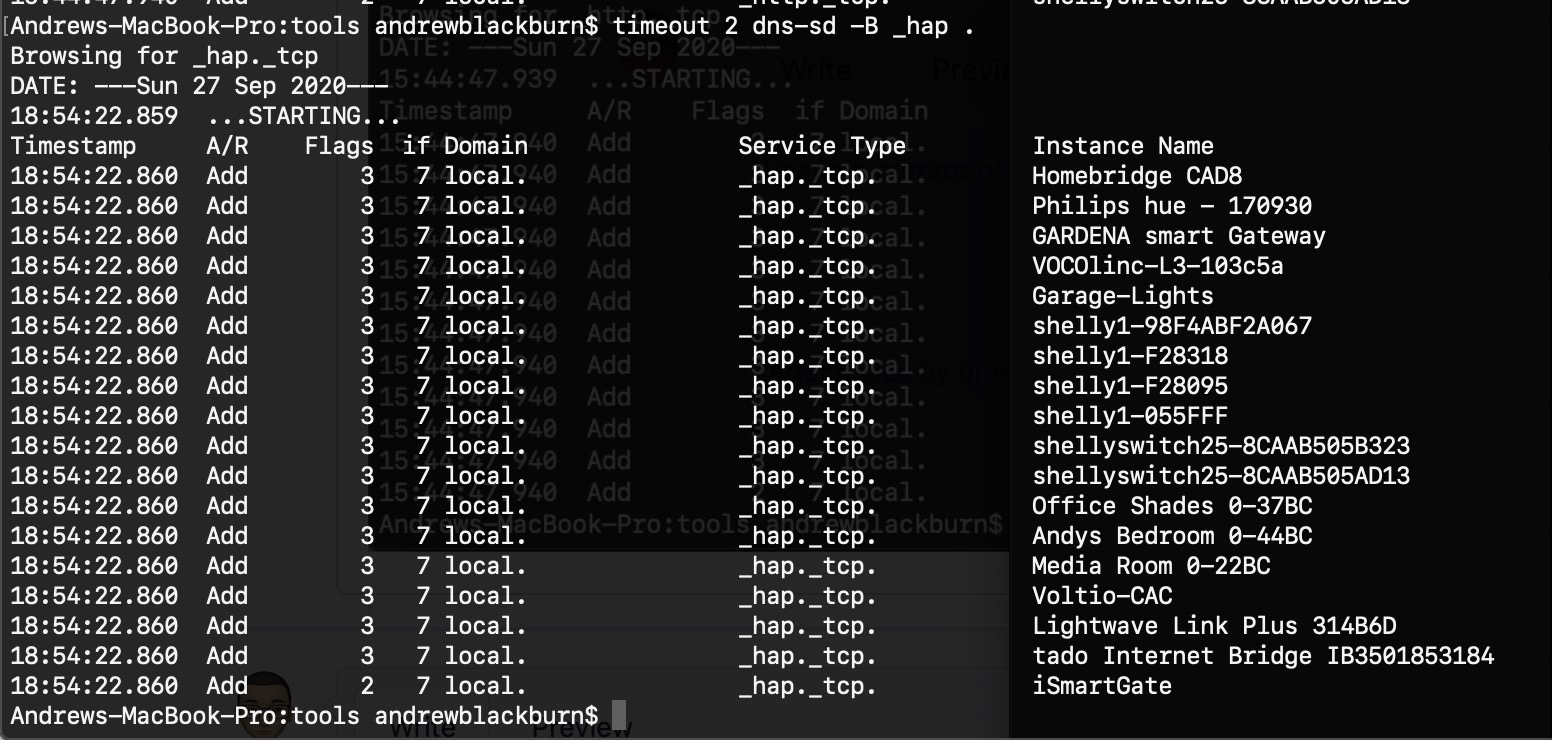
but this mean we would have to check every device for compatibility, this will slow search down a lot.
andyblac
on 27 Sep 2020
hm, true. i'll think about it, but at the moment all that's needed is a reboot.
can you confirm taht reboot fixes it?
rojer
on 27 Sep 2020
yes it does, so maybe just do an auto reboot after name change ?

andyblac
on 27 Sep 2020
but anyway, thinking about it I'll still have to check all _http as we ca not now search for 'shelly' in $7 any more.
andyblac
on 27 Sep 2020
checking all _hap add a lot of time to scan, best stick with _http
andyblac
on 27 Sep 2020
PR https://github.com/mongoose-os-apps/shelly-homekit/pull/152 should fix scanning, but a reboot is required after hostname change.
andyblac
on 27 Sep 2020
@rojer did you add a automatic reboot after setting Hostname ?
andyblac
on 29 Sep 2020
not yet, but i'll get to it before 2.2
rojer
on 29 Sep 2020
ok I'll leave this open for time being then.
andyblac
on 29 Sep 2020
ok, i fixed the issue on the 2.2 branch, will be in the next beta
rojer
on 30 Sep 2020
confirmed working thanks.
andyblac
on 1 Oct 2020
Related issues
andyblac
·
12Comments
andyblac
·
9Comments
 Baza207
·
5Comments
Baza207
·
5Comments
 italoc
·
3Comments
italoc
·
3Comments
 Rappelsack
·
10Comments
Rappelsack
·
10Comments
Most helpful comment
https://github.com/mongoose-os-apps/shelly-homekit/commit/95c21e455b836f81bdf320ce28ddbec400484d9e adds the API feature, @schemhad please add GUI when you have the time.