Shelly-homekit: New firmware version available
Hi,
What about if the web page, have a system that alerts if there is a new version of the firmware is available ?
 edgarclerigo
All 23 comments
good idea.
 rojer
on 13 Apr 2020
rojer
on 13 Apr 2020
Great idea
 BlancoDeMallloca
on 13 Apr 2020
BlancoDeMallloca
on 13 Apr 2020
doesn't HomeKit show new Version as a badge ? could this be added ?
 andyblac
on 13 Apr 2020
andyblac
on 13 Apr 2020
doesn't HomeKit show new Version as a badge ? could this be added ?
This is nothing a HomeKit accessory can control itself. AFAIK this is done on the iOS device itself.
 Supereg
on 13 Apr 2020
Supereg
on 13 Apr 2020
Inside of the device's GUI it will be easy, just 3 lines of JavaScript to show the latest release on GitHub.
Would that be OK for you?
jQuery(document).ready (function () {
jQuery.getJSON("https://api.github.com/repos/mongoose-os-apps/shelly-homekit/tags").done(function (data) {
var latestFW = (data[0].name)
 schemhad
on 28 Apr 2020
schemhad
on 28 Apr 2020
could you code something to allow us to update directly from github releases ?
ie
new update found with a 'UPDATE" button to perform the update.
andyblac
on 28 Apr 2020
Does this firmware is able to do https? Otherwise I would strongly argument against doing updates from the internet.
Supereg
on 28 Apr 2020
the device cannot fetch firmware remotely due to free mongoose os license conditions.
what we can do is as @andyblac suggested, have firmware fetched by browser via javascript, using HTTPS and all, and then send as a POST request to device.
rojer
on 28 Apr 2020
hi guys !
@rojer , i found this that this GitHub page have a release page, and we have there the zip files with the versions , e.g
Can't we have the code that @schemhad suggested, with a button, that redirect the user to:
var github_release_url = https://github.com/mongoose-os-apps/shelly-homekit/releases/download/latest_version/shelly_version.zip
http://shelly_ip/ota?url=github_release_url
It's the same thing that you have on yours Updating from stock firmware readme file, right ?
edgarclerigo
on 28 Apr 2020
OTA does not work on this firmware, as @rojer said we need to download to local, then get web if to PUSH it to shelly device.
andyblac
on 28 Apr 2020
Did I got it Right?
A button like e.g. „update to latest version“, which is only available/activated if there actually is a newer version on github.
And when you would press ist, it loads the latest (hardware specific, e.g. Shelly2.5) release directly without any prompt‘s.
Should be possible ...
schemhad
on 28 Apr 2020
also maybe link to release notes would be good, or pull notes directly and show them above the "update" button.
andyblac
on 28 Apr 2020
pretty much what you said. you can use GitHub REST API to obtain release information for available releases and links to ZIP blobs.
https://api.github.com/repos/mongoose-os-apps/shelly-homekit/releases
rojer
on 28 Apr 2020
btw, this should not remove the local file update option, that would still be handy when building and testing fw.
andyblac
on 28 Apr 2020
i agree, local file upload form should stay.
but in terms of development, nothing beats curl-ing the file directly.
i should document the development process, actually.
rojer
on 28 Apr 2020
@schemhad is this something you can add to your new GUI ?
andyblac
on 5 Jun 2020
Great idea, thanks for your work.
 Jaguaza
on 7 Jun 2020
Jaguaza
on 7 Jun 2020
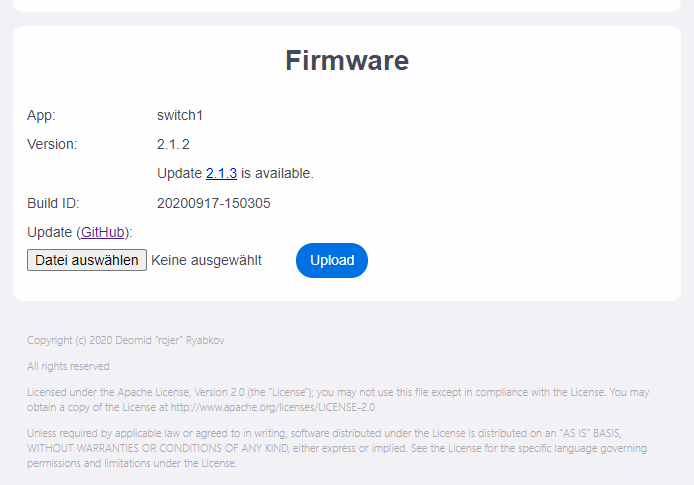
Version check runs for now, but i have to cleanup the code a little bit. Now it's working without jQuery over Github-API with less than 1kb of code. If it finds a newer one, the new Version-no. is already the direct download link, also over GitHub API.
I will upload anbd create a pull-request when the next stable version is live.
schemhad
on 17 Sep 2020
nice, wonder if we could link it with my flash script? ie tell It the location of the script on local machine, get a button to run the script locally to flash the update. and get the script to refresh the page when done?
or just download the file locally, and then send as a POST request to device.
andyblac
on 17 Sep 2020
not really possible, you can't have webpage run scripts on the client machine.
but really, all you need to do is fetch the file from github and http post it to /update, i'm sure it's not difficult.
@schemhad can you do that?
rojer
on 18 Sep 2020
I've created a pull request with just the simple check for now. We can optimize it and add more function after integration.
schemhad
on 19 Sep 2020
@schemhad i have expanded on your recent change and have automatic upload basically working.
slight problem is, we can't use GitHub URLs due to CORS restrictions, so we'll need to use urls from my site that sends the required header. but that's no big deal.
rojer
on 28 Sep 2020
added update check and automated install, and a button to revert to stock firmware.
rojer
on 28 Sep 2020
Related issues
 cschildhorn
·
7Comments
andyblac
·
12Comments
cschildhorn
·
7Comments
andyblac
·
12Comments
 nightout80
·
3Comments
nightout80
·
3Comments
 Leo-W536
·
11Comments
Leo-W536
·
11Comments
 Snekatis
·
4Comments
Snekatis
·
4Comments
Most helpful comment
the device cannot fetch firmware remotely due to free mongoose os license conditions.
what we can do is as @andyblac suggested, have firmware fetched by browser via javascript, using HTTPS and all, and then send as a POST request to device.