Shelly-homekit: Shelly 2.5 as roller shutter?
Hello
Congratulations! I was waiting for a firmware for using only home kit, now I'm using homebridge and a shelly plugin.
If I install this firmware... Will I be able to configure my shelly 2.5 as a roller shutter in homekit?
Thanks
 realguarroman
All 223 comments
Like for this , I’m also need it
 macguru341
on 8 Feb 2020
macguru341
on 8 Feb 2020
it's a pretty big feature, no ETA.
if anyone is willing to contribute, PRs welcome.
 rojer
on 8 Feb 2020
rojer
on 8 Feb 2020
I do not yet know Mongoose, I am a python coder, but I am willing to learn. once I get setup so I can build / flash the fun begins 😄.
@rojer do you have a discord server so we can chat direct ?
 andyblac
on 8 Feb 2020
andyblac
on 8 Feb 2020
most of your questions will probably be general mongoose os dev questions, you can use https://gitter.im/cesanta/mongoose-os
i'm hanging out there, and there are other folks that may be able to help
rojer
on 8 Feb 2020
thanks I'll take a look.
andyblac
on 8 Feb 2020
Hi, again great work, is there any ETA on Shelly 2.5 for shutter?
macguru341
on 27 Feb 2020
it's the first thing on my list, but haven't had the time yet
rojer
on 27 Feb 2020
@rojer
Hi! GREAT WORK! Thank you!
It would be great if it would soon be possible to use SHELLY 2,5 as a shutter switch in HomeKit. May I give you some money, maybe it will be faster? :-) :-) :-)
Thank you! BR, Patrick
 PatrickHrdl
on 8 Mar 2020
PatrickHrdl
on 8 Mar 2020
tell me in more detail, how is your setup wired?
rojer
on 8 Mar 2020
Currently I have not yet installed the SHELLY 2.5.
I have a Rollershutter double switch. (With mechanical interlock)
One switch for UP, the other for DOWN.
What else do you want to know?
It should work like the SHELLY firmware, but for HomeKit.
The SHELLY takes the switch impulse and then drives itself (after calibration) completely down or up. Or even a percentage setting is possible.
PatrickHrdl
on 8 Mar 2020
i am not familiar with how shutters work, so i have all sorts of questions, for example - i assume one output is used to close and the other is used to open, but should output stay on or just produce a single pulse? if it should stay on, for how long?
rojer
on 9 Mar 2020
Yes One to Close and one to Open.
I think (!) the SHELLY 2,5 Makes the calibration and than knows how long (in seconds) to close and open.
Liebe Grüße,
Patrick Hrdliczka
+43 676 / 76 76 706
[email protected]
Am 09.03.2020 um 10:42 schrieb Deomid Ryabkov notifications@github.com:
i am not familiar with how shutters work, so i have all sorts of questions, for example - i assume one output is used to close and the other is used to open, but should output stay on or just produce a single pulse? if it should stay on, for how long?—
You are receiving this because you commented.
Reply to this email directly, view it on GitHub, or unsubscribe.
PatrickHrdl
on 9 Mar 2020
Maybe this video could help https://www.youtube.com/watch?v=fhp8DooeguI&list=PLl9nrhAAwWskc4jQxhlaedn0M57QOu_yj
It seems that there are two variables storing the amount of time used for open and close the shutters.
In the video they use the app Eve for adjusting this values and more things
realguarroman
on 9 Mar 2020
Shelly 2 & 2.5 stock firmware has got different types of open / close working time:
1) calibration - use power consumption in order to determine the open / close working time.
2) manual setup open / close working time.. (in seconds)
Most important feature is the "interlock", so you can use relay1 (open) or relay2 (close) but not both at the same time..
 eurich
on 10 Mar 2020
eurich
on 10 Mar 2020
But with one and the Same Button in HomeKit and also with the percentage of the opening:)
Liebe Grüße,
Patrick Hrdliczka
+43 676 / 76 76 706
[email protected]
Am 10.03.2020 um 10:50 schrieb Thorsten Eurich notifications@github.com:
Shelly 2 & 2.5 stock firmware has got different types of open / close working time:calibration - use power consumption in order to determine the open / close working time.
manual setup open / close working time.. (in seconds)
Most important feature is the "interlock", so you can use relay1 (open) or relay2 (close) but not both at the same time..—
You are receiving this because you commented.
Reply to this email directly, view it on GitHub, or unsubscribe.
PatrickHrdl
on 10 Mar 2020
upup :=) Need the funktion :)
 Thotty1986
on 19 Mar 2020
Thotty1986
on 19 Mar 2020
Maybe this video could help https://www.youtube.com/watch?v=fhp8DooeguI&list=PLl9nrhAAwWskc4jQxhlaedn0M57QOu_yj
It seems that there are two variables storing the amount of time used for open and close the shutters.
that's right. and they probably use current sensor for auto learning - when end is reached and shutters stop moving, current consumption will go up significantly.
In the video they use the app Eve for adjusting this values and more things
unfirtunately, i am very short on spare time now, so no promises...
rojer
on 19 Mar 2020
Can i help you with Money die programming Roller Shutter? :)
PatrickHrdl
on 23 Mar 2020
at this point i think the biggest barrier for me personally is just not having the hardware and not being familiar with it.
can someone suggest what i can buy that would be representative of what's out there in the field?
if someone is willing to contribute hardware for me to work with, that would be even better.
rojer
on 23 Mar 2020
I will support you with € 200,- if you can offer me a HomeKit Firmware for Roller shutter
(Like SHELLY 2.5 over homebridge!) :)))
Liebe Grüße,
Patrick Hrdliczka
+43 676 / 76 76 706
[email protected]
Am 23.03.2020 um 18:35 schrieb Deomid Ryabkov notifications@github.com:
at this point i think the biggest barrier for me personally is just not having the hardware and not being familiar with it.
can someone suggest what i can buy that would be representative of what's out there in the field?
if someone is willing to contribute hardware for me to work with, that would be even better.—
You are receiving this because you commented.
Reply to this email directly, view it on GitHub, or unsubscribe.
PatrickHrdl
on 23 Mar 2020
On Amazon (https://www.amazon.de/gp/offer-listing/B085HKH8LR/ref=sr_1_6?s=diy&search-type=ss&keywords=HomekitBG&qid=1585689734&sr=1-6) you can buy a shelly 2.5 with the HomeKit firmware as a roll shutter. But nowhere I can find the firmware to download or find the right settings to set it as a shutter, maybe one of you can help me.
 ghost
on 1 Apr 2020
ghost
on 1 Apr 2020
Hi all,
Thank you very much for the flash software. This is great work.
I am really interested in this development too. Unfortunately I am not a software expert.
Maybe this video could help https://www.youtube.com/watch?v=fhp8DooeguI&list=PLl9nrhAAwWskc4jQxhlaedn0M57QOu_yj
It seems that there are two variables storing the amount of time used for open and close the shutters.that's right. and they probably use current sensor for auto learning - when end is reached and shutters stop moving, current consumption will go up significantly.
There is another video in German to show the usecase. https://m.youtube.com/watch?v=h0uxqDSpTz8
I think the endpositions (fully opened and fully closed) of the Roller are also determined by the motor of the roller shutter. So this feature could be implemented in a second step.
The main thing is to implement the feature that HomeKit detects Shelly 2.5 as a roller shutter and not as two separate switches. So the interlock would be Implemented to save the life of the roller shutter motor.
Thanks for your efforts.
 BlancoDeMallloca
on 7 Apr 2020
BlancoDeMallloca
on 7 Apr 2020
I'm currently working on this. For now I got the interlocking bit already done, so I already use it as the two switches. Before the second relay is turned on, the first is turned back off.
As for now I'm working on thermal protection, calibration and full positioning support like the ikea window blinds have. As this is more a side project there is no clear timeline.
 kaeferfreund
on 12 Apr 2020
kaeferfreund
on 12 Apr 2020
Wow! This would be very nice!
Liebe Grüße,
Patrick Hrdliczka
+43 676 / 76 76 706
[email protected]
Am 12.04.2020 um 17:59 schrieb Manuel notifications@github.com:
I'm currently working on this—
You are receiving this because you commented.
Reply to this email directly, view it on GitHub, or unsubscribe.
PatrickHrdl
on 12 Apr 2020
Cool! Thank you very much. This is awesome.
Will there be a pre release of the interlock? I am a little bit worried to „schredder“ my roller shutter if I am switching on both Shelly 2.5 channels at the same time
BlancoDeMallloca
on 12 Apr 2020
Currently I'm testing the software interlock with my own shutters, no problems so far. As development takes some time and @rojer provided such a great foundation, he should def. receive the compensation for his mos development claimed in his licensing program. This is why I'm still figuring out how and when the whole thing will be released. But I' glad to see that there is interest in this solution :)
kaeferfreund
on 12 Apr 2020
thanks for the kind words. yeah, there is definitely interest, as you can see.
go ahead, get it working and send in a PR.
rojer
on 12 Apr 2020
Good morning rojer,
Good morning kaeferfreund,
Once again thanks for the great efforts you provide within this project.
I saw that there had been an update tonight. Is there any release plan for the shutter functionality?
Thanks
BlancoDeMallloca
on 19 Apr 2020
no set timeline - testing works fine so far, but I couldn't find any time to work on this project since last week
kaeferfreund
on 19 Apr 2020
If you are interested, I can help you testing if you want
Thotty1986
on 20 Apr 2020
You guys did an amazing job with this!! Awesome 👍
Can this feature be prioritized? for my end will make a lot of diference !!
At this moment I am using the API provided by Shelly Cloud on shortcuts app.
you can take a look at this documentation, I don't know if it helps: https://shelly.cloud/support/shelly-cloud-api-access/
 pintopaulofrancisco
on 3 May 2020
pintopaulofrancisco
on 3 May 2020
For those who are impatient you can always this firmware from another great project: https://github.com/RavenSystem/esp-homekit-devices Been working everyday for the last 2 months without any issues, works natively on Shelly 2.5 without the need for a hub.
 shanghaix
on 4 May 2020
shanghaix
on 4 May 2020
Looks great but I would prefer a easy Firmeware to put on the device
Thotty1986
on 5 May 2020
By all means, feel free to make a commit and add the feature. As for myself, I don’t know that much about coding, I’m going back to my previous post, while the contributors of this firmware are hard at work adding features voluntarily, if you are impatient I recommend trying the firmware I linked my previous post.
shanghaix
on 5 May 2020
@shanghaix : How can the firmware from https://github.com/RavenSystem/esp-homekit-devices be installed on a shelly 2.5?
 Sursulapitschi
on 17 May 2020
Sursulapitschi
on 17 May 2020
thanks for the kind words. yeah, there is definitely interest, as you can see.
go ahead, get it working and send in a PR.
Hi @rojer
I see a hight interest in the roller functionality and one of the most wanted ones. I know it might be complex but why do not do it easy in the first wave? One idea would be to be able to select the time it works instead of using the “auto” detection as the official Shelly firmware. This will allow you to say for example it takes 8 seconds to close and 12 to open. I completely lack the knowledge of the programming but just an idea of what could be an “easy” way ;)
Thanks for all the work done, this is a great project.
 Borja90
on 17 May 2020
Borja90
on 17 May 2020
@shanghaix : How can the firmware from https://github.com/RavenSystem/esp-homekit-devices be installed on a shelly 2.5?
You need to flash using a serial adapter, I recommend using wires from an Ethernet cable as the GPIO holes are very small in the shelly 25 and standard DuPont wires will not fit. The flashing process is very straightforward and doesn’t take more than 2min.
shanghaix
on 17 May 2020
@shanghaix : ¿Cómo se puede instalar el firmware de https://github.com/RavenSystem/esp-homekit-devices en un shelly 2.5?
Necesita flashear con un adaptador en serie, le recomiendo usar cables de un cable Ethernet ya que los orificios GPIO son muy pequeños en el shelly 25 y los cables DuPont estándar no encajan. El proceso de flasheo es muy sencillo y no lleva más de 2 minutos.
He looks knowledgeable could help @rojer to program the roller.
My programming knowledge is nil. If not it would help to implement it and I do not have a roller.
 Jaguaza
on 17 May 2020
Jaguaza
on 17 May 2020
+1 😀
 prrtzt
on 19 May 2020
prrtzt
on 19 May 2020
i can try to help programming if you want to
Thotty1986
on 19 May 2020
i can try to help programming if you want to
please, by all means! you'll be a hero :)
rojer
on 19 May 2020
First of all thanks for your works, this project is great. Shelly at this time seems the only small devise to bring roller shutter support via wifi without any bridges for Z-Wave and Zigbee. So i'm in the line for this feature too ))
As it was mentioned — main thing is the interlock to be sure there won't be voltage on both outputs at the same time. But also many motors have it's own limiters for up and down positions, that prevents then from rotating even if the on or off signal (voltage) continue. So as a suggestion for some kind of mvp you can make only "open" and "closed" modes than just turns one of the relays and keeps it on, cause the motor will stop by itself anyway. Just an idea...
 Patisone
on 19 May 2020
Patisone
on 19 May 2020
When it is in HomeKit.... with the „dummy“ switches (See issue #9 and issue #74)
The time can be set in an HomeKit Automation. (When Button x is pressed, then switch on relay switch for 10 seconds and then switch off)
Only the interlock must be set in the Shelly web gui, when the roller shutter mode is active.
 Pixel-Chris
on 20 May 2020
Pixel-Chris
on 20 May 2020
Thank you very much for bringing Shelly to Homekit. All your work is highly appreciated!
As many others I am definitely in the queue for the roller shutter support. I urgently need it.
Unfortunately I‘m a total noob when it comes to coding, but I would contribute or pay 200 bucks for a fully configurable Shelly HK firmware, too.
@all Let‘s collect some money for the project.
 Lasso77
on 18 Jun 2020
Lasso77
on 18 Jun 2020
@rojer You can create a PayPal MoneyPool where we can collect money for the rolling shutter integration.
 alexanderbjelos
on 18 Jun 2020
alexanderbjelos
on 18 Jun 2020
i have test hardware now and starting to work on this.
question to everyone: is there a convention which channel to use for opening and closing?
i.e., channel 1 for output, channel 2 for close or vice-versa?
rojer
on 14 Jul 2020
i have test hardware now and starting to work on this.
question to everyone: is there a convention which channel to use for opening and closing?
i.e., channel 1 for output, channel 2 for close or vice-versa?
Hello @rojer, I use the first channel to open and the second one to close. An option to change the channel (when someone reversed the cables) would be nice.
Alex
alexanderbjelos
on 14 Jul 2020
naturally. just want to understand what to choose as the default.
rojer
on 14 Jul 2020
Hi rojer,
the default wiring scheme is displayed in the following graphic:
https://forum.creationx.de/index.php?attachment/3332-shelly2-5-rollladenschaltung-png/
SW1 open
SW2 close
However as Alex already mentioned, it would be great to change the default.
Thanks for your effort.
Robert
BlancoDeMallloca
on 15 Jul 2020
If you need somebody to test, please let me know I will do my best to help here .
Thotty1986
on 16 Jul 2020
Is it possible to join the beta test? I have a lot of experience with HomeKit and roller shutter controls.
 hejsiri
on 31 Jul 2020
hejsiri
on 31 Jul 2020
i'm still fighting with #30, i will let you know once i have something to test.
for now, i'm wondering how many are using motors with built-in stop switches and how many would like to use shelly inputs as such?
i have a bunch of these to play with, they have stop switches built-in.
rojer
on 31 Jul 2020
i'm still fighting with #30, i will let you know once i have something to test.
for now, i'm wondering how many are using motors with built-in stop switches and how many would like to use shelly inputs as such?
i have a bunch of these to play with, they have stop switches built-in.
would I be able to control the blind without a physical switch ?, how would these work within homekit, ie a % open, how would HomeKit know when they are open or closed ?
andyblac
on 31 Jul 2020
You can make it by time. But that is not recommend.
Normal is, that the end switch is integrated bei the Rollo Motor.
If you have Raffstors there is a physical switch.
Thotty1986
on 31 Jul 2020
would I be able to control the blind without a physical switch ?, how would these work within homekit, ie a % open, how would HomeKit know when they are open or closed ?
it would be represented in homekit as a "Window Covering" device. partial opening will be judged by movement time, we'll know full movement time after calibration.
so my current thinking is that we should expect end switch to be integrated into the circuit, so we expect current to drop to 0 when a limit is reached in either direction.
we will also have a configurable timeout so movement will stop after preconfigured number of seconds no matter what.
inputs will be used as optional external open/close controls.
rojer
on 31 Jul 2020
I now have a motorized roller shutter with mechanical toggle switch with two buttons. Line always stays "on" on the switch and motor, since it's the motor that stops when it reaches the end.
I'm buying a shelly 2.5 and a replacement momentary (push) switch with two buttons.
Quick questions:
- would it still work with the mechanical toggle? How would it interpret the current always on in the switch? what if I moved the shutters through homekit, how would then the work with the mechanical switch?
- the push buttons only has line "on" for as long as I push. can there by some "intelligent" action for short push (always keeps the line on to the motor) and long push (line "off" after the use let's go of the button)?
Thank you and keep up the great work!
 pivale
on 3 Aug 2020
pivale
on 3 Aug 2020
hi mate good job on firmware,
any news about the roller shutter?
its hard to control the roller in a switch mode...
 yehuda2525
on 6 Aug 2020
yehuda2525
on 6 Aug 2020
still ENOTIME, attending to more urgent matters. this is first on my list to do.
rojer
on 7 Aug 2020
good job Rojer!, look at this video, probably you have seen it already, there is a firmware outhere call multy accessory homekit, and it looks like is programmed thru EVE app and you get the response as well in homekit:
https://www.youtube.com/watch?v=_hFVtwb0wug&t=546s if you follow up you can also find the second part and there is also a firmware installation explanation. But I am not so expert to install this firmware but could give a clue to the topic of of roller shutter and garage door-
 Ludelag
on 7 Aug 2020
Ludelag
on 7 Aug 2020
Any progress yet...
 fahadalzoabi
on 21 Aug 2020
fahadalzoabi
on 21 Aug 2020
working on it. when planning the implementation, i realized that i need to do significant refactoring to avoid creating even more of a mess. i'm re-writing existing implementation in proper c++ that will make rearranging parts (e.g. combining two switches into a roller-shutter service) simpler.
rojer
on 21 Aug 2020
working on it. when planning the implementation, i realized that i need to do significant refactoring to avoid creating even more of a mess. i'm re-writing existing implementation in proper c++ that will make rearranging parts (e.g. combining two switches into a roller-shutter service) simpler.
When doing it, don't forget to add a pause when quickly switching from one direction to another. I was using the Ravencore firmware just before it was implemented in code, and fried one roller shutter because it hadn't the pause to let the motor stops completely before changing the direction.
;)
 greensouth
on 2 Sep 2020
greensouth
on 2 Sep 2020
@rojer thanks again for all your hard work. Also hoping to use Shelly 2.5 as roller-shutter.
On a side note, when I saw this "HomekitBG" person selling Shelly 2.5 with HomeKit support I thought it was a standard Shelly 2.5 with THIS firmware, but turns out they've got a different firmware. You think they developed it themselves?
 michaelnozbe
on 6 Sep 2020
michaelnozbe
on 6 Sep 2020
i have no idea but don't see why not.
rojer
on 6 Sep 2020
Is there anywhere to Download for Testing ?
Thotty1986
on 7 Sep 2020
Maybe the firmware that "HomekitBG" is using is HAA: https://github.com/RavenSystem/esp-homekit-devices
It can be configured as roller shutter device.
 mat130780
on 7 Sep 2020
mat130780
on 7 Sep 2020
I think the main feature everyone likes about the mongoose firmware is the ability to flash and update over the air. This is a great feature especially for me as a technical noob.
Hope to have the roller shutter implemented soon. This would be a great feature to make the firmware #1 firmware available
BlancoDeMallloca
on 7 Sep 2020
I think the main feature everyone likes about the mongoose firmware is the ability to flash and update over the air. This is a great feature especially for me as a technical noob.
Hope to have the roller shutter implemented soon. This would be a great feature to make the firmware #1 firmware available
Exact! that is why I love this firm. When it stops working, just go to the web interface and reboot it, voila! everything working again. Ravencore and HAA is awesome, but when it gets stuck, you have a problem, specially if it is not installed in an accessible place.
Can't wait for the roller shutter feature!
greensouth
on 8 Sep 2020
Any progress here? I am also desperate for the roller shutter feature...
mat130780
on 19 Sep 2020
there is plenty of progress (look at the commit log), though it may not be visible.
as i said in https://github.com/mongoose-os-apps/shelly-homekit/issues/5#issuecomment-678505831, i had to do refactoring before adding another accessory type. i ended up rewriting pretty much entire app, but this is now complete and i'm pretty happy with the result.
roller shutter is next in line, this time for real.
rojer
on 19 Sep 2020
there is plenty of progress (look at the commit log), though it may not be visible.
as i said in #5 (comment), i had to do refactoring before adding another accessory type. i ended up rewriting pretty much entire app, but this is now complete and i'm pretty happy with the result.
roller shutter is next in line, this time for real.
So happy to read that!
greensouth
on 19 Sep 2020
there is plenty of progress (look at the commit log), though it may not be visible.
as i said in #5 (comment), i had to do refactoring before adding another accessory type. i ended up rewriting pretty much entire app, but this is now complete and i'm pretty happy with the result.
roller shutter is next in line, this time for real.
Great!
Thanks @rojer
 juancitomadrid
on 20 Sep 2020
juancitomadrid
on 20 Sep 2020
i've created a separate branch for this work and have pushed the first commit.
those who are curious can follow development here.
once i have something working to test, i will be cutting builds and posting them here.
rojer
on 23 Sep 2020
Nice! thank you
Ludelag
on 23 Sep 2020
First signs of progress: https://www.youtube.com/watch?v=oQQQxtC7kP8 (as of https://github.com/mongoose-os-apps/shelly-homekit/commit/4fd5549c7e33acef2b2d8a2a7fb569f1999908fc).
rojer
on 24 Sep 2020
Thumbs up! Great work!
Am 24.09.2020 um 03:34 schrieb Deomid Ryabkov notifications@github.com:
First signs of progress: https://www.youtube.com/watch?v=oQQQxtC7kP8 (as of 4fd5549).—
You are receiving this because you commented.
Reply to this email directly, view it on GitHub, or unsubscribe.
Lasso77
on 24 Sep 2020
First signs of progress: https://www.youtube.com/watch?v=oQQQxtC7kP8 (as of 4fd5549).
YAY!!!
Don't forget (as previous experience with the superb! work from Ravencore firmware) that:
- Need a delay when suddenly changing the direction to not break the motor (on every start and stop).
- The calculations for percentage when using rolling shutters (like the ones used in Spain) is non-linear. As it rolls, it becomes bigger and every turn it does, it grabs more rolling shutter per round, so it accelerates. The opposite when closing. The calculation is available at HAA's github so you will need to provide a method (maybe in the web interface) which would allow to set a user defined correctionValue:
HomeKit Position = motorPosition / (1 + ((100 - motorPosition) * correctionValue * 0.0002))
Great Work! We are all waiting! ;)
greensouth
on 24 Sep 2020
First signs of progress: https://www.youtube.com/watch?v=oQQQxtC7kP8 (as of 4fd5549).
YAY!!!
Don't forget (as previous experience with the superb! work from Ravencore firmware) that:
- Need a delay when suddenly changing the direction to not break the motor (on every start and stop).
yes, this is already the case: direction won't change without going through a complete stop.
- The calculations for percentage when using rolling shutters (like the ones used in Spain) is non-linear. As it rolls, it becomes bigger and every turn it does, it grabs more rolling shutter per round, so it accelerates. The opposite when closing. The calculation is available at HAA's github so you will need to provide a method (maybe in the web interface) which would allow to set a user defined correctionValue:
HomeKit Position = motorPosition / (1 + ((100 - motorPosition) * correctionValue * 0.0002))
good point, thanks
Great Work! We are all waiting! ;)
rojer
on 24 Sep 2020
First signs of progress: https://www.youtube.com/watch?v=oQQQxtC7kP8 (as of https://github.com/mongoose-os-apps/shelly-homekit/commit/4fd5549c7e33acef2b2d8a2a7fb569f1999908fc).
Yes! Plenty of progress ! How could be set the calibration of the Shelly according to the motor ?
Ludelag
on 24 Sep 2020
calibration is already implemented. the way it works is:
- activate output 1 until full stop (no current consumed)
- ask user: is it fully open or fully closed? this way we know whether 1 is connected to open or close motor, 2 is then the opposite
- activate output 2, move until no current and note the time.
- when stopped, note the time. it will be used to calculate relative position.
- calibration done, move to 50% position.
rojer
on 24 Sep 2020
calibration is already implemented. the way it works is:
activate output 1 until full stop (no current consumed)
ask user: is it fully open or fully closed? this way we know whether 1 is connected to open or close motor, 2 is then the opposite
activate output 2, move until no current and note the time.
when stopped, note the time. it will be used to calculate relative position.
calibration done, move to 50% position.
Great¡! I can't wait to taste it already. Thank you very much @rojer
Ludelag
on 24 Sep 2020
Great work, thank you!! I will also test it from the first commit on.
However it must be ensured that never ever both relais switches (UP and DOWN) can be activated simultaneously. Is it already possible to actuate the roller shutter with external switches?
mat130780
on 24 Sep 2020
Sorry for the noob question,
But if I flash the firmware from the firs page is it now a roller shutter? Or I have to do something else?
yehuda2525
on 24 Sep 2020
no, there's no release with roller shutter feature yet. i need to tie up some loose ends and we can start testing. i will be posting builds here first, before it goes to release.
for now, i'm going to ignore the issue of relative position accuracy - ok, so 50% target will actually be 40 or 60 in reality, no big deal (or is it? we'll see). i'll make sure 0 and 100 work though.
rojer
on 24 Sep 2020
as i'm working on control from external inputs, question for all:
what kind of external control should we support?
we have an input for each output, so for now i'm implementing a simple scheme: input 1 activates output 1 (whether it's open or close), input 2 activates 2. output will be activated while inpout is activated, the effect being that to fully open or close the curtain user will need to hold the switch in the on position for the entire duration. as soon as input is released, the curtain stops moving. a check will be made to ensure that engaging both inputs will not lead to both outputs be enabled at the same time.
would this be enough? is this a common setup? do we need single button control (e.g. short press up, long press down or some such).
rojer
on 24 Sep 2020
We need input for Toggle-Switches also. In my Setup I have Switches where I can toggle up and down, and if nothing is pushed, the Switch stays in the middle. So one push starts, second push stops. Single Button setup is rather unusual, I think.
 chstoll
on 24 Sep 2020
chstoll
on 24 Sep 2020
Switches where I can toggle up and down, and if nothing is pushed, the Switch stays in the middle.
that's two inputs you are describing, so it's ok. does the switch stays on for the curtain to keep moving?
rojer
on 24 Sep 2020
No, it is only an impulse. In german it is called „Taster“, I don't know the correct translation. At the moment, I'm using z-wave modules from fibaro, I could take a short video to clear things up, if you like.
chstoll
on 25 Sep 2020
yes, please tell me about your setup.
rojer
on 25 Sep 2020
first alpha build that can be tested: https://rojer.me/files/shelly/2.2.0-alpha1/
Important: This is only suitable for motors with end switches that turn themselves off. Currently firmware has no overcurrent detection (though it's planned). In particular, I am testing with this Solroyal 120W motor. if your setup is different, tell me about it in the comments.
now, what to expect:
- a new "enable wc" button in the web ui. click it.
- after that, switch tiles will disappear and a new "window" tile will appear in both web ui and home app.
- control from the home app won't work until calibrated, read on (in the future the tile will not appear until properly calibrated).
- control with physical inputs in uncalibrated mode is possible. each input will simply turn on the corresponding output.
- calibration will ask you to choose whether curtain is fully open or fully closed after the first phase (as described here).
- calibration can be reset by disabling WC mode and enabling it again.
- inputs work as described here.
- input always override HAP actions. if the curtain was moving in one direction and opposite command came from the physical switch, it will override the HAP command.
- care was taken to never engage both outputs at the same time or in quick succession. changes in movement direction should always go through a complete stop, l=please report if it's not the case.
quick video demo: https://www.youtube.com/watch?v=W5uPfKGIhCg
please try it and let me know how it goes.
rojer
on 25 Sep 2020
yes, please tell me about your setup.
I took a short video: https://youtu.be/ciznJiDjT9c
At the end you can see the calibration-process.
chstoll
on 25 Sep 2020
as i'm working on control from external inputs, question for all:
what kind of external control should we support?
we have an input for each output, so for now i'm implementing a simple scheme: input 1 activates output 1 (whether it's open or close), input 2 activates 2. output will be activated while inpout is activated, the effect being that to fully open or close the curtain user will need to hold the switch in the on position for the entire duration. as soon as input is released, the curtain stops moving. a check will be made to ensure that engaging both inputs will not lead to both outputs be enabled at the same time.
would this be enough? is this a common setup? do we need single button control (e.g. short press up, long press down or some such).
Hi have two setups at home at the moment:
In my living room, I already have a shelly 2.5 working with stock firmware and i use it with push buttons (momentary), one to open and another to close. On single press/push/impulse will start the shutters to move and a second push on the same button will stop movement.
In my other rooms I have no shellys and I use toggle buttons, one to open and another to close. When toggling, the button will remain pressed (as will power) and movement will start until button is turned off or shutter ends it's course.
In my opinion, it should support at least two options:
- momentary (for push buttons), single press/push/impulse will start the shutters to move and a second push on the same button will stop movement. as bonus, if user long presses it should behave as you described and stop as soon as the user let go of the button.
- edge (for toggle switches), to make sure whatever buttons is pressed/switched, it always starts a movement opposite to the previous one (this is to make it wife proof in the case of the button pressed is the "close" button, but you opened it on Home app, and to make it work you would have to untoggle and toggle back the close button).
If not too much work, maybe toggle also could be good idea, always considering what the switches are for (not so wife friendly, but at least it's consistent).
pivale
on 25 Sep 2020
sorry for the ignorance.
I want to do a test.
This would be the correct way to setup?
juancitomadrid
on 25 Sep 2020
About the logic — scheme in pivale's comment is absolutely right. I think there's usually an option in UI, where you choose your switch type, so the firmware knows, with logic to use.
I've made a short video for better illustration — black one is classic switch and white is a button type: https://youtu.be/vN0WvdcHquA
Also about toggle switches — it's a usual case, that you toggle it in a needed direction and just go away, so the switch remains pressed and the roller stops in it's edge position. So there will be a case, when you want to open the window from app while the switch remains pressed in "close" direction, so last command should overwrite physical switch.
Patisone
on 25 Sep 2020
sorry for the ignorance.
I want to do a test.
This would be the correct way to setup?
This is also my setup.
Thank you very much for your effort on this issue.
BlancoDeMallloca
on 25 Sep 2020
I have a legrand shutter switch, I recorded a video of operation, I hope it helps.
https://youtu.be/v4xl1vss_y0
fahadalzoabi
on 25 Sep 2020
I have a legrand shutter switch, I recorded a video of operation, I hope it helps.
https://youtu.be/v4xl1vss_y0
I also have this type of switch,
There are 2 types of switch
1.you have to hold the button to activate
- One press to button to activate
yehuda2525
on 25 Sep 2020
sorry for the ignorance.
I want to do a test.
This would be the correct way to setup?
yes, this is correct.
rojer
on 25 Sep 2020
IMHO the best is the Version from pivale!
Momentary:
Short press and it moves to the end position
Short press (same button) it stops
Short press (other button) it moves to the end of the other direction
Long press it moves until you release
Optional double press
Double press and the roller shutter will move to a predefined position (a) (for example 95% - so that there are only the „holes“ of the shutter open)
Double press on the other button it will move to an other predefined position (b) (for example 50%)
Toggle:
Roller shutter moves until the toggle switch is released
A special calibration mode (without webui) would also be very nice
And one question:
Is there a Version planed, where the real switch is detached and a stateless switch will be announced to HomeKit?
Then eventually all specials... (short, double, longpress) can be realised in the homeapp
But I think for the shutter mode real hardware switches are better.
Pixel-Chris
on 25 Sep 2020
ok, thanks everyone for the comments.
@fahadalzoabi @yehuda2525 so these are toggle switches that stay closed while movement is happening. current behavior in alpha1 works like that, so it will do fine for you. this also described @pivale's second setup.
here's the plan for inputs:
1) i will implement momentary input mode with two buttons as @pivale and @Pixel-Chris describe.
2) i will also implement single-input edge mode, like what @pivale described, and to also mimick the behavior of the tile in the home app (it reverses direction when pressed while the curtain is moving).
A special calibration mode (without webui) would also be very nice
what would that be? can you elaborate?
Is there a Version planed, where the real switch is detached and a stateless switch will be announced to HomeKit?
yes, this can be done easily.
rojer
on 25 Sep 2020
input controls aside, i'd like feedback on calibration, movement and positioning for alpha1.
rojer
on 25 Sep 2020
A special calibration mode (without webui) would also be very nice
what would that be? can you elaborate?
Did you watch my video (https://youtu.be/ciznJiDjT9c) till the end? There you can see how the calibration mode works on the z-wave modules, this could be a possible solution.
chstoll
on 25 Sep 2020
@chstoll oh, my apologies. now i have. it's possible to trigger calibration, but we also ask the user about the direction, that is not as easy to get.
for now i think calibration via web ui is fine, after all, the user will have to interact with it at least once - to set up HAP pin and enable roller shutter mode.
one question: when the curtain is moving, what does pressing the same button again do?
rojer
on 25 Sep 2020
For me (momentary switch with Schellenberg motor), this first alpha build is already working fine.
- calibration worked fine as per your video
- movement directions are correct (my Shelly is wired like this ), in Home app and with external switch
- position shown in Home app is not quite correct yet, the percentage is too low. That will have to be solved with a correction factor.
- The states "closed", "open", "closing" and "opening" are all shown correctly in the Home app.
For now it is already working better than my ioBroker/Yahka bridge solution. Thanks a lot!
One more feature request: In the Shelly app, we have the option "swap inputs". The Shellys in my home are wired in a way that I had to activate this option. The reason is that they changed the UP/DOWN behaviour (for external swichtes) in some older firmware version, so I had to wire the first Shellys vice versa, later I did it as per above link. Instead of having to dismount and re-wire everything, it would be nice to have a "swap inputs" option in the firmware. I am sure I am not the only one with this issue.
EDIT: I think I found a small bug. When I play around with very small steps (e.g. change from 70% open to 72% open, then back), the shutter is not moving and the Home app gets confused.
mat130780
on 25 Sep 2020
One more thought about calibration — you can just dedicate, that input/output one is always for up, and input/output 2 is always for down. That will remove the need to select it in UI. In fact many specialised controllers come with dedicated contacts for up and down, marked on their bodies. For example: https://katalog.gira.de/en/datenblatt.html?id=699157
Patisone
on 25 Sep 2020
After installing,calibration works great but for example in home app if I switch to 10% in real it's like 40%
yehuda2525
on 25 Sep 2020
In my oppinion thats normal because you forget the closing of the lammelas
Thotty1986
on 25 Sep 2020
Alpha1 work fine.
Notes:
When it's going up or down, a press should stop it, but what it does is change the direction.
Test video
juancitomadrid
on 25 Sep 2020
Can You sent me the Code so I can have a look at it ?
It should normely be easey to stop by tabbing,. when you remember you are moving
Thotty1986
on 25 Sep 2020
When it's going up or down, a press should stop it, but what it does is change the direction.
yeah, i noticed that too. you'd think so, right? but the home app is quite clear: it wants us to go back.
when you tap a tile first, it sends target position either 0 or 100, i.e. either close fully or open fully.
when you tap it again while it's moving, it sends the opposite, 100 or 0 respectively.
i guess we should not take it literally then, and interpret reversal as "stop right there".
ok, i'll do it in alpha2.
Can You sent me the Code so I can have a look at it ?
It should normely be easey to stop by tabbing,. when you remember you are moving
roller shutter development is happening on this branch: https://github.com/mongoose-os-apps/shelly-homekit/tree/rsh
rojer
on 25 Sep 2020
EDIT: I think I found a small bug. When I play around with very small steps (e.g. change from 70% open to 72% open, then back), the shutter is not moving and the Home app gets confused.
that's because there's a "noise threshold": we won't start moving if we are within 2% of the target position.
but i see why the home app can be confused by this, i'll take a look. thanks for reporting!
rojer
on 25 Sep 2020
After installing,calibration works great but for example in home app if I switch to 10% in real it's like 40%
at the end of calibration it's supposed to go to 50%. does it do that? or is it off as well?
rojer
on 25 Sep 2020
Which Programm do you use to Programm ?
Thotty1986
on 25 Sep 2020
@Thotty1986 read https://github.com/mongoose-os-apps/shelly-homekit/wiki/Development
rojer
on 25 Sep 2020
ok, new build to test: https://rojer.me/files/shelly/2.2.0-alpha2/
changes:
- No more user interaction during calibration, we always assume output 1 is to open, output 2 is close
- Instead, two options are provided: swap inputs and outputs. swapping input without swapping outputs will address @mat130780 's case outlined in https://github.com/mongoose-os-apps/shelly-homekit/issues/5#issuecomment-698889620.
- Fixed HAP target position setting interpretation: when told to do a 180 while moving, instead we will stop, as requested by @juancitomadrid . new behavior is better, but still somehow not completely intuitive to me. suggestions welcome.
- Fixed tiny target position changes, now device will react to 1% changes as well and shouldn't leave Home in a confused state.
No external input control changes in this build, i need some more time to think them over.
rojer
on 25 Sep 2020
I have just installed and tested alpha2, well done! Some feedback:
- "Swap inputs" and "Swap outputs" is working as it should. However, directly after activating "swap outputs" there was some strange initial behaviour (Shelly did not execute command from Home app at first).
- Tiny target position changes now work as they should, the Home app is not confused any more.
- About target position interpretation: I agree, it is better now but still not completely intuitive. When only tapping the tile, it is always a "compromise" because the Home app cannot really be sure if you want to open or close (unless it is in the end position). That is probably why the standard behaviour is "1st tap: close", "2nd tap: open" without stop.
So now you implemented it like "1st tap: close", "2nd tap: stop" which is IMHO the best you can get. You could do some crazy things like "1st tap: close", "2nd tap: stop", "3rd tap: open" etc. or make it dependent on the time of the day, but that would become too confusing in my view.
mat130780
on 26 Sep 2020
No external input control changes in this build, i need some more time to think them over.
I would not „overengineer“ it in the first step. Simple start/stop with push buttons (as in my video) suits the most cases, in my opinion. Do we really need an additional „hold the button down and stop on release“ when you can just push twice? Even a direct reverse is a nice to have feature, but not really necessary. If it goes down, push up to stop and a second time to go up again.
chstoll
on 26 Sep 2020
Beta1: https://rojer.me/files/shelly/2.2.0-beta1/
changes:
- Input controls: mimick the two input modes stock firmware provides, i.e. momentary separate up/down and single button tah cycles through up and down via stop.
- Added detached input mode
- Added over-current detection (2x normal power)
- Added obstruction detection (moving for too long without turning off)
- New UI for mode change
i'm pretty happy with this, i think we're close to getting release ready.
please test and let me know.
rojer
on 27 Sep 2020
Thanks. With this beta release, my external buttons are not working correctly any more. I have two separate switches like this one . The shutter moves when I turn the switch, but it should stop when I flip the switch back to its original position, however it keeps on moving and cannot be stopped :-(
mat130780
on 27 Sep 2020
it can be stopped by pressing the same button again.
this is how the stock firmware works and it makes code a bit simpler, so i decided to settle on that.
rojer
on 27 Sep 2020
I have made a short video: https://youtu.be/4_T50e91hN0
The first shutter is working as it should be (Shelly with stock firmware). For the second shutter, the external button does not stop the shutter when pressing it the 2nd time. This is not the normal behavior for these buttons.
mat130780
on 27 Sep 2020
ok, what you have is a separate button mode + momentary button type in the terms that stock firmware uses, what i implemented is separate + toggle.
i actually think their description of momentary and toggle is reversed - description doesn't match the name and disagrees with what they use in the relay mode. ugh.
ok, i need to implement this additional mode.
rojer
on 27 Sep 2020
Great job @rojer! Thank you a lot for investing your personal time on this.
Tested and seems to be working exactly as I expected with my push buttons.
* as bonus, if user long presses it should behave as you described and stop as soon as the user let go of the button.I think that what I mentioned before as a bonus for momentary (long press) could work as normal for toggle, where user "let go" is equivalent to switching off.
pivale
on 27 Sep 2020
@mat130780 added a new "separate, toggle" input mode that should work for you.
@pivale correct, that is covered by the new input mode.
please test https://rojer.me/files/shelly/2.2.0-beta2/
rojer
on 27 Sep 2020
@rojer Well done, I tested it and now it works like a charm! For me the beta2 is already a good replacement for the stock firmware now. The only thing missing is the correction of the % value of the shutter, but that can be fixed later.
mat130780
on 27 Sep 2020
Thanks @rojer !!!
Tested and for me is working perfect!!!
The only thing left to try to fix is the % of aperture.
The problem is that once it is closed, the motor keeps turning until all the slats are completely closed. This counts as a total percentage. This means that "50% open" is actually about 25%.
Is there any way to fix this?
juancitomadrid
on 27 Sep 2020
thanks @mat130780 and @juancitomadrid ! there is a way to fix it of course but i'd like to do it after initial release. we'll create a new issue and come up with a way to express this correction. some cases will need just a linear correction, some will need non-linear calculation... it's not very clear to me at the moment and i'd like to get basic functionality out and then apply polish.
rojer
on 27 Sep 2020
thanks rojer for your work! ;)
I've a separate+toogle with the beta2, and works fine, only on the homekit, if I press on the accessory it goes down, if I press again stop it, and when I press another it goes down again, doesn't go up, only if I enter on it and select a % or 100%.
 Perrako
on 28 Sep 2020
Perrako
on 28 Sep 2020
thanks rojer for your work! ;)
I've a separate+toogle with the beta2, and works fine, only on the homekit, if I press on the accessory it goes down, if I press again stop it, and when I press another it goes down again, doesn't go up, only if I enter on it and select a % or 100%.
What happens when you press the HomeKit button, when it is already completely down?
Pixel-Chris
on 28 Sep 2020
ok, it goes up, and when completely open, goes down. if this is the procedure, it's ok. thanks
Perrako
on 28 Sep 2020
Sorry....
I don’t know the normal behaviour of roller shutters in HomeKit
I only wanted to know, if this works or if it does nothing.
Pixel-Chris
on 28 Sep 2020
I'm asking because on the alpha when press once goes down and if press again goes up. but the actual method it's good for me
Perrako
on 28 Sep 2020
Hey, not sure if this a problem on my setup/wifi or not, so I'm reporting it:
- My shelly2.5 has been rebooting from time to time for no apparent reason. It's currently up for 3 minutes.
- Sometimes I press close on Home, I hear the relay doing something, but nothing happens (the spinning gear appears as if closing) and if I press again it starts opening.
- Physical switches working flawlessly
pivale
on 28 Sep 2020
@Perrako yeah, it "prefers closing": on the way up, it will actually reverse on repeated press and go down, but it it won't reverse on the way down. strange. we (device) don't get any control over that, unfortunately.
@pivale does reboot happens in response to some action or just on its own and you only notice that uptime has reset?
rojer
on 28 Sep 2020
* Sometimes I press close on Home, I hear the relay doing something, but nothing happens (the spinning gear appears as if closing) and if I press again it starts opening.
@rojer not sure if it's related with the second point. when I'm able to replicate it, I'll let you know.
pivale
on 28 Sep 2020
I can confirm the rebooting and some strange thing happening on Home.
Sometimes, when I press the tile, I hear the relay but nothing happens. On Home, the tile changes to open/close/open/close with the spinning gear showing without any action from the shutter. Some time later, the shutter starts moving and all seems to be working again.
On webui I can see that the shelly has rebooted (that explains why nothing happens for a while on Home).
pivale
on 28 Sep 2020
beta3: http://rojer.me/files/shelly/2.2.0-beta3/
- Added debug log file and a way to fetch it from UI
- Integrated automated version check and update from UI
@pivale (or anyone else who experiences strange behavior) please install this firmware and as soon as strange things happen, go to /debug/log location of the device (i.e. http://a.b.c.d/debug/log) and capture it. Post it as a Gist or, if not comfortable with making it public, email it to me directly at [email protected]
rojer
on 29 Sep 2020
Hey @rojer,
I managed to replicate right after install. Here is the log.
log.log
pivale
on 29 Sep 2020
yes, reboot occurs at this point:
118807986 shelly_hap_window_c:308 WC 1: Target pos 72.11 -> 0.00 (HAP)
118820130 shelly_hap_window_c:288 WC 1: State transition: idle -> move (0 -> 20)
450895 mgos_rpc_channel_mq:203 0x3fff3884 shellyswitch25-D8F15B132789/rpc
462743 mgos_rpc_channel_ua:313 0x3fff42fc UART0
can you capture a couple more?
the most common cause of crash is some sort of pointer issue.
thing is though, we don't really create any new objects or pointers at that time...
does anyone else see this happen?
rojer
on 29 Sep 2020
Not sure if it helps, but it seems to happen only when clicking the tile on Home.
If I use the slider to choose percentage, I haven't been able to replicate.
Using physical switches has also been working correctly.
ofc, the last 2 might be only by bad luck that I can't replicate the bug...
pivale
on 29 Sep 2020
i've been tapping like crazy here - still nothing :)
rojer
on 29 Sep 2020
Managed to do it again...
The weird thing is that I can hear the relay on the shelly, but nothing happens!
Maybe it's a hardware problem?
Also, wifi connection is not great by the window, but if I'm earing the relay, it's because it got there.
pivale
on 29 Sep 2020
Managed to do it again...
log2.log
there's no sign of reboot in this one. in fact, there was no movement for about 105 seconds when you saved the log.
rojer
on 29 Sep 2020
How long is the log? Maybe I was slow to come to the computer and fetch the log :P
pivale
on 29 Sep 2020
Hello Rojer, I'm following this thread for a while and really appreciate your work.
I do have following setup:
Moving up while the up button is constantly engaged or vis versa.
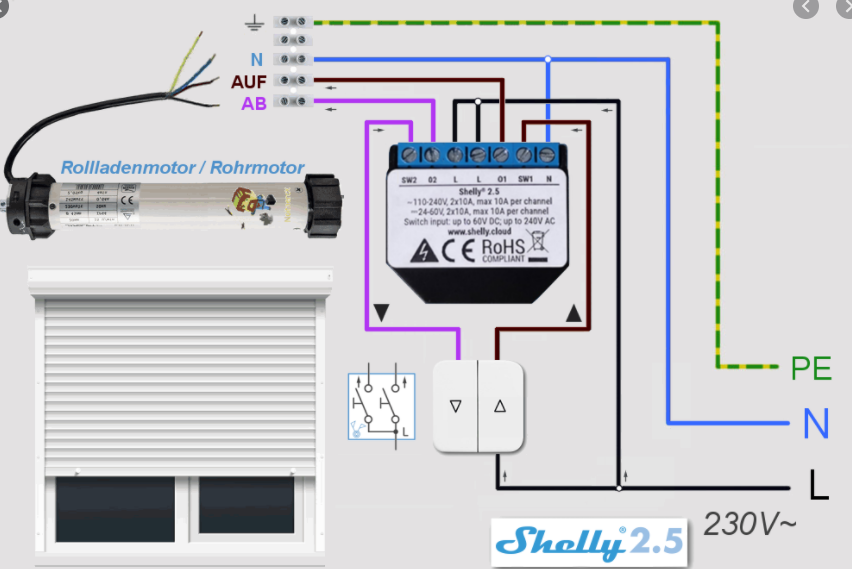
It kind of works with homekit, but if I do use the up/down button it immediately jumps from the idle position to 100 respectively 0. Basically, instantaneously after pressing the button. The blinds do not move at all. All I can hear is the relay clicking.
Calibration : open:1, close:2, movement time 60,28s
Input mode: Separate - momentary
I added the debug file. Hope it tells you more as it does to me.
I first changed position by homekit, pressed afterwards the down button and later the up one.
4232554570 mgos_sys_config.c:232 Loading conf3.json
4232722670 mgos_sys_config.c:174 Saved to conf9.json
4232740001 shelly_hap_window_c:288 WC 1: State transition: stop -> stopping (22 -> 23)
4232759042 shelly_hap_window_c:288 WC 1: State transition: stopping -> idle (23 -> 0)
4232914975 shelly_input.cpp:72 Input 1: long (state 1)
4233529059 shelly_input.cpp:72 Input 1: change (state 0)
4233650620 shelly_main.cpp:464 Uptime: 4233.64, conns 0/4/9, RAM: 41224, 21452 free
4238735878 shelly_input.cpp:72 Input 1: change (state 1)
4238943481 shelly_input.cpp:72 Input 1: change (state 0)
4239246616 shelly_input.cpp:72 Input 1: single (state 0)
4239312690 shelly_input.cpp:72 Input 1: change (state 1)
4240322857 shelly_input.cpp:72 Input 1: long (state 1)
4240456123 shelly_input.cpp:72 Input 1: change (state 0)
4241650786 shelly_main.cpp:464 Uptime: 4241.64, conns 0/4/9, RAM: 41224, 21452 free
4249650790 shelly_main.cpp:464 Uptime: 4249.64, conns 0/4/9, RAM: 41224, 21452 free
4257650599 shelly_main.cpp:464 Uptime: 4257.64, conns 0/4/9, RAM: 41224, 21452 free
4265650831 shelly_main.cpp:464 Uptime: 4265.64, conns 0/4/9, RAM: 41224, 21452 free
4265805533 mgos_http_server.c:180 0x3fff69fc HTTP connection from 192.168.0.39:60903
4265822029 mgos_http_server.c:187 0x3fff69fc GET /
4265863026 mgos_http_server.c:187 0x3fff69fc GET /axios.min.js.gz
4265899289 mgos_http_server.c:180 0x3fff4bd4 HTTP connection from 192.168.0.39:60904
4265911142 mgos_http_server.c:187 0x3fff4bd4 GET /style.css.gz
4265967138 mgos_http_server.c:180 0x3fff7584 HTTP connection from 192.168.0.39:60905
4265978758 mgos_http_server.c:187 0x3fff7584 GET /logo.png
4266041280 mg_rpc.c:292 Shelly.GetInfo via HTTP 192.168.0.39:60903
4273650543 shelly_main.cpp:464 Uptime: 4273.64, conns 0/4/9, RAM: 41224, 19968 free
4276773911 mgos_http_server.c:187 0x3fff69fc GET /
4276823852 mgos_http_server.c:187 0x3fff69fc GET /style.css.gz
4276846846 mgos_http_server.c:187 0x3fff4bd4 GET /axios.min.js.gz
4276876537 mgos_http_server.c:187 0x3fff7584 GET /logo.png
4276915667 mg_rpc.c:292 Shelly.GetInfo via HTTP 192.168.0.39:60903
4281650651 shelly_main.cpp:464 Uptime: 4281.64, conns 0/4/9, RAM: 41224, 19968 free
4286383355 mgos_http_server.c:187 0x3fff69fc GET /
4286436304 mg_http.c:368 '/index.html.gz' '/index.html' 'text/html'
4286481802 mgos_http_server.c:187 0x3fff4bd4 GET /style.css.gz
4286503092 mgos_http_server.c:187 0x3fff7584 GET /logo.png
4286539119 mgos_http_server.c:180 0x3fff74d4 HTTP connection from 192.168.0.39:60907
4286555793 mgos_http_server.c:187 0x3fff74d4 GET /axios.min.js.gz
4286686890 mg_rpc.c:292 Shelly.GetInfo via HTTP 192.168.0.39:60904
4289650601 shelly_main.cpp:464 Uptime: 4289.64, conns 0/4/9, RAM: 41224, 19768 free
4297650665 shelly_main.cpp:464 Uptime: 4297.64, conns 0/4/9, RAM: 41224, 19956 free
4305650577 shelly_main.cpp:464 Uptime: 4305.64, conns 0/4/9, RAM: 41224, 19956 free
4313176472 shelly_hap_window_c:308 WC 1: Target pos 100.00 -> 82.00 (HAP)
4313187807 shelly_hap_window_c:288 WC 1: State transition: idle -> move (0 -> 20)
4313255547 shelly_output.cpp:52 Output 2: off -> on (move)
4313298331 shelly_hap_window_c:288 WC 1: State transition: move -> moving (20 -> 21)
4313356523 shelly_hap_window_c:298 WC 1: Current pos 100.00 -> 99.92
4313456241 shelly_hap_window_c:298 WC 1: Current pos 99.92 -> 99.76
4313504299 shelly_hap_window_c:308 WC 1: Target pos 82.00 -> 94.00 (HAP)
4313516132 shelly_hap_window_c:298 WC 1: Current pos 99.76 -> 99.66
4313556718 shelly_hap_window_c:298 WC 1: Current pos 99.66 -> 99.59
4313589541 shelly_hap_window_c:308 WC 1: Target pos 94.00 -> 93.00 (HAP)
4313599756 shelly_hap_window_c:298 WC 1: Current pos 99.59 -> 99.52
4313650970 shelly_main.cpp:464 Uptime: 4313.64, conns 0/4/9, RAM: 41224, 19908 free
4313662764 shelly_hap_window_c:298 WC 1: Current pos 99.52 -> 99.41
4313756356 shelly_hap_window_c:298 WC 1: Current pos 99.41 -> 99.26
4313856307 shelly_hap_window_c:298 WC 1: Current pos 99.26 -> 99.09
4313956315 shelly_hap_window_c:298 WC 1: Current pos 99.09 -> 98.93
4314056258 shelly_hap_window_c:298 WC 1: Current pos 98.93 -> 98.76
4314156358 shelly_hap_window_c:298 WC 1: Current pos 98.76 -> 98.60
4314256332 shelly_hap_window_c:298 WC 1: Current pos 98.60 -> 98.43
4314356385 shelly_hap_window_c:298 WC 1: Current pos 98.43 -> 98.26
4314456332 shelly_hap_window_c:298 WC 1: Current pos 98.26 -> 98.10
4314556338 shelly_hap_window_c:298 WC 1: Current pos 98.10 -> 97.93
4314656316 shelly_hap_window_c:298 WC 1: Current pos 97.93 -> 97.77
4314756360 shelly_hap_window_c:298 WC 1: Current pos 97.77 -> 97.60
4314856345 shelly_hap_window_c:298 WC 1: Current pos 97.60 -> 97.44
4314956334 shelly_hap_window_c:298 WC 1: Current pos 97.44 -> 97.27
4315057631 shelly_hap_window_c:298 WC 1: Current pos 97.27 -> 97.10
4315156445 shelly_hap_window_c:298 WC 1: Current pos 97.10 -> 96.94
4315256710 shelly_hap_window_c:298 WC 1: Current pos 96.94 -> 96.77
4315356757 shelly_hap_window_c:298 WC 1: Current pos 96.77 -> 96.60
4315456373 shelly_hap_window_c:298 WC 1: Current pos 96.60 -> 96.44
4315556522 shelly_hap_window_c:298 WC 1: Current pos 96.44 -> 96.27
4315656432 shelly_hap_window_c:298 WC 1: Current pos 96.27 -> 96.11
4315756488 shelly_hap_window_c:298 WC 1: Current pos 96.11 -> 95.94
4315856370 shelly_hap_window_c:298 WC 1: Current pos 95.94 -> 95.78
4315956450 shelly_hap_window_c:298 WC 1: Current pos 95.78 -> 95.61
4316056458 shelly_hap_window_c:298 WC 1: Current pos 95.61 -> 95.44
4316156419 shelly_hap_window_c:298 WC 1: Current pos 95.44 -> 95.28
4316256432 shelly_hap_window_c:298 WC 1: Current pos 95.28 -> 95.11
4316356396 shelly_hap_window_c:298 WC 1: Current pos 95.11 -> 94.95
4316456373 shelly_hap_window_c:298 WC 1: Current pos 94.95 -> 94.78
4316556591 shelly_hap_window_c:298 WC 1: Current pos 94.78 -> 94.61
4316656450 shelly_hap_window_c:298 WC 1: Current pos 94.61 -> 94.45
4316756581 shelly_hap_window_c:298 WC 1: Current pos 94.45 -> 94.28
4316856617 shelly_hap_window_c:298 WC 1: Current pos 94.28 -> 94.12
4316956472 shelly_hap_window_c:298 WC 1: Current pos 94.12 -> 93.95
4316968394 shelly_hap_window_c:308 WC 1: Target pos 93.00 -> 93.95 (fixup)
4316979295 shelly_output.cpp:52 Output 2: on -> off (moving)
4316991077 shelly_hap_window_c:288 WC 1: State transition: moving -> stop (21 -> 22)
4317079395 mgos_sys_config.c:232 Loading conf2.json
4317130596 mgos_sys_config.c:232 Loading conf3.json
4317267013 mgos_sys_config.c:174 Saved to conf9.json
4317284421 shelly_hap_window_c:288 WC 1: State transition: stop -> stopping (22 -> 23)
4317301783 shelly_hap_window_c:288 WC 1: State transition: stopping -> idle (23 -> 0)
4320718298 shelly_input.cpp:72 Input 2: change (state 1)
4320728735 shelly_hap_window_c:308 WC 1: Target pos 93.95 -> 0.00 (ext)
4320740057 shelly_hap_window_c:288 WC 1: State transition: idle -> move (0 -> 20)
4320798186 shelly_output.cpp:52 Output 2: off -> on (move)
4320842887 shelly_hap_window_c:288 WC 1: State transition: move -> moving (20 -> 21)
4320899105 shelly_hap_window_c:298 WC 1: Current pos 93.95 -> 93.87
4320999129 shelly_hap_window_c:298 WC 1: Current pos 93.87 -> 93.71
4321099109 shelly_hap_window_c:298 WC 1: Current pos 93.71 -> 93.54
4321199098 shelly_hap_window_c:298 WC 1: Current pos 93.54 -> 93.38
4321210295 shelly_hap_window_c:298 WC 1: Current pos 93.38 -> 0.00
4321219587 shelly_output.cpp:52 Output 2: on -> off (moving)
4321231727 shelly_hap_window_c:288 WC 1: State transition: moving -> stop (21 -> 22)
4321321184 mgos_sys_config.c:232 Loading conf2.json
4321341206 mgos_sys_config.c:232 Loading conf3.json
4321502661 mgos_sys_config.c:174 Saved to conf9.json
4321521067 shelly_hap_window_c:288 WC 1: State transition: stop -> stopping (22 -> 23)
4321539936 shelly_hap_window_c:288 WC 1: State transition: stopping -> idle (23 -> 0)
4321650543 shelly_main.cpp:464 Uptime: 4321.64, conns 0/4/9, RAM: 41224, 21368 free
4321749953 shelly_input.cpp:72 Input 2: long (state 1)
4323854336 shelly_input.cpp:72 Input 2: change (state 0)
4328604891 shelly_input.cpp:72 Input 1: change (state 1)
4328615434 shelly_hap_window_c:308 WC 1: Target pos 0.00 -> 100.00 (ext)
4328627754 shelly_hap_window_c:288 WC 1: State transition: idle -> move (0 -> 20)
4328679241 shelly_output.cpp:52 Output 1: off -> on (move)
4328690887 shelly_hap_window_c:288 WC 1: State transition: move -> moving (20 -> 21)
4328737322 shelly_hap_window_c:298 WC 1: Current pos 0.00 -> 0.06
4328837228 shelly_hap_window_c:298 WC 1: Current pos 0.06 -> 0.22
4328937187 shelly_hap_window_c:298 WC 1: Current pos 0.22 -> 0.39
4329037145 shelly_hap_window_c:298 WC 1: Current pos 0.39 -> 0.56
4329049423 shelly_hap_window_c:298 WC 1: Current pos 0.56 -> 100.00
4329058666 shelly_output.cpp:52 Output 1: on -> off (moving)
4329069863 shelly_hap_window_c:288 WC 1: State transition: moving -> stop (21 -> 22)
4329159015 mgos_sys_config.c:232 Loading conf2.json
4329180055 mgos_sys_config.c:232 Loading conf3.json
4329342144 mgos_sys_config.c:174 Saved to conf9.json
4329359563 shelly_hap_window_c:288 WC 1: State transition: stop -> stopping (22 -> 23)
4329377721 shelly_hap_window_c:288 WC 1: State transition: stopping -> idle (23 -> 0)
4329650657 shelly_main.cpp:464 Uptime: 4329.64, conns 0/4/9, RAM: 41224, 21368 free
4329873428 shelly_input.cpp:72 Input 1: long (state 1)
4332652294 shelly_input.cpp:72 Input 1: change (state 0)
4333630932 mgos_http_server.c:180 0x3fff6984 HTTP connection from 192.168.0.39:60908
 heiligsblech
on 29 Sep 2020
heiligsblech
on 29 Sep 2020
@heiligsblech ok, so i see that the curtain is initially fully open, then there is some activity on input 1 (open), which doesn't do anything as we are already fully open.
we get target position from home app to move to 83, shortly updated to 94 and then 93. we reach the position of 93.95 (which is within 1% of the target) and stop.
then we get input event on input 2 (close) and start moving from 93.95 to 0 (fully closed). but after 400 ms we abruptly jump to 0:
4321210295 shelly_hap_window_c:298 WC 1: Current pos 93.38 -> 0.00
this can happen if we sense 0 current - we assume that movement stopped and target position has been reached.
this check is not performed when moving to an intermediate position, which explains why it works when an intermediate openign position is set from the app.
we allow 300 ms for motor to ramp up and start moving, but maybe it's not enough? does your motor require more time to start moving? i guess so... do you have an idea how long?
rojer
on 29 Sep 2020
Hello Rojer,
I would guess out of 10 times it does work ones.
Therefore I assume we are not too far off. Makes quiet sense after your explanation.
In below debug file it did work ones. Maybe you can see how long it took for that event.
Thx for your support
7441976071 HAPPlatformTCPStrea:120 0x3fff6b0c 192.168.0.22:49655 Incoming HAP connection, ns 0/0/9
7441990210 HAPPlatformTCPStrea:274 0x3fff6b0c 192.168.0.22:49655 Accepted HAP connection, ns 0/1/9 ts 0x3fff4b9c
7443261994 HAPPlatformTCPStrea:120 0x3fff553c 192.168.0.38:57705 Incoming HAP connection, ns 0/1/9
7444217007 HAPPlatformTCPStrea:120 0x3fff4ae4 192.168.0.40:50262 Incoming HAP connection, ns 1/1/9
7444839491 shelly_input.cpp:72 Input 2: change (state 1)
7444849934 shelly_hap_window_c:308 WC 1: Target pos 84.21 -> 0.00 (ext)
7444861817 shelly_hap_window_c:288 WC 1: State transition: idle -> move (0 -> 20)
7444873388 shelly_output.cpp:52 Output 2: off -> on (move)
7444884559 shelly_hap_window_c:288 WC 1: State transition: move -> moving (20 -> 21)
7444956780 shelly_hap_window_c:298 WC 1: Current pos 84.21 -> 84.11
7445024168 HAPPlatformTCPStrea:274 0x3fff553c 192.168.0.38:57705 Accepted HAP connection, ns 1/2/9 ts 0x3fff5e0c
7446297688 shelly_hap_window_c:298 WC 1: Current pos 84.11 -> 81.88
7446533965 shelly_hap_window_c:298 WC 1: Current pos 81.88 -> 81.49
7446634331 shelly_hap_window_c:298 WC 1: Current pos 81.49 -> 81.33
7446734189 shelly_hap_window_c:298 WC 1: Current pos 81.33 -> 81.16
7446812466 shelly_input.cpp:72 Input 2: long (state 1)
7446834150 shelly_hap_window_c:298 WC 1: Current pos 81.16 -> 80.99
7446935419 shelly_hap_window_c:298 WC 1: Current pos 80.99 -> 80.83
7447035410 shelly_hap_window_c:298 WC 1: Current pos 80.83 -> 80.66
7447135362 shelly_hap_window_c:298 WC 1: Current pos 80.66 -> 80.49
7447234196 shelly_hap_window_c:298 WC 1: Current pos 80.49 -> 80.33
7447334185 shelly_hap_window_c:298 WC 1: Current pos 80.33 -> 80.16
7447407380 shelly_input.cpp:72 Input 2: change (state 0)
7447451541 shelly_hap_window_c:298 WC 1: Current pos 80.16 -> 79.97
7447463210 shelly_hap_window_c:308 WC 1: Target pos 0.00 -> 79.97 (ext)
7447473416 shelly_hap_window_c:298 WC 1: Current pos 79.97 -> 79.93
7447485315 shelly_hap_window_c:308 WC 1: Target pos 79.97 -> 79.93 (fixup)
7447495603 shelly_output.cpp:52 Output 2: on -> off (moving)
7447506773 shelly_hap_window_c:288 WC 1: State transition: moving -> stop (21 -> 22)
7447544108 mgos_sys_config.c:232 Loading conf2.json
7447564182 mgos_sys_config.c:232 Loading conf3.json
7447695291 mgos_sys_config.c:174 Saved to conf9.json
7447743956 shelly_hap_window_c:288 WC 1: State transition: stop -> stopping (22 -> 23)
7447762151 shelly_hap_window_c:288 WC 1: State transition: stopping -> idle (23 -> 0)
7448115074 HAPPlatformTCPStrea:274 0x3fff4ae4 192.168.0.40:50262 Accepted HAP connection, ns 0/3/9 ts 0x3fff6b94
7449359098 HAPPlatformTCPStrea:104 0x3fff4ae4 192.168.0.40:50262 HAP connection closed, ns 0/3/9 i 2
7449370799 HAPPlatformTCPStrea:301 HAPPlatformTCPStreamClose ts 0x3fff6b94 nc 0x0 0/2/9
7449404130 shelly_input.cpp:72 Input 2: change (state 1)
7449414586 shelly_hap_window_c:308 WC 1: Target pos 79.93 -> 0.00 (ext)
7449425511 shelly_hap_window_c:288 WC 1: State transition: idle -> move (0 -> 20)
7449485312 shelly_output.cpp:52 Output 2: off -> on (move)
7449496511 shelly_hap_window_c:288 WC 1: State transition: move -> moving (20 -> 21)
7449586224 shelly_hap_window_c:298 WC 1: Current pos 79.93 -> 79.86
7449650574 shelly_main.cpp:464 Uptime: 7449.64, conns 0/2/9, RAM: 41224, 21372 free
7449686319 shelly_hap_window_c:298 WC 1: Current pos 79.86 -> 79.69
7449786379 shelly_hap_window_c:298 WC 1: Current pos 79.69 -> 79.53
7449886284 shelly_hap_window_c:298 WC 1: Current pos 79.53 -> 79.36
7449898461 shelly_hap_window_c:298 WC 1: Current pos 79.36 -> 0.00
7449907767 shelly_output.cpp:52 Output 2: on -> off (moving)
7449918941 shelly_hap_window_c:288 WC 1: State transition: moving -> stop (21 -> 22)
7450007998 mgos_sys_config.c:232 Loading conf2.json
7450028083 mgos_sys_config.c:232 Loading conf3.json
7450189936 mgos_sys_config.c:174 Saved to conf9.json
7450207372 shelly_hap_window_c:288 WC 1: State transition: stop -> stopping (22 -> 23)
7450225577 shelly_hap_window_c:288 WC 1: State transition: stopping -> idle (23 -> 0)
7450436436 shelly_input.cpp:72 Input 2: long (state 1)
7450996846 shelly_input.cpp:72 Input 2: change (state 0)
7457581560 HAPPlatformTCPStrea:120 0x3fff4ae4 192.168.0.39:50062 Incoming HAP connection, ns 0/2/9
7457596747 HAPPlatformTCPStrea:274 0x3fff4ae4 192.168.0.39:50062 Accepted HAP connection, ns 0/3/9 ts 0x3fff6654
7458839439 shelly_main.cpp:464 Uptime: 7458.83, conns 0/3/9, RAM: 41224, 19948 free
heiligsblech
on 29 Sep 2020
i think a better approach will be to introduce an intermediate state between kMove and kMoving where we wait for the motor to ramp up.
rojer
on 29 Sep 2020
beta4: https://rojer.me/files/shelly/2.2.0-beta4/ (or just check for update in the web UI if using beta3)
- Added motor ramp-up state: allow up to 5 seconds for motor to get up to 75% of expected power (measured during calibration). @heiligsblech
- Added
/debug/coreHTTP handler - it will serve core dump from last crash. @pivale please send contents along with the log next time. it's about 128K of data, attach as a file, - Minor UI tweaks
rojer
on 30 Sep 2020
works perfectly with beta 4. Thanks a lot.
heiligsblech
on 30 Sep 2020
I couldn't reproduce the situation.
I suspect it's related to test/use right after reboot (maybe some background things still happening and memory is low?).
I'll install beta4 and report asap.
pivale
on 30 Sep 2020
@rojer any other reason for the uptime to change?
I'm pretty sure the counter came back to 0, but I can't see any reboot in the logs and there was no core dump generated.
I'll keep trying to replicate the situation and send you the logs.
pivale
on 30 Sep 2020
no, uptime reset is a pretty solid indication that device has restarted.
log size is limited to 16K, maybe it already rotated?
the fact that no core was generated suggests that it wasn't a crash.
it could be a hardware issue or maybe wiring - for example, we could have voltage dips or some sort of transitional noise that makes it through the internal voltage regulator and causes device to reset.
rojer
on 30 Sep 2020
One problem I found,
When using fiscal switch can't stop the operation...
What I mean is in the switch there is an up zero and down when I press up and move to zero for stopping the roller it doesn't stop...
yehuda2525
on 30 Sep 2020
One problem I found,
When using fiscal switch can't stop the operation...
What I mean is in the switch there is an up zero and down when I press up and move to zero for stopping the roller it doesn't stop...
@yehuda2525 sounds like you want to stop when you release the switch. this is not the default behavior, you need to change input mode to "separate - toggle" in the ui.
rojer
on 30 Sep 2020
beta4: https://rojer.me/files/shelly/2.2.0-beta4/ (or just check for update in the web UI if using beta3)
Added motor ramp-up state: allow up to 5 seconds for motor to get up to 75% of expected power (measured during calibration). @heiligsblech
Added
/debug/coreHTTP handler - it will serve core dump from last crash. @pivale please send contents along with the log next time. it's about 128K of data, attach as a file,Minor UI tweaks
This could be silly but I'm a beginner with Shelly and homekit, to install this firmware do I go to the shelly ip e.g. (http://xx.xxx.x.xxx/ota?url=https://rojer.me/files/shelly/shelly-homekit-Shelly25.zip) or it's a different case here ? If so can someone direct me,😅
fahadalzoabi
on 30 Sep 2020
@fahadalzoabi if you want to try beta4, use this:
```
http://xx.xxx.x.xxx/ota?url=http://rojer.me/files/shelly/2.2.0-beta4/shelly-homekit-Shelly25.zip
````
we are getting closer to release, it will be pushed to the main location soon.
rojer
on 30 Sep 2020
Managed to do it again
log4.log
Still no core dump.
I'll check my wiring as soon as I can to confirm all well and tight...
pivale
on 30 Sep 2020
@pivale and again we see - motor starting to move and device restarting abruptly:
16046486 shelly_hap_window_c:309 WC 1: Tgt pos 100.00 -> 0.00 (HAP)
16056625 shelly_hap_window_c:290 WC 1: State: idle -> move (0 -> 20)
449439 mgos_rpc_channel_mq:203 0x3fff3884 shellyswitch25-D8F15B132789/rpc
460471 mgos_rpc_channel_ua:313 0x3fff42fc UART0
no coredump means that it didn't crash, or at least not the usual way it happens when there's a bug.
so, i'm leaning towards flaky hardware or wiring. high current consumption associated with motor starting to move causes some sort of disturbance that resets the device.
rojer
on 30 Sep 2020
I would say that you should ignore my situation for now :)
I will:
- order some other shelly 2.5 and replace it to test
- test this one in another window/motor
- test this one with stock firmware
I won't be able to do it anytime soon for personal reasons, but I'll send you some feedback asap.
pivale
on 30 Sep 2020
@pivale great, thanks!
ok, everybody, beta5 time (use the UI button to update or get the files here.
this will be the last one before release, unless something bad crops up. but if it does - please speak up!
changes:
- Add UI controls to open and close the window
- Disable debug log by default, add a toggle to enable
- Make UI spinners less jittery, fix release notes link when an update is available.
- Update
_http_._tcpBonjour/DNS-SD instance name when changing hostname
rojer
on 30 Sep 2020
7446935419 shelly_hap_window_c:298 WC 1: Current pos 80.99 -> 80.83
7447035410 shelly_hap_window_c:298 WC 1: Current pos 80.83 -> 80.66
7447135362 shelly_hap_window_c:298 WC 1: Current pos 80.66 -> 80.49
7447234196 shelly_hap_window_c:298 WC 1: Current pos 80.49 -> 80.33
@rojer since we have a limited amount of space for the log, is it possible to not disply these details?
Or maybe have incremental log priorities/configurations (I know it's not something user friendly)
Also, instead of a log rotation, deleting the first row and adding a new one could make sure we wouldn't loose critical information on the log file because it hit the max size.
(these are suggestions for future, not urgent or anything like that, but could help in debugging)
pivale
on 1 Oct 2020
yes, verbosity of messages needs tweaking. we already have verbosity levels in mos, this is INFO.
line-wise rotation requires too much I/O, not really feasible.
we can have multiple log files, though there isn't a way to serve them right now.
i needed something quick, this will definitely be polished later.
rojer
on 1 Oct 2020
Hi,
i have three shelly 2.5 with your Software and a Gira switch with seperated keys for up and down.. All working perfect, thanks for this.
Now i want to install a 4. roller shutter with the same installation. The problem is, that the calibration is not working. it began calibration and the roller shutter is getting open or close (depending on it's starting position). But the calibration didn't ends. When the roller shutter stops, the calibration runs on and on. I tested with all beta's. Also the new keys in beta5 didn't work, but the manual switch is working correct. I tested with shelly original firmware and it seems to be working. Now i have no more idea because the other three roller shutter are working fine.
Any idea? Thanks
 epiphany11
on 1 Oct 2020
epiphany11
on 1 Oct 2020
@epiphany11 please enable debug log and post it here, i'd like to see power consumption.
we use pwoer consumption < 5 watts as a signal that motor has stopped moving, looks like that is not enough?
rojer
on 1 Oct 2020
@rojer here is the:
27696599895 shelly_main.cpp:463 Uptime: 27696.53, conns 0/0/9, RAM: 41216, 25212 free
27697966930 mgos_http_server.c:187 0x3fff5914 GET /
27697990090 mg_http.c:368 '/index.html.gz' '/index.html' 'text/html'
27698831460 mg_rpc.c:292 Shelly.GetInfo via HTTP 192.168.122.137:51146
27698862670 mgos_http_server.c:180 0x3fff5d84 HTTP connection from 192.168.122.137:51169
27698876654 mgos_http_server.c:187 0x3fff5d84 GET /favicon.ico
27702877726 mg_rpc.c:292 Shelly.SetConfig via HTTP 192.168.122.137:51146
27702890112 shelly_hap_window_c:313 WC 1: Tgt pos 0.00 -> 100.00 (rpc)
27702918646 mgos_sys_config.c:232 Loading conf2.json
27702941223 mgos_sys_config.c:232 Loading conf3.json
27703122924 mgos_sys_config.c:174 Saved to conf9.json
27704297142 mg_rpc.c:292 Shelly.GetInfo via HTTP 192.168.122.137:51146
27704533679 shelly_main.cpp:463 Uptime: 27704.53, conns 0/0/9, RAM: 41216, 25156 free
27705811841 mg_rpc.c:292 Shelly.SetConfig via HTTP 192.168.122.137:51146
27705824225 shelly_hap_window_c:313 WC 1: Tgt pos 100.00 -> 0.00 (rpc)
27705856716 mgos_sys_config.c:232 Loading conf2.json
27705879286 mgos_sys_config.c:232 Loading conf3.json
27706054814 mgos_sys_config.c:174 Saved to conf9.json
27707203822 mg_rpc.c:292 Shelly.GetInfo via HTTP 192.168.122.137:51146
27710625497 mg_rpc.c:292 Shelly.SetConfig via HTTP 192.168.122.137:51146
27710659217 mgos_sys_config.c:232 Loading conf2.json
27710681780 mgos_sys_config.c:232 Loading conf3.json
27710861218 mgos_sys_config.c:174 Saved to conf9.json
27710884815 shelly_hap_window_c:294 WC 1: State: idle -> precal0 (0 -> 10)
27710982998 shelly_hap_window_c:386 Begin calibration
27711014814 mgos_sys_config.c:232 Loading conf2.json
27711038316 mgos_sys_config.c:232 Loading conf3.json
27711171893 mgos_sys_config.c:174 Saved to conf9.json
27711235460 shelly_output.cpp:52 Output 1: off -> on (precal0)
27711245385 shelly_hap_window_c:294 WC 1: State: precal0 -> cal0 (10 -> 11)
27712009244 mg_rpc.c:292 Shelly.GetInfo via HTTP 192.168.122.137:51146
27712533691 shelly_main.cpp:463 Uptime: 27712.53, conns 0/0/9, RAM: 41216, 25540 free
27712814871 mg_rpc.c:292 Shelly.GetInfo via HTTP 192.168.122.137:51146
27713817334 mg_rpc.c:292 Shelly.GetInfo via HTTP 192.168.122.137:51146
27714824238 mg_rpc.c:292 Shelly.GetInfo via HTTP 192.168.122.137:51146
27715814028 mg_rpc.c:292 Shelly.GetInfo via HTTP 192.168.122.137:51146
27716815115 mg_rpc.c:292 Shelly.GetInfo via HTTP 192.168.122.137:51146
27717812821 mg_rpc.c:292 Shelly.GetInfo via HTTP 192.168.122.137:51146
27718813803 mg_rpc.c:292 Shelly.GetInfo via HTTP 192.168.122.137:51146
27719823651 mg_rpc.c:292 Shelly.GetInfo via HTTP 192.168.122.137:51146
27720533719 shelly_main.cpp:463 Uptime: 27720.53, conns 0/0/9, RAM: 41216, 25540 free
27721370170 mg_rpc.c:292 Shelly.GetInfo via HTTP 192.168.122.137:51146
27722360689 mg_rpc.c:292 Shelly.GetInfo via HTTP 192.168.122.137:51146
27723358385 mg_rpc.c:292 Shelly.GetInfo via HTTP 192.168.122.137:51146
27724372361 mg_rpc.c:292 Shelly.GetInfo via HTTP 192.168.122.137:51146
27725363644 mg_rpc.c:292 Shelly.GetInfo via HTTP 192.168.122.137:51146
27726363847 mg_rpc.c:292 Shelly.GetInfo via HTTP 192.168.122.137:51146
27727364299 mg_rpc.c:292 Shelly.GetInfo via HTTP 192.168.122.137:51146
27728368841 mg_rpc.c:292 Shelly.GetInfo via HTTP 192.168.122.137:51146
27728533708 shelly_main.cpp:463 Uptime: 27728.53, conns 0/0/9, RAM: 41216, 24872 free
27729362313 mg_rpc.c:292 Shelly.GetInfo via HTTP 192.168.122.137:51146
27730388987 mg_rpc.c:292 Shelly.GetInfo via HTTP 192.168.122.137:51146
27730839921 mg_rpc.c:292 Shelly.GetInfo via HTTP 192.168.122.137:51146
27731818062 mg_rpc.c:292 Shelly.GetInfo via HTTP 192.168.122.137:51146
27732816923 mg_rpc.c:292 Shelly.GetInfo via HTTP 192.168.122.137:51146
27733821728 mg_rpc.c:292 Shelly.GetInfo via HTTP 192.168.122.137:51146
27734824568 mg_rpc.c:292 Shelly.GetInfo via HTTP 192.168.122.137:51146
27736365311 mg_rpc.c:292 Shelly.GetInfo via HTTP 192.168.122.137:51146
27736533663 shelly_main.cpp:463 Uptime: 27736.53, conns 0/0/9, RAM: 41216, 25540 free
27737362266 mg_rpc.c:292 Shelly.GetInfo via HTTP 192.168.122.137:51146
27738357371 mg_rpc.c:292 Shelly.GetInfo via HTTP 192.168.122.137:51146
27739378494 mg_rpc.c:292 Shelly.GetInfo via HTTP 192.168.122.137:51146
27740392192 mg_rpc.c:292 Shelly.GetInfo via HTTP 192.168.122.137:51146
27741357092 mg_rpc.c:292 Shelly.GetInfo via HTTP 192.168.122.137:51146
27742358182 mg_rpc.c:292 Shelly.GetInfo via HTTP 192.168.122.137:51146
27743364685 mg_rpc.c:292 Shelly.GetInfo via HTTP 192.168.122.137:51146
27744382853 mg_rpc.c:292 Shelly.GetInfo via HTTP 192.168.122.137:51146
27744533684 shelly_main.cpp:463 Uptime: 27744.53, conns 0/0/9, RAM: 41216, 25540 free
27745355668 mg_rpc.c:292 Shelly.GetInfo via HTTP 192.168.122.137:51146
27746366269 mg_rpc.c:292 Shelly.GetInfo via HTTP 192.168.122.137:51146
27747363547 mg_rpc.c:292 Shelly.GetInfo via HTTP 192.168.122.137:51146
27748372535 mg_rpc.c:292 Shelly.GetInfo via HTTP 192.168.122.137:51146
27749366105 mg_rpc.c:292 Shelly.GetInfo via HTTP 192.168.122.137:51146
27750357099 mg_rpc.c:292 Shelly.GetInfo via HTTP 192.168.122.137:51146
27751357388 mg_rpc.c:292 Shelly.GetInfo via HTTP 192.168.122.137:51146
27752357956 mg_rpc.c:292 Shelly.GetInfo via HTTP 192.168.122.137:51146
27752533665 shelly_main.cpp:463 Uptime: 27752.53, conns 0/0/9, RAM: 41216, 25540 free
27753375299 mg_rpc.c:292 Shelly.GetInfo via HTTP 192.168.122.137:51146
27754369843 mg_rpc.c:292 Shelly.GetInfo via HTTP 192.168.122.137:51146
27755375179 mg_rpc.c:292 Shelly.GetInfo via HTTP 192.168.122.137:51146
27756360812 mg_rpc.c:292 Shelly.GetInfo via HTTP 192.168.122.137:51146
27757368834 mg_rpc.c:292 Shelly.GetInfo via HTTP 192.168.122.137:51146
27758362901 mg_rpc.c:292 Shelly.GetInfo via HTTP 192.168.122.137:51146
27759362824 mg_rpc.c:292 Shelly.GetInfo via HTTP 192.168.122.137:51146
27760369706 mg_rpc.c:292 Shelly.GetInfo via HTTP 192.168.122.137:51146
27760533711 shelly_main.cpp:463 Uptime: 27760.53, conns 0/0/9, RAM: 41216, 25540 free
27761359419 mg_rpc.c:292 Shelly.GetInfo via HTTP 192.168.122.137:51146
27762373764 mg_rpc.c:292 Shelly.GetInfo via HTTP 192.168.122.137:51146
27763368594 mg_rpc.c:292 Shelly.GetInfo via HTTP 192.168.122.137:51146
27764356468 mg_rpc.c:292 Shelly.GetInfo via HTTP 192.168.122.137:51146
27765362599 mg_rpc.c:292 Shelly.GetInfo via HTTP 192.168.122.137:51146
27766357882 mg_rpc.c:292 Shelly.GetInfo via HTTP 192.168.122.137:51146
27767358654 mg_rpc.c:292 Shelly.GetInfo via HTTP 192.168.122.137:51146
27767956896 mg_rpc.c:292 Shelly.GetInfo via HTTP 192.168.122.137:51146
27768533708 shelly_main.cpp:463 Uptime: 27768.53, conns 0/0/9, RAM: 41216, 25540 free
27768820677 mg_rpc.c:292 Shelly.GetInfo via HTTP 192.168.122.137:51146
27769817367 mg_rpc.c:292 Shelly.GetInfo via HTTP 192.168.122.137:51146
27770811636 mg_rpc.c:292 Shelly.GetInfo via HTTP 192.168.122.137:51146
Perhaps that is a solution,
epiphany11
on 1 Oct 2020
ironically, we don't log at high enough verbosity during calibration.
i pushed beta6, @epiphany11 please update and repeat.
- Populate the model field in the UI
- Improve logging during calibration
rojer
on 1 Oct 2020
@rojer thank you for the help and the new beta. Open/Close Buttons without function. Calibrate only start, when roller shutter is closed --> shutter is moving in open position --> shutter stops but calibrationg is working on. Manual switch working without problems.
Log:
27696599895 shelly_main.cpp:463 Uptime: 27696.53, conns 0/0/9, RAM: 41216, 25212 free
27697966930 mgos_http_server.c:187 0x3fff5914 GET /
27697990090 mg_http.c:368 '/index.html.gz' '/index.html' 'text/html'
27698831460 mg_rpc.c:292 Shelly.GetInfo via HTTP 192.168.122.137:51146
27698862670 mgos_http_server.c:180 0x3fff5d84 HTTP connection from 192.168.122.137:51169
27698876654 mgos_http_server.c:187 0x3fff5d84 GET /favicon.ico
27702877726 mg_rpc.c:292 Shelly.SetConfig via HTTP 192.168.122.137:51146
27702890112 shelly_hap_window_c:313 WC 1: Tgt pos 0.00 -> 100.00 (rpc)
27702918646 mgos_sys_config.c:232 Loading conf2.json
27702941223 mgos_sys_config.c:232 Loading conf3.json
27703122924 mgos_sys_config.c:174 Saved to conf9.json
27704297142 mg_rpc.c:292 Shelly.GetInfo via HTTP 192.168.122.137:51146
27704533679 shelly_main.cpp:463 Uptime: 27704.53, conns 0/0/9, RAM: 41216, 25156 free
27705811841 mg_rpc.c:292 Shelly.SetConfig via HTTP 192.168.122.137:51146
27705824225 shelly_hap_window_c:313 WC 1: Tgt pos 100.00 -> 0.00 (rpc)
27705856716 mgos_sys_config.c:232 Loading conf2.json
27705879286 mgos_sys_config.c:232 Loading conf3.json
27706054814 mgos_sys_config.c:174 Saved to conf9.json
27707203822 mg_rpc.c:292 Shelly.GetInfo via HTTP 192.168.122.137:51146
27710625497 mg_rpc.c:292 Shelly.SetConfig via HTTP 192.168.122.137:51146
27710659217 mgos_sys_config.c:232 Loading conf2.json
27710681780 mgos_sys_config.c:232 Loading conf3.json
27710861218 mgos_sys_config.c:174 Saved to conf9.json
27710884815 shelly_hap_window_c:294 WC 1: State: idle -> precal0 (0 -> 10)
27710982998 shelly_hap_window_c:386 Begin calibration
27711014814 mgos_sys_config.c:232 Loading conf2.json
27711038316 mgos_sys_config.c:232 Loading conf3.json
27711171893 mgos_sys_config.c:174 Saved to conf9.json
27711235460 shelly_output.cpp:52 Output 1: off -> on (precal0)
27711245385 shelly_hap_window_c:294 WC 1: State: precal0 -> cal0 (10 -> 11)
27712009244 mg_rpc.c:292 Shelly.GetInfo via HTTP 192.168.122.137:51146
27712533691 shelly_main.cpp:463 Uptime: 27712.53, conns 0/0/9, RAM: 41216, 25540 free
27712814871 mg_rpc.c:292 Shelly.GetInfo via HTTP 192.168.122.137:51146
27713817334 mg_rpc.c:292 Shelly.GetInfo via HTTP 192.168.122.137:51146
27714824238 mg_rpc.c:292 Shelly.GetInfo via HTTP 192.168.122.137:51146
27715814028 mg_rpc.c:292 Shelly.GetInfo via HTTP 192.168.122.137:51146
27716815115 mg_rpc.c:292 Shelly.GetInfo via HTTP 192.168.122.137:51146
27717812821 mg_rpc.c:292 Shelly.GetInfo via HTTP 192.168.122.137:51146
27718813803 mg_rpc.c:292 Shelly.GetInfo via HTTP 192.168.122.137:51146
27719823651 mg_rpc.c:292 Shelly.GetInfo via HTTP 192.168.122.137:51146
27720533719 shelly_main.cpp:463 Uptime: 27720.53, conns 0/0/9, RAM: 41216, 25540 free
27721370170 mg_rpc.c:292 Shelly.GetInfo via HTTP 192.168.122.137:51146
27722360689 mg_rpc.c:292 Shelly.GetInfo via HTTP 192.168.122.137:51146
27723358385 mg_rpc.c:292 Shelly.GetInfo via HTTP 192.168.122.137:51146
27724372361 mg_rpc.c:292 Shelly.GetInfo via HTTP 192.168.122.137:51146
27725363644 mg_rpc.c:292 Shelly.GetInfo via HTTP 192.168.122.137:51146
27726363847 mg_rpc.c:292 Shelly.GetInfo via HTTP 192.168.122.137:51146
27727364299 mg_rpc.c:292 Shelly.GetInfo via HTTP 192.168.122.137:51146
27728368841 mg_rpc.c:292 Shelly.GetInfo via HTTP 192.168.122.137:51146
27728533708 shelly_main.cpp:463 Uptime: 27728.53, conns 0/0/9, RAM: 41216, 24872 free
27729362313 mg_rpc.c:292 Shelly.GetInfo via HTTP 192.168.122.137:51146
27730388987 mg_rpc.c:292 Shelly.GetInfo via HTTP 192.168.122.137:51146
27730839921 mg_rpc.c:292 Shelly.GetInfo via HTTP 192.168.122.137:51146
27731818062 mg_rpc.c:292 Shelly.GetInfo via HTTP 192.168.122.137:51146
27732816923 mg_rpc.c:292 Shelly.GetInfo via HTTP 192.168.122.137:51146
27733821728 mg_rpc.c:292 Shelly.GetInfo via HTTP 192.168.122.137:51146
27734824568 mg_rpc.c:292 Shelly.GetInfo via HTTP 192.168.122.137:51146
27736365311 mg_rpc.c:292 Shelly.GetInfo via HTTP 192.168.122.137:51146
27736533663 shelly_main.cpp:463 Uptime: 27736.53, conns 0/0/9, RAM: 41216, 25540 free
27737362266 mg_rpc.c:292 Shelly.GetInfo via HTTP 192.168.122.137:51146
27738357371 mg_rpc.c:292 Shelly.GetInfo via HTTP 192.168.122.137:51146
27739378494 mg_rpc.c:292 Shelly.GetInfo via HTTP 192.168.122.137:51146
27740392192 mg_rpc.c:292 Shelly.GetInfo via HTTP 192.168.122.137:51146
27741357092 mg_rpc.c:292 Shelly.GetInfo via HTTP 192.168.122.137:51146
27742358182 mg_rpc.c:292 Shelly.GetInfo via HTTP 192.168.122.137:51146
27743364685 mg_rpc.c:292 Shelly.GetInfo via HTTP 192.168.122.137:51146
27744382853 mg_rpc.c:292 Shelly.GetInfo via HTTP 192.168.122.137:51146
27744533684 shelly_main.cpp:463 Uptime: 27744.53, conns 0/0/9, RAM: 41216, 25540 free
27745355668 mg_rpc.c:292 Shelly.GetInfo via HTTP 192.168.122.137:51146
27746366269 mg_rpc.c:292 Shelly.GetInfo via HTTP 192.168.122.137:51146
27747363547 mg_rpc.c:292 Shelly.GetInfo via HTTP 192.168.122.137:51146
27748372535 mg_rpc.c:292 Shelly.GetInfo via HTTP 192.168.122.137:51146
27749366105 mg_rpc.c:292 Shelly.GetInfo via HTTP 192.168.122.137:51146
27750357099 mg_rpc.c:292 Shelly.GetInfo via HTTP 192.168.122.137:51146
27751357388 mg_rpc.c:292 Shelly.GetInfo via HTTP 192.168.122.137:51146
27752357956 mg_rpc.c:292 Shelly.GetInfo via HTTP 192.168.122.137:51146
27752533665 shelly_main.cpp:463 Uptime: 27752.53, conns 0/0/9, RAM: 41216, 25540 free
27753375299 mg_rpc.c:292 Shelly.GetInfo via HTTP 192.168.122.137:51146
27754369843 mg_rpc.c:292 Shelly.GetInfo via HTTP 192.168.122.137:51146
27755375179 mg_rpc.c:292 Shelly.GetInfo via HTTP 192.168.122.137:51146
27756360812 mg_rpc.c:292 Shelly.GetInfo via HTTP 192.168.122.137:51146
27757368834 mg_rpc.c:292 Shelly.GetInfo via HTTP 192.168.122.137:51146
27758362901 mg_rpc.c:292 Shelly.GetInfo via HTTP 192.168.122.137:51146
27759362824 mg_rpc.c:292 Shelly.GetInfo via HTTP 192.168.122.137:51146
27760369706 mg_rpc.c:292 Shelly.GetInfo via HTTP 192.168.122.137:51146
27760533711 shelly_main.cpp:463 Uptime: 27760.53, conns 0/0/9, RAM: 41216, 25540 free
27761359419 mg_rpc.c:292 Shelly.GetInfo via HTTP 192.168.122.137:51146
27762373764 mg_rpc.c:292 Shelly.GetInfo via HTTP 192.168.122.137:51146
27763368594 mg_rpc.c:292 Shelly.GetInfo via HTTP 192.168.122.137:51146
27764356468 mg_rpc.c:292 Shelly.GetInfo via HTTP 192.168.122.137:51146
27765362599 mg_rpc.c:292 Shelly.GetInfo via HTTP 192.168.122.137:51146
27766357882 mg_rpc.c:292 Shelly.GetInfo via HTTP 192.168.122.137:51146
27767358654 mg_rpc.c:292 Shelly.GetInfo via HTTP 192.168.122.137:51146
27767956896 mg_rpc.c:292 Shelly.GetInfo via HTTP 192.168.122.137:51146
27768533708 shelly_main.cpp:463 Uptime: 27768.53, conns 0/0/9, RAM: 41216, 25540 free
27768820677 mg_rpc.c:292 Shelly.GetInfo via HTTP 192.168.122.137:51146
27769817367 mg_rpc.c:292 Shelly.GetInfo via HTTP 192.168.122.137:51146
27770811636 mg_rpc.c:292 Shelly.GetInfo via HTTP 192.168.122.137:51146
epiphany11
on 1 Oct 2020
Calibrating only stops when I reboot the shelly over the reboot button.
epiphany11
on 1 Oct 2020
Open/Close Buttons without function.
they only work when calibrated. i guess we shouldn't even show them until calibrated.
Manual switch working without problems.
manual switches work in pre-calibration mode, that's expected.
Calibrate only start, when roller shutter is closed --> shutter is moving in open position --> shutter stops but calibrationg is working on.
did you update to beta6? i don't see records in the log that i expected. and uptime is way too high, device hasn't rebooted in a while.
rojer
on 1 Oct 2020
Updated directly to beta6.
Open/Close buttons showing after calibrating is a good idea.
Manual switches work, i can open and close the shutter without problems (swap inputs is on)
New log, i rebooted again:
27696599895 shelly_main.cpp:463 Uptime: 27696.53, conns 0/0/9, RAM: 41216, 25212 free
27697966930 mgos_http_server.c:187 0x3fff5914 GET /
27697990090 mg_http.c:368 '/index.html.gz' '/index.html' 'text/html'
27698831460 mg_rpc.c:292 Shelly.GetInfo via HTTP 192.168.122.137:51146
27698862670 mgos_http_server.c:180 0x3fff5d84 HTTP connection from 192.168.122.137:51169
27698876654 mgos_http_server.c:187 0x3fff5d84 GET /favicon.ico
27702877726 mg_rpc.c:292 Shelly.SetConfig via HTTP 192.168.122.137:51146
27702890112 shelly_hap_window_c:313 WC 1: Tgt pos 0.00 -> 100.00 (rpc)
27702918646 mgos_sys_config.c:232 Loading conf2.json
27702941223 mgos_sys_config.c:232 Loading conf3.json
27703122924 mgos_sys_config.c:174 Saved to conf9.json
27704297142 mg_rpc.c:292 Shelly.GetInfo via HTTP 192.168.122.137:51146
27704533679 shelly_main.cpp:463 Uptime: 27704.53, conns 0/0/9, RAM: 41216, 25156 free
27705811841 mg_rpc.c:292 Shelly.SetConfig via HTTP 192.168.122.137:51146
27705824225 shelly_hap_window_c:313 WC 1: Tgt pos 100.00 -> 0.00 (rpc)
27705856716 mgos_sys_config.c:232 Loading conf2.json
27705879286 mgos_sys_config.c:232 Loading conf3.json
27706054814 mgos_sys_config.c:174 Saved to conf9.json
27707203822 mg_rpc.c:292 Shelly.GetInfo via HTTP 192.168.122.137:51146
27710625497 mg_rpc.c:292 Shelly.SetConfig via HTTP 192.168.122.137:51146
27710659217 mgos_sys_config.c:232 Loading conf2.json
27710681780 mgos_sys_config.c:232 Loading conf3.json
27710861218 mgos_sys_config.c:174 Saved to conf9.json
27710884815 shelly_hap_window_c:294 WC 1: State: idle -> precal0 (0 -> 10)
27710982998 shelly_hap_window_c:386 Begin calibration
27711014814 mgos_sys_config.c:232 Loading conf2.json
27711038316 mgos_sys_config.c:232 Loading conf3.json
27711171893 mgos_sys_config.c:174 Saved to conf9.json
27711235460 shelly_output.cpp:52 Output 1: off -> on (precal0)
27711245385 shelly_hap_window_c:294 WC 1: State: precal0 -> cal0 (10 -> 11)
27712009244 mg_rpc.c:292 Shelly.GetInfo via HTTP 192.168.122.137:51146
27712533691 shelly_main.cpp:463 Uptime: 27712.53, conns 0/0/9, RAM: 41216, 25540 free
27712814871 mg_rpc.c:292 Shelly.GetInfo via HTTP 192.168.122.137:51146
27713817334 mg_rpc.c:292 Shelly.GetInfo via HTTP 192.168.122.137:51146
27714824238 mg_rpc.c:292 Shelly.GetInfo via HTTP 192.168.122.137:51146
27715814028 mg_rpc.c:292 Shelly.GetInfo via HTTP 192.168.122.137:51146
27716815115 mg_rpc.c:292 Shelly.GetInfo via HTTP 192.168.122.137:51146
27717812821 mg_rpc.c:292 Shelly.GetInfo via HTTP 192.168.122.137:51146
27718813803 mg_rpc.c:292 Shelly.GetInfo via HTTP 192.168.122.137:51146
27719823651 mg_rpc.c:292 Shelly.GetInfo via HTTP 192.168.122.137:51146
27720533719 shelly_main.cpp:463 Uptime: 27720.53, conns 0/0/9, RAM: 41216, 25540 free
27721370170 mg_rpc.c:292 Shelly.GetInfo via HTTP 192.168.122.137:51146
27722360689 mg_rpc.c:292 Shelly.GetInfo via HTTP 192.168.122.137:51146
27723358385 mg_rpc.c:292 Shelly.GetInfo via HTTP 192.168.122.137:51146
27724372361 mg_rpc.c:292 Shelly.GetInfo via HTTP 192.168.122.137:51146
27725363644 mg_rpc.c:292 Shelly.GetInfo via HTTP 192.168.122.137:51146
27726363847 mg_rpc.c:292 Shelly.GetInfo via HTTP 192.168.122.137:51146
27727364299 mg_rpc.c:292 Shelly.GetInfo via HTTP 192.168.122.137:51146
27728368841 mg_rpc.c:292 Shelly.GetInfo via HTTP 192.168.122.137:51146
27728533708 shelly_main.cpp:463 Uptime: 27728.53, conns 0/0/9, RAM: 41216, 24872 free
27729362313 mg_rpc.c:292 Shelly.GetInfo via HTTP 192.168.122.137:51146
27730388987 mg_rpc.c:292 Shelly.GetInfo via HTTP 192.168.122.137:51146
27730839921 mg_rpc.c:292 Shelly.GetInfo via HTTP 192.168.122.137:51146
27731818062 mg_rpc.c:292 Shelly.GetInfo via HTTP 192.168.122.137:51146
27732816923 mg_rpc.c:292 Shelly.GetInfo via HTTP 192.168.122.137:51146
27733821728 mg_rpc.c:292 Shelly.GetInfo via HTTP 192.168.122.137:51146
27734824568 mg_rpc.c:292 Shelly.GetInfo via HTTP 192.168.122.137:51146
27736365311 mg_rpc.c:292 Shelly.GetInfo via HTTP 192.168.122.137:51146
27736533663 shelly_main.cpp:463 Uptime: 27736.53, conns 0/0/9, RAM: 41216, 25540 free
27737362266 mg_rpc.c:292 Shelly.GetInfo via HTTP 192.168.122.137:51146
27738357371 mg_rpc.c:292 Shelly.GetInfo via HTTP 192.168.122.137:51146
27739378494 mg_rpc.c:292 Shelly.GetInfo via HTTP 192.168.122.137:51146
27740392192 mg_rpc.c:292 Shelly.GetInfo via HTTP 192.168.122.137:51146
27741357092 mg_rpc.c:292 Shelly.GetInfo via HTTP 192.168.122.137:51146
27742358182 mg_rpc.c:292 Shelly.GetInfo via HTTP 192.168.122.137:51146
27743364685 mg_rpc.c:292 Shelly.GetInfo via HTTP 192.168.122.137:51146
27744382853 mg_rpc.c:292 Shelly.GetInfo via HTTP 192.168.122.137:51146
27744533684 shelly_main.cpp:463 Uptime: 27744.53, conns 0/0/9, RAM: 41216, 25540 free
27745355668 mg_rpc.c:292 Shelly.GetInfo via HTTP 192.168.122.137:51146
27746366269 mg_rpc.c:292 Shelly.GetInfo via HTTP 192.168.122.137:51146
27747363547 mg_rpc.c:292 Shelly.GetInfo via HTTP 192.168.122.137:51146
27748372535 mg_rpc.c:292 Shelly.GetInfo via HTTP 192.168.122.137:51146
27749366105 mg_rpc.c:292 Shelly.GetInfo via HTTP 192.168.122.137:51146
27750357099 mg_rpc.c:292 Shelly.GetInfo via HTTP 192.168.122.137:51146
27751357388 mg_rpc.c:292 Shelly.GetInfo via HTTP 192.168.122.137:51146
27752357956 mg_rpc.c:292 Shelly.GetInfo via HTTP 192.168.122.137:51146
27752533665 shelly_main.cpp:463 Uptime: 27752.53, conns 0/0/9, RAM: 41216, 25540 free
27753375299 mg_rpc.c:292 Shelly.GetInfo via HTTP 192.168.122.137:51146
27754369843 mg_rpc.c:292 Shelly.GetInfo via HTTP 192.168.122.137:51146
27755375179 mg_rpc.c:292 Shelly.GetInfo via HTTP 192.168.122.137:51146
27756360812 mg_rpc.c:292 Shelly.GetInfo via HTTP 192.168.122.137:51146
27757368834 mg_rpc.c:292 Shelly.GetInfo via HTTP 192.168.122.137:51146
27758362901 mg_rpc.c:292 Shelly.GetInfo via HTTP 192.168.122.137:51146
27759362824 mg_rpc.c:292 Shelly.GetInfo via HTTP 192.168.122.137:51146
27760369706 mg_rpc.c:292 Shelly.GetInfo via HTTP 192.168.122.137:51146
27760533711 shelly_main.cpp:463 Uptime: 27760.53, conns 0/0/9, RAM: 41216, 25540 free
27761359419 mg_rpc.c:292 Shelly.GetInfo via HTTP 192.168.122.137:51146
27762373764 mg_rpc.c:292 Shelly.GetInfo via HTTP 192.168.122.137:51146
27763368594 mg_rpc.c:292 Shelly.GetInfo via HTTP 192.168.122.137:51146
27764356468 mg_rpc.c:292 Shelly.GetInfo via HTTP 192.168.122.137:51146
27765362599 mg_rpc.c:292 Shelly.GetInfo via HTTP 192.168.122.137:51146
27766357882 mg_rpc.c:292 Shelly.GetInfo via HTTP 192.168.122.137:51146
27767358654 mg_rpc.c:292 Shelly.GetInfo via HTTP 192.168.122.137:51146
27767956896 mg_rpc.c:292 Shelly.GetInfo via HTTP 192.168.122.137:51146
27768533708 shelly_main.cpp:463 Uptime: 27768.53, conns 0/0/9, RAM: 41216, 25540 free
27768820677 mg_rpc.c:292 Shelly.GetInfo via HTTP 192.168.122.137:51146
27769817367 mg_rpc.c:292 Shelly.GetInfo via HTTP 192.168.122.137:51146
27770811636 mg_rpc.c:292 Shelly.GetInfo via HTTP 192.168.122.137:51146
epiphany11
on 1 Oct 2020
um... the log is exactly the same though, all 3 times you pasted. something's wrong. is "debug log" enabled in the UI? try disabling it and enabling again.
rojer
on 1 Oct 2020
Sorry...flashing to stock and updating againg to beta6:
249848217 mgos_sys_config.c:232 Loading conf2.json
249870621 mgos_sys_config.c:232 Loading conf3.json
250000732 mgos_sys_config.c:174 Saved to conf9.json
250145432 mg_rpc.c:292 Shelly.GetInfo via HTTP 192.168.122.137:63249
250193113 mg_rpc.c:292 Shelly.GetInfo via HTTP 192.168.122.137:63251
250522971 shelly_hap_window_c:403 WC 1: P0 = 7.951
251193565 mg_rpc.c:292 Shelly.GetInfo via HTTP 192.168.122.137:63249
251322945 shelly_hap_window_c:403 WC 1: P0 = 7.982
252122805 shelly_hap_window_c:403 WC 1: P0 = 7.055
252208601 mg_rpc.c:292 Shelly.GetInfo via HTTP 192.168.122.137:63249
252932442 shelly_hap_window_c:403 WC 1: P0 = 8.646
253722827 shelly_hap_window_c:403 WC 1: P0 = 8.134
254522924 shelly_hap_window_c:403 WC 1: P0 = 7.677
255322829 shelly_hap_window_c:403 WC 1: P0 = 8.457
256122757 shelly_hap_window_c:403 WC 1: P0 = 8.530
256922799 shelly_hap_window_c:403 WC 1: P0 = 8.555
257451579 shelly_main.cpp:463 Uptime: 257.44, conns 0/0/9, RAM: 41200, 25160 free
257638044 mg_rpc.c:292 Shelly.GetInfo via HTTP 192.168.122.137:63251
257723073 shelly_hap_window_c:403 WC 1: P0 = 7.701
258522940 shelly_hap_window_c:403 WC 1: P0 = 8.256
258665574 mg_rpc.c:292 Shelly.GetInfo via HTTP 192.168.122.137:63251
259322813 shelly_hap_window_c:403 WC 1: P0 = 8.140
259645978 mg_rpc.c:292 Shelly.GetInfo via HTTP 192.168.122.137:63251
260122855 shelly_hap_window_c:403 WC 1: P0 = 8.134
260204773 mg_rpc.c:292 Sys.Reboot via HTTP 192.168.122.137:63251
260214357 mgos_system.c:58 Rebooting in 500 ms
450673 mgos_rpc_channel_mq:203 0x3fff36d4 shellyswitch25-40F520048FAB/rpc
463106 mgos_rpc_channel_ua:313 0x3fff4174 UART0
482373 mgos_ade7953.c:98 ADE7953 silicon version: 0x02 (2)
495910 shelly_main.cpp:304 === Creating accessories
507209 shelly_hap_window_c:167 WC 1: not calibrated
516752 shelly_main.cpp:319 === Accessory not provisioned
529469 mgos_init.c:33 Init done, RAM: 41200 total, 29036 free, 29048 min free
542700 mgos_ota_core.c:1335 UID: 03c86c0c36ffa148, license: none
553424 mgos_mdns.c:82 Listening on udp://:5353
566136 mgos_mongoose.c:66 New heap free LWM: 27312
574141 mgos_net.c:86 WiFi STA: connecting
586231 mgos_mdns.c:55 mDNS socket closed
595759 mgos_mdns.c:82 Listening on udp://:5353
3278422 esp_main.c:158 SDK: scandone
4173116 esp_main.c:158 SDK: state: 0 -> 2 (b0)
4189335 esp_main.c:158 SDK: state: 2 -> 3 (0)
4206104 esp_main.c:158 SDK: state: 3 -> 5 (10)
4213597 esp_main.c:158 SDK: add 0
4220943 esp_main.c:158 SDK: aid 2
4228500 esp_main.c:158 SDK: cnt
4256859 esp_main.c:158 SDK:
4265903 esp_main.c:158 SDK: connected with W, channel 6
4280131 esp_main.c:158 SDK: ip:192.168.122.31,mask:255.255.255.0,gw:192.168.122.1
4292244 esp_main.c:158 SDK: ip:192.168.122.31,mask:255.255.255.0,gw:192.168.122.1
4309246 mgos_wifi.c:133 WiFi STA: Connected, BSSID e0:28:6d:74:69:1c ch 6 RSSI -66
4319931 mgos_net.c:90 WiFi STA: connected
4333065 mgos_net.c:101 WiFi STA: ready, IP 192.168.122.31, GW 192.168.122.1, DNS 192.168.122.1
4346542 mgos_mongoose.c:66 New heap free LWM: 26608
4660089 mgos_mongoose.c:66 New heap free LWM: 26120
5323683 mgos_sntp.c:95 SNTP query to time.google.com
5335447 mgos_mongoose.c:66 New heap free LWM: 24536
5424023 mgos_sntp.c:58 SNTP reply from 216.239.35.0: time 1601576468.167199, local 5.410972, delta 1601576462.756227
7034679:1601576469773561 mgos_http_server.c:180 0x3fff5584 HTTP connection from 192.168.122.137:63268
8538002 shelly_main.cpp:463 Uptime: 8.52, conns 0/0/9, RAM: 41200, 28548 free
14229792 esp_main.c:158 SDK: pm open,type:0 0
16528750 shelly_main.cpp:463 Uptime: 16.52, conns 0/0/9, RAM: 41200, 26996 free
16793549 mgos_http_server.c:180 0x3fff3ea4 HTTP connection from 192.168.122.137:63269
16811158 mg_rpc.c:292 Shelly.GetInfo via HTTP 192.168.122.137:63269
16830218 mgos_mongoose.c:66 New heap free LWM: 22144
24528747 shelly_main.cpp:463 Uptime: 24.52, conns 0/0/9, RAM: 41200, 26564 free
32528737 shelly_main.cpp:463 Uptime: 32.52, conns 0/0/9, RAM: 41200, 26564 free
40528829 shelly_main.cpp:463 Uptime: 40.52, conns 0/0/9, RAM: 41200, 26564 free
42647677 mgos_mongoose.c:66 New heap free LWM: 15528
48528768 shelly_main.cpp:463 Uptime: 48.52, conns 0/0/9, RAM: 41200, 22624 free
56528745 shelly_main.cpp:463 Uptime: 56.52, conns 0/0/9, RAM: 41200, 22624 free
64528748 shelly_main.cpp:463 Uptime: 64.52, conns 0/0/9, RAM: 41200, 26564 free
69538671 shelly_input.cpp:72 Input 1: change (state 1)
70306586 shelly_input.cpp:72 Input 1: change (state 0)
70315298 shelly_output.cpp:52 Output 1: on -> off (ext)
70324179 shelly_input.cpp:72 Input 1: single (state 0)
70748508 shelly_input.cpp:72 Input 2: change (state 1)
70757273 shelly_output.cpp:52 Output 2: off -> on (ext)
71767544 shelly_input.cpp:72 Input 2: long (state 1)
72528774 shelly_main.cpp:463 Uptime: 72.52, conns 0/0/9, RAM: 41200, 24140 free
80538180 shelly_main.cpp:463 Uptime: 80.52, conns 0/0/9, RAM: 41200, 24232 free
88528748 shelly_main.cpp:463 Uptime: 88.52, conns 0/0/9, RAM: 41200, 25828 free
90179060 mgos_http_server.c:180 0x3fff58dc HTTP connection from 192.168.122.137:63301
91951780 shelly_input.cpp:72 Input 2: change (state 0)
91961477 shelly_output.cpp:52 Output 2: on -> off (ext)
96528744 shelly_main.cpp:463 Uptime: 96.52, conns 0/0/9, RAM: 41200, 26868 free
98390596 mgos_http_server.c:180 0x3fff592c HTTP connection from 192.168.122.137:63303
98405681 mg_rpc.c:292 Shelly.SetConfig via HTTP 192.168.122.137:63303
98438111 mgos_sys_config.c:232 Loading conf2.json
98460840 mgos_sys_config.c:232 Loading conf3.json
98591239 mgos_sys_config.c:174 Saved to conf9.json
98615924 shelly_hap_window_c:294 WC 1: State: idle -> precal0 (0 -> 10)
98713985 shelly_hap_window_c:387 Begin calibration
98744136 mgos_sys_config.c:232 Loading conf2.json
98766830 mgos_sys_config.c:232 Loading conf3.json
98897291 mgos_sys_config.c:174 Saved to conf9.json
98911288 shelly_output.cpp:52 Output 1: off -> on (precal0)
98921273 shelly_hap_window_c:294 WC 1: State: precal0 -> cal0 (10 -> 11)
98934060 shelly_hap_window_c:403 WC 1: P0 = 0.000
99734337 shelly_hap_window_c:403 WC 1: P0 = 751.872
99762431 mg_rpc.c:292 Shelly.GetInfo via HTTP 192.168.122.137:63303
100534267 shelly_hap_window_c:403 WC 1: P0 = 751.201
100577967 mg_rpc.c:292 Shelly.GetInfo via HTTP 192.168.122.137:63303
101334376 shelly_hap_window_c:403 WC 1: P0 = 753.140
101581716 mg_rpc.c:292 Shelly.GetInfo via HTTP 192.168.122.137:63303
102134502 shelly_hap_window_c:403 WC 1: P0 = 751.988
102707463 mg_rpc.c:292 Shelly.GetInfo via HTTP 192.168.122.137:63303
102934429 shelly_hap_window_c:403 WC 1: P0 = 751.671
103744059 shelly_hap_window_c:403 WC 1: P0 = 751.610
103783187 mgos_http_server.c:180 0x3fff3d84 HTTP connection from 192.168.122.137:63304
103797774 mg_rpc.c:292 Shelly.GetInfo via HTTP 192.168.122.137:63304
104528847 shelly_main.cpp:463 Uptime: 104.52, conns 0/0/9, RAM: 41200, 26224 free
104542502 shelly_hap_window_c:403 WC 1: P0 = 752.134
104724713 mg_rpc.c:292 Shelly.GetInfo via HTTP 192.168.122.137:63304
105334367 shelly_hap_window_c:403 WC 1: P0 = 749.299
105725977 mg_rpc.c:292 Shelly.GetInfo via HTTP 192.168.122.137:63304
106134540 shelly_hap_window_c:403 WC 1: P0 = 748.421
106742525 mg_rpc.c:292 Shelly.GetInfo via HTTP 192.168.122.137:63304
106934478 shelly_hap_window_c:403 WC 1: P0 = 749.323
107734371 shelly_hap_window_c:403 WC 1: P0 = 748.591
107750581 mg_rpc.c:292 Shelly.GetInfo via HTTP 192.168.122.137:63304
108534399 shelly_hap_window_c:403 WC 1: P0 = 747.366
108766346 mg_rpc.c:292 Shelly.GetInfo via HTTP 192.168.122.137:63304
109334489 shelly_hap_window_c:403 WC 1: P0 = 746.738
109773670 mg_rpc.c:292 Shelly.GetInfo via HTTP 192.168.122.137:63304
110134501 shelly_hap_window_c:403 WC 1: P0 = 745.433
110783373 mg_rpc.c:292 Shelly.GetInfo via HTTP 192.168.122.137:63304
110934477 shelly_hap_window_c:403 WC 1: P0 = 745.640
111734346 shelly_hap_window_c:403 WC 1: P0 = 745.012
111795243 mg_rpc.c:292 Shelly.GetInfo via HTTP 192.168.122.137:63304
112538360 shelly_main.cpp:463 Uptime: 112.52, conns 0/0/9, RAM: 41200, 24672 free
112550529 shelly_hap_window_c:403 WC 1: P0 = 744.738
112831864 mgos_http_server.c:180 0x3fff59dc HTTP connection from 192.168.122.137:63305
112846426 mg_rpc.c:292 Shelly.GetInfo via HTTP 192.168.122.137:63305
113334597 shelly_hap_window_c:403 WC 1: P0 = 743.427
113830333 mg_rpc.c:292 Shelly.GetInfo via HTTP 192.168.122.137:63305
114134384 shelly_hap_window_c:403 WC 1: P0 = 742.963
114841476 mg_rpc.c:292 Shelly.GetInfo via HTTP 192.168.122.137:63305
114934649 shelly_hap_window_c:403 WC 1: P0 = 742.055
115734354 shelly_hap_window_c:403 WC 1: P0 = 742.262
115851652 mg_rpc.c:292 Shelly.GetInfo via HTTP 192.168.122.137:63305
116534377 shelly_hap_window_c:403 WC 1: P0 = 740.567
116851675 mg_rpc.c:292 Shelly.GetInfo via HTTP 192.168.122.137:63305
117334357 shelly_hap_window_c:403 WC 1: P0 = 740.872
117863926 mg_rpc.c:292 Shelly.GetInfo via HTTP 192.168.122.137:63305
118134183 shelly_hap_window_c:403 WC 1: P0 = 8.427
118885413 mg_rpc.c:292 Shelly.GetInfo via HTTP 192.168.122.137:63305
118934379 shelly_hap_window_c:403 WC 1: P0 = 7.390
119734148 shelly_hap_window_c:403 WC 1: P0 = 8.652
119895754 mg_rpc.c:292 Shelly.GetInfo via HTTP 192.168.122.137:63305
120010693 mgos_http_server.c:180 0x3fff3d6c HTTP connection from 192.168.122.137:63306
120538456 shelly_main.cpp:463 Uptime: 120.52, conns 0/0/9, RAM: 41200, 24288 free
120552887 shelly_hap_window_c:403 WC 1: P0 = 8.000
120914763 mg_rpc.c:292 Shelly.GetInfo via HTTP 192.168.122.137:63306
121334256 shelly_hap_window_c:403 WC 1: P0 = 8.598
121927439 mg_rpc.c:292 Shelly.GetInfo via HTTP 192.168.122.137:63306
122134210 shelly_hap_window_c:403 WC 1: P0 = 7.799
122936651 mg_rpc.c:292 Shelly.GetInfo via HTTP 192.168.122.137:63306
122958892 shelly_hap_window_c:403 WC 1: P0 = 8.159
123734225 shelly_hap_window_c:403 WC 1: P0 = 7.671
123942389 mg_rpc.c:292 Shelly.GetInfo via HTTP 192.168.122.137:63306
124534201 shelly_hap_window_c:403 WC 1: P0 = 8.140
124946057 mg_rpc.c:292 Shelly.GetInfo via HTTP 192.168.122.137:63306
125334219 shelly_hap_window_c:403 WC 1: P0 = 7.866
125968129 mg_rpc.c:292 Shelly.GetInfo via HTTP 192.168.122.137:63306
126134247 shelly_hap_window_c:403 WC 1: P0 = 8.146
126934148 shelly_hap_window_c:403 WC 1: P0 = 7.817
126965232 mg_rpc.c:292 Shelly.GetInfo via HTTP 192.168.122.137:63306
127734251 shelly_hap_window_c:403 WC 1: P0 = 7.659
127966550 mg_rpc.c:292 Shelly.GetInfo via HTTP 192.168.122.137:63306
128528951 shelly_main.cpp:463 Uptime: 128.52, conns 0/0/9, RAM: 41200, 26356 free
128539660 shelly_hap_window_c:403 WC 1: P0 = 7.841
128966753 mg_rpc.c:292 Shelly.GetInfo via HTTP 192.168.122.137:63306
129334155 shelly_hap_window_c:403 WC 1: P0 = 8.037
129969433 mg_rpc.c:292 Shelly.GetInfo via HTTP 192.168.122.137:63306
130134237 shelly_hap_window_c:403 WC 1: P0 = 7.976
130934132 shelly_hap_window_c:403 WC 1: P0 = 7.915
130968171 mg_rpc.c:292 Shelly.GetInfo via HTTP 192.168.122.137:63306
131734164 shelly_hap_window_c:403 WC 1: P0 = 8.085
131970223 mg_rpc.c:292 Shelly.GetInfo via HTTP 192.168.122.137:63306
132534194 shelly_hap_window_c:403 WC 1: P0 = 8.110
132974337 mg_rpc.c:292 Shelly.GetInfo via HTTP 192.168.122.137:63306
133334140 shelly_hap_window_c:403 WC 1: P0 = 8.049
133993824 mg_rpc.c:292 Shelly.GetInfo via HTTP 192.168.122.137:63306
134134294 shelly_hap_window_c:403 WC 1: P0 = 8.213
134934133 shelly_hap_window_c:403 WC 1: P0 = 7.994
134987241 mg_rpc.c:292 Shelly.GetInfo via HTTP 192.168.122.137:63306
135415982 mg_rpc.c:292 Sys.Reboot via HTTP 192.168.122.137:63306
135425658 mgos_system.c:58 Rebooting in 500 ms
135734118 shelly_hap_window_c:403 WC 1: P0 = 7.848
453610 mgos_rpc_channel_mq:203 0x3fff36d4 shellyswitch25-40F520048FAB/rpc
467137 mgos_rpc_channel_ua:313 0x3fff4174 UART0
486260 mgos_ade7953.c:98 ADE7953 silicon version: 0x02 (2)
498932 shelly_main.cpp:304 === Creating accessories
510323 shelly_hap_window_c:167 WC 1: not calibrated
519959 shelly_main.cpp:319 === Accessory not provisioned
533728 mgos_init.c:33 Init done, RAM: 41200 total, 29036 free, 29048 min free
546090 mgos_ota_core.c:1335 UID: 03c86c0c36ffa148, license: none
556907 mgos_mdns.c:82 Listening on udp://:5353
569712 mgos_mongoose.c:66 New heap free LWM: 27312
578772 mgos_net.c:86 WiFi STA: connecting
589997 mgos_mdns.c:55 mDNS socket closed
599618 mgos_mdns.c:82 Listening on udp://:5353
3282333 esp_main.c:158 SDK: scandone
4177137 esp_main.c:158 SDK: state: 0 -> 2 (b0)
4196278 esp_main.c:158 SDK: state: 2 -> 3 (0)
4211296 esp_main.c:158 SDK: state: 3 -> 5 (10)
4218890 esp_main.c:158 SDK: add 0
4226333 esp_main.c:158 SDK: aid 2
4233992 esp_main.c:158 SDK: cnt
4264357 esp_main.c:158 SDK:
4273489 esp_main.c:158 SDK: connected with W, channel 6
4286852 esp_main.c:158 SDK: ip:192.168.122.31,mask:255.255.255.0,gw:192.168.122.1
4299051 esp_main.c:158 SDK: ip:192.168.122.31,mask:255.255.255.0,gw:192.168.122.1
4316780 mgos_wifi.c:133 WiFi STA: Connected, BSSID e0:28:6d:74:69:1c ch 6 RSSI -68
4329144 mgos_net.c:90 WiFi STA: connected
4342885 mgos_net.c:101 WiFi STA: ready, IP 192.168.122.31, GW 192.168.122.1, DNS 192.168.122.1
4357358 mgos_mongoose.c:66 New heap free LWM: 26232
4393171 mgos_http_server.c:180 0x3fff4fcc HTTP connection from 192.168.122.137:63313
4407712 mg_rpc.c:292 Shelly.GetInfo via HTTP 192.168.122.137:63313
4427777 mgos_mongoose.c:66 New heap free LWM: 23296
4560430 mg_rpc.c:292 Shelly.GetInfo via HTTP 192.168.122.137:63313
4579401 mgos_mongoose.c:66 New heap free LWM: 22864
4596575 mgos_http_server.c:180 0x3fff5d0c HTTP connection from 192.168.122.137:63314
4612109 mg_rpc.c:292 Shelly.GetInfo via HTTP 192.168.122.137:63314
4631351 mgos_mongoose.c:66 New heap free LWM: 21248
4667687 mgos_http_server.c:180 0x3fff5584 HTTP connection from 192.168.122.137:63316
5318592 mgos_http_server.c:180 0x3fff5adc HTTP connection from 192.168.122.137:63315
5330339 mgos_http_server.c:180 0x3fff5b64 HTTP connection from 192.168.122.137:63311
5343655 mgos_sntp.c:95 SNTP query to time.google.com
5404979 mgos_sntp.c:58 SNTP reply from 216.239.35.0: time 1601576604.118596, local 5.391812, delta 1601576598.726784
5584436:1601576604294605 mgos_http_server.c:180 0x3fff5f4c HTTP connection from 192.168.122.137:63312
6092477 mg_rpc.c:292 Shelly.GetInfo via HTTP 192.168.122.137:63313
6112928 mgos_mongoose.c:66 New heap free LWM: 20752
8532963 shelly_main.cpp:463 Uptime: 8.52, conns 0/0/9, RAM: 41200, 24956 free
epiphany11
on 1 Oct 2020
@epiphany11 ok, so this is working as designed but the actual numbers don't make much sense. why does the motor consume 7 to 8 watts when it reached the final position? what type of motor is this, do you know?
i guess i should make it configurable somehow... or just increase threshold to 10 and hope we don't have motors like that :)
rojer
on 1 Oct 2020
I don‘t know the motor type...its a outdoor roller shutter from „Lakal“ and closed system.
epiphany11
on 1 Oct 2020
@epiphany11 i pushed beta7 where i made idle power a config parameter with a default of 10. there's no UI to change it yet, we'll see if we need it. give it a go.
also made small UI tweaks.
rojer
on 1 Oct 2020
I tested beta7. When roller shutter stops, shelly is a small time only clicking (click, click, click, click, click, click....).
At calibration stands: "open: undefined, close: undefined, movement time: 0.281 s"!
After that, manual inputs only work a short way!
Here the log:
86078521 mgos_sys_config.c:174 Saved to conf9.json
86092070 shelly_hap_window_c:293 WC 1: State: stop -> stopping (24 -> 25)
86110411 shelly_hap_window_c:293 WC 1: State: stopping -> idle (25 -> 0)
86208370 shelly_hap_window_c:293 WC 1: State: idle -> move (0 -> 20)
86307824 shelly_output.cpp:52 Output 2: off -> on (move)
86317719 shelly_hap_window_c:293 WC 1: State: move -> rampup (20 -> 22)
86408323 shelly_hap_window_c:487 P = 7.34 -> 7.74
86418283 shelly_hap_window_c:293 WC 1: State: rampup -> moving (22 -> 23)
86511403 shelly_hap_window_c:302 WC 1: Cur pos 59.79 -> 31.32, P = 8.16
86520508 shelly_output.cpp:52 Output 2: on -> off (moving)
86530376 shelly_hap_window_c:293 WC 1: State: moving -> stop (23 -> 24)
86627650 mgos_sys_config.c:232 Loading conf2.json
86699579 mgos_sys_config.c:232 Loading conf3.json
86834785 mgos_sys_config.c:174 Saved to conf9.json
86848775 shelly_hap_window_c:293 WC 1: State: stop -> stopping (24 -> 25)
86867093 shelly_hap_window_c:293 WC 1: State: stopping -> idle (25 -> 0)
86965077 shelly_hap_window_c:293 WC 1: State: idle -> move (0 -> 20)
87064244 shelly_output.cpp:52 Output 1: off -> on (move)
87074174 shelly_hap_window_c:293 WC 1: State: move -> rampup (20 -> 22)
87164934 shelly_hap_window_c:487 P = 6.01 -> 7.74
87175859 shelly_hap_window_c:293 WC 1: State: rampup -> moving (22 -> 23)
87261388 mgos_http_server.c:180 0x3fff47ac HTTP connection from 192.168.122.137:63691
87272275 mgos_http_server.c:187 0x3fff47ac GET /status
87301137 shelly_output.cpp:52 Output 1: on -> off (moving)
87312056 shelly_hap_window_c:293 WC 1: State: moving -> stop (23 -> 24)
87384297 mgos_sys_config.c:232 Loading conf2.json
87406997 mgos_sys_config.c:232 Loading conf3.json
87542314 mgos_sys_config.c:174 Saved to conf9.json
87599433 shelly_hap_window_c:293 WC 1: State: stop -> stopping (24 -> 25)
87617555 shelly_hap_window_c:293 WC 1: State: stopping -> idle (25 -> 0)
87715489 shelly_hap_window_c:293 WC 1: State: idle -> move (0 -> 20)
87814744 shelly_output.cpp:52 Output 2: off -> on (move)
87824650 shelly_hap_window_c:293 WC 1: State: move -> rampup (20 -> 22)
87915282 shelly_hap_window_c:487 P = 6.10 -> 7.74
87925252 shelly_hap_window_c:293 WC 1: State: rampup -> moving (22 -> 23)
88016043 shelly_output.cpp:52 Output 2: on -> off (moving)
88025958 shelly_hap_window_c:293 WC 1: State: moving -> stop (23 -> 24)
88134444 mgos_sys_config.c:232 Loading conf2.json
88203509 mgos_sys_config.c:232 Loading conf3.json
88339830 mgos_sys_config.c:174 Saved to conf9.json
88354814 shelly_hap_window_c:293 WC 1: State: stop -> stopping (24 -> 25)
88371705 shelly_hap_window_c:293 WC 1: State: stopping -> idle (25 -> 0)
88469745 shelly_hap_window_c:293 WC 1: State: idle -> move (0 -> 20)
88568908 shelly_output.cpp:52 Output 1: off -> on (move)
88578925 shelly_hap_window_c:293 WC 1: State: move -> rampup (20 -> 22)
88669443 shelly_hap_window_c:487 P = 6.95 -> 7.74
88679422 shelly_hap_window_c:293 WC 1: State: rampup -> moving (22 -> 23)
88770289 shelly_output.cpp:52 Output 1: on -> off (moving)
88780235 shelly_hap_window_c:293 WC 1: State: moving -> stop (23 -> 24)
88894049 mgos_sys_config.c:232 Loading conf2.json
88916760 mgos_sys_config.c:232 Loading conf3.json
89048483 mgos_sys_config.c:174 Saved to conf9.json
89113600 shelly_hap_window_c:293 WC 1: State: stop -> stopping (24 -> 25)
89129189 shelly_hap_window_c:293 WC 1: State: stopping -> idle (25 -> 0)
89227438 shelly_hap_window_c:293 WC 1: State: idle -> move (0 -> 20)
89326999 shelly_output.cpp:52 Output 2: off -> on (move)
89336921 shelly_hap_window_c:293 WC 1: State: move -> rampup (20 -> 22)
89427064 shelly_hap_window_c:487 P = 6.42 -> 7.74
89437047 shelly_hap_window_c:293 WC 1: State: rampup -> moving (22 -> 23)
89527920 shelly_output.cpp:52 Output 2: on -> off (moving)
89537847 shelly_hap_window_c:293 WC 1: State: moving -> stop (23 -> 24)
89650690 mgos_sys_config.c:232 Loading conf2.json
89673413 mgos_sys_config.c:232 Loading conf3.json
89856380 mgos_sys_config.c:174 Saved to conf9.json
89870398 shelly_hap_window_c:293 WC 1: State: stop -> stopping (24 -> 25)
89885384 shelly_main.cpp:463 Uptime: 89.88, conns 0/0/9, RAM: 41184, 25888 free
89900188 shelly_hap_window_c:293 WC 1: State: stopping -> idle (25 -> 0)
89998153 shelly_hap_window_c:293 WC 1: State: idle -> move (0 -> 20)
90097399 shelly_output.cpp:52 Output 1: off -> on (move)
90107356 shelly_hap_window_c:293 WC 1: State: move -> rampup (20 -> 22)
90198029 shelly_hap_window_c:487 P = 6.43 -> 7.74
90208975 shelly_hap_window_c:293 WC 1: State: rampup -> moving (22 -> 23)
90298779 shelly_output.cpp:52 Output 1: on -> off (moving)
90308742 shelly_hap_window_c:293 WC 1: State: moving -> stop (23 -> 24)
90421684 mgos_sys_config.c:232 Loading conf2.json
90444413 mgos_sys_config.c:232 Loading conf3.json
90575462 mgos_sys_config.c:174 Saved to conf9.json
90589489 shelly_hap_window_c:293 WC 1: State: stop -> stopping (24 -> 25)
90605370 shelly_hap_window_c:293 WC 1: State: stopping -> idle (25 -> 0)
90703250 shelly_hap_window_c:293 WC 1: State: idle -> move (0 -> 20)
90802554 shelly_output.cpp:52 Output 2: off -> on (move)
90812511 shelly_hap_window_c:293 WC 1: State: move -> rampup (20 -> 22)
90903182 shelly_hap_window_c:487 P = 7.28 -> 7.74
90913201 shelly_hap_window_c:293 WC 1: State: rampup -> moving (22 -> 23)
91003868 shelly_output.cpp:52 Output 2: on -> off (moving)
91013814 shelly_hap_window_c:293 WC 1: State: moving -> stop (23 -> 24)
91126723 mgos_sys_config.c:232 Loading conf2.json
91149464 mgos_sys_config.c:232 Loading conf3.json
91280574 mgos_sys_config.c:174 Saved to conf9.json
91342001 shelly_hap_window_c:293 WC 1: State: stop -> stopping (24 -> 25)
91358051 shelly_hap_window_c:293 WC 1: State: stopping -> idle (25 -> 0)
91455970 shelly_hap_window_c:293 WC 1: State: idle -> move (0 -> 20)
91555446 shelly_output.cpp:52 Output 1: off -> on (move)
91565417 shelly_hap_window_c:293 WC 1: State: move -> rampup (20 -> 22)
91655823 shelly_hap_window_c:487 P = 7.31 -> 7.74
91665824 shelly_hap_window_c:293 WC 1: State: rampup -> moving (22 -> 23)
91756569 shelly_output.cpp:52 Output 1: on -> off (moving)
91766547 shelly_hap_window_c:293 WC 1: State: moving -> stop (23 -> 24)
91879203 mgos_sys_config.c:232 Loading conf2.json
91901956 mgos_sys_config.c:232 Loading conf3.json
92033290 mgos_sys_config.c:174 Saved to conf9.json
92047330 shelly_hap_window_c:293 WC 1: State: stop -> stopping (24 -> 25)
92063747 shelly_hap_window_c:293 WC 1: State: stopping -> idle (25 -> 0)
92161752 shelly_hap_window_c:293 WC 1: State: idle -> move (0 -> 20)
92262898 shelly_output.cpp:52 Output 2: off -> on (move)
92317854 shelly_hap_window_c:293 WC 1: State: move -> rampup (20 -> 22)
92334243 mgos_http_server.c:180 0x3fff47ac HTTP connection from 192.168.122.137:63693
92345179 mgos_http_server.c:187 0x3fff47ac GET /status
92376087 shelly_hap_window_c:487 P = 7.30 -> 7.74
92386134 shelly_hap_window_c:293 WC 1: State: rampup -> moving (22 -> 23)
92463603 shelly_hap_window_c:302 WC 1: Cur pos 54.09 -> 31.32, P = 8.26
92472750 shelly_output.cpp:52 Output 2: on -> off (moving)
92482678 shelly_hap_window_c:293 WC 1: State: moving -> stop (23 -> 24)
92584928 mgos_sys_config.c:232 Loading conf2.json
92608651 mgos_sys_config.c:232 Loading conf3.json
92782062 mgos_sys_config.c:174 Saved to conf9.json
92796111 shelly_hap_window_c:293 WC 1: State: stop -> stopping (24 -> 25)
92812190 shelly_hap_window_c:293 WC 1: State: stopping -> idle (25 -> 0)
92910222 shelly_hap_window_c:293 WC 1: State: idle -> move (0 -> 20)
92986650 mgos_http_server.c:180 0x3fff59cc HTTP connection from 192.168.122.137:63694
93009350 shelly_output.cpp:52 Output 1: off -> on (move)
93020292 shelly_hap_window_c:293 WC 1: State: move -> rampup (20 -> 22)
93110047 shelly_hap_window_c:487 P = 6.35 -> 7.74
93120063 shelly_hap_window_c:293 WC 1: State: rampup -> moving (22 -> 23)
93310329 shelly_output.cpp:52 Output 1: on -> off (moving)
93321281 shelly_hap_window_c:293 WC 1: State: moving -> stop (23 -> 24)
93432898 mgos_sys_config.c:232 Loading conf2.json
93455675 mgos_sys_config.c:232 Loading conf3.json
93587444 mgos_sys_config.c:174 Saved to conf9.json
93602468 shelly_hap_window_c:293 WC 1: State: stop -> stopping (24 -> 25)
93617661 shelly_hap_window_c:293 WC 1: State: stopping -> idle (25 -> 0)
93715565 shelly_hap_window_c:293 WC 1: State: idle -> move (0 -> 20)
93814875 shelly_output.cpp:52 Output 2: off -> on (move)
93825803 shelly_hap_window_c:293 WC 1: State: move -> rampup (20 -> 22)
93915455 shelly_hap_window_c:487 P = 7.15 -> 7.74
93925480 shelly_hap_window_c:293 WC 1: State: rampup -> moving (22 -> 23)
94017488 shelly_hap_window_c:313 WC 1: Tgt pos 50.00 -> 50.18 (fixup)
94027551 shelly_output.cpp:52 Output 2: on -> off (moving)
94037499 shelly_hap_window_c:293 WC 1: State: moving -> stop (23 -> 24)
94138432 mgos_sys_config.c:232 Loading conf2.json
94161225 mgos_sys_config.c:232 Loading conf3.json
94345787 mgos_sys_config.c:174 Saved to conf9.json
94359853 shelly_hap_window_c:293 WC 1: State: stop -> stopping (24 -> 25)
94376992 shelly_hap_window_c:293 WC 1: State: stopping -> idle (25 -> 0)
97279314 mgos_http_server.c:180 0x3fff654c HTTP connection from 192.168.122.137:63696
97293920 mgos_http_server.c:187 0x3fff654c GET /status
97633871 shelly_main.cpp:463 Uptime: 97.63, conns 0/0/9, RAM: 41184, 23860 free
97750935 mgos_http_server.c:187 0x3fff59cc GET /favicon.ico
102346021 mgos_http_server.c:180 0x3fff46ec HTTP connection from 192.168.122.137:63698
102359105 mgos_http_server.c:187 0x3fff46ec GET /status
105634009 shelly_main.cpp:463 Uptime: 105.63, conns 0/0/9, RAM: 41184, 26332 free
107276272 mgos_http_server.c:180 0x3fff51ac HTTP connection from 192.168.122.137:63699
107290359 mgos_http_server.c:187 0x3fff51ac GET /status
108145740 mgos_http_server.c:180 0x3fff55a4 HTTP connection from 192.168.122.137:63702
108162287 mgos_http_server.c:180 0x3fff61e4 HTTP connection from 192.168.122.137:63703
epiphany11
on 1 Oct 2020
@epiphany11 ok, calibration finished but we ended up with some really weird values. this log does not capture calibration, please run it again and post the log right after it.
rojer
on 1 Oct 2020
New run:
1998576797 shelly_hap_window_c:293 WC 1: State: stop -> stopping (24 -> 25)
1998591859 shelly_hap_window_c:293 WC 1: State: stopping -> idle (25 -> 0)
1998689791 shelly_hap_window_c:293 WC 1: State: idle -> move (0 -> 20)
1998789253 shelly_output.cpp:52 Output 2: off -> on (move)
1998800134 shelly_hap_window_c:293 WC 1: State: move -> rampup (20 -> 22)
1998889601 shelly_hap_window_c:487 P = 7.19 -> 7.65
1998899565 shelly_hap_window_c:293 WC 1: State: rampup -> moving (22 -> 23)
1998990509 shelly_output.cpp:52 Output 2: on -> off (moving)
1999001380 shelly_hap_window_c:293 WC 1: State: moving -> stop (23 -> 24)
1999111355 mgos_sys_config.c:232 Loading conf2.json
1999134118 mgos_sys_config.c:232 Loading conf3.json
1999266850 mgos_sys_config.c:174 Saved to conf9.json
1999281831 shelly_hap_window_c:293 WC 1: State: stop -> stopping (24 -> 25)
1999342354 shelly_hap_window_c:293 WC 1: State: stopping -> idle (25 -> 0)
1999440394 shelly_hap_window_c:293 WC 1: State: idle -> move (0 -> 20)
1999539508 shelly_output.cpp:52 Output 1: off -> on (move)
1999549473 shelly_hap_window_c:293 WC 1: State: move -> rampup (20 -> 22)
1999640126 shelly_hap_window_c:487 P = 7.58 -> 7.65
1999650108 shelly_hap_window_c:293 WC 1: State: rampup -> moving (22 -> 23)
1999742219 shelly_hap_window_c:302 WC 1: Cur pos 39.15 -> 67.26, P = 8.20
1999751288 shelly_output.cpp:52 Output 1: on -> off (moving)
1999761221 shelly_hap_window_c:293 WC 1: State: moving -> stop (23 -> 24)
1999861841 mgos_sys_config.c:232 Loading conf2.json
1999885584 mgos_sys_config.c:232 Loading conf3.json
2000060007 mgos_sys_config.c:174 Saved to conf9.json
2000074025 shelly_hap_window_c:293 WC 1: State: stop -> stopping (24 -> 25)
2000089465 shelly_hap_window_c:293 WC 1: State: stopping -> idle (25 -> 0)
2000187903 shelly_hap_window_c:293 WC 1: State: idle -> move (0 -> 20)
2000286668 shelly_output.cpp:52 Output 2: off -> on (move)
2000296592 shelly_hap_window_c:293 WC 1: State: move -> rampup (20 -> 22)
2000388086 shelly_hap_window_c:487 P = 6.64 -> 7.65
2000401449 shelly_hap_window_c:293 WC 1: State: rampup -> moving (22 -> 23)
2000589254 mgos_http_server.c:180 0x3fff5d94 HTTP connection from 192.168.122.137:64399
2000600168 mgos_http_server.c:187 0x3fff5d94 GET /status
2000632404 shelly_output.cpp:52 Output 2: on -> off (moving)
2000642387 shelly_hap_window_c:293 WC 1: State: moving -> stop (23 -> 24)
2000708912 mgos_sys_config.c:232 Loading conf2.json
2000731691 mgos_sys_config.c:232 Loading conf3.json
2000868784 mgos_sys_config.c:174 Saved to conf9.json
2000930922 shelly_hap_window_c:293 WC 1: State: stop -> stopping (24 -> 25)
2000946767 shelly_hap_window_c:293 WC 1: State: stopping -> idle (25 -> 0)
2001044714 shelly_hap_window_c:293 WC 1: State: idle -> move (0 -> 20)
2001143910 shelly_output.cpp:52 Output 1: off -> on (move)
2001153886 shelly_hap_window_c:293 WC 1: State: move -> rampup (20 -> 22)
2001244579 shelly_hap_window_c:487 P = 6.51 -> 7.65
2001254570 shelly_hap_window_c:293 WC 1: State: rampup -> moving (22 -> 23)
2001444858 shelly_output.cpp:52 Output 1: on -> off (moving)
2001454831 shelly_hap_window_c:293 WC 1: State: moving -> stop (23 -> 24)
2001468194 shelly_main.cpp:463 Uptime: 2001.46, conns 0/0/9, RAM: 41184, 25296 free
2001568523 mgos_sys_config.c:232 Loading conf2.json
2001642285 mgos_sys_config.c:232 Loading conf3.json
2001772977 mgos_sys_config.c:174 Saved to conf9.json
2001787014 shelly_hap_window_c:293 WC 1: State: stop -> stopping (24 -> 25)
2001804269 shelly_hap_window_c:293 WC 1: State: stopping -> idle (25 -> 0)
2001902197 shelly_hap_window_c:293 WC 1: State: idle -> move (0 -> 20)
2002001505 shelly_output.cpp:52 Output 2: off -> on (move)
2002011448 shelly_hap_window_c:293 WC 1: State: move -> rampup (20 -> 22)
2002102015 shelly_hap_window_c:487 P = 6.96 -> 7.65
2002159668 shelly_hap_window_c:293 WC 1: State: rampup -> moving (22 -> 23)
2002302365 shelly_output.cpp:52 Output 2: on -> off (moving)
2002312313 shelly_hap_window_c:293 WC 1: State: moving -> stop (23 -> 24)
2002425826 mgos_sys_config.c:232 Loading conf2.json
2002448622 mgos_sys_config.c:232 Loading conf3.json
2002579501 mgos_sys_config.c:174 Saved to conf9.json
2002593547 shelly_hap_window_c:293 WC 1: State: stop -> stopping (24 -> 25)
2002657624 shelly_hap_window_c:293 WC 1: State: stopping -> idle (25 -> 0)
2002755587 shelly_hap_window_c:293 WC 1: State: idle -> move (0 -> 20)
2002854791 shelly_output.cpp:52 Output 1: off -> on (move)
2002865731 shelly_hap_window_c:293 WC 1: State: move -> rampup (20 -> 22)
2002955412 shelly_hap_window_c:487 P = 6.43 -> 7.65
2002965419 shelly_hap_window_c:293 WC 1: State: rampup -> moving (22 -> 23)
2003056243 shelly_output.cpp:52 Output 1: on -> off (moving)
2003067189 shelly_hap_window_c:293 WC 1: State: moving -> stop (23 -> 24)
2003179054 mgos_sys_config.c:232 Loading conf2.json
2003201849 mgos_sys_config.c:232 Loading conf3.json
2003383291 mgos_sys_config.c:174 Saved to conf9.json
2003398301 shelly_hap_window_c:293 WC 1: State: stop -> stopping (24 -> 25)
2003417249 shelly_hap_window_c:293 WC 1: State: stopping -> idle (25 -> 0)
2003515221 shelly_hap_window_c:293 WC 1: State: idle -> move (0 -> 20)
2003614523 shelly_output.cpp:52 Output 2: off -> on (move)
2003625451 shelly_hap_window_c:293 WC 1: State: move -> rampup (20 -> 22)
2003715103 shelly_hap_window_c:487 P = 6.48 -> 7.65
2003725117 shelly_hap_window_c:293 WC 1: State: rampup -> moving (22 -> 23)
2003817249 shelly_hap_window_c:302 WC 1: Cur pos 51.25 -> 22.78, P = 8.01
2003875536 shelly_output.cpp:52 Output 2: on -> off (moving)
2003885472 shelly_hap_window_c:293 WC 1: State: moving -> stop (23 -> 24)
2003938235 mgos_sys_config.c:232 Loading conf2.json
2003962005 mgos_sys_config.c:232 Loading conf3.json
2004093156 mgos_sys_config.c:174 Saved to conf9.json
2004107212 shelly_hap_window_c:293 WC 1: State: stop -> stopping (24 -> 25)
2004123039 shelly_hap_window_c:293 WC 1: State: stopping -> idle (25 -> 0)
2004220975 shelly_hap_window_c:293 WC 1: State: idle -> move (0 -> 20)
2004320469 shelly_output.cpp:52 Output 1: off -> on (move)
2004330472 shelly_hap_window_c:293 WC 1: State: move -> rampup (20 -> 22)
2004420840 shelly_hap_window_c:487 P = 7.05 -> 7.65
2004431831 shelly_hap_window_c:293 WC 1: State: rampup -> moving (22 -> 23)
2004522889 shelly_hap_window_c:313 WC 1: Tgt pos 50.00 -> 50.89 (fixup)
2004531929 shelly_output.cpp:52 Output 1: on -> off (moving)
2004541903 shelly_hap_window_c:293 WC 1: State: moving -> stop (23 -> 24)
2004644098 mgos_sys_config.c:232 Loading conf2.json
2004666911 mgos_sys_config.c:232 Loading conf3.json
2004843092 mgos_sys_config.c:174 Saved to conf9.json
2004857159 shelly_hap_window_c:293 WC 1: State: stop -> stopping (24 -> 25)
2004873713 shelly_hap_window_c:293 WC 1: State: stopping -> idle (25 -> 0)
epiphany11
on 1 Oct 2020
@epiphany11 i don't see evidence of calibration in this log. press "calibrate", let it run, then save the log.
rojer
on 1 Oct 2020
New run:
92440659 mgos_sys_config.c:232 Loading conf2.json
92462964 mgos_sys_config.c:232 Loading conf3.json
92590642 mgos_sys_config.c:174 Saved to conf9.json
92689640 mg_rpc.c:292 Shelly.GetInfo via HTTP 192.168.122.137:64986
97484223 shelly_main.cpp:463 Uptime: 97.48, conns 0/0/9, RAM: 41184, 26508 free
104052048 mgos_http_server.c:180 0x3fff565c HTTP connection from 192.168.122.137:64989
104067024 mg_rpc.c:292 Shelly.SetConfig via HTTP 192.168.122.137:64989
104100953 mgos_sys_config.c:232 Loading conf2.json
104124607 mgos_sys_config.c:232 Loading conf3.json
104252431 mgos_sys_config.c:174 Saved to conf9.json
104275569 shelly_hap_window_c:293 WC 1: State: idle -> precal0 (0 -> 10)
104374034 shelly_hap_window_c:386 Begin calibration
104407503 mgos_sys_config.c:232 Loading conf2.json
104430176 mgos_sys_config.c:232 Loading conf3.json
104557989 mgos_sys_config.c:174 Saved to conf9.json
104570968 shelly_output.cpp:52 Output 1: off -> on (precal0)
104580898 shelly_hap_window_c:293 WC 1: State: precal0 -> cal0 (10 -> 11)
104596201 shelly_hap_window_c:402 WC 1: P0 = 1.378
105396155 shelly_hap_window_c:402 WC 1: P0 = 755.226
105469920 mg_rpc.c:292 Shelly.GetInfo via HTTP 192.168.122.137:64989
105496137 shelly_main.cpp:463 Uptime: 105.49, conns 0/0/9, RAM: 41184, 25276 free
106196184 shelly_hap_window_c:402 WC 1: P0 = 754.591
106516608 mg_rpc.c:292 Shelly.GetInfo via HTTP 192.168.122.137:64989
106996168 shelly_hap_window_c:402 WC 1: P0 = 755.573
107518379 mg_rpc.c:292 Shelly.GetInfo via HTTP 192.168.122.137:64989
107796148 shelly_hap_window_c:402 WC 1: P0 = 754.591
108515878 mg_rpc.c:292 Shelly.GetInfo via HTTP 192.168.122.137:64989
108596450 shelly_hap_window_c:402 WC 1: P0 = 755.494
109396141 shelly_hap_window_c:402 WC 1: P0 = 754.195
109520564 mg_rpc.c:292 Shelly.GetInfo via HTTP 192.168.122.137:64989
110196317 shelly_hap_window_c:402 WC 1: P0 = 753.390
110530482 mg_rpc.c:292 Shelly.GetInfo via HTTP 192.168.122.137:64989
110996157 shelly_hap_window_c:402 WC 1: P0 = 752.933
111519052 mg_rpc.c:292 Shelly.GetInfo via HTTP 192.168.122.137:64989
111796174 shelly_hap_window_c:402 WC 1: P0 = 751.866
112520761 mg_rpc.c:292 Shelly.GetInfo via HTTP 192.168.122.137:64989
112596396 shelly_hap_window_c:402 WC 1: P0 = 749.732
113396395 shelly_hap_window_c:402 WC 1: P0 = 749.848
113484378 shelly_main.cpp:463 Uptime: 113.48, conns 0/0/9, RAM: 41184, 26512 free
113523202 mg_rpc.c:292 Shelly.GetInfo via HTTP 192.168.122.137:64989
114196332 shelly_hap_window_c:402 WC 1: P0 = 750.219
114545517 mg_rpc.c:292 Shelly.GetInfo via HTTP 192.168.122.137:64989
114996328 shelly_hap_window_c:402 WC 1: P0 = 750.110
115538445 mg_rpc.c:292 Shelly.GetInfo via HTTP 192.168.122.137:64989
115796185 shelly_hap_window_c:402 WC 1: P0 = 748.640
116539942 mg_rpc.c:292 Shelly.GetInfo via HTTP 192.168.122.137:64989
116596456 shelly_hap_window_c:402 WC 1: P0 = 747.543
117396175 shelly_hap_window_c:402 WC 1: P0 = 747.500
117539703 mg_rpc.c:292 Shelly.GetInfo via HTTP 192.168.122.137:64989
118196709 shelly_hap_window_c:402 WC 1: P0 = 747.384
118541778 mg_rpc.c:292 Shelly.GetInfo via HTTP 192.168.122.137:64989
118996185 shelly_hap_window_c:402 WC 1: P0 = 747.415
119557860 mg_rpc.c:292 Shelly.GetInfo via HTTP 192.168.122.137:64989
119796150 shelly_hap_window_c:402 WC 1: P0 = 747.250
120558862 mg_rpc.c:292 Shelly.GetInfo via HTTP 192.168.122.137:64989
120596369 shelly_hap_window_c:402 WC 1: P0 = 747.378
121396298 shelly_hap_window_c:402 WC 1: P0 = 746.573
121484302 shelly_main.cpp:463 Uptime: 121.48, conns 0/0/9, RAM: 41184, 26512 free
121560952 mg_rpc.c:292 Shelly.GetInfo via HTTP 192.168.122.137:64989
122196124 shelly_hap_window_c:402 WC 1: P0 = 745.957
122575138 mg_rpc.c:292 Shelly.GetInfo via HTTP 192.168.122.137:64989
122996432 shelly_hap_window_c:402 WC 1: P0 = 745.415
123576953 mg_rpc.c:292 Shelly.GetInfo via HTTP 192.168.122.137:64989
123796211 shelly_hap_window_c:402 WC 1: P0 = 153.201
123996362 shelly_output.cpp:52 Output 1: on -> off (cal0)
124006375 shelly_hap_window_c:293 WC 1: State: cal0 -> postcal0 (11 -> 12)
124097338 shelly_hap_window_c:293 WC 1: State: postcal0 -> precal1 (12 -> 13)
124196078 shelly_output.cpp:52 Output 2: off -> on (precal1)
124206022 shelly_hap_window_c:293 WC 1: State: precal1 -> cal1 (13 -> 14)
124296325 shelly_hap_window_c:432 WC 1: P1 = 7.378
124496318 shelly_output.cpp:52 Output 2: on -> off (cal1)
124508189 shelly_hap_window_c:438 WC 1: calibration done, move_time 280, move_power 7.704
124518191 shelly_hap_window_c:293 WC 1: State: cal1 -> postcal1 (14 -> 15)
124594732 mg_rpc.c:292 Shelly.GetInfo via HTTP 192.168.122.137:64989
124639335 mgos_sys_config.c:232 Loading conf2.json
124662068 mgos_sys_config.c:232 Loading conf3.json
124792411 mgos_sys_config.c:174 Saved to conf9.json
124807813 shelly_hap_window_c:313 WC 1: Tgt pos 0.00 -> 50.00 (postcal1)
124817775 shelly_hap_window_c:293 WC 1: State: postcal1 -> idle (15 -> 0)
124831888 shelly_hap_window_c:293 WC 1: State: idle -> move (0 -> 20)
124931211 shelly_output.cpp:52 Output 1: off -> on (move)
124942192 shelly_hap_window_c:293 WC 1: State: move -> rampup (20 -> 22)
125031785 shelly_hap_window_c:487 P = 6.15 -> 7.70
125041796 shelly_hap_window_c:293 WC 1: State: rampup -> moving (22 -> 23)
125133835 shelly_hap_window_c:302 WC 1: Cur pos 0.00 -> 28.57, P = 8.33
125232438 shelly_output.cpp:52 Output 1: on -> off (moving)
125242416 shelly_hap_window_c:293 WC 1: State: moving -> stop (23 -> 24)
125354090 mgos_sys_config.c:232 Loading conf2.json
125377783 mgos_sys_config.c:232 Loading conf3.json
125509226 mgos_sys_config.c:174 Saved to conf9.json
125523264 shelly_hap_window_c:293 WC 1: State: stop -> stopping (24 -> 25)
125538758 shelly_hap_window_c:293 WC 1: State: stopping -> idle (25 -> 0)
125599924 mg_rpc.c:292 Shelly.GetInfo via HTTP 192.168.122.137:64989
125636783 shelly_hap_window_c:293 WC 1: State: idle -> move (0 -> 20)
125736084 shelly_output.cpp:52 Output 2: off -> on (move)
125746079 shelly_hap_window_c:293 WC 1: State: move -> rampup (20 -> 22)
125836562 shelly_hap_window_c:487 P = 7.55 -> 7.70
125846573 shelly_hap_window_c:293 WC 1: State: rampup -> moving (22 -> 23)
125937402 shelly_output.cpp:52 Output 2: on -> off (moving)
125947356 shelly_hap_window_c:293 WC 1: State: moving -> stop (23 -> 24)
126059058 mgos_sys_config.c:232 Loading conf2.json
126081802 mgos_sys_config.c:232 Loading conf3.json
126213300 mgos_sys_config.c:174 Saved to conf9.json
126227342 shelly_hap_window_c:293 WC 1: State: stop -> stopping (24 -> 25)
126246210 shelly_hap_window_c:293 WC 1: State: stopping -> idle (25 -> 0)
126344175 shelly_hap_window_c:293 WC 1: State: idle -> move (0 -> 20)
126443349 shelly_output.cpp:52 Output 1: off -> on (move)
126453348 shelly_hap_window_c:293 WC 1: State: move -> rampup (20 -> 22)
126544025 shelly_hap_window_c:487 P = 6.55 -> 7.70
126554045 shelly_hap_window_c:293 WC 1: State: rampup -> moving (22 -> 23)
126644845 shelly_output.cpp:52 Output 1: on -> off (moving)
126655803 shelly_hap_window_c:293 WC 1: State: moving -> stop (23 -> 24)
126766057 mgos_sys_config.c:232 Loading conf2.json
126788801 mgos_sys_config.c:232 Loading conf3.json
126920516 mgos_sys_config.c:174 Saved to conf9.json
126934567 shelly_hap_window_c:293 WC 1: State: stop -> stopping (24 -> 25)
126951425 shelly_hap_window_c:293 WC 1: State: stopping -> idle (25 -> 0)
127049367 shelly_hap_window_c:293 WC 1: State: idle -> move (0 -> 20)
127148694 shelly_output.cpp:52 Output 2: off -> on (move)
127159618 shelly_hap_window_c:293 WC 1: State: move -> rampup (20 -> 22)
127249224 shelly_hap_window_c:487 P = 6.83 -> 7.70
127259253 shelly_hap_window_c:293 WC 1: State: rampup -> moving (22 -> 23)
127350030 shelly_output.cpp:52 Output 2: on -> off (moving)
127360952 shelly_hap_window_c:293 WC 1: State: moving -> stop (23 -> 24)
127471730 mgos_sys_config.c:232 Loading conf2.json
127494470 mgos_sys_config.c:232 Loading conf3.json
127626286 mgos_sys_config.c:174 Saved to conf9.json
127641309 shelly_hap_window_c:293 WC 1: State: stop -> stopping (24 -> 25)
127660808 shelly_hap_window_c:293 WC 1: State: stopping -> idle (25 -> 0)
127758778 shelly_hap_window_c:293 WC 1: State: idle -> move (0 -> 20)
127858039 shelly_output.cpp:52 Output 1: off -> on (move)
127869010 shelly_hap_window_c:293 WC 1: State: move -> rampup (20 -> 22)
127958641 shelly_hap_window_c:487 P = 6.77 -> 7.70
127968670 shelly_hap_window_c:293 WC 1: State: rampup -> moving (22 -> 23)
128059500 shelly_output.cpp:52 Output 1: on -> off (moving)
128070472 shelly_hap_window_c:293 WC 1: State: moving -> stop (23 -> 24)
128180699 mgos_sys_config.c:232 Loading conf2.json
128203459 mgos_sys_config.c:232 Loading conf3.json
128335454 mgos_sys_config.c:174 Saved to conf9.json
128350486 shelly_hap_window_c:293 WC 1: State: stop -> stopping (24 -> 25)
epiphany11
on 1 Oct 2020
ok, it looks we weren't allowing enough time during second calibration phase.
i pushed beta8, @epiphany11 please update and test.
rojer
on 1 Oct 2020
Hi all, for testing reason, it will be good to have prepared beta firmware as final zip file. Instead of install whole develop environment. What do you thinking?
 MilanBacaCz
on 2 Oct 2020
MilanBacaCz
on 2 Oct 2020
@MilanBacaCz of course, here it is - https://rojer.me/files/shelly/2.2.0-beta8/shelly-homekit-Shelly25.zip
rojer
on 2 Oct 2020
@MilanBacaCz of course, here it is - https://rojer.me/files/shelly/2.2.0-beta8/shelly-homekit-Shelly25.zip
thank you :-)
MilanBacaCz
on 2 Oct 2020
I have 6 Shelly 2.5. One of them I am not able to install your firmware.
{"status":"updating","has_update":false,"new_version":"","old_version":"20191217-074901/1047-long-id-for-shelly-devices@ab2bdce7"}
Do you have an idea what could be wrong?
Other five peaces work great :-)
MilanBacaCz
on 2 Oct 2020
@MilanBacaCz can you try updating to latest stock fw first?
rojer
on 2 Oct 2020
@MilanBacaCz for a simple way to do that try the script here https://github.com/mongoose-os-apps/shelly-homekit/wiki/Flashing#Script
or if you can still get into the stock firmware use there webUI
andyblac
on 2 Oct 2020
@andyblac can i ask you to add a section on roller shutter feature to the wiki? i'll include the link in the release notes.
rojer
on 2 Oct 2020
There is still stock firmware.
"The current Firmware version of your Shelly device is 20191217-074901/1047-long-id-for-shelly-devices@ab2bdce7 No newer firmware available."
MilanBacaCz
on 2 Oct 2020
@MilanBacaCz weird, my shelly 2.5 has newer firmware:
Current version: 20200827-065456/v1.8.3@4a8bc427
You have latest version of your device!
are you sure that device is a shelly 2.5?
rojer
on 2 Oct 2020
@andyblac can i ask you to add a section on roller shutter feature to the wiki? i'll include the link in the release notes.
sure but I'll need info and screen shots. as I don't have a roller shutter to setup.
@everyone any one able to give me screen shots of setup procedure please?
andyblac
on 2 Oct 2020
yes I have access to it and also I can control the roller shutters with it.
MilanBacaCz
on 2 Oct 2020
@MilanBacaCz it's running a weird firmware, for sure.
Maybe @kzyapkov would know why a shelly2.5 would be stuck on 20191217-074901/1047-long-id-for-shelly-devices@ab2bdce7 ?
rojer
on 2 Oct 2020
@MilanBacaCz I have just taken a shelly 2.5 out of a box and it has the same firmware version, so it running old firmware just go to firmware section in stock webUI and click update
andyblac
on 2 Oct 2020
I did Factory reset and it seems now it works.
MilanBacaCz
on 2 Oct 2020
@rojer ok I have flashed spare shelly2.5 and setup as RolerShutter, can you just confirm what these do please.

andyblac
on 2 Oct 2020
Separate - momentary: external inputs are separate, input 1 to open, input 2 to close and operate in push button mode - press and release input to start moving, press and release again to stop.
Separate - toggle: external inputs are separate but operate in toggle mode - press and hold to move, release to stop moving.
Single: only input 1 is used, operates in push buttone mode: press and release to cycle between open, stop, and close. input 2 is unused and is exported as a separate accessory.
Detached: inputs are not used for roller shutter control and are available as separate accessories instead.
rojer
on 2 Oct 2020
ok I've done that basics, give it a once over. now can someone here do a setup procedure from start to finish, I'll write it up for wiki, some screenshots would be good too. thanks
https://github.com/mongoose-os-apps/shelly-homekit/wiki/Roller-Shutter-Settings
andyblac
on 2 Oct 2020
@rojer what is the difference between "Detached" for switch and roller shutter? is it necessary ?, could it be removed and if use wants "Detached" use switch mode, after all the homekit accessory is a switch ?
andyblac
on 2 Oct 2020
but what if they want to have roller shutter control via HAPbut don't need external inputs? must be rare, i know, but still - it was easy to add, so i did.
rojer
on 2 Oct 2020
so is the accessory a Window in HomeKit when in detached mode ?
andyblac
on 2 Oct 2020
yes, window + 2 stateless switches.
rojer
on 2 Oct 2020
ok I'll have to add to get a screenshot or do you have one ?
andyblac
on 2 Oct 2020
also why is it called Window 1 (Window 1) , surely Window (Window) is better as it can only control 1 motor at a time ?
andyblac
on 2 Oct 2020
and I presume the Input1 can be renamed to Input as well, also can I just copy the text from Input from Switch to roller shutter I presume the 3 options are the same ?
andyblac
on 2 Oct 2020
ok just added the 2.5 to home in detached mode, it make no sense to me. I now have 5 accessories ??
Window Covering
2 x Switches. (No Response)
2 x Stateless Switches


andyblac
on 2 Oct 2020
i guess home will eventually realize that switches are not there and remove them. window + stateless switches is correct, plus you should have a primary bridge accessory hidden away somewhere.
rojer
on 2 Oct 2020
i guess home will eventually realize that switches are not there and remove them. window + stateless switches is correct, plus you should have a primary bridge accessory hidden away somewhere.
I added in Detached state.
andyblac
on 2 Oct 2020
remember this is iOS14. yes I have a bridge listed in Home settings, they do not get titles now.
andyblac
on 2 Oct 2020
oh wait this could be, Homebridge, it could have detected the shelly in official firmware, let me check.
andyblac
on 2 Oct 2020
@rojer yup, that was it, Homebridge found the shelly as 1st boot, and added to homekit, I have removed it from the cache now it only shows 3 tiles 👍
andyblac
on 2 Oct 2020
@rojer ok so only outstanding issue is Window 1 (Window 1), should this not just simply be Window (Window) ?
andyblac
on 2 Oct 2020
please give the once over https://github.com/mongoose-os-apps/shelly-homekit/wiki/Roller-Shutter-Settings
we still need someone to do a setup guide, please. (not adding to homekit, but a guide on setting up in webUI, ie. calibration process.
andyblac
on 2 Oct 2020
i think changing window labeling makes sense, will do in the final release.
i'm waiting for confirmation from @epiphany11 that the calibration change i made works. this was a real issue.
rojer
on 2 Oct 2020
Are there different hap types for roller shutters awnings, blinds and so on....?
Pixel-Chris
on 2 Oct 2020
You can change the icon in HomeKit to suite
andyblac
on 2 Oct 2020
@rojer seems to be working!
epiphany11
on 2 Oct 2020
ok, pushed out 2.2.0, thanks everyone for your help with building this!
rojer
on 2 Oct 2020
@rojer I would just like to say and I think I speak for everyone here, A Massive THANK YOU!!!!
andyblac
on 2 Oct 2020
my pleasure :)
rojer
on 2 Oct 2020
@rojer I would just like to say and I think I speak for everyone here, A Massive THANK YOU!!!!
+1
Great work @rojer !!! Thanks for your time.
juancitomadrid
on 2 Oct 2020
I would say that you should ignore my situation for now :)
I will:
order some other shelly 2.5 and replace it to test
test this one in another window/motor
test this one with stock firmware
I won't be able to do it anytime soon for personal reasons, but I'll send you some feedback asap.
I've installed my other 2.5 and this never happened there.
I've managed to solve the problem on the one with issues by reinstalling stock firmware with latest version and then installing again HomeKit version.
A few days already and haven't had the problem since...
@rojer just to let you know what worked for me, might be a solution for other mysterious issues.
pivale
on 25 Oct 2020
Related issues
andyblac
·
12Comments
 tohmc
·
10Comments
tohmc
·
10Comments
 Rappelsack
·
10Comments
Rappelsack
·
10Comments
 miamilabs
·
8Comments
miamilabs
·
8Comments
 rudyemm
·
8Comments
rudyemm
·
8Comments
Most helpful comment
working on it. when planning the implementation, i realized that i need to do significant refactoring to avoid creating even more of a mess. i'm re-writing existing implementation in proper c++ that will make rearranging parts (e.g. combining two switches into a roller-shutter service) simpler.