Sheetjs: common special characters doesn't work
When I read from the file, simple characters like apostrophe doesn't translate as it is and I get some random text instead:
Like I don't know -> I donât know
Is there something I'm missing?
 mubasharrasheed
All 5 comments
It looks like an encoding issue (a nonstandard apostrophe encoded as binary), can you share the original file?
 SheetJSDev
on 30 Jun 2020
SheetJSDev
on 30 Jun 2020
yeah sure. Please check out the 'hint' column. Anyhow many other columns also have an apostrophe and that looks standard to me. But please see if that is the issue.
template6.xlsx
mubasharrasheed
on 1 Jul 2020
This is a UTF-8 encoded CSV file but it does not have the requisite UTF-8 BOM.
You can see the bytes in the file using xxd on linux or osx:
00000140: 5361 6d2c 4974 e280 9973 2061 2054 6965 Sam,It...s a Tie
The byte sequence e2 80 99 is the UTF-8 encoding of ’, \u2019 also known as "RIGHT SINGLE QUOTATION MARK"
For proper processing in Excel, this file should have been prepended with the UTF8 BOM EF BB BF. For SheetJS to read it, pass the option codepage: 65001. In NodeJS:
> require("xlsx").readFile("template6.xlsx").Sheets.Sheet1.P2.v
'Itâ\x80\x99s a Tie' // binary bytes interpreted incorrectly
> require("xlsx").readFile("template6.xlsx", {codepage: 65001}).Sheets.Sheet1.P2.v
'It’s a Tie' // UTF-8
{codepage: 65001} This woked. Thanks a lot :)
mubasharrasheed
on 1 Jul 2020
If you're wondering why it isn't the default, try opening the file in excel -- you'll see the same jibberish:
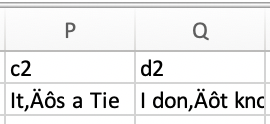
Manual codepage override is a backdoor because some non-compliant software always write UTF-8 without BOM
SheetJSDev
on 1 Jul 2020
Related issues
 m-ketan
·
3Comments
m-ketan
·
3Comments
 thomasledoux1
·
3Comments
thomasledoux1
·
3Comments
 Sankrish
·
4Comments
Sankrish
·
4Comments
 goxr3plus
·
3Comments
goxr3plus
·
3Comments
 magtuan
·
3Comments
magtuan
·
3Comments
Most helpful comment
This is a UTF-8 encoded CSV file but it does not have the requisite UTF-8 BOM.
You can see the bytes in the file using
xxdon linux or osx:The byte sequence
e2 80 99is the UTF-8 encoding of’,\u2019also known as "RIGHT SINGLE QUOTATION MARK"For proper processing in Excel, this file should have been prepended with the UTF8 BOM
EF BB BF. For SheetJS to read it, pass the optioncodepage: 65001. In NodeJS: