Sheetjs: utils.sheet_to_json reading only columns having values in the rows
Hi All,
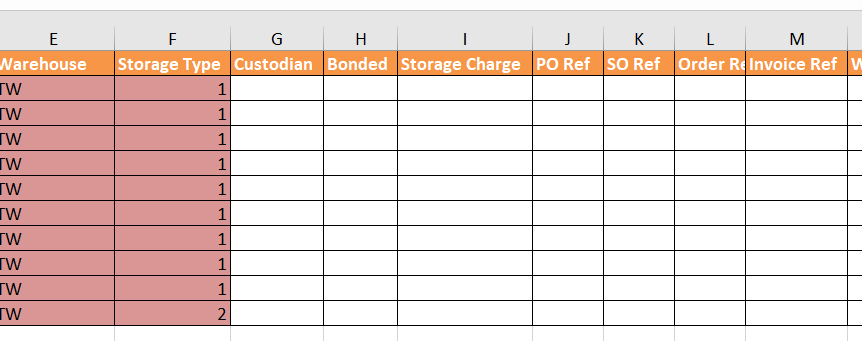
I need your help in getting all the records with all columns represented in sheet 1st row as keys even the value is not present in further rows.
My Code snippet is like this:
var XLSX = require('xlsx');
var workbook = XLSX.readFile('testdata.xlsx');
var sheet_name_list = workbook.SheetNames;
console.log(XLSX.utils.sheet_to_json(workbook.Sheets[sheet_name_list[0]], {raw: true}))
Output : [ { Separator: 'B',
ID: 1,
'Expected Receive': '2017-11-21',
Storer: 'LOAD TEST',
Warehouse: 'TW',
'Storage Type': 1,
SKU: 'SKU 01 LOAD',
Qty: 1 },
{ Separator: 'B',
ID: 1,
'Expected Receive': '2017-11-21',
Storer: 'LOAD TEST',
Warehouse: 'TW',
'Storage Type': 1,
SKU: 'SKU 01 LOAD',
Qty: 2 }......]
But Excel sheet is having.. After storage type the columns were missing... in the return object.
 ayyappaappana
>All comments
Set defval:null in the options for sheet_to_json
console.log(XLSX.utils.sheet_to_json(workbook.Sheets[sheet_name_list[0]], {raw: true, defval:null}))
Here is a simple fiddle showing the difference: https://jsfiddle.net/sheetjs/c2o34gt4/
Fiddle Code (click to show)
// <pre id="out"></pre>
var csv = "a,b,c\n1\n2,3\n,4"
var wb = XLSX.read(csv, {type:"binary"});
var a1 = XLSX.utils.sheet_to_json(wb.Sheets.Sheet1, {raw:true});
var a2 = XLSX.utils.sheet_to_json(wb.Sheets.Sheet1, {raw:true, defval:null});

out.innerHTML += "<b>Original CSV</b>\n" + csv + "\n\n";

out.innerHTML += "<b>`sheet_to_json` no defval</b>\n" + "[\n" + a1.map(function(r) { return "  " + JSON.stringify(r); }).join(",\n") + "\n]" + "\n\n";

out.innerHTML += "<b>`sheet_to_json` defval=null</b>\n" + "[\n" + a2.map(function(r) { return "  " + JSON.stringify(r); }).join(",\n") + "\n]" + "\n\n";
 SheetJSDev
on 12 Mar 2018
SheetJSDev
on 12 Mar 2018
Related issues
 DannyRyman
·
3Comments
DannyRyman
·
3Comments
 Alex0007
·
3Comments
Alex0007
·
3Comments
 dullin
·
3Comments
dullin
·
3Comments
 jamesbillinger
·
4Comments
jamesbillinger
·
4Comments
 magtuan
·
3Comments
magtuan
·
3Comments
Most helpful comment
Set
defval:nullin the options forsheet_to_jsonHere is a simple fiddle showing the difference: https://jsfiddle.net/sheetjs/c2o34gt4/
Fiddle Code (click to show)