Sheetjs: How to specify a different format date dd/mm/yyyy for Excel export?
I tried this:
var ws = XLSX.utils.table_to_sheet(document.getElementById(id), {dateNF:'d/m/yy'});
instead of:
var ws = XLSX.utils.table_to_sheet(document.getElementById(id));
No effect. date result is still inversed (formatted in html table with dd/mm/yyyy)
04/10/2017 in html table is written 10/04/2017 in excel file.
It seems to does not support french format...
Do you have any idea to resolv my issue?
 laurentauthier
All 13 comments
dateNF:'mm/dd/yyyy;@' seems to resolv my problem but I don't understand why cell format is mixed with Standard and date format.
Please help, I'm lost!
And cellDate has no effect
var ws = XLSX.utils.table_to_sheet(document.getElementById(id), {dateNF:'mm/dd/yyyy;@',cellDates:true });
laurentauthier
on 18 Oct 2017
@laurentauthier can you share a small HTML table and the result of XLSX.utils.table_to_sheet(document.getElementById(id)); ? Wondering whether it is an ingress or egress issue
 SheetJSDev
on 18 Oct 2017
SheetJSDev
on 18 Oct 2017
@SheetJSDev with dateNF:'mm/dd/yyyy;@' it seems to be ok: 04/10/2017 (4 october) is written 04/10/2017 in xlsx file with date format.
But 31/01/2017 is written with standard format with spaces before and after (due to comments in html I suppose). I don't understand why.
I'm french and I use an Excel french version.
laurentauthier
on 18 Oct 2017
@laurentauthier the ingress part (which takes the cell text and generates a date) uses the browser Date constructor to parse the date string: https://github.com/SheetJS/js-xlsx/blob/master/bits/20_jsutils.js#L129 . I suspect that the browser parsing implicitly assumes the format is "m/d/y". Here's what I get on Windows 7 Chrome under French (France) Locale:
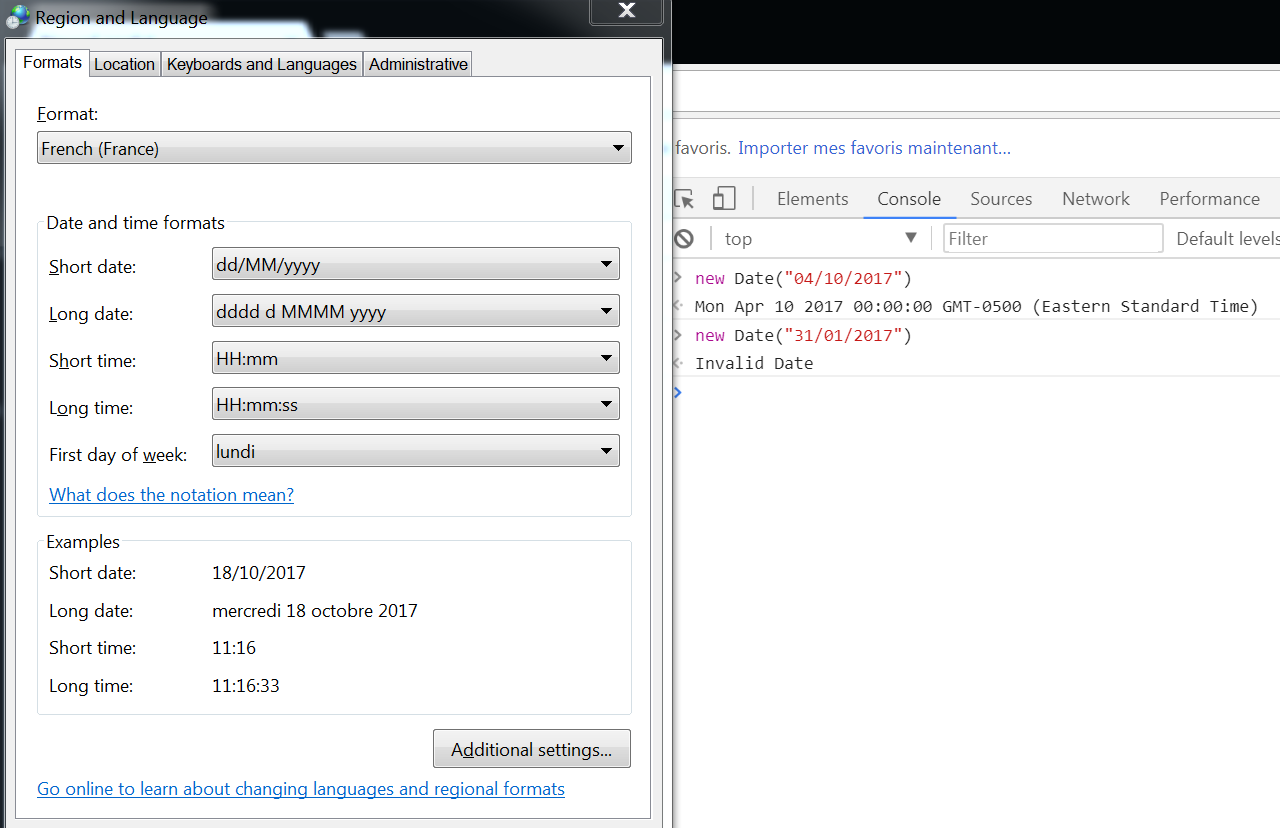
Can you check the two commands against your browser (new Date("04/10/2017") and new Date("31/01/2017")) and see whether you get the same results?
SheetJSDev
on 18 Oct 2017
@SheetJSDev export as csv:
,ADM - administratif 2016,-, 31/01/2017 , ...
,ADM - Administratif 2017,-,04/10/2017, , ...
when there is some whitespaces, dates are not formatted.
How to specify to trim values?
laurentauthier
on 18 Oct 2017

laurentauthier
on 19 Oct 2017
In fact,I do not understand why specify dateNF:'mm/dd/yyyy;@' to format dd/mm/yyyy in excel file... How to do? To resolv I specify raw:true and let Excel do the conversion. But I need to trim values... (see another issue about this problem)
laurentauthier
on 19 Oct 2017
i have problem to:
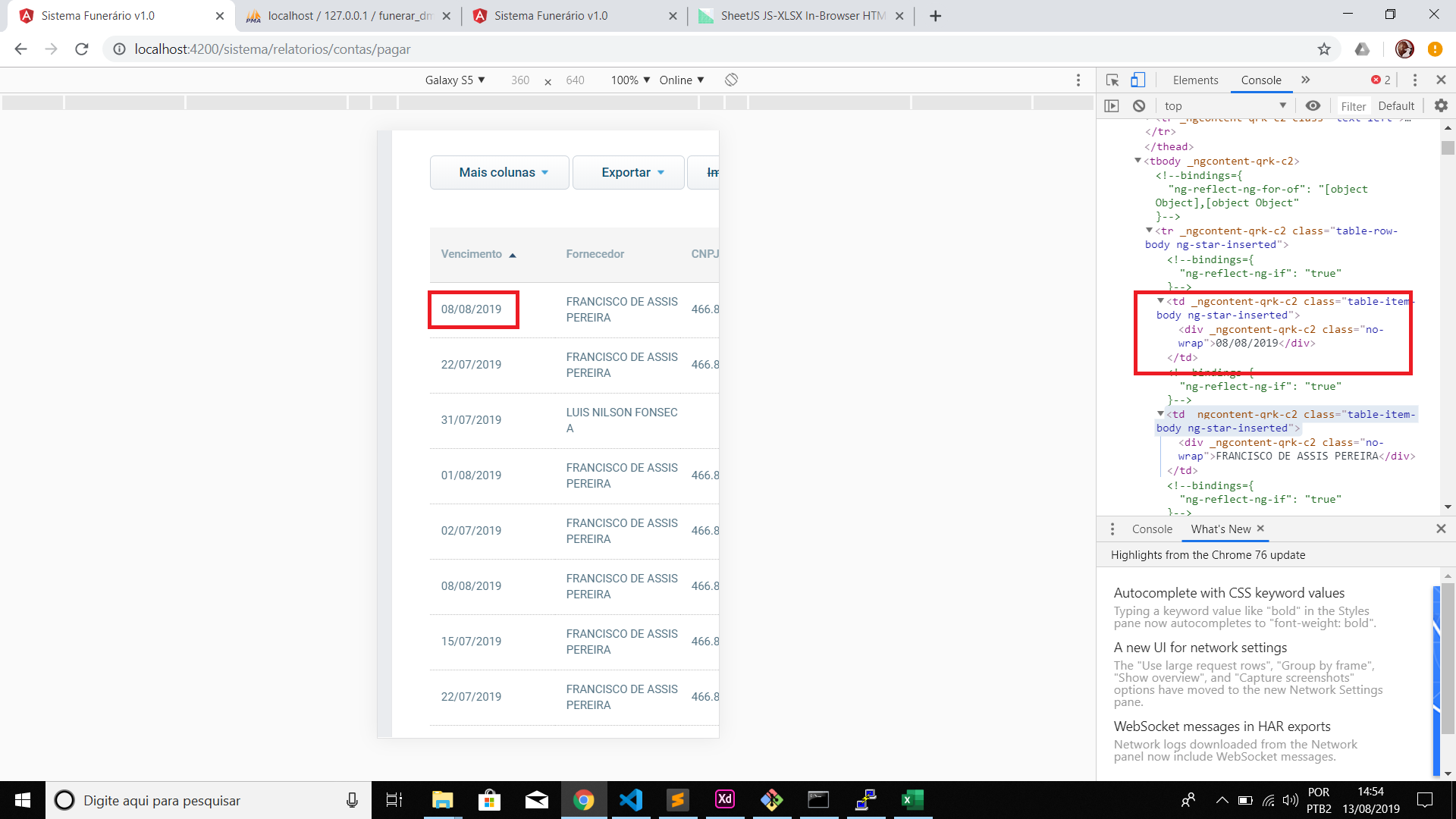
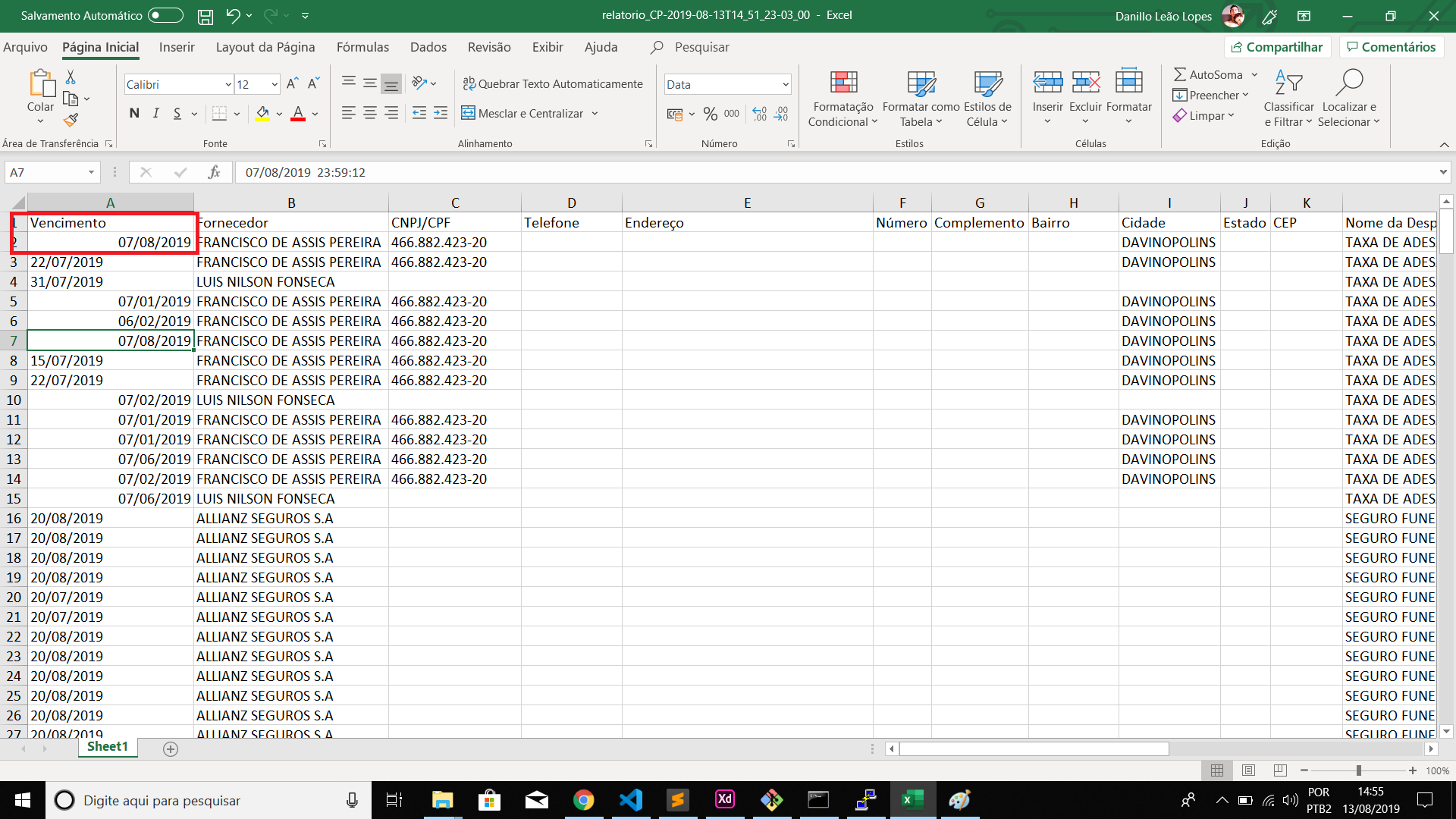
 danillo10
on 13 Aug 2019
danillo10
on 13 Aug 2019
this.viewExportar = false;
const ws: XLSX.WorkSheet=XLSX.utils.table_to_sheet(this.table.nativeElement, {dateNF:'mm/dd/yyyy;@',cellDates:true});
const wb: XLSX.WorkBook = XLSX.utils.book_new();
XLSX.utils.book_append_sheet(wb, ws, 'Sheet1');
/* save to file */
XLSX.writeFile(wb, "relatorio_CP-"+moment().format()+".xlsx");
Solved with: const ws: XLSX.WorkSheet=XLSX.utils.table_to_sheet(this.table.nativeElement, {dateNF:'mm/dd/yyyy;@',cellDates:true, raw: true});
danillo10
on 13 Aug 2019
Muchas gracias danillo10, ¿De dónde sacaste la referencia mil disculpas?, me interesaría profundizar más sobre esta librería, muchas gracias
 igwtsagl70
on 18 Sep 2019
igwtsagl70
on 18 Sep 2019
Thanks a lot @danillo10 your answer solved my same problem.
 kaldaf
on 16 Nov 2019
kaldaf
on 16 Nov 2019
@danillo10 thank you so much. it works!
 Riowaldy
on 16 Jun 2020
Riowaldy
on 16 Jun 2020
Related issues
 sangpuion
·
3Comments
sangpuion
·
3Comments
 upasana-shah
·
4Comments
upasana-shah
·
4Comments
 sudhakar-sekar
·
3Comments
sudhakar-sekar
·
3Comments
 jamespan0
·
3Comments
jamespan0
·
3Comments
 mmancosu
·
3Comments
mmancosu
·
3Comments
Most helpful comment
Solved with: const ws: XLSX.WorkSheet=XLSX.utils.table_to_sheet(this.table.nativeElement, {dateNF:'mm/dd/yyyy;@',cellDates:true, raw: true});