Sheetjs: How to simply export a Worksheet to xlsx?
Hello, I hope this doesn't send a blast email to everyone. I apologize if it does... I am out of luck and have been Googling this question for a long time and I hope it is okay to ask here:
- How would one export a worksheet to xlsx using SheetJS?
- The excel sheet would be formatted and then would save on the clients end?
Example:
Using SheetJS, how would I take this Sheet (array of objects):
var ws = XLSX.utils.json_to_sheet([{"name":"John"}, {"city":"Seattle"}]);
and store it in an excel sheet with name and city as header and John and Seattle as the row data?
Thanks in advance.
- Brian
 brmendez
All 16 comments
There are two issues:
1) each object is mapped to a row, so if you want a row with name "John" and city "Seattle", you should combine in one object. For example, here are 3 people:
var data = [
    {"name":"John", "city": "Seattle"},
    {"name":"Mike", "city": "Los Angeles"},
    {"name":"Zach", "city": "New York"}
];
2) ws is a worksheet there, you need to make a workbook from it. The simplest way is with:
var wb = XLSX.utils.book_new();
XLSX.utils.book_append_sheet(wb, ws, "WorksheetName");
https://jsfiddle.net/uxnf00z8/ is a complete example for the web browser, starting from the same data and ultimately triggering a download. The library is loaded as an external reference, and the saveAs function is defined in the FileSaver external reference
https://runkit.com/sheetjs/59c5c7dd804721001214aa74 is a complete example of generating an XLSX if you are using node or webpack (you'll see a "Download ZIP" at the end, download and rename to "output.xlsx" to see the data -- this is unfortunately a runkit limitation)
/* external references:
 - https://rawgit.com/SheetJS/js-xlsx/master/dist/xlsx.full.min.js
*/
/* original data */
var data = [
    {"name":"John", "city": "Seattle"},
    {"name":"Mike", "city": "Los Angeles"},
    {"name":"Zach", "city": "New York"}
];

/* this line is only needed if you are not adding a script tag reference */
if(typeof XLSX == 'undefined') XLSX = require('xlsx');

/* make the worksheet */
var ws = XLSX.utils.json_to_sheet(data);

/* add to workbook */
var wb = XLSX.utils.book_new();
XLSX.utils.book_append_sheet(wb, ws, "People");

/* generate an XLSX file */
XLSX.writeFile(wb, "sheetjs.xlsx");
 SheetJSDev
on 23 Sep 2017
SheetJSDev
on 23 Sep 2017
Thank you so much for the very prompt and detailed response including a Fiddle! This is working as expected.
brmendez
on 25 Sep 2017
I also appreciate the fiddle, it helps a lot!
However, what I don't understand here is why you can't
XLSX.write(wb, { bookType: 'xlsx', type: 'string' });
directly, on the client at least.
That way you wouldn't need to do the extra character conversion with your s2ab(s) function.
Whenever I try to write to a xlsx bookType with type: string I get an error.
Also, is there a particular reason you're using application/octet-stream and not application/vnd.openxmlformats-officedocument.spreadsheetml.sheet?
 leosco
on 2 Nov 2017
leosco
on 2 Nov 2017
@leosco XLSX is a ZIP-based format, just like XLSB XLSM and ODS. Attempts to write a ZIP-based format as type "string" are explicitly blocked due to various issues with getting other browser APIs to play nice with the string. The "string" output format is primarily for text-based formats like HTML and CSV where you don't want to convert Chinese and other characters back to raw bytes.
The preference for application/octet-stream probably has to do with IE6 compatibility.
 reviewher
on 2 Nov 2017
reviewher
on 2 Nov 2017
Awesome! Thanks for the quick response 😄
leosco
on 2 Nov 2017
I think these methods like XLSX.utils.book_new() and XLSX.utils.book_append_sheet() should be list in README.md. Some key method to export a xlsx file but I can't find them easily.
 F-loat
on 9 Nov 2017
F-loat
on 9 Nov 2017
There are some helpers in the type definitions https://github.com/SheetJS/js-xlsx/blob/master/types/index.d.ts#L679 that aren't currently in the documentation. Those definitely should be added.
reviewher
on 9 Nov 2017
I am able to work on it and it is downloadable but my requirement is to put some title on top as well .
Requirement is like following format : -
Please have a look on this ,

How can i achieve that ? I am getting only data set not title ,
 Anujmoglix
on 11 Apr 2018
Anujmoglix
on 11 Apr 2018
where have you defined saveAs function. @SheetJSDev
 ghost
on 17 May 2018
ghost
on 17 May 2018
@monikamaheshwari that code sample uses the FileSaver saveAs implementation. Recent versions integrate the logic in writeFile directly, so you just need XLSX.writeFile(wb, "sheetjs.xlsx"); The sample was updated.
SheetJSDev
on 17 May 2018
saveAs(new Blob([s2ab(wbout)],{type:"application/octet-stream"}), "sheetjs.xlsx");
This method is not defined.. How can i import this?
 varunchandran333
on 22 Jun 2018
varunchandran333
on 22 Jun 2018
saveAs(new Blob([s2ab(wbout)],{type:"application/octet-stream"}), "sheetjs.xlsx");
This method is not defined.. How can i import this?
var FileSaver = require('file-saver');
FileSaver.saveAs(new Blob([s2ab(wbout)],{type:"application/octet-stream"}), "sheetjs.xlsx");
or
import {saveAs} from 'file-saver';
 xavitoro
on 15 Jan 2019
xavitoro
on 15 Jan 2019
There are two issues:
- each object is mapped to a row, so if you want a row with name "John" and city "Seattle", you should combine in one object. For example, here are 3 people:
var data = [
    {"name":"John", "city": "Seattle"},
    {"name":"Mike", "city": "Los Angeles"},
    {"name":"Zach", "city": "New York"}
];
wsis a worksheet there, you need to make a workbook from it. The simplest way is with:var wb = XLSX.utils.book_new(); XLSX.utils.book_append_sheet(wb, ws, "WorksheetName");https://jsfiddle.net/uxnf00z8/ is a complete example for the web browser, starting from the same data and ultimately triggering a download. The library is loaded as an external reference, and the
saveAsfunction is defined in the FileSaver external referencehttps://runkit.com/sheetjs/59c5c7dd804721001214aa74 is a complete example of generating an XLSX if you are using node or webpack (you'll see a "Download ZIP" at the end, download and rename to "output.xlsx" to see the data -- this is unfortunately a runkit limitation)
/* external references:
 - https://rawgit.com/SheetJS/js-xlsx/master/dist/xlsx.full.min.js
*/
/* original data */
var data = [
    {"name":"John", "city": "Seattle"},
    {"name":"Mike", "city": "Los Angeles"},
    {"name":"Zach", "city": "New York"}
];

/* this line is only needed if you are not adding a script tag reference */
if(typeof XLSX == 'undefined') XLSX = require('xlsx');

/* make the worksheet */
var ws = XLSX.utils.json_to_sheet(data);

/* add to workbook */
var wb = XLSX.utils.book_new();
XLSX.utils.book_append_sheet(wb, ws, "People");

/* generate an XLSX file */
XLSX.writeFile(wb, "sheetjs.xlsx");
Does this "writeFile" work if the data is very large? Do we need to use stream or something to write the data? @SheetJSDev
 linrl3
on 26 Mar 2019
linrl3
on 26 Mar 2019
i want to change the download path or the directory.. but how??? can anybody help me?? plsss 🙏🙏🙏
 votyox69
on 29 Mar 2019
votyox69
on 29 Mar 2019
@varunchandran333 @xavitoro the saveAs hook refers to FileSaver.js, which we used to recommend until they decided to break browser support. The current approach tries a few different techniques, including object URLs and even an ActiveX solution! If saveAs is available, it will try calling, but it is completely optional and there is a guard to ensure things work even if saveAs is unavailable.
@linrl3 writeFile can lag for multiple reasons. Chrome supports blobs of up to 2GB so other parts like generating the final ZIP file will crash the browser long before hitting Chrome's download limit.
SheetJSDev
on 6 Jun 2019
I am able to work on it and it is downloadable but my requirement is to put some title on top as well .
Requirement is like following format : -
Please have a look on this ,
How can i achieve that ? I am getting only data set not title ,
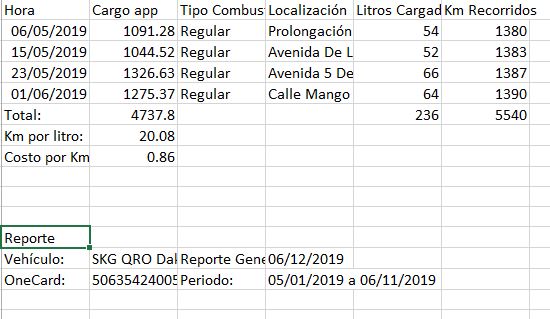
I have a similar Issue I have an HTML table and I'm generating the workbook there is a way to add text but I don't know how to add it before the generated table. { origin: "A12" } adds the text after the table generated it look something like this:
var wb = XLSX.utils.table_to_book(document.getElementById('tblData'));
var ws = wb.Sheets[wb.SheetNames[0]];
XLSX.utils.sheet_add_aoa(ws, [
["Vehículo "],
["Reporte Generado "],
["OneCard" ],
["Periodo " ]
], { origin: "A12" });
XLSX.writeFile(wb, 'new.xlsx');
 EdwinRM
on 13 Jun 2019
EdwinRM
on 13 Jun 2019
Related issues
 nvcken
·
17Comments
nvcken
·
17Comments
 LittleBreak
·
21Comments
LittleBreak
·
21Comments
 gongph
·
16Comments
gongph
·
16Comments
 roccomuso
·
21Comments
roccomuso
·
21Comments
 tamlyn
·
38Comments
tamlyn
·
38Comments
Most helpful comment
There are two issues:
1) each object is mapped to a row, so if you want a row with name "John" and city "Seattle", you should combine in one object. For example, here are 3 people:
2)
wsis a worksheet there, you need to make a workbook from it. The simplest way is with:https://jsfiddle.net/uxnf00z8/ is a complete example for the web browser, starting from the same data and ultimately triggering a download. The library is loaded as an external reference, and the
saveAsfunction is defined in the FileSaver external referencehttps://runkit.com/sheetjs/59c5c7dd804721001214aa74 is a complete example of generating an XLSX if you are using node or webpack (you'll see a "Download ZIP" at the end, download and rename to "output.xlsx" to see the data -- this is unfortunately a runkit limitation)