Hey there,
First of all, I've prepared a minimal demo of the issue I'm running into. You can find it here: https://github.com/pkaske/xlsx-date-issue
You should just need to clone, npm install and node ./index.js it to reproduce.
Input data
input.xlsx contains the following data:
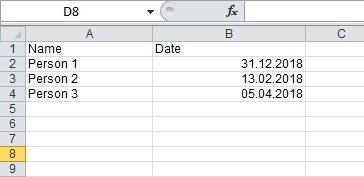
The date format you see here is German (DD.MM.YYYY).
The cells are formated as dates in excel (2010).
What I want to accomplish
I want to convert that table to CSV and keep the date format as it is displayed in the screenshot (DD.MM.YYY).
This is what I tried
const stream = XLSX.stream.to_csv(worksheet, {
  FS: ';',
  RS: '\n',
  dateNF: 'dd.mm.yyyy',   // <--- Seems to be ignored.
  strip: false,
  blankrows: true
});

stream.pipe(Fs.createWriteStream(output))
  .on('finish', () => {
    console.log(output, 'written');
  });
The actual output is
Name;Date
Person 1;12/31/18
Person 2;2/13/18
Person 3;4/5/18
Expected output
The dates should read 31.12.2018, 13.02.2018 and 05.04.2018.
Hopefully I just did something silly and that's all :)
 trading-peter
All 12 comments
Both of us did something silly :)
tl;dr:
const workbook = XLSX.readFile(input, {cellText:false, cellDates:true});
// ...
const stream = XLSX.stream.to_csv(worksheet, {
FS: ';',
RS: '\n',
dateNF: 'dd"."mm"."yyyy', // <-- notice the double quotes
strip: false,
blankrows: true
});
How does Excel handle international dates?
Excel dates are somewhat hokey. In the file, if you unzip and take a peek at xl/worksheets/sheet1.xml you'll see entries like
<c r="B2" s="1">
<v>43465</v>
</c>
The reader has to figure out that the number corresponds to a date and convert it back. To do that it looks at the cell format from xl/styles.xml:
<xf numFmtId="14" fontId="0" fillId="0" borderId="0" xfId="0" applyNumberFormat="1" applyFill="1"/>
All it stores is the number 14. Based in new york, your file looks like:

By fiddling with the regional settings, the same exact file will be displayed differently. https://github.com/SheetJS/js-xlsx/issues/326#issuecomment-286014758 is one comment showing a few different regional setting screenshots against Excel 95
What you should do
To override the date format, you must force the reader to ignore the original number format and force the writer to use a valid cell format.
On the read side, the line should be:
const workbook = XLSX.readFile(input, {cellText:false, cellDates:true});
the cellText:false option skips generation of the original strings (the w field is omitted) and cellDates:true forces generation of date objects for cells that are possibly dates (instead of the file's number values). After doing this, the worksheet date cells look like:
{
// ...
B2: { t: 'd', v: 2018-12-31T00:00:00.000Z },
//...
}
On the write side, you need to quote the periods:
const stream = XLSX.stream.to_csv(worksheet, {
FS: ';',
RS: '\n',
dateNF: 'dd"."mm"."yyyy',
strip: false,
blankrows: true
});
Why are quotes required in the date format?
The format displayed in the UI is not necessarily the same as the format displayed in the file. I took your file and changed one of the cells to follow the dd.mm.yyyy format in the UI. When saving the file, the actual format entry looks like:
<numFmt numFmtId="165" formatCode="dd\.mm\.yyyy"/>
Excel is automagically fixing the decimal points as literal. The double quotes achieve the same effect.
What we should be doing
1) The library should really take a locale option that sets everything up automatically. The ideal resolution is:
const workbook = XLSX.readFile(input, {locale:"en-US"});
2) Common format errors should be autocorrected in the same way that Excel corrects them.
 SheetJSDev
on 6 Jul 2017
SheetJSDev
on 6 Jul 2017
Works like a charm 🎉🎉🎉
Thank you!
trading-peter
on 7 Jul 2017
@pkaske good to hear that worked! Let's keep this issue open until the locale stuff is resolved
SheetJSDev
on 7 Jul 2017
@SheetJSDev cellText:false seems not work, I set it to false but still got w in cell object.
 haio
on 25 Jan 2018
haio
on 25 Jan 2018
@SheetJSDev @pkaske I'm using the exact same code, however, it's still the default format that gets applied..
var data = XLSX.utils.sheet_to_json(worksheet, {dateNF: 'dd"."mm"."yy', raw: false});
what's wrong with my code?
 sonjadeissenboeck
on 17 Oct 2018
sonjadeissenboeck
on 17 Oct 2018
Thank you, did work for me!
const workbook = XLSX.readFile(input, {cellText:false, cellDates:true});
var excelCSV = XLSX.utils.sheet_to_csv(worksheet, { FS: ";", RS: "n" , strip: true, blankrows: false, skipHidden: true, dateNF: 'DD"/"MM"/"YYYY HH":"mm":"ss' });
 Fabio-Pires
on 30 Oct 2018
Fabio-Pires
on 30 Oct 2018
@sonjadeissenboeck regarding https://github.com/SheetJS/js-xlsx/issues/718#issuecomment-430628199, having same situation.
For me, it helped to work with the formatting in the data reading:
const workbook = XLSX.read(data, {
  cellDates: true,
  dateNF: 'dd/mm/yyyy',
});
And you leave the XLSX.utils.sheet_to_json({ raw: false })
 kalinchernev
on 22 Apr 2019
kalinchernev
on 22 Apr 2019
@sonjadeissenboeck regarding #718 (comment), having same situation.
For me, it helped to work with the formatting in the data reading:
const workbook = XLSX.read(data, {
  cellDates: true,
  dateNF: 'dd/mm/yyyy',
});
And you leave the
XLSX.utils.sheet_to_json({ raw: false })
Thanks, XLSX.utils.sheet_to_json({ raw: false }) worked for me.
 TerryZ
on 15 Jul 2019
TerryZ
on 15 Jul 2019
In my case, I solved it by your all help as below;
workbook.SheetNames.forEach(function (sheetName, index) {
        var roa = XLSX.utils.sheet_to_json(workbook.Sheets[sheetName], {
            raw: false,
            dateNF: 'dd"."mm"."yyyy',
        });
var sheets = ExcelUtils.readSheets(
            decodeURIComponent(this.state.tempFile.file),
            {   type: 'base64',
                cellText:false,
                cellDates:true
            }
        );
 elaliwat
on 19 Jun 2020
elaliwat
on 19 Jun 2020
@SheetJSDev what format should I pass in for dates with deliberate whitespaces, eg. Czech dates 5. 1. 2021 (d. m. yyyy)?
I tried
raw: false
dateNF: 'd"." m"." yyyy', but it returned "30. 4. 2021".
dateNF: 'd". "m". "yyyy', but it returned "30. 4. 2021".
dateNF: 'd. m. yyyy', but it threw an error: bad second format
raw: true
dateNF: 'd"." m"." yyyy', but it returned date object May 01 2021 instead of Jan 05 2021
dateNF: 'd". "m". "yyyy', but it returned date object May 01 2021 instead of Jan 05 2021
dateNF: 'd. m. yyyy', but it threw an error: bad second format
Also, I'd like to ask, is there a option to completely disable date localisation and just get the date string as it is?
 serena97
on 18 Dec 2020
serena97
on 18 Dec 2020
@serena97 just to be clear, the "date string as it is" does not exist in XLSX or XLS or XLSB formats. They just store a number and a number format. That's why we need the formatting library (https://github.com/sheetjs/ssf).
As for delimiters, Excel generally stores the generic "/", which in certain contexts is to be interpreted as the date delimiter character in your current locale.
As for the actual date values (raw: false) what is your current locale? (Intl.DateTimeFormat().resolvedOptions().locale)
SheetJSDev
on 18 Dec 2020
@SheetJSDev Thanks for your prompt response! My current locale is 'en-US'.
Also, thanks for letting me know that "date string as it is" doesn't exist in XLSX/XLS/XLSB. I understand now that the dates must be interpreted based on the date formats of the system settings for these formats, but is there a option to disable date localisation for other formats such as csv at least?
serena97
on 18 Dec 2020
Related issues
 jamespan0
·
3Comments
jamespan0
·
3Comments
 sangpuion
·
3Comments
sangpuion
·
3Comments
 Alex0007
·
3Comments
Alex0007
·
3Comments
 happy0088
·
3Comments
happy0088
·
3Comments
 HachimDev
·
3Comments
HachimDev
·
3Comments
Most helpful comment
@sonjadeissenboeck regarding https://github.com/SheetJS/js-xlsx/issues/718#issuecomment-430628199, having same situation.
For me, it helped to work with the formatting in the data reading:
And you leave the
XLSX.utils.sheet_to_json({ raw: false })