Sheetjs: Exporting with Multiple Sheets
How to export excel with multiple sheets?
 HeroSony
All 13 comments
You need to add the name to the SheetNames array of the workbook and add the sheet object to the Sheets object. For example:
 var wb = {
    SheetNames: ["Sheet", "JS"], // <-- include the sheet names in the array
    Sheets: {
        Sheet: { // <-- each sheet name is a key in the Sheets object
            "!ref":"A1:B2",
            A1: { t:"n", v:1 },
            B2: { t:"n", v:4 }
        },
        JS: { // <-- since "JS" is the second entry in SheetNames, it will be the second tab
            "!ref":"A1:B2",
            A2: { t:"s", v:"Sheet" },
            B1: { t:"s", v:"JS" }
        }
    }
}
The book_append_sheet utility function basically appends the new sheet name to the SheetNames array and assigns the appropriate key of the Sheets object.
 reviewher
on 23 May 2017
reviewher
on 23 May 2017
Hi, reviewher. I am new with SheetJS.
This is what I've done ( https://jsfiddle.net/Herosony/97ajn9wm ) and it works fine with one sheet but I want to make one more sheet in that file. And your example is object base but I really don't know how to replace it with String base like my example above. Please help me!
HeroSony
on 23 May 2017
Made some changes to your example and saved a draft: https://jsfiddle.net/97ajn9wm/1/
HTML is a supported read format so XLSX.read should generate a workbook. All you need to do is read the html texts and extract the worksheet (which will generally be Sheet1):
- add the reference to xlsx.full.min.js (https://cdnjs.cloudflare.com/ajax/libs/xlsx/0.10.3/xlsx.full.min.js)
- you had a typo in the string list (the
'</table>'wasn't being added) wrap the html in
<html> </html>make a blank workbook:
var wb = {SheetNames:[], Sheets:{}};
- use XLSX.read to parse the HTML and extract the worksheet:
var ws1 = XLSX.read(prepareTable(1), {type:"binary"}).Sheets.Sheet1;
var ws2 = XLSX.read(prepareTable(2), {type:"binary"}).Sheets.Sheet1;
- add worksheets to new workbook:
wb.SheetNames.push("Sheet1"); wb.Sheets["Sheet1"] = ws1; // First workbook is named "Sheet1", you can change it
wb.SheetNames.push("Sheet2"); wb.Sheets["Sheet2"] = ws2; // Second workbook is named "Sheet2", you can change it
function s2ab(s) {
  var buf = new ArrayBuffer(s.length);
  var view = new Uint8Array(buf);
  for (var i=0; i!=s.length; ++i) view[i] = s.charCodeAt(i) & 0xFF;
  return buf;
}
var blob = new Blob([s2ab(XLSX.write(wb, {bookType:'xlsx', type:'binary'}))], { type: "application/octet-stream" });
saveAs(blob, "test.xlsx");
Hi, I am facing the same issue, @reviewher can you tell why the styling broke in the fiddle that you gave as a solution. I am stuck at figuring out why that haop
 abroy88
on 9 Nov 2017
abroy88
on 9 Nov 2017
@reviewher can you please help with a solution where the styling works too in multiple sheets
abroy88
on 9 Nov 2017
Hi I need help with the following code:I have added 2 sheets to the same workbook and writing it to the same file. But I only get the first sheet written to the file.
const ws = XLSX.utils.aoa_to_sheet(rows);
const ws1 = XLSX.utils.aoa_to_sheet(rows1);
/* write workbook (use type 'binary') */
const wb = XLSX.utils.book_new();
XLSX.utils.book_append_sheet(wb, ws,"sheet1");
XLSX.utils.book_append_sheet(wb, ws1,"sheet2");
const stream = XLSX.writeFile(wb, ..\\out\\processed\\data_${site}.csv, { flag: 'w+' });
 priya0412
on 28 Nov 2018
priya0412
on 28 Nov 2018
Made some changes to your example and saved a draft: https://jsfiddle.net/97ajn9wm/1/
HTML is a supported read format so
XLSX.readshould generate a workbook. All you need to do is read the html texts and extract the worksheet (which will generally be Sheet1):
- add the reference to xlsx.full.min.js (https://cdnjs.cloudflare.com/ajax/libs/xlsx/0.10.3/xlsx.full.min.js)
- you had a typo in the string list (the
'</table>'wasn't being added)- wrap the html in
<html> </html>- make a blank workbook:
var wb = {SheetNames:[], Sheets:{}};
- use XLSX.read to parse the HTML and extract the worksheet:
var ws1 = XLSX.read(prepareTable(1), {type:"binary"}).Sheets.Sheet1;
var ws2 = XLSX.read(prepareTable(2), {type:"binary"}).Sheets.Sheet1;
- add worksheets to new workbook:
wb.SheetNames.push("Sheet1"); wb.Sheets["Sheet1"] = ws1; // First workbook is named "Sheet1", you can change it wb.SheetNames.push("Sheet2"); wb.Sheets["Sheet2"] = ws2; // Second workbook is named "Sheet2", you can change itfunction s2ab(s) { var buf = new ArrayBuffer(s.length); var view = new Uint8Array(buf); for (var i=0; i!=s.length; ++i) view[i] = s.charCodeAt(i) & 0xFF; return buf; } var blob = new Blob([s2ab(XLSX.write(wb, {bookType:'xlsx', type:'binary'}))], { type: "application/octet-stream" }); saveAs(blob, "test.xlsx");
how can i export in uft8. i got font error
 HieuHoang1602
on 6 Dec 2018
HieuHoang1602
on 6 Dec 2018
does any body have answer for @priya0421 question only one sheet is created .
 Naval-Ganesh
on 6 Nov 2019
Naval-Ganesh
on 6 Nov 2019
does any body have answer for @priya0421 question only one sheet is created .
Hi I need help with the following code:I have added 2 sheets to the same workbook and writing it to the same file. But I only get the first sheet written to the file.
const ws = XLSX.utils.aoa_to_sheet(rows);
const ws1 = XLSX.utils.aoa_to_sheet(rows1);
/* write workbook (use type 'binary') */
const wb = XLSX.utils.book_new();
XLSX.utils.book_append_sheet(wb, ws,"sheet1");
XLSX.utils.book_append_sheet(wb, ws1,"sheet2");
const stream = XLSX.writeFile(wb,..\\out\\processed\\data_${site}.csv, { flag: 'w+' });
I run into this and testing it around, it appears that only csv files are affected by this, since it's working on xlsx files.So I looked around about csv standards and I found this :
CSV, as a file format, assumes one "table" of data; in Excel terms that's one sheet of a workbook.
So it is not possible to do it on workbooks, yet you can find some way to do it with separate files and nomination rules to be able to find them programatically.
 Maxtoros
on 28 Apr 2020
Maxtoros
on 28 Apr 2020
just try this?
var wb = XLSX.utils.book_new();
for (var i = 0; i < sheetName.length; i++) {
    var ws = XLSX.utils.json_to_sheet(dataFinal[i],{skipHeader: 1});
    XLSX.utils.book_append_sheet(wb, ws, sheetName[i]);
}
XLSX.writeFile(wb, "excel_name.xlsx");
 ycrz
on 25 May 2020
ycrz
on 25 May 2020
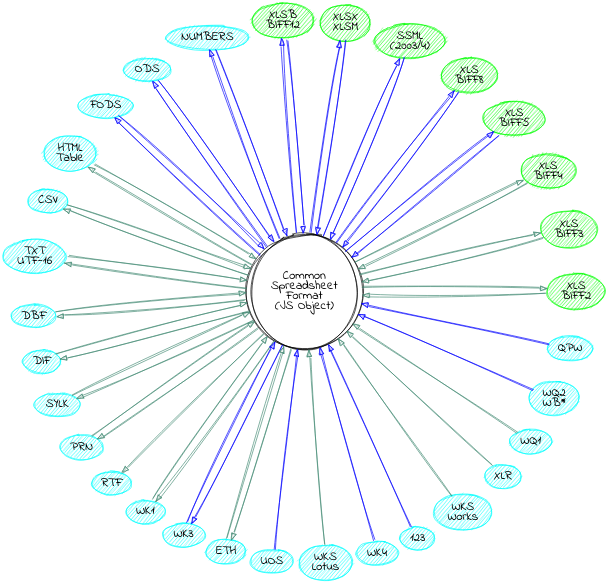
@priya0412 @Naval-Ganesh CSV is a single-sheet format. There's a diagram in the README (click on "Graph of Supported Formats" to see it)
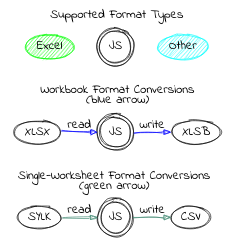
The nodes that have an incoming green arrow (CSV, HTML, TXT, DBF, DIF, SYLK, PRN, RTF, ETH, BIFF2 XLS) are single-sheet conversions. By default XLSX.write and XLSX.writeFile will write the first worksheet. You can pass the sheet option with the name of the worksheet you want to write.
For example, you can loop across sheet names and generate CSVs of every single worksheet in a file:
var wb = XLSX.readFile("workbook.xlsx");
wb.SheetNames.forEach((n, idx) => {
  XLSX.writeFile(`workbook.xlsx.${idx}.csv`, {sheet: n});
});
 SheetJSDev
on 25 May 2020
SheetJSDev
on 25 May 2020
I have the same issue If anyone has a solution please help me to solve this... I try all the above ways to solve.
 Muzamil-Hussain176
on 16 Sep 2020
Muzamil-Hussain176
on 16 Sep 2020
@Muzamil-Hussain176 what issue?
@HieuHoang1602 you may need to ensure <meta charset="utf8"> is somewhere in your page
reviewher
on 16 Sep 2020
Related issues
 thomasledoux1
·
3Comments
thomasledoux1
·
3Comments
 m-ketan
·
3Comments
m-ketan
·
3Comments
 eyalcohen4
·
3Comments
eyalcohen4
·
3Comments
 HachimDev
·
3Comments
HachimDev
·
3Comments
 jamespan0
·
3Comments
jamespan0
·
3Comments
Most helpful comment
You need to add the name to the SheetNames array of the workbook and add the sheet object to the Sheets object. For example:
The
book_append_sheetutility function basically appends the new sheet name to the SheetNames array and assigns the appropriate key of the Sheets object.