Sheetjs: Format columns when creating xlsx ( Is there any chance that i can have a fixed column width and when the column get longer text, can it wrap within the given space ? )
// this is my script: is there any chance that i can have a fixed column width and when the column get longer text, can it wrap within the given space ?
tableau('xlsxbtn', 'xportxlsx', 'xlsx', 'ViewComments.xlsx');
//function doit(type, fn) { return export_table_to_excel('IDvf-div-comment-quotes', type || 'xlsx', fn); }
function doit(type, fn) { return export_table_to_excel(getTableData(), type || 'xlsx', fn); }

function getTableData() {

    $("#tmp_Div").find("tr(:nth-child(0))").remove();

    var divCurrentClassVal = $('#divCurrentClass').text();
    var sltQuestion1 = $('#sltQuestion1 option:selected').text();
    $('.cmtDark').css('color', "red !important");
    $("#tmp_Div").append($('#IDvf-div-comment-quotes').html());
    var htmlTable = $('#IDvf-div-comment-quotes').text();

    var html = '<table id="tbl_Export_2Excel"><thead><tr style="font-weight: bold">.TEST DATA..</tr></thead>';
    var rowCount = $('#IDvf-div-comment-quotes tr').length;

    var css_html = '<style>td {border: 0.5pt solid #c0c0c0} .tRight { text-align:right} .tLeft { text-align:left} </style>';

    row2 = $("<tr bgcolor='#87AFC6'> </tr>");
    row2.append().prependTo("#tmp_Div");

    //<colgroup> <col width='1500' style='vertical-align:middle;' /> <col style='width:200px;' /> </colgroup>
    var vf_search_input = $('.vf-search-criteria:eq(0)').find('input[name=and-search]').val();
    if (vf_search_input != "") {
        row11 = $("<tr></tr>");
        col44 = $("<td></td>");
        col33 = $(" <td>Search for : " + vf_search_input + "</td>");
        row11.append(col44, col33).prependTo("#tmp_Div");
    }

    row1 = $("<tr bgcolor='#87AFC6'></tr>");
    col4 = $("<td></td>");
    col3 = $("<td>Area : " + divCurrentClassVal + "</td>");
    row1.append(col4, col3).prependTo("#tmp_Div").html();

    row2 = $("<tr bgcolor='#87AFC6'></tr>");
    col0 = $("<td></td>");
    col1 = $("<td style='vertical-align:bottom;background: red;'>Question : " + sltQuestion1 + "</td>");
    row2.append(col0, col1).prependTo("#tmp_Div");

    var tmpHTMLTable = $('#tmp_Div').html();
    alert(tmpHTMLTable);
    return id = 'tmp_Div';
}

function tableau(pid, iid, fmt, ofile) {

    if (fallback) {
        if (document.getElementById(iid)) document.getElementById(iid).hidden = true;
        Downloadify.create(pid, {
            width: 100,
            height: 30,
            filename: ofile, data: function () { var o = doit(fmt, ofile); return window.btoa(o); },
            transparent: false,
            append: false,
            dataType: 'base64',
            onComplete: function () { alert('Your File Has Been Saved!'); },
            onCancel: function () { alert('You have cancelled the saving of this file.'); },
            onError: function () { alert('You must put something in the File Contents or there will be nothing to save!'); }
        });
    } else document.getElementById(pid).innerHTML = "";
}

function s2ab(s) {
    if (typeof ArrayBuffer !== 'undefined') {
        var buf = new ArrayBuffer(s.length);
        var view = new Uint8Array(buf);
        for (var i = 0; i != s.length; ++i) view[i] = s.charCodeAt(i) & 0xFF;
        return buf;
    } else {
        var buf = new Array(s.length);
        for (var i = 0; i != s.length; ++i) buf[i] = s.charCodeAt(i) & 0xFF;
        return buf;
    }
}

function export_table_to_excel(id, type, fn) {
    var tmpHTMLTable = $('#tmp_Div').html();
    alert(tmpHTMLTable);
    var wb = XLSX.utils.table_to_book(tmpHTMLTable, { sheet: "View Comments" });
    var wbout = XLSX.write(wb, { bookType: type, bookSST: true, type: 'binary' });
    var fname = fn || 'ViewComments.' + type;
    try {
        saveAs(new Blob([s2ab(wbout)], { type: "data:application/vnd.ms-excel;base64" }), fname);
    } catch (e) { if (typeof console != 'undefined') console.log(e, wbout); }
    return wbout;
}
 Albion87
All 8 comments
I managed to find the answer with help of this: " https://www.npmjs.com/package/xlsx-style "
Albion87
on 23 May 2017
Thanks! Works for me.
let charNumbers = [3, 10, 5]
let charPixel = 14 // for Chinese characters being wider
worksheet["!cols"] = [ // just demo, should use for-loop
  { wpx: charNumbers[0] * charPixel },
  { wpx: charNumbers[1] * charPixel },
  { wpx: charNumbers[2] * charPixel },
]
 liukun
on 25 May 2017
liukun
on 25 May 2017
@Albion87 , does Jquesry required for this snippet?
 Suncatcher
on 13 Nov 2017
Suncatcher
on 13 Nov 2017
yeah you need jQuery
Albion87
on 13 Nov 2017
yeah you need jQuery
I am not about the original code in the first post, but about the fiddle you have. What modified libraries did you load from protobi?
Suncatcher
on 13 Nov 2017
Hi, Do you mean "liukun" comment on 25th of May or my fiddle.
for the fiddle, you can see I'm using 4 external libraries. (if you click on external resources)
Albion87
on 13 Nov 2017
hi, I mean your fiddle:
for the fiddle, you can see I'm using 4 external libraries. (if you click on external resources)
Well, I don't see JQuery among those libraries, but such line as
var colsCount = $(rows[0]).find("td").length;
tells me that it is used. In JSFiddle JQuery is loaded by default.
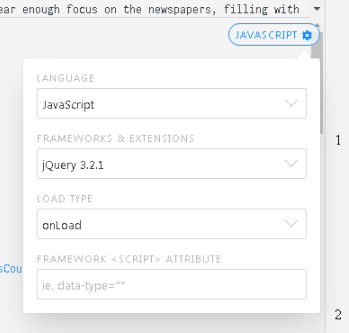
All in all, in my environment, where JQ is not loaded explicitly, this piece doesn't work.
Suncatcher
on 13 Nov 2017
Is there a way to align text in columns when creating xlsx?
Ps : (Not via Exceljs)
 shubham738
on 25 May 2020
shubham738
on 25 May 2020
Related issues
 thomasledoux1
·
3Comments
thomasledoux1
·
3Comments
 dullin
·
3Comments
dullin
·
3Comments
 happy0088
·
3Comments
happy0088
·
3Comments
 sangpuion
·
3Comments
sangpuion
·
3Comments
 Alex0007
·
3Comments
Alex0007
·
3Comments
Most helpful comment
Thanks! Works for me.