Sharp: Rendering SVG from buffer with external or local image using xlink
What are you trying to achieve?
Render an SVG from buffer that refers to an external or local image file.
For example:
<svg width="200" height="200"
  xmlns="http://www.w3.org/2000/svg" xmlns:xlink="http://www.w3.org/1999/xlink">
  <image xlink:href="https://mdn.mozillademos.org/files/6457/mdn_logo_only_color.png" height="200" width="200"/>
</svg>
(image taken from this Mozilla example: https://developer.mozilla.org/en-US/docs/Web/SVG/Element/image)
Have you searched for similar questions?
Yes.
Are you able to provide a standalone code sample that demonstrates this question?
This code:
const sharp = require('sharp');

var svgData = `<svg width="200" height="200"
  xmlns="http://www.w3.org/2000/svg" xmlns:xlink="http://www.w3.org/1999/xlink">
  <image xlink:href="https://mdn.mozillademos.org/files/6457/mdn_logo_only_color.png" height="200" width="200"/>
</svg>`;

sharp(new Buffer.from(svgData))
    .toFile("test.png")
    .catch(err => {
        console.error(err);
    });
Results in this error:
[Error: vips_realpath: unable to form filename
unix error: No such file or directory
svgload_buffer: SVG rendering failed
vips2png: unable to write "test.png"
]
I am probably missing something simple, but it seems that buffer input confuses the path resolution somehow. For local files with relative paths, would these be relative to the execution directory?
Are you able to provide a sample image that helps explain the question?
See: https://developer.mozilla.org/en-US/docs/Web/SVG/Element/image
 Andargor
All 11 comments
Using a file called test-buffer.svg with the same SVG and the following code also returns an error, so something seems amiss:
const sharp = require('sharp');

// test-buffer.svg contains same SVG as OP

sharp("test-buffer.svg")
    .toFile("test.png")
    .catch(err => {
        console.error(err);
    });
Error:
[Error: svgload: SVG rendering failed
vips2png: unable to write "test.png"
]
Hello, did you see https://github.com/lovell/sharp/issues/1378?
 kleisauke
on 16 Sep 2019
kleisauke
on 16 Sep 2019
No, I had not. Is it the same issue? For example, if I download that Mozilla image in the img directory just below my js, and modify the image tag to refer to it with a relative path, it works:
<svg width="200" height="200"
  xmlns="http://www.w3.org/2000/svg" xmlns:xlink="http://www.w3.org/1999/xlink">
  <image xlink:href="img/mdn_logo_only_color.png" height="200" width="200"/>
</svg>
But if I put this SVG in a variable and load it with Buffer.from like my first example, it does not. My issue seems to be path resolution rather than nesting. Or maybe I'm wrong and all this is related to pixbuf.
Andargor
on 16 Sep 2019
librsvg needs a base URL for referenced files. If a base URL is not given, then any referenced files will not be allowed.
https://gitlab.gnome.org/GNOME/librsvg/blob/b4aa8d277d30f4042797dc8b64c073b10f8bac4b/rsvg_internals/src/allowed_url.rs#L60
When loading from a file, librsvg will set the base file to the file itself. But when a SVG image is loaded from a buffer (Buffer.from) a base file isn't set.
https://github.com/libvips/libvips/blob/3b0d44be51fac4d04355f409e12ffed34d886efd/libvips/foreign/svgload.c#L582
This will require a new optional argument within vips_svgload_buffer (for e.g. base_uri) that will set the base URL (this can be done with rsvg_handle_set_base_uri).
To workaround this for now you'll need to base64 encode the relevant image directly within the SVG file. data: URLs doesn't require a base URL.
kleisauke
on 16 Sep 2019
I see, thanks for the explanation. I'm creating SVG on the fly, so my workaround would be to save a temporary file and load that with sharp. Unfortunate.
Andargor
on 16 Sep 2019
As an added note, even for loading as an SVG file, when the xlink:href is a full URL, an error is generated. When the image is locally available and referenced with a relative path, it works. Surely that is a bug?
Andargor
on 16 Sep 2019
librsvg will not load http resources. As librsvg is shared across the GNOME environment, it's pretty important to have a strict deny on remote resources. This to keep malicious SVG data from "phoning home".
kleisauke
on 16 Sep 2019
Interesting, even though Chrome renders it. I will work with local files then.
Andargor
on 16 Sep 2019
The current behaviour of librsvg is expected and by design. Should network access be required when rendering a given SVG then librsvg+libvips is probably not the right solution. Ensure you trust both the source and contents of any SVG before attempting to rasterise it when using alternatives.
It might be possible to improve the error messaging; I had a quick look and it appears librsvg does not update the internal cairo status when an error occurs. For this example the message obtained via cairo_status_to_string is "no error has occurred", which suggests an improvement to librsvg itself may be possible, but this is very much left as an exercise for the reader.
 lovell
on 17 Sep 2019
lovell
on 17 Sep 2019
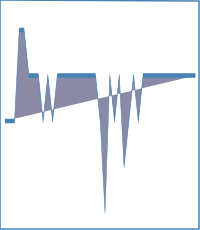
Hi, is there not a simple way to embed/overlay a base64 encoded PNG on to an SVG and then render the whole thing as a PNG? Phantomjs includes the logo in the final PNG (see image below). sharp ignores the logo. Is this possible? Thanks!
sharp(Buffer.from(`
<svg width="200" height="230">
<path fill="none" stroke="steelblue" stroke-width="1.5" d="M0,0 L0,229 L199,229 L199,1 L0,0Z"></path>
<g transform="translate(5,5)">
<image width="100" height="9" xlink:href="data:image/png;base64,/9j/4AAQSkZJRgABAQEAYABgAAD/4QBmRXhpZgAATU0AKgAAAAgABgESAAMAAAABAAEAAAMBAAUAAAABAAAAVgMDAAEAAAABAAAAAFEQAAEAAAABAQAAAFERAAQAAAABAAAOw1ESAAQAAAABAAAOwwAAAAAAAYagAACxj//bAEMAAgEBAgEBAgICAgICAgIDBQMDAwMDBgQEAwUHBgcHBwYHBwgJCwkICAoIBwcKDQoKCwwMDAwHCQ4PDQwOCwwMDP/bAEMBAgICAwMDBgMDBgwIBwgMDAwMDAwMDAwMDAwMDAwMDAwMDAwMDAwMDAwMDAwMDAwMDAwMDAwMDAwMDAwMDAwMDP/AABEIAAkAZAMBIgACEQEDEQH/xAAfAAABBQEBAQEBAQAAAAAAAAAAAQIDBAUGBwgJCgv/xAC1EAACAQMDAgQDBQUEBAAAAX0BAgMABBEFEiExQQYTUWEHInEUMoGRoQgjQrHBFVLR8CQzYnKCCQoWFxgZGiUmJygpKjQ1Njc4OTpDREVGR0hJSlNUVVZXWFlaY2RlZmdoaWpzdHV2d3h5eoOEhYaHiImKkpOUlZaXmJmaoqOkpaanqKmqsrO0tba3uLm6wsPExcbHyMnK0tPU1dbX2Nna4eLj5OXm5+jp6vHy8/T19vf4+fr/xAAfAQADAQEBAQEBAQEBAAAAAAAAAQIDBAUGBwgJCgv/xAC1EQACAQIEBAMEBwUEBAABAncAAQIDEQQFITEGEkFRB2FxEyIygQgUQpGhscEJIzNS8BVictEKFiQ04SXxFxgZGiYnKCkqNTY3ODk6Q0RFRkdISUpTVFVWV1hZWmNkZWZnaGlqc3R1dnd4eXqCg4SFhoeIiYqSk5SVlpeYmZqio6Slpqeoqaqys7S1tre4ubrCw8TFxsfIycrS09TV1tfY2dri4+Tl5ufo6ery8/T19vf4+fr/2gAMAwEAAhEDEQA/AP0m/wCCFn7TnhP4k/8ABOb4I+G3+Inh7xH4/i8KRzahpr+IYb3WUCOQzTRGRpvlDICWHGV9q+Nf+CHOm+G/FEnwd8TeIn+Ad54iubvUJTq118ZtVn8c3NyZbxIt2iPCLZpWYohQzN+7+cFmAWvRP+CSf/KQXUP+wPqf/o6CvPf2Uv8AlJB4V/7G6b/0KWqWoHX/ALZn7W3j+X9vvxL8e/Cei/FLWvhF+yprtl4V1S+8P3dlN4bns1jlbxi13ZteRXc00Ed7ZCNo7eaNJ9EbJX948d3/AIKjfE343XH/AAUJ8bW3wUvteu/Cs3wL8Oa34uufCmroPEkfh/8A4SLVhfyeHInDW76tLaljFM/KpEyxHz3gK/a1n/yZR8aP+v7xv/6W6hXQfBn/AJOD/wC6caF/6U39SB8k/wDBRnWfh78VP2Yf2YdM8CfE7wpp/gHxBcxTeF9M8calrNt4P+IdnDphW30/VNYiJuIJ1jdZ4VunZ557Yh4pnQhfJPFfxKj8Vf8ABDD4taV4bsdZ3eE/i/pHhZdNb4g/27o8it4p0NjZaTrkcMczaU0V15KmWMy27G4hYN5Iz9g/8FXf+UTvir/sFaZ/6Pt6p/AP/lFH8I/+vvwx/wCn+yoA+edS/Zx+Lv7IPwQ+M3jia1m/Z/8Ahtrlj4Y0rVPDXhH4gan4yutBsxrYTxF4mguri1jbT5o9EncA2qMV+yeexDxR54f4NvJ8K/2jdBuvCnwj0X4L69qHxF0HS/h1qPhXVYLhvi94enurZNae8WBWbVbSLSPtl+15dtM0M0Ucyzqzor/sNX4Ff8Go3/KT79qj/rjN/wCnFa6KdVRhKLinfq+np/X4XT56tFznGak1y9O/r/T++zX2vYfsP/C+L/gurdeH10O9Gl23wutviDFZf29qBiTWz4jmBvdnn4z8ijYR5eFA244q1+2X+w18L/Gf/BW/4FaXqWg302n/ABT0Lxtq3ie2TXdQgi1a7tE0X7NIVjnUIYxPNgJtH7xuK+yIv+Tubn/sT4v/AEukpnjv/k7f4b/9i/4g/wDRul1znQfnl/wUR0zTfGv/AAVV8eWGvL8ENSstN+HfhZ7K2+JfxY1TwTFaPLe695jWS2cMouC2yPzdwUpthxne2N//AIKBeBpviL8bv2I/BXhHwr4P8eaNf+D/ABRNbeFT8Qr/AE/w/qkVtpmlGAw6pBbzS3Kxqf3MskI8wNuZo9xNZX/Bb7/k67w//wBija/+ll9X19+z/wD8i1+y/wD9iG//AKbrGmBw/wDwQksL6+/YTXxfLqbHSPiN4j1DxHo3hkX+oagnw9tmZLZ9AE98fOke2ura5MvyRxrPLMsabFVmK+hP2Xv+Sa6n/wBjd4n/APT9qFFID//Z"></image><g fill="none" font-size="10" font-family="sans-serif" text-anchor="middle" transform="translate(0, 25) scale(4.761904761904762, -45.5) translate(0, -4)"><path fill="#8a89a6" stroke="steelblue" stroke-width="0.1" d="M0,2L1,2 L2,2 L3,4 L4,4 L5,3 L6,3 L7,3 L8,2 L9,3 L10,2 L11,3 L12,3 L13,3 L14,3 L15,3 L16,3 L17,3 L18,3 L19,3 L20,2 L21,0 L22,3 L23,2 L24,3 L25,1 L26,2 L27,3 L28,2 L29,3 L30,3 L31,3 L32,3 L33,3 L34,3 L35,3 L36,3 L37,3 L38,3 L39,3 L40,3 M0,0Z"></path></g></g></svg>
`
))
  .png()
  .toBuffer()

 mahesh2000
on 13 Jan 2020
mahesh2000
on 13 Jan 2020
@mahesh2000 Your example is not valid XML e.g. it is missing the xmlns:xlink="http://www.w3.org/1999/xlink" attribute from the svg element.
lovell
on 13 Jan 2020
Related issues
 sansroman
·
3Comments
sansroman
·
3Comments
 OleVik
·
3Comments
OleVik
·
3Comments
 natural-law
·
3Comments
natural-law
·
3Comments
 zilions
·
3Comments
zilions
·
3Comments
 zhump
·
3Comments
zhump
·
3Comments