My main target is to be able to manipulate TIFF image , as per my knowledge Tiff is the output format of a multiple feeder scanner device .
so basically I'm trying to use angular which is installed on top of NodeJS
Angular CLI: 7.2.3
Node: 10.15.0
OS: win32 x64
below is the steps to reproduce the issue
1- npm install sharp
2- npm install @types/sharp
3- create basic project and a home component
4- here 's my home component code below :
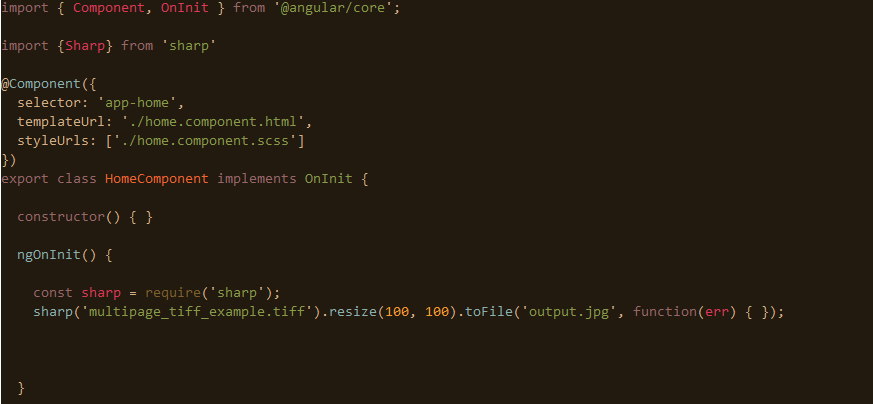
5- run ng serve
6- i get the below in the visual studio code terminal console :
chunk {main} main.js, main.js.map (main) 13 kB [initial] [rendered]
chunk {polyfills} polyfills.js, polyfills.js.map (polyfills) 237 kB [initial] [rendered]
chunk {runtime} runtime.js, runtime.js.map (runtime) 6.08 kB [entry] [rendered]
chunk {styles} styles.js, styles.js.map (styles) 16.6 kB [initial] [rendered]
chunk {vendor} vendor.js, vendor.js.map (vendor) 3.73 MB [initial] [rendered]
WARNING in ./node_modules/sharp/lib/libvips.js 51:22-69
Critical dependency: the request of a dependency is an expression
WARNING in ./node_modules/sharp/lib/libvips.js 52:23-70
Critical dependency: the request of a dependency is an expression
ERROR in ./node_modules/detect-libc/lib/detect-libc.js
Module not found: Error: Can't resolve 'child_process' in 'D:\angular-workspace\testsharp\node_modules\detect-libc\lib'
ERROR in ./node_modules/sharp/lib/libvips.js
Module not found: Error: Can't resolve 'child_process' in 'D:\angular-workspace\testsharp\node_modules\sharp\lib'
ERROR in ./node_modules/bindings/bindings.js
Module not found: Error: Can't resolve 'fs' in 'D:\angular-workspace\testsharp\node_modules\bindings'
ERROR in ./node_modules/detect-libc/lib/detect-libc.js
Module not found: Error: Can't resolve 'fs' in 'D:\angular-workspace\testsharp\node_modules\detect-libc\lib'
ERROR in ./node_modules/sharp/lib/libvips.js
Module not found: Error: Can't resolve 'fs' in 'D:\angular-workspace\testsharp\node_modules\sharp\lib'
ERROR in ./node_modules/detect-libc/lib/detect-libc.js
Module not found: Error: Can't resolve 'os' in 'D:\angular-workspace\testsharp\node_modules\detect-libc\lib'
ERROR in ./node_modules/sharp/lib/libvips.js
Module not found: Error: Can't resolve 'os' in 'D:\angular-workspace\testsharp\node_modules\sharp\lib'
ERROR in ./node_modules/bindings/bindings.js
Module not found: Error: Can't resolve 'path' in 'D:\angular-workspace\testsharp\node_modules\bindings'
ERROR in ./node_modules/file-uri-to-path/index.js
Module not found: Error: Can't resolve 'path' in 'D:\angular-workspace\testsharp\node_modules\file-uri-to-path'
ERROR in ./node_modules/sharp/lib/constructor.js
Module not found: Error: Can't resolve 'path' in 'D:\angular-workspace\testsharp\node_modules\sharp\lib'
ERROR in ./node_modules/sharp/lib/libvips.js
Module not found: Error: Can't resolve 'path' in 'D:\angular-workspace\testsharp\node_modules\sharp\lib'
ERROR in ./node_modules/sharp/lib/constructor.js
Module not found: Error: Can't resolve 'stream' in 'D:\angular-workspace\testsharp\node_modules\sharp\lib'
ERROR in ./node_modules/sharp/build/Release/sharp.node 1:2
Module parse failed: Unexpected character '�' (1:2)
You may need an appropriate loader to handle this file type.
(Source code omitted for this binary file)
any suggestions ?
thanks
 AMamdouh3000
All 5 comments
Is this code intended to run in a web browser? sharp requires the Node.js runtime and will not work client-side.
 lovell
on 11 Mar 2019
lovell
on 11 Mar 2019
Angular is installed on top of nodejs. And will be running on a web server
that has the nodejs runtime.
On Mon, Mar 11, 2019, 5:52 PM Lovell Fuller notifications@github.com
wrote:
Is this code intended to run in a web browser? sharp requires the Node.js
runtime and will not work client-side.—
You are receiving this because you authored the thread.
Reply to this email directly, view it on GitHub
https://github.com/lovell/sharp/issues/1605#issuecomment-471599724, or mute
the thread
https://github.com/notifications/unsubscribe-auth/AjiRuTbwAJG86GqPQjm_KusooRKlO_0Sks5vVnvIgaJpZM4bo7ci
.
AMamdouh3000
on 11 Mar 2019
Add sharp (and any other native modules) to Webpack externals.
lovell
on 11 Mar 2019
Thanks lovell for pointing me to install other native modules
I have managed to install the other required dependencies from npm , modules like os , path and platform were successfully installed ,and when I build the project it doesn't give warning any more , however only 2 modules(fs , child_process) which shows like installed but when opened it is only having package.json and a read-me file without any js files !
After opened the read-me file I found the below message.
This package name is not currently in use but was formerly occupied by another package. To avoid malicious use, npm is hanging on to the package name, but loosely, and we'll probably give it to you if you want it. You may adopt this package by contacting [email protected] and
requesting the name
This is currently my only bottleneck !
AMamdouh3000
on 12 Mar 2019
Is the webpack target set to node? https://webpack.js.org/configuration/target
Angular is intended as a client-side framework so it's an odd (and insecure based on its default configuration) choice for server-side use.
These questions/decisions are unrelated to sharp - you'd be better off searching for and/or asking such things on a site like StackOverflow - good luck!
lovell
on 12 Mar 2019
Related issues
 OleVik
·
3Comments
OleVik
·
3Comments
 vermin1337
·
3Comments
vermin1337
·
3Comments
 kachurovskiy
·
3Comments
kachurovskiy
·
3Comments
 genifycom
·
3Comments
genifycom
·
3Comments
 janaz
·
3Comments
janaz
·
3Comments
Most helpful comment
Add
sharp(and any other native modules) to Webpack externals.