Sharp: Image get cropped when I try to resize image using Sharp
I faced a problem when I try to resize an image and I tried to keep an aspect ratio but the image get cropped.
Below is the original Image :
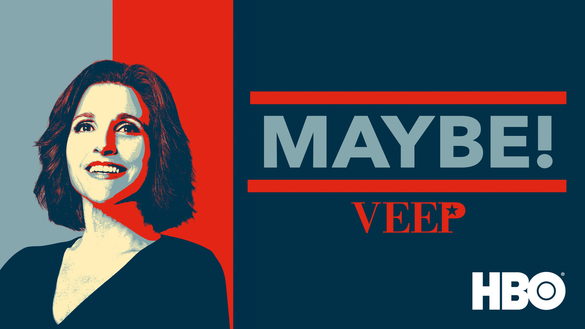
When I tried to resize my image with
.resize(401, 300).toFormat('jpg').toBuffer(function(err, data) {
}
then resized image will become :
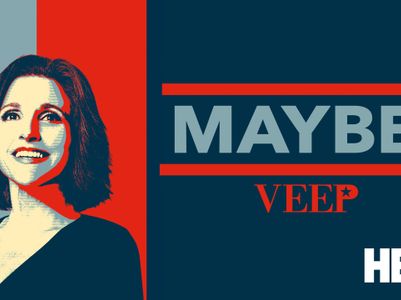
As, you can see the image got cropped.
Thanks
 mailmeankit
All 11 comments
Hello, did you see the various resize options in the documentation?
http://sharp.dimens.io/en/stable/api-resize/
 lovell
on 6 Sep 2017
lovell
on 6 Sep 2017
Hi,
Yes I went through it but didn't get a much idea like what values to select for different resize options when I want to resize my image.
Although I tried with below content but it still provided me cropped image, please let me know if I am doing something wrong.
sharp(imageData).resize(401, 300,{
kernel: sharp.kernel.lanczos2,
interpolator: sharp.interpolator.bicubic
}).toFormat('jpg').toBuffer(function(err, data) {
}
Also the original image is of 585x329 dimensions and by using above configuration, the image is still showing cropped.
Thanks
mailmeankit
on 6 Sep 2017
The ratio of the widths 585:401 is different to the ratio of the heights 329:300 so by specifying both width and height the image will be cropped as per the docs: "By default, the resized image is centre cropped to the exact size specified."
Perhaps you meant to use max?
sharp(imageData)
  .resize(401, 300)
  .max()
  .toFormat('jpg')
  ...
I tried using max(), although image didn't get cropped which is fine but it get resized on 226 height instead of 300 height.
I used below :
sharp(imageData)
.resize(401, 300)
.max()
.toFormat('jpg')
But it resized to 401,226 dimensions.
mailmeankit
on 6 Sep 2017
Did you see "Use null or undefined to auto-scale the width to match the height"?
sharp(imageData)
  .resize(null, 300)
  ...
Well I tried using null or undefined in .resize(null,300), and it has auto scale the image dimensions to match the height and it becomes 533x300 dimension but this is not required in my scenario.
I am creating On demand Image Resize and the resize image dimensions will be provided dynamically and the image should be resize to the provided dimensions.
mailmeankit
on 6 Sep 2017
Sorry, I don't understand what you're expecting as output.
Perhaps ignoreAspectRatio, which will stretch the image to fit the specific dimensions?
sharp(imageData)
  .resize(401, 300)
  .ignoreAspectRatio()
  .toFormat('jpg')
  ...
I'll need fully-worked input and expected output image dimensions and behaviour to be able to help further.
lovell
on 6 Sep 2017
Hi,
I tried with below parameters and yes it works, its not cropping my image and also resizing my image to provided dimensions.
sharp(imageData)
.resize(401, 300)
.ignoreAspectRatio()
.toFormat('jpg')
Thanks for help.
mailmeankit
on 7 Sep 2017
Glad to hear we got there in the end!
(I was confused by the initial "tried to keep an aspect ratio" comment, which I understood to mean you wanted to maintain the same aspect ratio.)
lovell
on 7 Sep 2017
Sorry, I don't understand what you're expecting as output.
Perhaps ignoreAspectRatio, which will stretch the image to fit the specific dimensions?
sharp(imageData)
  .resize(401, 300)
  .ignoreAspectRatio()
  .toFormat('jpg')
  ...
I'll need fully-worked input and expected output image dimensions and behaviour to be able to help further.
We have upgraded sharp to version 0.23.0. It seems that ignoreAspectRatio() is removed in this version. Is there any workaround to get same functionality that ignoreAspectRatio() function offers?
 Subham115
on 18 Sep 2019
Subham115
on 18 Sep 2019
@Subham115 See https://sharp.pixelplumbing.com/en/stable/api-resize/ especially { fit: 'fill' }
lovell
on 18 Sep 2019
Related issues
 zilions
·
3Comments
zilions
·
3Comments
 kachurovskiy
·
3Comments
kachurovskiy
·
3Comments
 natural-law
·
3Comments
natural-law
·
3Comments
 janaz
·
3Comments
janaz
·
3Comments
 emmtte
·
3Comments
emmtte
·
3Comments
Most helpful comment
Glad to hear we got there in the end!
(I was confused by the initial "tried to keep an aspect ratio" comment, which I understood to mean you wanted to maintain the same aspect ratio.)