Sharex: Open an image file in ShareX editor instead of immediately uploading it?
If I use the "open with" explorer context menu command to open an image file in ShareX, it automatically uploads the file via ShareX.
But I would like it to open the file in the editor first so I can edit it before uploading instead of just immediately uploading it. Is there a way to do this?
Thank you.
 ThankYou2
All 8 comments
Try this: 
 Jaex
on 21 Jul 2015
Jaex
on 21 Jul 2015
Am I allowed to say OMG here?! Spectacular response time, and spectacular result! Works like a charm! Thank you for ShareX. It's a brilliant piece of work!
ThankYou2
on 21 Jul 2015
Actually I was responded 3 minutes late because was doing testings :(
Jaex
on 21 Jul 2015
@Jaex @ThankYou2 Image link broken, how did you get image in editor before upload?
 sparcut
on 23 Apr 2017
sparcut
on 23 Apr 2017
Version 11.6.0 - is ok
Version 11.7.0 - not opening editor :(
 Snoradbe
on 26 Apr 2017
Snoradbe
on 26 Apr 2017
Version 11.7.0 - not opening editor :(
Me too. ;(
 iamcmnut
on 8 May 2017
iamcmnut
on 8 May 2017
did you remove the image editor from application????? :O that was a very strong and great tool. that was all in one window with powerful abilities.
:(
:(
:((
 mhjgithub
on 7 Jul 2017
mhjgithub
on 7 Jul 2017
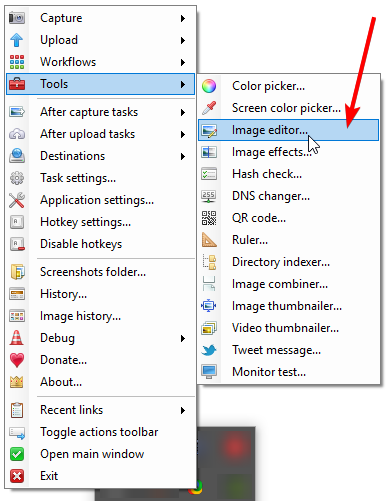
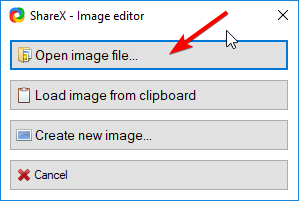
if you still have the captured image filename in the 'main panel' of ShareX, you can select > right click and 'edit image'. you can also right click on taskbar icon and go to tools > image editor and then open a file.
 oshihirii
on 24 Jul 2019
oshihirii
on 24 Jul 2019
Related issues
 BristolITDave
·
3Comments
BristolITDave
·
3Comments
 Stele77
·
3Comments
Stele77
·
3Comments
 skygate2012
·
3Comments
skygate2012
·
3Comments
 wilandlane
·
3Comments
wilandlane
·
3Comments
 nickodemos
·
3Comments
nickodemos
·
3Comments
Most helpful comment
Actually I was responded 3 minutes late because was doing testings :(