Sharex: Please add HEX at the Screen Color Picker
I found possibility change SCP format to HEX but it only copies HEX to clipboard

Also need to show HEX code beside a cursor where RGB right now

 Anlini
All 6 comments
I don't see point of seeing hex there.
 Jaex
on 2 Mar 2015
Jaex
on 2 Mar 2015
It is very useful when there is a need to compare known hex color with existing, for example, after image compression some colors can be distorted. And I just hover SCP on it to check, without copying to clipboard.
Now I need to use PicPick for this purpose
Anlini
on 2 Mar 2015
Thank you! Was wondering where I could change this.
 mnpenner
on 7 Mar 2016
mnpenner
on 7 Mar 2016
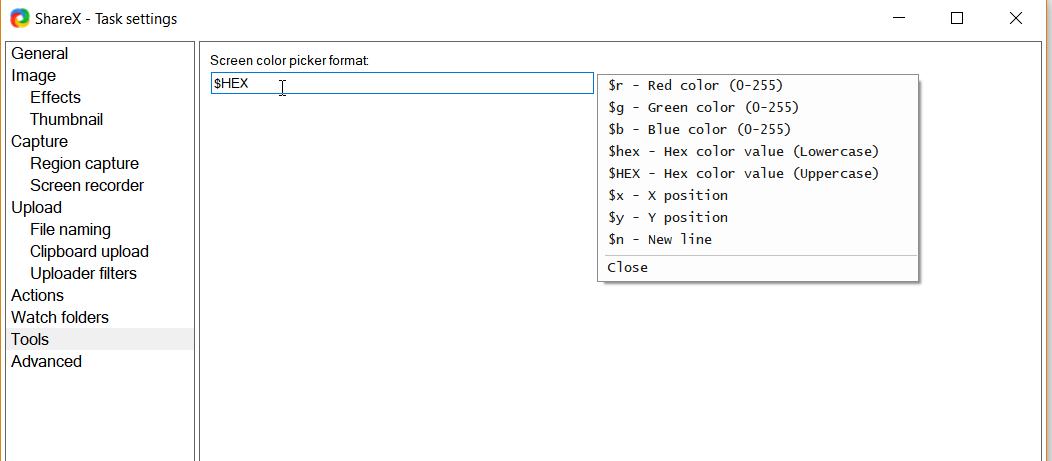
You mean this?

Jaex
on 7 Mar 2016
Yes. It does support $hex. Which is perfect. I use that feature fairly regularly. Much easier than screenshotting and pasting into PhotoShop like I used to do.
mnpenner
on 7 Mar 2016
the screenshot above is broken, for those that this might help here is how I believe they solved it.
task settings -> tools -> write $hex or $HEX
 benjanderson
on 1 Aug 2017
benjanderson
on 1 Aug 2017
Related issues
 ned-martin
·
112Comments
ned-martin
·
112Comments
 coggy9
·
29Comments
coggy9
·
29Comments
 maciozo
·
24Comments
maciozo
·
24Comments
 carasius
·
19Comments
carasius
·
19Comments
 Centzilius
·
39Comments
Centzilius
·
39Comments
Most helpful comment
the screenshot above is broken, for those that this might help here is how I believe they solved it.
task settings -> tools -> write $hex or $HEX
mirror