Sharex: Warning after capture since upgrade to 13.1
Since last upgrade, I am getting a warning message after every capture:
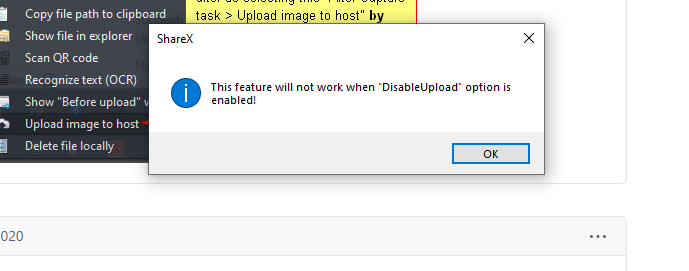
"This feature will not work when "DisableUpload" option is enabled!"
My DisableUpload is enabled but I do not know what other feature is causing this message.
Thanks
 okulair
All 9 comments
I also have this warning come up, I've tried playing with a few several upload settings but none make any difference.
I always have the upload settings disabled as it's not a feature I'm using
 TameTheCloud
on 10 Mar 2020
TameTheCloud
on 10 Mar 2020
You have this option enabled:
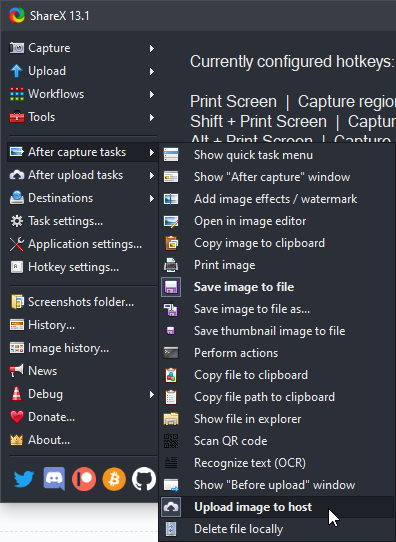
So ShareX warning you telling that your upload option is enabled yet it can't be done because you disabled uploading application wide. So you must uncheck that option from after capture tasks menu.
 Jaex
on 11 Mar 2020
Jaex
on 11 Mar 2020
Thank you :-)
 simonl65
on 13 Mar 2020
simonl65
on 13 Mar 2020
Sadly this isn't a fix for my issue. It was disabled for me by default. Even by redisabling it (toggling it twice) it still does it.
Also maybe pin one of these so it will be found easier
 Speiger
on 15 Mar 2020
Speiger
on 15 Mar 2020
For Everyone who has this issue still even after doing what the developer is suggesting.
Here is a simple fix:
https://github.com/ShareX/ShareX/releases/tag/v13.0.1
Install that version disable updates for a bit and you have no longer this bug that was introduced 1 version later
Speiger
on 15 Mar 2020
For Everyone who has this issue still even after doing what the developer is suggesting.
Here is a simple fix:
https://github.com/ShareX/ShareX/releases/tag/v13.0.1
Install that version disable updates for a bit and you have no longer this bug that was introduced 1 version later
23/3/2020
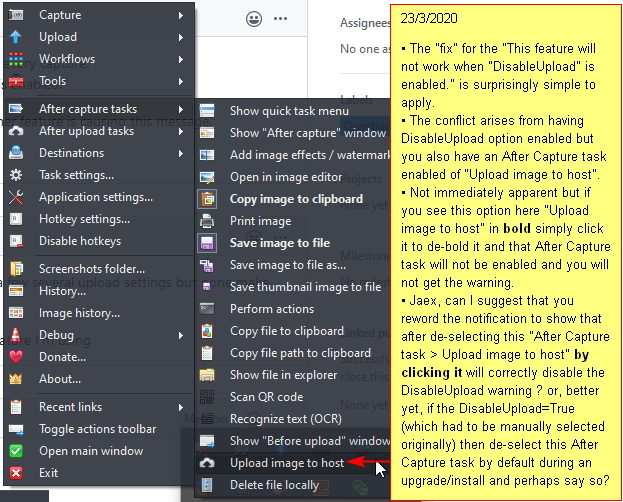
• The "fix" for the "This feature will not work when "DisableUpload" is enabled." is surprisingly simple to apply.
• The conflict arises from having DisableUpload option enabled but you also have an After Capture task enabled of "Upload image to host".
• Not immediately apparent but if you see this option here "Upload image to host" in bold simply click it to de-bold it and that After Capture task will not be enabled and you will not get the warning.
• Jaex, can I suggest that you reword the notification to show that after de-selecting this "After Capture task > Upload image to host" by clicking it will correctly disable the DisableUpload warning ? or, better yet, if the DisableUpload=True (which had to be manually selected originally) then de-select this After Capture task by default during an upgrade/install and perhaps say so?
 davcomNZ
on 22 Mar 2020
davcomNZ
on 22 Mar 2020
@davcomNZ i had this option disabled. And it still did it. Unless there was a "fix" for it done recently after i made my "fix" description
Speiger
on 22 Mar 2020
This issue comes back with the latest Release 13.4.0 :/
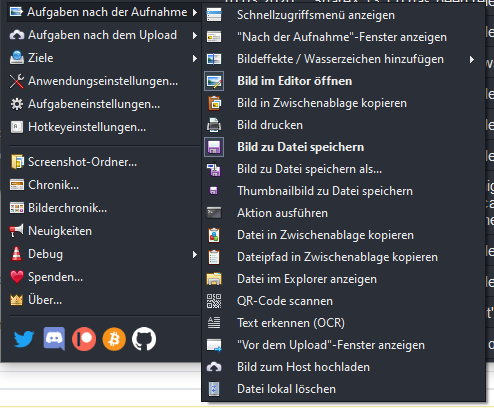
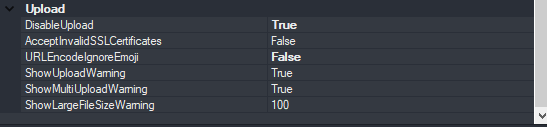
I have disabled the option that the image is uploaded directly.
Still I get this message..,
I use ShareX for work and need to make screenshots regularly, so the DisableUploads is at "TRUE" for security reasons.
This message popup is quite annoying.
Also, the editor does not open now after the screenshot is taken.
 KleinDevDE
on 7 Jan 2021
KleinDevDE
on 7 Jan 2021
Embarrassing
Seems to be gone after I restarted ShareX
KleinDevDE
on 7 Jan 2021
Related issues
 sparxz
·
4Comments
sparxz
·
4Comments
 hikapoo
·
4Comments
hikapoo
·
4Comments
 thelastfantasy
·
3Comments
thelastfantasy
·
3Comments
 skygate2012
·
3Comments
skygate2012
·
3Comments
 BristolITDave
·
3Comments
BristolITDave
·
3Comments
Most helpful comment
You have this option enabled:
So ShareX warning you telling that your upload option is enabled yet it can't be done because you disabled uploading application wide. So you must uncheck that option from after capture tasks menu.