Sharex: Lost ability to draw lines / arrows / shapes etc in Sharex 13.1
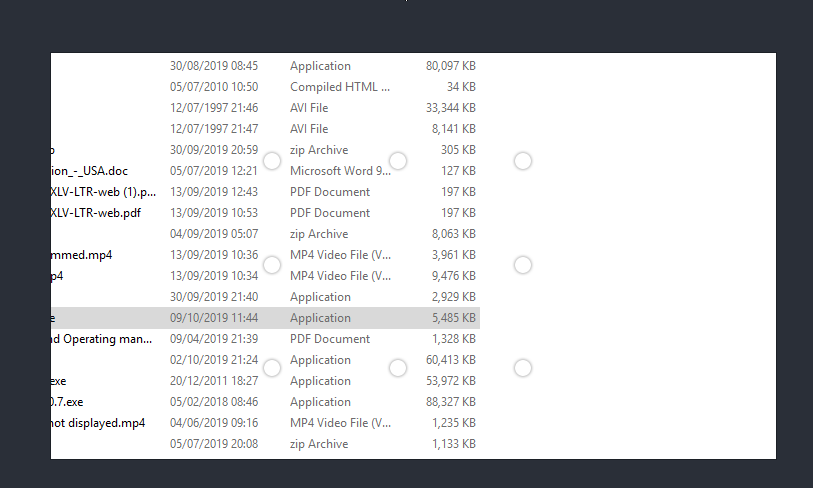
I can add these objects but they seem to be drawn in transparent ink. So I can only see the drag circles but not the added object. I eventually found out that my border size had been set to 0. Maybe it would be good to limit this to a minimum of 1
 mhoneywill
All 8 comments
There is a reason it is not limited to minimum 1 because rectangle etc. also using same setting and it can be set 0 to hide border.
 Jaex
on 9 Oct 2019
Jaex
on 9 Oct 2019
Thanks for quick reply :-)
It just took me ages to find out why I couldn't see the arrows that I was adding. If I set this to 0 and I draw rectangle, I can't see them. What use is that? maybe there is a valid use I'm just not aware of it.
mhoneywill
on 9 Oct 2019
Initially I told that I can't set minimum 1 to that border size option (numeric up down control) but while drawing those shapes I can do that limiting inside codes, that way border size configuration won't be affected and minimum restriction will be only applied to shapes which is needed.
Jaex
on 9 Oct 2019
But still limiting that in freehand, line and arrow drawing not gonna solve your rectangle drawing issue because it is expected that user can have no border but only fill color.
Jaex
on 9 Oct 2019
Finally I could reproduce this issue. It is related to cursor tool added in pull request #4058
If you draw text which have border size 0 and then use cursor tool to select the text and afterwards try to draw line then border size of line sets to 0.
@Danielku15 can you check the issue?
Jaex
on 9 Nov 2019
But where can I set the border size?
 mulfunction
on 14 Nov 2019
mulfunction
on 14 Nov 2019
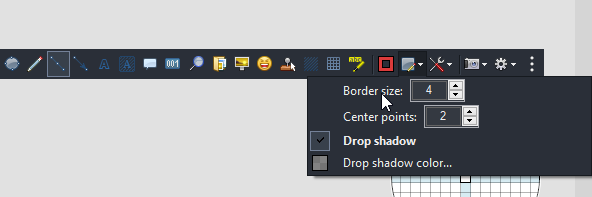
Jaex
on 14 Nov 2019
Thanks so much
mulfunction
on 15 Nov 2019
Related issues
 hikapoo
·
4Comments
hikapoo
·
4Comments
 olsonnn
·
3Comments
olsonnn
·
3Comments
 Stele77
·
3Comments
Stele77
·
3Comments
 Atmaks
·
3Comments
Atmaks
·
3Comments
 Hakaan256
·
4Comments
Hakaan256
·
4Comments
Most helpful comment