Sharex: missing option UseDefaultClipboardCopyImage in Version 13.0.1
Dear all,
i just installed version 13.0.1 on my new Win10 PC and now the option UseDefaultClipboardCopyImage is missing.. I need the option otherwise i'm not able to paste screenshots in IBM Sametime (see issue #1239)
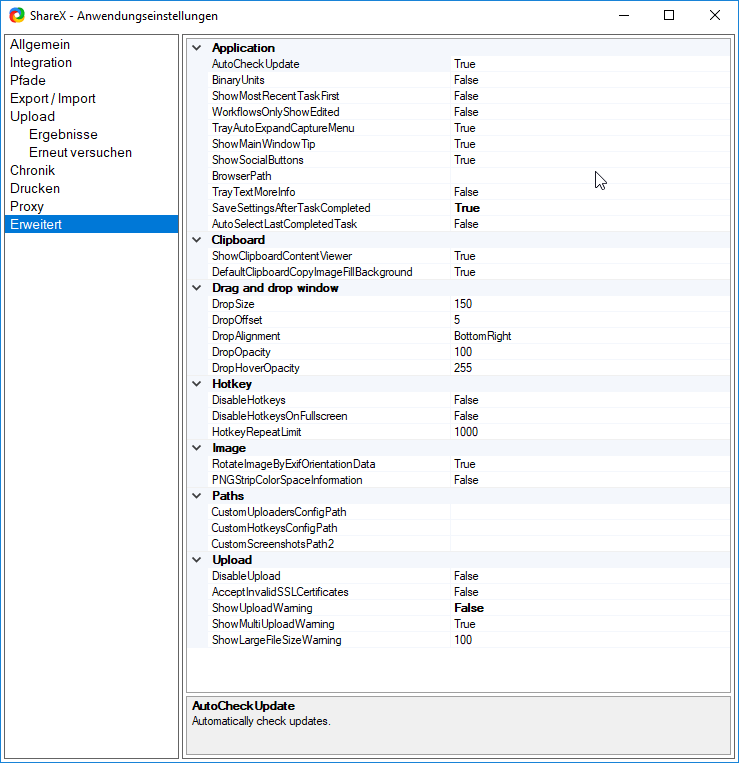
Can you please check and add the option again? Or is there another way to enable this feature?
Best regards,
Maik
 maikxmh
All 4 comments
It seems this option has been replaced with DefaultClipboardCopyImageFillBackground. Both options are used to address the .NET image copying not support alpha channel issue. Old option use PNG or DIB for clipboard image. The option fill transparent background with white.
In my opinion the previous option has better compatibility. Don't know why it is changed in 13.0.0.1
 xlijun
on 29 Sep 2019
xlijun
on 29 Sep 2019
Dear all,
I am experiencing the same issue.
I need to take a screenshot, keep it in the clipboard, and then paste it to a remote computer using TeamViewer.
This was only working when I could set UseDefaultClipboardCopyImage = False
Now it only works if I take a screenshot, paste to Paint, select all/copy and then I am able to paste to the remote computer.
Setting DefaultClipboardCopyImageFillBackground = False does not solve the issue.
Can you please re-add the old option?
Is there another possible solution?
 Dollarius
on 11 Oct 2019
Dollarius
on 11 Oct 2019
I'm experiencing the same issue for Sametime.
For now I've downgraded my version to 12.4.1., which still offers this option. But it would be great if it could be added again in Version 13 onwards.
 Glyxbaer
on 16 Oct 2019
Glyxbaer
on 16 Oct 2019
I tested the new Version 13.1.0 but the problem still occurs. Would be great when the issue is fixed asap
maikxmh
on 10 Mar 2020
Related issues
 skygate2012
·
3Comments
skygate2012
·
3Comments
 nitrocode
·
4Comments
nitrocode
·
4Comments
 Not-Kris
·
3Comments
Not-Kris
·
3Comments
 thelastfantasy
·
3Comments
thelastfantasy
·
3Comments
 hikapoo
·
4Comments
hikapoo
·
4Comments
Most helpful comment
Dear all,
I am experiencing the same issue.
I need to take a screenshot, keep it in the clipboard, and then paste it to a remote computer using TeamViewer.
This was only working when I could set
UseDefaultClipboardCopyImage = FalseNow it only works if I take a screenshot, paste to Paint, select all/copy and then I am able to paste to the remote computer.
Setting
DefaultClipboardCopyImageFillBackground = Falsedoes not solve the issue.Can you please re-add the old option?
Is there another possible solution?