after few days ago when I was offered v13 update, today I can no longer create fluid gif recordings. it records first few seconds then it misses movement for several seconds.
 mailinglists35
All 9 comments
win 1903, hd graphics 530, driver version 22.20.16.4836
mailinglists35
on 30 Aug 2019
incoming video demonstration (filmed with phone)
mailinglists35
on 30 Aug 2019
you can observe how the sequence when browser is opening the page is missed (connection progress details in the status bar)
gif: https://drive.google.com/file/d/1WvKAIkOxLY6UOqxIgCndXVnfAWj7Cpjw/view?usp=sharing-NOCRAWL
filmed with phone: https://drive.google.com/file/d/1FVjxuDH-L1fGGiewRGkxbGhoQ5errv1U/view?usp=sharing-NOCRAWL
remove -NOCRAWL appended to prevent scavenging bots
mailinglists35
on 30 Aug 2019
if you read these by mail, please view updated upload links on github, first ones were wrong
mailinglists35
on 30 Aug 2019
Not sure if every, but most recorded gifs look like it suddenly freezes after few seconds from start. At some point frames start missing.
Example where mouse pointer stops moving although it is moved during all animation:
 neminovno
on 1 Sep 2019
neminovno
on 1 Sep 2019
Try updating FFmpeg to see if that resolves the issue:
From ShareX
Task settings... > Screen recorder > Screen recording options… > Download
 robertgz
on 1 Sep 2019
robertgz
on 1 Sep 2019
@robertgz Thanks! Updating FFmpeg solved the issue in my case.
neminovno
on 1 Sep 2019
I had the same problem, and updating FFmpeg resolved it for me too.
 tboby
on 2 Sep 2019
tboby
on 2 Sep 2019
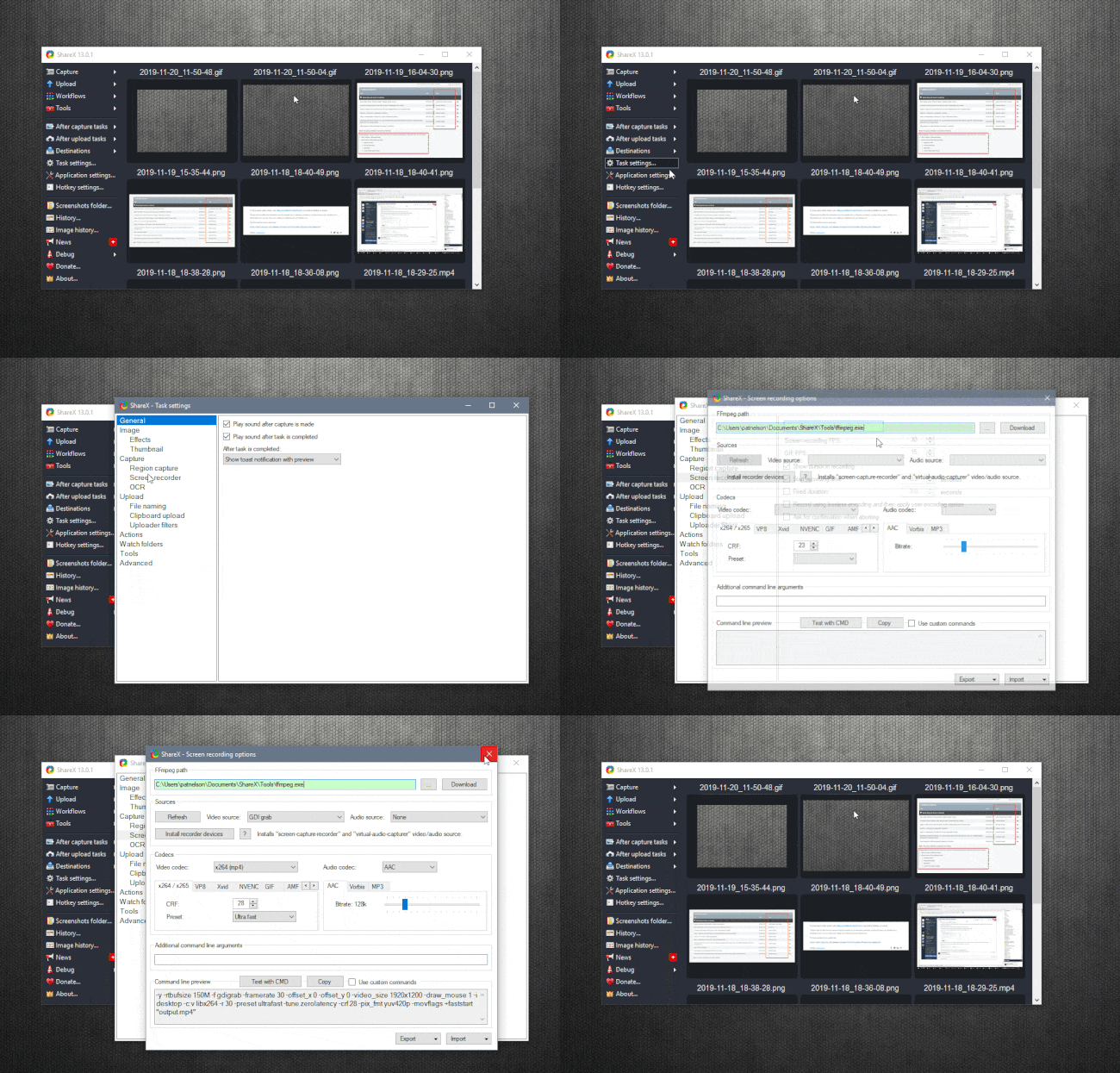
The instructions above were a bit confusing to me since I wasn't familiar with where to go to configure FFmpeg. Now that I've fixed GIF recording, I can demonstrate or anyone else thick-headed like me 😄
In ShareX 13.0.1, I found it under Task Settings -> Capture -> Screen Recorder -> Screen recording settings... then click "Download" at the top.
 patricknelson
on 20 Nov 2019
patricknelson
on 20 Nov 2019
Related issues
 skygate2012
·
3Comments
skygate2012
·
3Comments
 Stele77
·
3Comments
Stele77
·
3Comments
 nitrocode
·
4Comments
nitrocode
·
4Comments
 Not-Kris
·
3Comments
Not-Kris
·
3Comments
 monirulalom
·
3Comments
monirulalom
·
3Comments
Most helpful comment
Try updating FFmpeg to see if that resolves the issue:
From ShareX
Task settings... > Screen recorder > Screen recording options… > Download