Everytime I start ShareX it's not responding. Tried already reinstalling, deleting all old config files and everything. Couldn't find any solution on Google or here.
 kottchup
All 14 comments
Same problem for me. The same solutions also didn't work, neither did installing an older version.
 ZooD3
on 13 Nov 2018
ZooD3
on 13 Nov 2018
Very few people have this issue and I can't figure out what is different in your PCs to cause this issue when we can't reproduce it. And when I can't reproduce it, it is not possible for me to find the cause of it. So I'm hoping someone who already using Visual Studio have this issue and can debug it to pin point where freeze happens.
 Jaex
on 13 Nov 2018
Jaex
on 13 Nov 2018
I had same problem. ShareX prompted for update and did the setup steps. It started freezing and wouldn't respond no matter how much time passed. Had to end task from Task Manager. Didn't uninstall.
Then, downloaded the installer afresh from here, and installed again.
Upon starting ShareX, again it froze. But this time, after a couple of minutes, it was OK.
No changes done in OS or didn't have to delete any files. Just download installer and re-install.
Working fine for now.
 vipulpradhan
on 14 Nov 2018
vipulpradhan
on 14 Nov 2018
Same problem, it started a few days ago. ShareX completely freezes after launch and first 2 minutes it occupies 100% of one core. Reinstall didn't solve problem.
The only solution for me is to disconnect network before launch ShareX or to block "getsharex.com" by firewall or by hosts file.
 a1test
on 14 Nov 2018
a1test
on 14 Nov 2018
This means freeze happens because of News section but why it was not happening before and now it suddenly started to happen for few people. It even happens to previous version, so not to do with latest version changes.
Jaex
on 14 Nov 2018
So this new entry caused it I think: https://github.com/ShareX/sharex.github.io/commit/46d42fbc35a364a1989ad0806dd70d6b7530ca71
Which makes no sense.
Jaex
on 14 Nov 2018
I tried older portable releases, the problem is not reproduced on 12.1.1 and reproduced on 12.2.0. Tested using Eset firewall - after launching ShareX 12.2.0 Eset notifiying about connection to 185.199.108.153 with asking to allow/deny it. At this time, ShareX working fine. Clicking Allow leads to freezing. After that, the "update available" window appears, but clicking No does not unfreeze main window and tray icon. Maybe this will help in some way :)
a1test
on 14 Nov 2018
Hello,
I successfully reproduced it on my machine with a visual studio attached. The solution must be compiled as Release with the Any CPU architecture selected.
The problem is caused by the following function https://github.com/ShareX/ShareX/blob/6a88f1e70e1994e139841cd65260ac84f6afdca5/ShareX/Controls/NewsListControl.cs#L109
I have added a few lines to make debugging easier, which resulted in:
Initialized Layout <NewsListControl()>
[...] A few other things are being changed here, like the bounds, parent, etc
*Padding Set*
[Sender]: System.Windows.Forms.TableLayoutPanel, BorderStyle: System.Windows.Forms.BorderStyle.None
[AffectedComponent]: System.Windows.Forms.TableLayoutPanel, BorderStyle: System.Windows.Forms.BorderStyle.None
[AffectedControl]: System.Windows.Forms.TableLayoutPanel, BorderStyle: System.Windows.Forms.BorderStyle.None
[AffectedProperty]: Padding
*Padding Removed*
[Sender]: System.Windows.Forms.TableLayoutPanel, BorderStyle: System.Windows.Forms.BorderStyle.None
[AffectedComponent]: System.Windows.Forms.TableLayoutPanel, BorderStyle: System.Windows.Forms.BorderStyle.None
[AffectedControl]: System.Windows.Forms.TableLayoutPanel, BorderStyle: System.Windows.Forms.BorderStyle.None
[AffectedProperty]: Padding
!!!The above sequence is repeated a lot, until the program is killed by the os because of memory leak/max no of threads!!!
I made the following changes to show the previous data
        private async void TlpMain_Layout(object sender, LayoutEventArgs e)
        {
            await Task.Delay(1);

            if (tlpMain.HorizontalScroll.Visible)
            {
                Console.WriteLine("*Padding Set*");
                Console.WriteLine("[Sender]: {0}", sender.ToString());
                Console.WriteLine("[AffectedComponent]: {0}", e.AffectedComponent.ToString());
                Console.WriteLine("[AffectedControl]: {0}", e.AffectedControl.ToString());
                Console.WriteLine("[AffectedProperty]: {0}", e.AffectedProperty.ToString());
                tlpMain.Padding = new Padding(0, 0, SystemInformation.VerticalScrollBarWidth, 0);
            }
            else
            {
                Console.WriteLine("*Padding Removed*");
                Console.WriteLine("[Sender]: {0}", sender.ToString());
                Console.WriteLine("[AffectedComponent]: {0}", e.AffectedComponent.ToString());
                Console.WriteLine("[AffectedControl]: {0}", e.AffectedControl.ToString());
                Console.WriteLine("[AffectedProperty]: {0}", e.AffectedProperty.ToString());
                tlpMain.Padding = new Padding(0);
            }
        }
 Zephyrrus
on 14 Nov 2018
Zephyrrus
on 14 Nov 2018
It's not caused by https://github.com/ShareX/sharex.github.io/commit/46d42fbc35a364a1989ad0806dd70d6b7530ca71 directly, the problem appears from adding a 12th NewsItem to the list, because it creates a horizontal scroll on the news page, which triggers the layout change event.
Then padding is added to remove the horizontal scroll, which triggers another layout change event, but this time the scrollbar is not visible anymore, so the else branch is called which results in the horizontal scroll being added back for some reason and it triggers another change event.
Zephyrrus
on 14 Nov 2018
@Zephyrrus thanks for debugging!
I was also suspecting that scroll bar appeared after last item added was causing that issue to some users. So I was added fake items to cause scroll bar to appear in my news panel yet still couldn't reproduce the issue in my PC. That layout function was ugly workaround I needed to use to make unnecessary horizontal scroll bar to disappear. Whatever other workarounds I tried was not working so it was my last resort. For example this is how it shows when I add one more fake item to cause horizontal scroll bar to appear and disable that layout workaround:
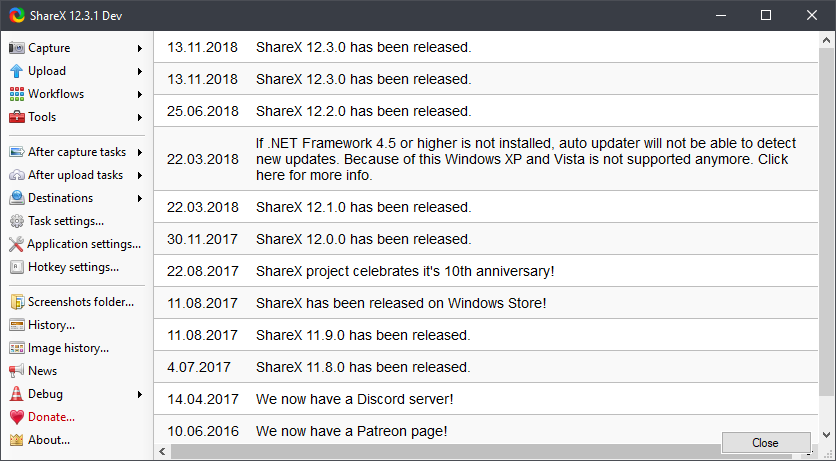
and this is with layout workaround:
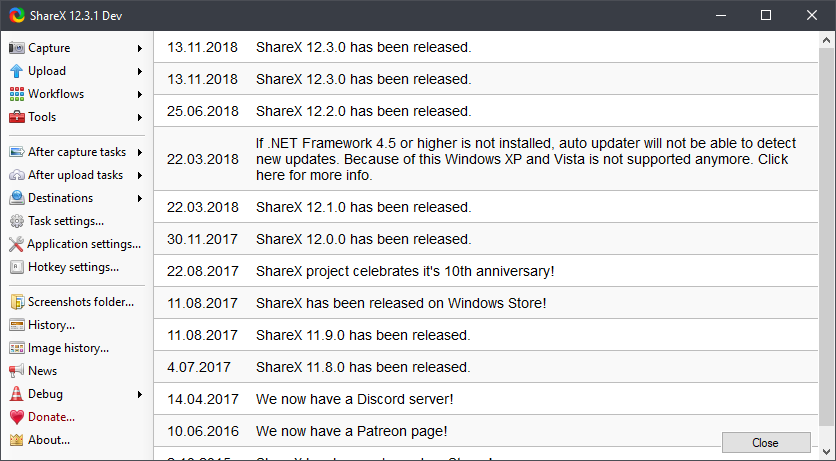
So without that layout codes, horizontal scroll bar shows up there.
so the else branch is called which results in the horizontal scroll being added back for some reason and it triggers another change event
Without else branch this will happen:
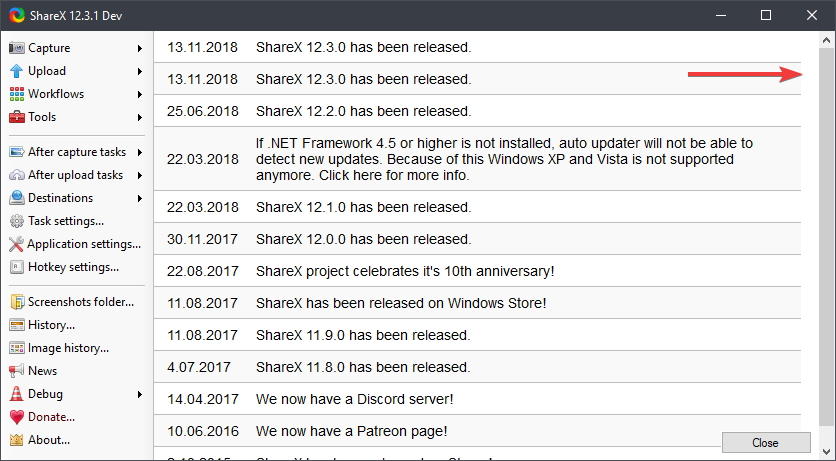
So it is necessary.
I'm still not sure why majority of users don't have this freeze yet it still causing it to very few people. Also because I needed to add fake item to cause this horizontal scroll bar to show, something must be different in your PC, like using Windows with high DPI?
Jaex
on 15 Nov 2018
Now I'm re making news panel using DataGridView control instead of using my own custom control, so this problem will be solved that way.
Jaex
on 15 Nov 2018
You can test it using: https://getsharex.com/docs/dev-builds
Jaex
on 15 Nov 2018
I also had this bug in 12.3.0 but it seems to be ok in 12.3.1 ( tested from https://github.com/ShareX/ShareX/releases/tag/v12.3.1 ).
 jirkafm
on 21 Nov 2018
jirkafm
on 21 Nov 2018
Okey thanks.
Jaex
on 21 Nov 2018
Related issues
 monirulalom
·
3Comments
monirulalom
·
3Comments
 sparxz
·
4Comments
sparxz
·
4Comments
 wilandlane
·
3Comments
wilandlane
·
3Comments
 Not-Kris
·
3Comments
Not-Kris
·
3Comments
 thelastfantasy
·
3Comments
thelastfantasy
·
3Comments
Most helpful comment
You can test it using: https://getsharex.com/docs/dev-builds