Sharex: [Feature Request] Set Window Size
Hi,
First of all, thank you for such a great tool!
I'd like to request a simple but useful feature: Set Window Size
Prior to recording a window (or snapping window-based screenshots), I'd like to set the window to a standard size so that all of my recordings have the same resolution. It would be great to be able to be able to use UI similar to the Ruler function to set the size of a window (or UI that shows a list of windows like the Capture->Window->... function). Sizes could be selected from a list of pre-defined options or the user could enter any valid values for width and height. If you use a list of windows, then the list of sizes, plus "Custom..." could be an additional pop-out menu.
I did look for this function, but couldn't find it. If it is already there, please let me know.
Thanks,
Walt
 YipYipX4
All 10 comments
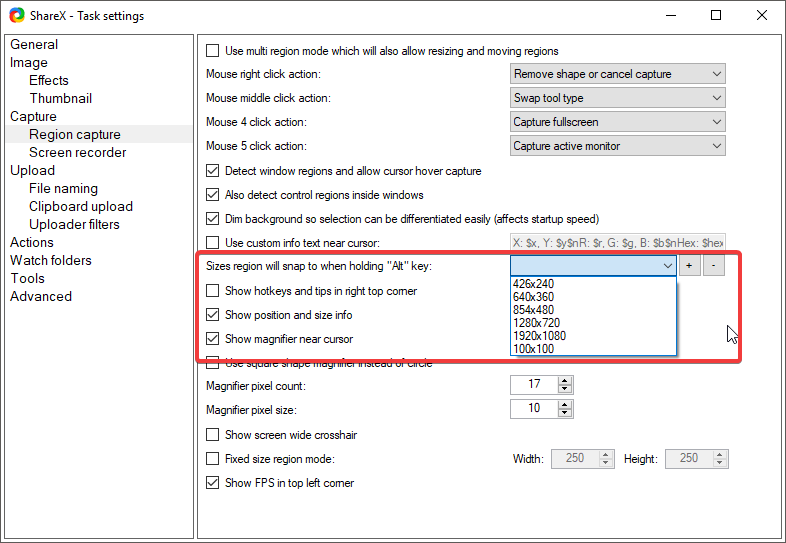
This is what you need I think:
 Jaex
on 30 Aug 2017
Jaex
on 30 Aug 2017
I tried that out, but it does not affect the target window size -- it only causes the capture region to snap to those various pre-defined sizes.
Let's say I'm running my desktop at 1200p, but I want to record a session of Visual Studio (or any other app) running at 720p (the screen recorder function already makes it easy to record just one window). I'd like to adjust the non-maximized (restored) size of my Visual Studio window to exactly 720p (1280x720) including title bar and status bar. I could try to do this by hand, but I'll most likely be off by a few pixels. I could then check with the Ruler tool, and then make adjustments again, but it would be difficult to exactly hit 720p.
One possible UI for this would be:
Tools ->Set Window Size ->(menu listing open windows) -> (menu listing pre-defined sizes, plus "Custom...")
Then, if "Custom..." is selected, show a dialog to input precise width and height, then set the selected window to the specified resolution. Or, just use the same list of resolutions provided in your screenshot (which can already be customized).
FYI, web developers may also find this function useful for testing web sites at various specific resolutions (although Chrome helps by showing the [page] window size when resizing with the dev tools open).
YipYipX4
on 30 Aug 2017
Web developers never need this function because there is built in feature for it in Chrome: https://jaex.getsharex.com/2017/08/chrome_a1md8ZlBXk.png
Jaex
on 31 Aug 2017
That feature in Chrome does not actually resize the outer window (including the window "chrome"). It resizes the client area and puts a dark background around the client area (it also changes the media type, affecting the page rendering). Thus, even for Chrome, if I want to record a training video at exactly 720p and I want to include the tabs and address bar as part of the training video (so the full window size is 720p), then this feature would be useful.
Plus, some web developers still have to support Internet Explorer or other browsers that don't have this feature built-in. And, of course, there are millions of other apps that don't have built-in capability to set the window size to specific sizes, so I think it makes a lot of sense to have this feature in ShareX.
Also when creating documentation for an application, it would look better if all of the screenshots of an application have the same image dimensions, so prior to pressing Alt+PrintScreen, I'd like to set the window size to some pre-determined size suitable for the documentation format.
Here's a mock-up of the UI I proposed:
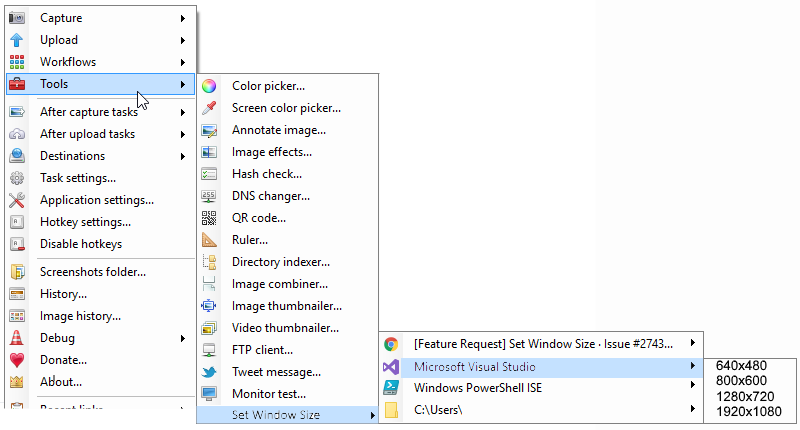
The menu of window dimensions can come from the same customizable list of dimensions for the capture region snap sizes.
YipYipX4
on 31 Aug 2017
This can be done fairly easily, but I'm not sure it will be useful for most users.
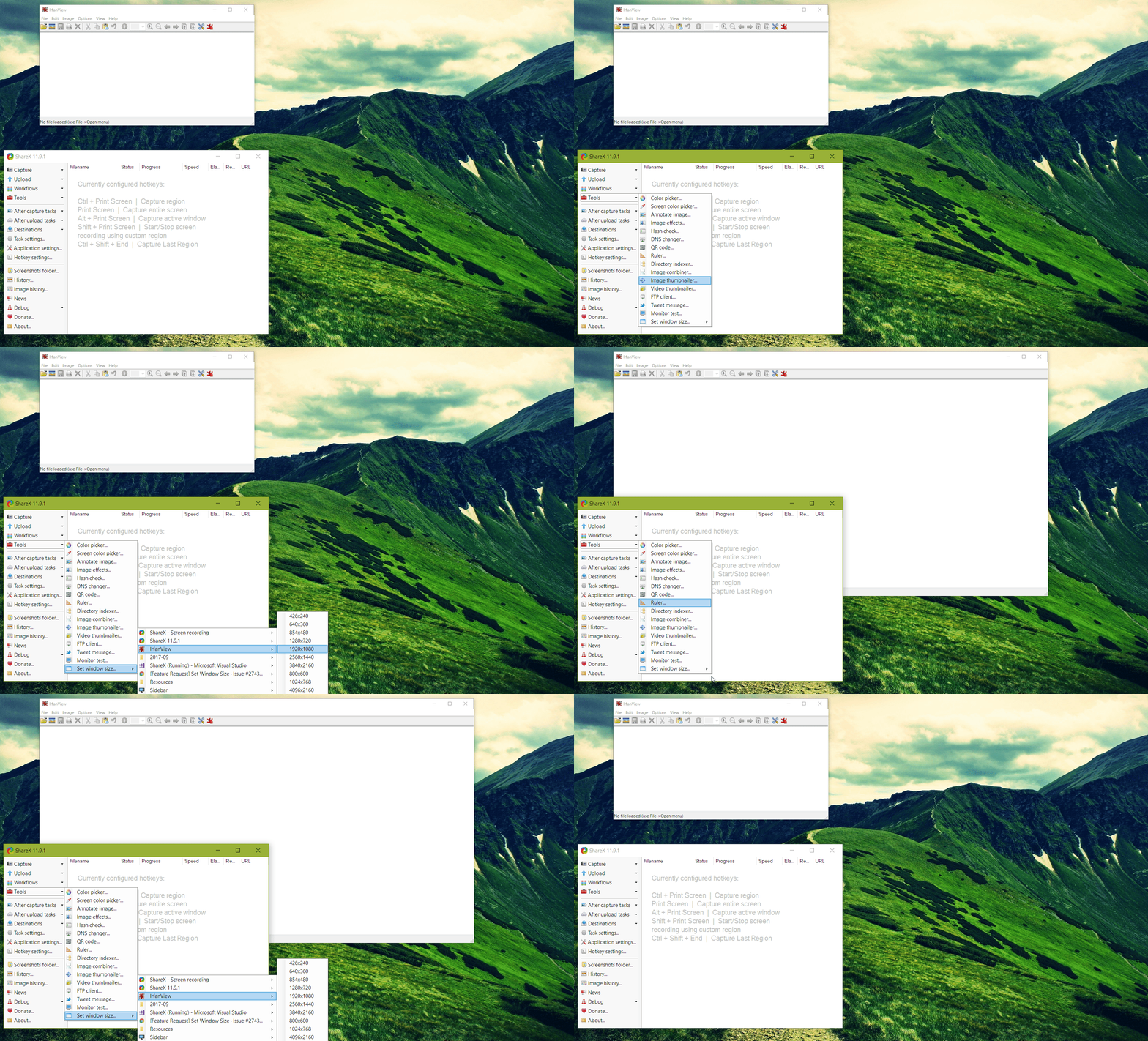
Edit: Also, for some reason the size doesn't get set exactly as chosen. It gets shorted 7-8 pixels in height and twice that in width. Something to do with Windows 10 I suppose.
 campbeb
on 2 Sep 2017
campbeb
on 2 Sep 2017
Well, I most often use this tool for snapping screenshots of applications for documentation, recording training videos, or capturing a UI bug for an issue report. I understand that a big focus of the tool is uploading & sharing images, and not everyone would care about the precise resolution of window screenshots. I can't think of another tool more suitable for this feature, though.
If you are concerned about keeping the UI simple, then maybe the feature could be hidden by default and enabled with a checkbox under settings?
Thank you for considering this request!
YipYipX4
on 3 Sep 2017
So where did this feature disappear to? It is gone in 12.0
 3Rton
on 17 Dec 2017
3Rton
on 17 Dec 2017
This issue has been automatically marked as stale because it has not had recent activity. It will be closed if no further activity occurs.
![stale[bot] picture](https://avatars3.githubusercontent.com/in/1724?v=4&s=40) stale[bot]
on 15 Jun 2018
stale[bot]
on 15 Jun 2018
That is /almost/ a perfect solution for an issue I'm having. I need to add the aspect-ratio into this mix. Gonna talk to my C# dev tomorrow... (yay!)
... Actually, the "shift" select modifier is set to 1:1 ratio right now. Modifying that to respect any ratio should be pretty straightforward.
 Solarbotics
on 3 Feb 2019
Solarbotics
on 3 Feb 2019
Nope. Did some digging around, and where we _thought_ was the 1:1 ratio doesn't compile it to the default 4:3 we want. If any dev can point out where in the source that 1:1 ratio is set, we'd appreciate it!
Solarbotics
on 3 Apr 2019
Related issues
 coggy9
·
29Comments
coggy9
·
29Comments
 MoistLemon
·
25Comments
MoistLemon
·
25Comments
 Zaczero
·
74Comments
Zaczero
·
74Comments
 maciozo
·
24Comments
maciozo
·
24Comments
 DBJDBJ
·
25Comments
DBJDBJ
·
25Comments
Most helpful comment
That feature in Chrome does not actually resize the outer window (including the window "chrome"). It resizes the client area and puts a dark background around the client area (it also changes the media type, affecting the page rendering). Thus, even for Chrome, if I want to record a training video at exactly 720p and I want to include the tabs and address bar as part of the training video (so the full window size is 720p), then this feature would be useful.
Plus, some web developers still have to support Internet Explorer or other browsers that don't have this feature built-in. And, of course, there are millions of other apps that don't have built-in capability to set the window size to specific sizes, so I think it makes a lot of sense to have this feature in ShareX.
Also when creating documentation for an application, it would look better if all of the screenshots of an application have the same image dimensions, so prior to pressing Alt+PrintScreen, I'd like to set the window size to some pre-determined size suitable for the documentation format.
Here's a mock-up of the UI I proposed:
The menu of window dimensions can come from the same customizable list of dimensions for the capture region snap sizes.