Sharex: [Request] Cut feature after screen recording?
Hey,
like the title says. Is there the possibility for a cut feature after i made a screen recording?
Because well i liked to cut off some few seconds in the end and in the Beginning like always when i made a screen capture. But i dont know how much i wanna cut away.
I seached through the options and i honestly don't know what the CLI video encoder is and if there is the possebility to do that with this.
Thanks for your great work. I really appreciat it.
Blaxz
 Blaxzter
All 5 comments
Adding video editing will be very difficult. Therefore I have no plans for video editing support.
 Jaex
on 24 Feb 2017
Jaex
on 24 Feb 2017
Is there the possibility for a cut feature after i made a screen recording?
As this issue has come up twice now, wanted to point out that there's an open source video editor program OpenShot that's come a long way in the past few years. I attended a talk with the author who corroborated Jaex's suggestion that video edition is a genuinely complex process, probably only moreso with more new codecs coming out.
Avidemux is also open and very effective, but has a bit steeper learning curve.
 vatterspun
on 21 Jan 2018
vatterspun
on 21 Jan 2018
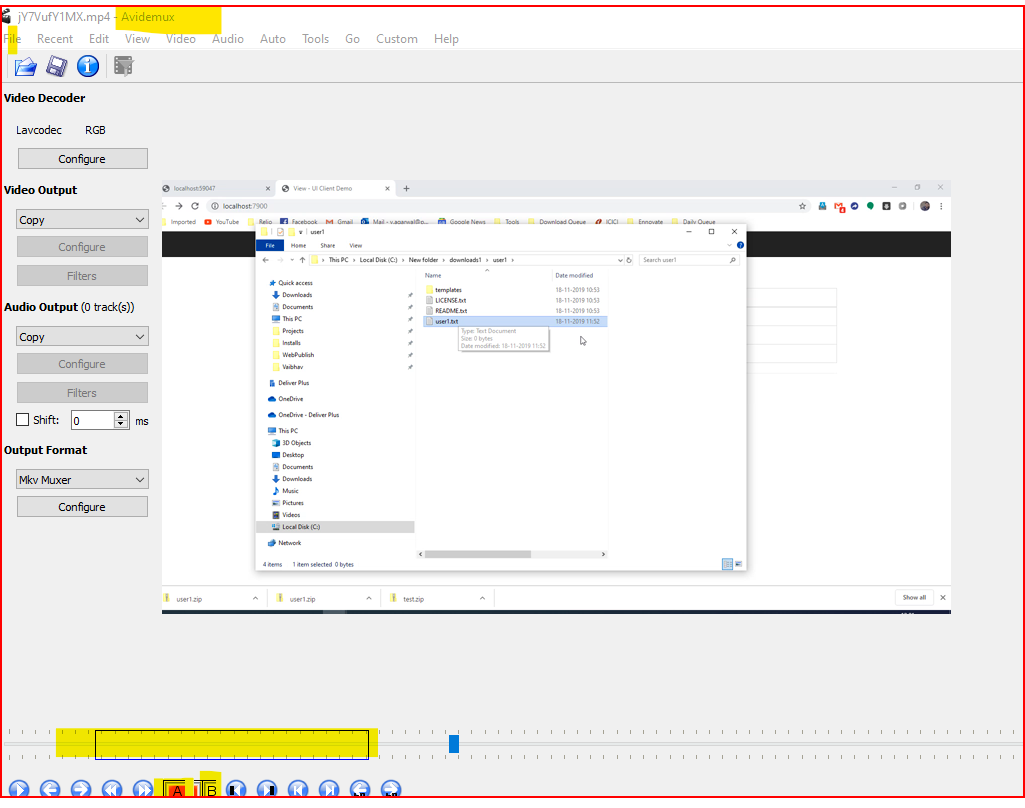
I use Avidemux (an open source video editor) that easily edits videos created by ShareX.
 vibs2006
on 18 Nov 2019
vibs2006
on 18 Nov 2019
@vibs2006 Does it maintain the original smallness (if that is a word) of the video clip to use that application? I have tried clipping the recorded video clip with two famous general video editors (not the app you mention, but they all vastly increased the file size.
 HubKing
on 20 Jan 2020
HubKing
on 20 Jan 2020
@vibs2006 Does it maintain the original smallness (if that is a word) of the video clip to use that application? I have tried clipping the recorded video clip with two famous general video editors (not the app you mention, but they all vastly increased the file size.
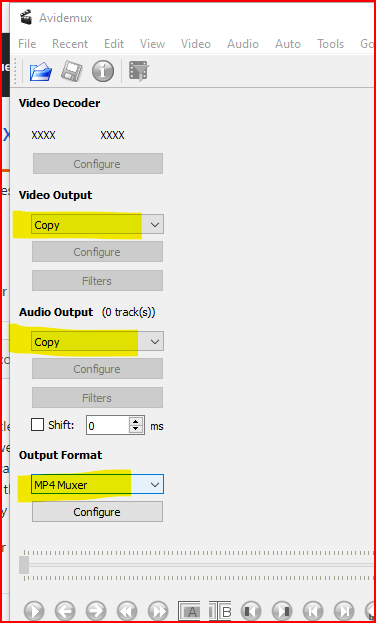
If you want to maintain the original smallness (what you basically mean is keep the original file Audio and Video Encodings WITHOUT re-encoding) then yes, Avidemux gives you option to ONLY copy the stream rather than reencoding it. Please ensure that you select the following options as mentioned in screenshot.
After that simply save the file
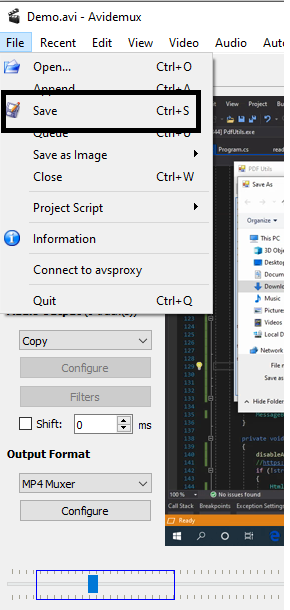
To Know more Read this article further Tutorial: How to Trim a Video without Transcoding using Avidemux
vibs2006
on 20 Jan 2020
Related issues
 maciozo
·
24Comments
maciozo
·
24Comments
 carasius
·
19Comments
carasius
·
19Comments
 Zaczero
·
74Comments
Zaczero
·
74Comments
 ghost
·
27Comments
ghost
·
27Comments
 SKILLEDxKILLAH
·
19Comments
SKILLEDxKILLAH
·
19Comments