Sharex: [Feature Request] multiple screenshots -> one image output
It would be amazing to have a function to record a series of screenshots with a hotkey (for example Ctrl + F1) for every screenshot and a second hotkey (for example Ctrl + F2) that's different from the first one but only works if atleast one screenshot has been recorded
so now if you press Ctrl + F2 it will open a window in which you can align the screenshots
this could either start from scratch (a window that is the image area and the screenshots are in a list/sidebar on the left, you need to drag them on to the panel) or auto-align them in the order of creation
this could be a setting for the hotkey (which version you prefer)
the screenshots should snap to each other to make it easier
at the end you press either a button to save or to edit the image (to get to the already window that allows placing text/borders and marking text and stuff)
of course this mode should have and autoupload feature, but I guess that's to be expected already from this amazing programm ;)
I hope you like my idea and can integrate it into sharex
Don't hesitate to ask questions, if it's not clear what I want to achieve how
I can sketch a simple design if needed
 Djfe
Djfe
All 16 comments
In Summary: You want to stitch together multiple screenshots into a single image
Is this correct?
 davidruhmann
on 8 Oct 2015
davidruhmann
on 8 Oct 2015
Yeah exactly that
If it's not too difficult to implement :fingers-crossed:
Djfe
on 8 Oct 2015
What is difference of this from scrolling capture?
 Jaex
on 8 Oct 2015
Jaex
on 8 Oct 2015
Rather than scrolling an active screen, I think Djfe wants to take several screenshots showing changes in the state of whatever is in context, then attach them all together into a single image. Like those compilation posts of something funny from a TV show that are often on imgur, but with your computer.
Quick Example Pulled From Imgur: http://i.imgur.com/rODsLix.jpg
davidruhmann
on 8 Oct 2015
ShareX already have it, called image combiner?
Jaex
on 8 Oct 2015
yeah but not in the automatic way it would be usable in the way I described above
maybe there is a way
but I wasn't able to define hotkeys that are only activated if another special hotkey was used before
and if I put image combiner on a hotkey I'm not able to tell it which screenshots it should select -> I need to select them manually with an open file dialog
and I cannot order the images in the way I want to
I can only give it a general setting (order vertically or horizontally)
which looks ugly with images of different sizes
you cannot upscale/crop single images in the process to make them fit and stuff
there is no drag and drop action possible (canvas) which would simplify things a lot
at the moment the image combiner is rather simple
I would like to have something that allows me to work faster than just dragging the images into gimp and aligning them there which takes some time
and it would be enough if sharex saves the images in the ram before combining them since I only need the combined image
all in all this is useful for making tutorials (how to use a programm)
or giving someone such instructions
it might be quite some work to realize such a feature but I think that it would be useful in the end
Djfe
on 10 Oct 2015
I don't understand why you don't use automated scrolling capture but want manual one? Manual mainly required if automated scrolling fails and not possible.
Programming manual scrolling capture support in scrolling capture UI gonna be very complicated, therefore I'm not planning to make it currently.
Jaex
on 11 Oct 2015
I don't know why you think I'm asking for scrolling here
The use case in which I would use this is:
I open an example programm
take a screenshot of it with CTRL+F2 then click some stuff and do stuff, then make another screenshot with CTRL + F2 of the same programm (or another one it doesn't really matter, maybe even several programms) just a rectangle of the screen and so on (the state of the programm7what is shown changes and I don't want to make a screenshot of a website or something, so there is no scrolling needed for my feature)
then I'm finished making screenshot and press CTRL + F3 now an image combiner pops up and let's me arrange all previous made images (the ones I made with CTRl + F2 and selecting a rectangle with the mouse) on a canvas how I want them, then I click save
and then I'm even allowed to do further action share x allows me to do on the finished picture (that contains all screenshots)
for example I can now edit it with the image editor and mark text on it
then I press again save/approve and it will be saved on disk and maybe uploaded on imgur and co.
I think @davidruhmann already understood where I was heading too
could you pls help me out in explaining @Jaex what I mean, that would be great! :)
an example picture I found through google that shows what stuff I'm trying to achieve:

I simply want to take screenshots of several dialogs put them onto a canvas and then after that write text around them and add arrows and stuff like that
Djfe
on 11 Oct 2015
What you looking for is then image editor. Like Photoshop. What is it to do with ShareX? What you need to do is set ShareX to automatically copy image to clipboard and then insert them to your image editor and then arrange there. It is nothing to do with combining because this is just custom position and resizing of inserted objects for your needs.
Jaex
on 11 Oct 2015
I guess your solution is even better, I didn't really think of it
still I think it would be nice to have, but one can dream ^^
gonna try your solution out tomorrow (opening gimp with parameters)
is it possible to collect several screenshots with sharex and then send them to another programm (like GIMP) at once?
Or do I need to open the screenshot folder and open them manually still? (through the context menu)
EDIT: what I mean is: can sharex add several images to the clipboard or only one?
Djfe
on 11 Oct 2015
If I add multiple images to clipboard how you can resize or position them separately?
Jaex
on 11 Oct 2015
@Djfe clipboard one at a time, paste into editor. Or create a new folder to have them saved to and drag them all in to your editor at once.
Another option is to get a Clipboard Manager which can keep a history of all your clipboard objects and allow you to select the one to paste. Although this solution would be slower than just pasting one at a time or saving to a new folder and dragging all the images out of that.
 zikeji
on 12 Oct 2015
zikeji
on 12 Oct 2015
ShareX can't do everything. Sometimes things must be little more manual. Therefore closing this issue.
Jaex
on 12 Oct 2015
Dear Jaex, i must disagree with you. Please, look at monosnap, look how they works with multiple images. This is extremely useful and important thing. Im using this day to day, and i must say - im using it in different(!) tasks.
 rainbowjose
on 11 Jul 2017
rainbowjose
on 11 Jul 2017
I just found this issue and have something to propose for the automatic image combiner: It should be able to take images from the clipboard or act as a destination or task after recording.
 sinni800
on 5 Nov 2019
sinni800
on 5 Nov 2019
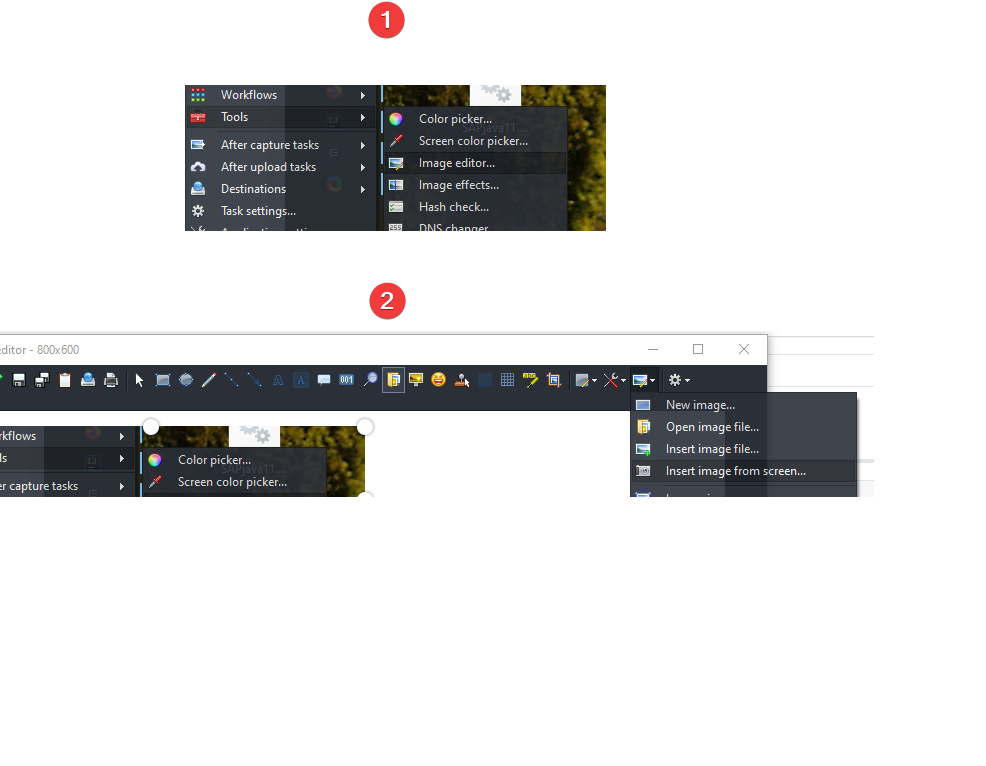
I also just found this issue and now since you can use image editor as a tool in ShareX you can take and add as many screenshots as you want to your canvas. Really useful and also all other features are there:)
 szegi
on 20 Aug 2020
szegi
on 20 Aug 2020
Related issues
 MoistLemon
·
25Comments
MoistLemon
·
25Comments
 maciozo
·
24Comments
maciozo
·
24Comments
 makingbillions
·
28Comments
makingbillions
·
28Comments
 DBJDBJ
·
25Comments
DBJDBJ
·
25Comments
 SKILLEDxKILLAH
·
19Comments
SKILLEDxKILLAH
·
19Comments