Shardingsphere: Failed to initialize pool: Communications link failure
Question
I deployed sharding-proxy in kubernetes, and the database was also deployed in kubernetes. Now I use coreDNS with kubernetes to do DNS resolution, but the service reported an error. The error log is as follows
Exception in thread "main" org.apache.shardingsphere.core.exception.ShardingException: Can not build data source, name is ds_master.

at org.apache.shardingsphere.shardingproxy.backend.communication.jdbc.datasource.JDBCBackendDataSource.createDataSources(JDBCBackendDataSource.java:79)`
at org.apache.shardingsphere.shardingproxy.backend.communication.jdbc.datasource.JDBCBackendDataSource.(JDBCBackendDataSource.java:67)

at org.apache.shardingsphere.shardingproxy.backend.schema.LogicSchema.(LogicSchema.java:63)

at org.apache.shardingsphere.shardingproxy.backend.schema.impl.MasterSlaveSchema.(MasterSlaveSchema.java:58)

at org.apache.shardingsphere.shardingproxy.backend.schema.LogicSchemaFactory.newInstance(LogicSchemaFactory.java:59)

at org.apache.shardingsphere.shardingproxy.backend.schema.LogicSchemas.initSchemas(LogicSchemas.java:104)

at org.apache.shardingsphere.shardingproxy.backend.schema.LogicSchemas.init(LogicSchemas.java:94)

at org.apache.shardingsphere.shardingproxy.backend.schema.LogicSchemas.init(LogicSchemas.java:78)

at org.apache.shardingsphere.shardingproxy.Bootstrap.startWithoutRegistryCenter(Bootstrap.java:101)

at org.apache.shardingsphere.shardingproxy.Bootstrap.main(Bootstrap.java:81)

Caused by: com.zaxxer.hikari.pool.HikariPool$PoolInitializationException: Failed to initialize pool: Communications link failure

at com.zaxxer.hikari.pool.HikariPool.throwPoolInitializationException(HikariPool.java:528)

at com.zaxxer.hikari.pool.HikariPool.checkFailFast(HikariPool.java:520)

at com.zaxxer.hikari.pool.HikariPool.(HikariPool.java:112)

at com.zaxxer.hikari.HikariDataSource.(HikariDataSource.java:72)

at org.apache.shardingsphere.shardingproxy.backend.communication.jdbc.datasource.JDBCRawBackendDataSourceFactory.build(JDBCRawBackendDataSourceFactory.java:77)

at org.apache.shardingsphere.shardingproxy.backend.communication.jdbc.datasource.JDBCBackendDataSource.createDataSources(JDBCBackendDataSource.java:75)

... 9 more

Caused by: com.mysql.jdbc.exceptions.jdbc4.CommunicationsException: Communications link failure

at sun.reflect.NativeConstructorAccessorImpl.newInstance0(Native Method)

at sun.reflect.NativeConstructorAccessorImpl.newInstance(NativeConstructorAccessorImpl.java:57)

at sun.reflect.DelegatingConstructorAccessorImpl.newInstance(DelegatingConstructorAccessorImpl.java:45)

at java.lang.reflect.Constructor.newInstance(Constructor.java:526)

at com.mysql.jdbc.Util.handleNewInstance(Util.java:425)

at com.mysql.jdbc.SQLError.createCommunicationsException(SQLError.java:990)

at com.mysql.jdbc.MysqlIO.(MysqlIO.java:342)

at com.mysql.jdbc.ConnectionImpl.coreConnect(ConnectionImpl.java:2197)

at com.mysql.jdbc.ConnectionImpl.connectOneTryOnly(ConnectionImpl.java:2230)

at com.mysql.jdbc.ConnectionImpl.createNewIO(ConnectionImpl.java:2025)

at com.mysql.jdbc.ConnectionImpl.(ConnectionImpl.java:778)

at com.mysql.jdbc.JDBC4Connection.(JDBC4Connection.java:47)

at sun.reflect.NativeConstructorAccessorImpl.newInstance0(Native Method)

at sun.reflect.NativeConstructorAccessorImpl.newInstance(NativeConstructorAccessorImpl.java:57)

at sun.reflect.DelegatingConstructorAccessorImpl.newInstance(DelegatingConstructorAccessorImpl.java:45)

at java.lang.reflect.Constructor.newInstance(Constructor.java:526)

at com.mysql.jdbc.Util.handleNewInstance(Util.java:425)

at com.mysql.jdbc.ConnectionImpl.getInstance(ConnectionImpl.java:386)

at com.mysql.jdbc.NonRegisteringDriver.connect(NonRegisteringDriver.java:330)

at com.zaxxer.hikari.util.DriverDataSource.getConnection(DriverDataSource.java:95)

at com.zaxxer.hikari.util.DriverDataSource.getConnection(DriverDataSource.java:101)

at com.zaxxer.hikari.pool.PoolBase.newConnection(PoolBase.java:341)

at com.zaxxer.hikari.pool.PoolBase.newPoolEntry(PoolBase.java:193)

at com.zaxxer.hikari.pool.HikariPool.createPoolEntry(HikariPool.java:428)

at com.zaxxer.hikari.pool.HikariPool.checkFailFast(HikariPool.java:499)
My configuration file is as follows
config-master_slave.yaml
schemaName: master_slave_db

dataSources:
  ds_master:
    url: jdbc:mysql://master-aaa.test:3306/lly
    username: root
    password: root
    connectionTimeoutMilliseconds: 30000
    idleTimeoutMilliseconds: 60000
    maxLifetimeMilliseconds: 1800000
    maxPoolSize: 65
  ds_slave0:
    url: jdbc:mysql://slave-aaa.test:3306/lly
    username: root
    password: root
    connectionTimeoutMilliseconds: 30000
    idleTimeoutMilliseconds: 60000
    maxLifetimeMilliseconds: 1800000
    maxPoolSize: 65

masterSlaveRule:
  name: ds_ms
  masterDataSourceName: ds_master
  slaveDataSourceNames:
    - ds_slave0
server.yaml
authentication:
  users:
    root:
      password: root

props:
  sql.show: true
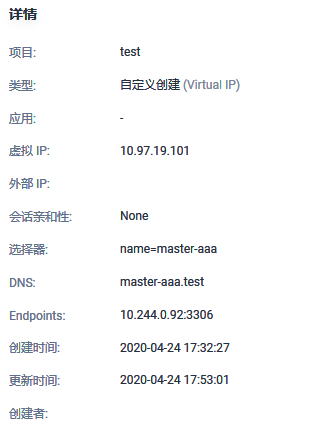
Dockerfile
FROM apache/sharding-proxy:latest
COPY mysql-connector-java-5.1.47.jar /opt/sharding-proxy/lib/
I used docker-compose to launch, no problem
docker-compose.yaml
version: '3.1'
services:
  mysql-master:
    restart: always
    image: sharding-proxy:v5
    container_name: sharding-proxy
    ports:
      - 3312:3307
    volumes:
      - ./conf:/opt/sharding-proxy/conf
    networks:
      - sharding-proxy

networks:
  sharding-proxy:
    external:
      name: mysqltest
config-xxx.yaml
schemaName: master_slave_db2

dataSources:
  ds_master:
    url: jdbc:mysql://mysql-master:3306/cloud-master
    username: root
    password: root
    connectionTimeoutMilliseconds: 30000
    idleTimeoutMilliseconds: 60000
    maxLifetimeMilliseconds: 1800000
    maxPoolSize: 65
  ds_slave0:
    url: jdbc:mysql://mysql-slave:3306/cloud-master
    username: root
    password: root
    connectionTimeoutMilliseconds: 30000
    idleTimeoutMilliseconds: 60000
    maxLifetimeMilliseconds: 1800000
    maxPoolSize: 65

masterSlaveRule:
  name: ds_ms1
  masterDataSourceName: ds_master
  slaveDataSourceNames:
    - ds_slave0
Thank you for your answers
 huntunshule
All 8 comments
You should ensure sharding-proxy in your container could access your mysql node mysql-master server.
 kimmking
on 24 Apr 2020
kimmking
on 24 Apr 2020
You should ensure sharding-proxy in your container could access your mysql node mysql-master server.
I think I know why. I started with my own helm with one key. Maybe after sharding proxy was started, mysql was not started yet, so the connection failed.Just now, I tried to delete pod and restart it. Is the application only trying to connect to the database once? Will it not try to reconnect after failure
huntunshule
on 24 Apr 2020
When a proxy starts, it will check the datasources available or not, if unavailable, it should be failed and shutdown.
But after it started, one or more datasources turn to available, the reconnecting will be take affect.
kimmking
on 24 Apr 2020
When a proxy starts, it will check the datasources available or not, if unavailable, it should be failed and shutdown.
But after it started, one or more datasources turn to available, the reconnecting will be take affect.
But it's not working now, it's a failure state
huntunshule
on 24 Apr 2020
I think you should config depend on mysql in your docker-compose.yaml
 cherrylzhao
on 24 Apr 2020
cherrylzhao
on 24 Apr 2020
I think you should config depend on mysql in your docker-compose.yaml
I added depend on when the docker-compose mode was started, which is what I have always done, I started the compose file separately during the test, so I did not add it.At present, what I want is to add sharding-proxy into the k8s system, and I have made helm char, which can be started with one key of helm. The problem I have found is that it is started with helm.When mysql is not started, sharding-proxy will report an error after startup and cannot connect to mysql.However, after mysql started correctly, sharding proxy still failed to connect to mysql after reporting an error. I observed the log time, but sharding proxy did not retry to connect to mysql. Currently, my solution is to add livenessProbe into the deployment file of sharding proxy, detect port 3307, and restart the container by myself
huntunshule
on 26 Apr 2020
Yaml file for sharding - proxy
kind: Deployment
apiVersion: extensions/v1beta1
metadata:
name: shardingproxy-{{.Values.projectname}}
spec:
replicas: 2
template:
metadata:
labels:
name: shard-{{.Values.projectname}}
spec:
containers:
- name: sharding-{{.Values.projectname}}
image: sharding-proxy:v5
imagePullPolicy: IfNotPresent
volumeMounts:
- name: {{.Values.projectname}}-conf
mountPath: /opt/sharding-proxy/conf
ports:
- name: sharding-proxy
containerPort: 3307
livenessProbe:
tcpSocket:
port: 3307
initialDelaySeconds: 15
periodSeconds: 20
volumes:
- name: {{.Values.projectname}}-conf
configMap:
name: "{{.Values.conf}}"
I have solved this problem, thank you, my k8s system deployment file is as follows for reference
kind: Deployment
apiVersion: extensions/v1beta1
metadata:
  name: shardingproxy-{{.Values.projectname}}
spec:
  replicas: 1
  template:
    metadata:
      labels:
        name: shard-{{.Values.projectname}}
    spec:
      containers:
      - name: sharding-{{.Values.projectname}}
        image: sharding-proxy:v5
        imagePullPolicy: IfNotPresent
        volumeMounts:
        - name: {{.Values.projectname}}-conf
          mountPath: /opt/sharding-proxy/conf
        - name: localtime
          mountPath: /etc/localtime
        ports:
        - name: sharding-proxy
          containerPort: 3307
        livenessProbe:
          tcpSocket:
            port: 3307
          initialDelaySeconds: 15
          periodSeconds: 20
      initContainers:
      - name: init-mysqlmaster
        image: busybox:latest
        command: ['sh', '-c', 'until telnet master-{{.Values.projectname}}.{{.Release.Namespace}}:3306; do echo waiting for mysql; sleep 10; done;']
      - name: init-mysqlslave
        image: busybox:latest
        command: ['sh', '-c', 'until telnet slave-{{.Values.projectname}}.{{.Release.Namespace}}:3306; do echo waiting for mysql; sleep 10; done;']
      volumes:
        - name: {{.Values.projectname}}-conf
          configMap:
           name: "{{.Values.conf}}"
        - name: localtime
          hostPath:
            path: /usr/share/zoneinfo/Asia/Shanghai
Related issues
 cocodroid
·
5Comments
cocodroid
·
5Comments
 xiangtao123
·
7Comments
xiangtao123
·
7Comments
 Akigaze
·
7Comments
Akigaze
·
7Comments
 sandynz
·
4Comments
sandynz
·
4Comments
 LaoWhites
·
6Comments
LaoWhites
·
6Comments
Most helpful comment
I have solved this problem, thank you, my k8s system deployment file is as follows for reference