Shaka-player: Memory leaks in Tizen OS
Have you read the FAQ and checked for duplicate open issues? - yes
What version of Shaka Player are you using? - 2.4.6 and 2.5.3
Can you reproduce the issue with our latest release version? - checking the changelog for 2.5.4 highly likely it will have the same issues.
Can you reproduce the issue with the latest code from master? - did not try
Are you using the demo app or your own custom app? - Custom Application
If custom app, can you reproduce the issue using our demo app? - did not try
What browser and OS are you using? - Chromium / Samsung Tizen TV
For embedded devices (smart TVs, etc.), what model and firmware version are you using?
- 32" Class N5300 Smart Full HD TV (2018)
- 40" Class NU7100 Smart 4K UHD TV (2018)
- 49" Class NU8000 Premium Smart 4K UHD TV (2018)
- 43" Class Q60R QLED Smart 4K UHD TV (2019)
- 43" NU6900 Smart 4K UHD TV (2018)
What are the manifest and license server URIs? - private information. We can explore the possibility to have public URLs and share with you.
What did you do?
- Start playback of HLS Live Broadcast with 4-second segments and play it as long as possible
What did you expect to happen?
- We expect that that Tizen TV device can play Live broadcast for at least 4 hours, ideally 24 hours
What actually happened?
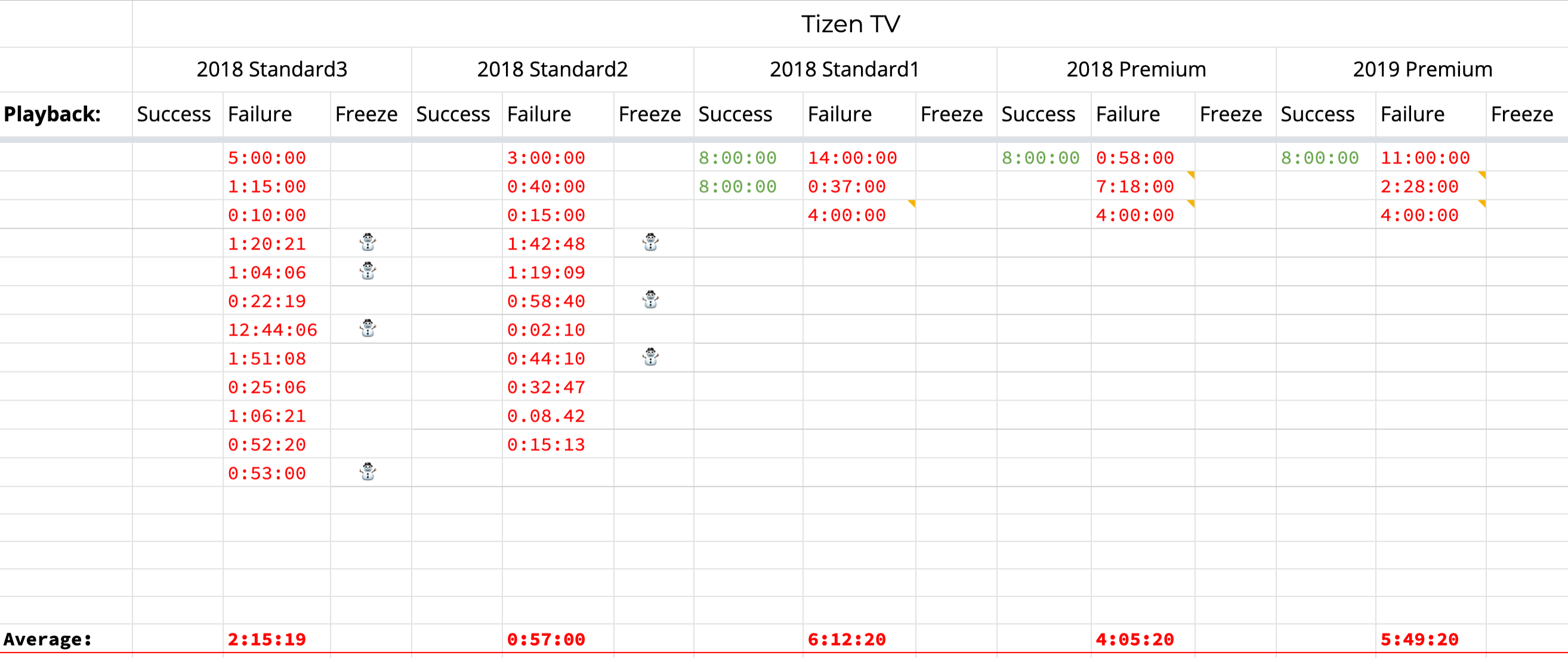
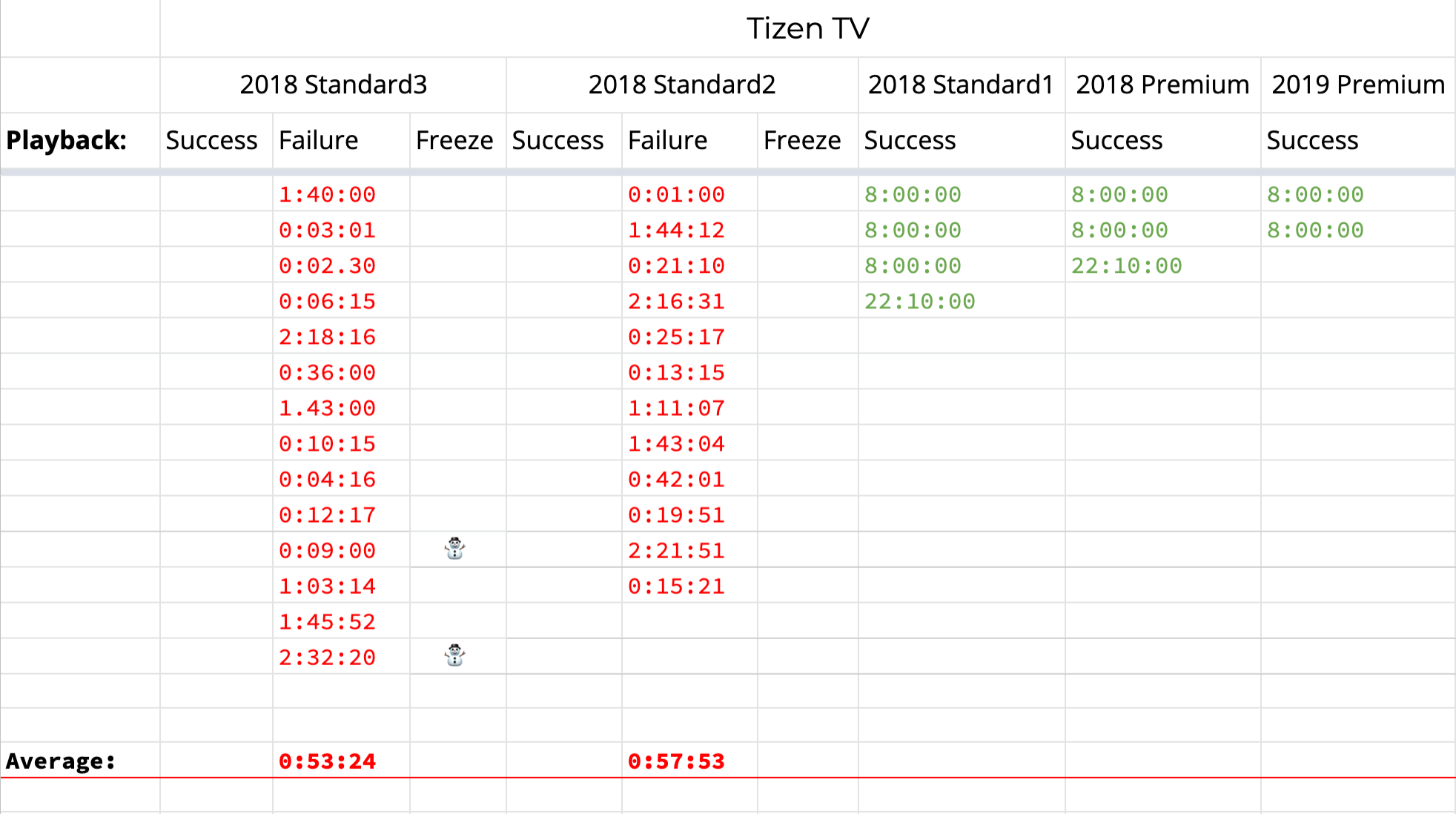
We see that low-end and high-end devices crash after some time. The low-end devices can even freeze. We see a bit better results with 2.4.6, where 2.5.3 - could fail even for Premium devices.
For 2.4.6 - we do not see anything useful in the application logs, mostly last logs an about of playing segment successfully.
For 2.5.3 - we see Error: 3016 for Premium devices after playing for 2+ hours. In the cases when device freeze, we do not see any error in the persisted application logs.
Test Results for 2.5.3 (In Progress)
Test Results for 2.4.6
 NicolasSiver
All 34 comments
Some questions:
- Can you please explain what you mean by "device freeze"? Does the OS completely lock up and the device requires a reboot? Or does playback just stall? Are requests still going out? Is there video in the buffer at the time of the freeze?
- What codecs are you using?
- Have you tried restricting playback to lower variants and seeing if you can reproduce?
 chrisfillmore
on 26 Jul 2019
chrisfillmore
on 26 Jul 2019
- You can not interact with the device, the device is not responsible for normal remote commands. The easiest solution is to power off/on in such case. On the screen, you just see the last played frame.
- H.264. For example for Live, 720p,
H.264, Profile: Main, Level: 3.0, BR: 2.3 Mbps. We see also issues with VOD, but it will be a different conversation (VoD: 1080p,H.264, Profile: High, Level 4.0, VBR: 5.0 Mbps) - We did not try to restrict to play lower renditions. Our expectation that it should work as-is with the provided manifests and internal logic (ABR, etc.) can downgrade if needed. The same application with Shaka Player integration works very well on Universal Windows Platform (Xbox One S/X)
NicolasSiver
on 26 Jul 2019
Error 3016 is an error from the device. The device perhaps cannot decode or play your content; unfortunately there's nothing Shaka can do about that. (Although this may be separate from your freezing problem.)
We have seen this frequently on Tizen devices. For some time we restricted playback to some lower variants, which addressed the problem. In our case, the problem was that Tizen did not support the codecs we were using for some higher quality variants.
One more question: are you able to play the content on 2017 model TV's?
chrisfillmore
on 26 Jul 2019
We support only 2018+ Tizen TV devices.
NicolasSiver
on 26 Jul 2019
Thanks for the report, and please accept my apologies for the delay in responding.
It seems that you have not shared with us any content that would reproduce the issue, so we can't look into this yet. Please consider sharing your manifest and license server URIs privately at the alias in the issue template. If you don't want to do this, you could also try some of the content in our demo app, and see if any of the already-public content there produces the same results.
 joeyparrish
on 14 Aug 2019
joeyparrish
on 14 Aug 2019
Hello Joey,
When you play on your Tizen TV devices (ideally 2018+) you do not see the same trends/results?
I think we could try to play Live stream available in the demo application, but I have some doubts that it's related to the stream. Stream which we use already on the market for many years and we do not have any issues on Xbox One devices (where we also use Shaka Player).
NicolasSiver
on 15 Aug 2019
When you play on your Tizen TV devices (ideally 2018+) you do not see the same trends/results?
We haven't done the kind of hours-long analysis you're showing us on Tizen.
But we have many times spent hours or even days of effort debugging issues that turned out to be caused by a particular characteristic of the user's content, all the while debugging with the wrong content and unable to reproduce the issue. So it's a matter of policy that we need to have a piece of content in the report, or sent to us privately via email.
Does this happen with all live content? DASH and HLS are both complicated enough that it's hard to say. Maybe it's the h264 profile that's important to reproduce the issue, or the size of the timestamps, or massive composition time offsets, or multi-period content, or CEA captions, or one of myriad combinations of these things. (Every one of those is a real example.)
Thanks for your understanding.
joeyparrish
on 15 Aug 2019
Hello Joey,
Do you have HLS Live stream (Container: MPEG-2 TS, no DRM) which we could use for testing? We could conduct some tests with the stream you are confident with.
NicolasSiver
on 19 Aug 2019
We don't have any HLS live streams that use the TS container, no. We do have our test HLS live stream, but it's an MP4 stream, not TS. We also have a non-live TS sample asset. But we were unable to find any publicly-available assets that are both live and TS.
 theodab
on 19 Aug 2019
theodab
on 19 Aug 2019
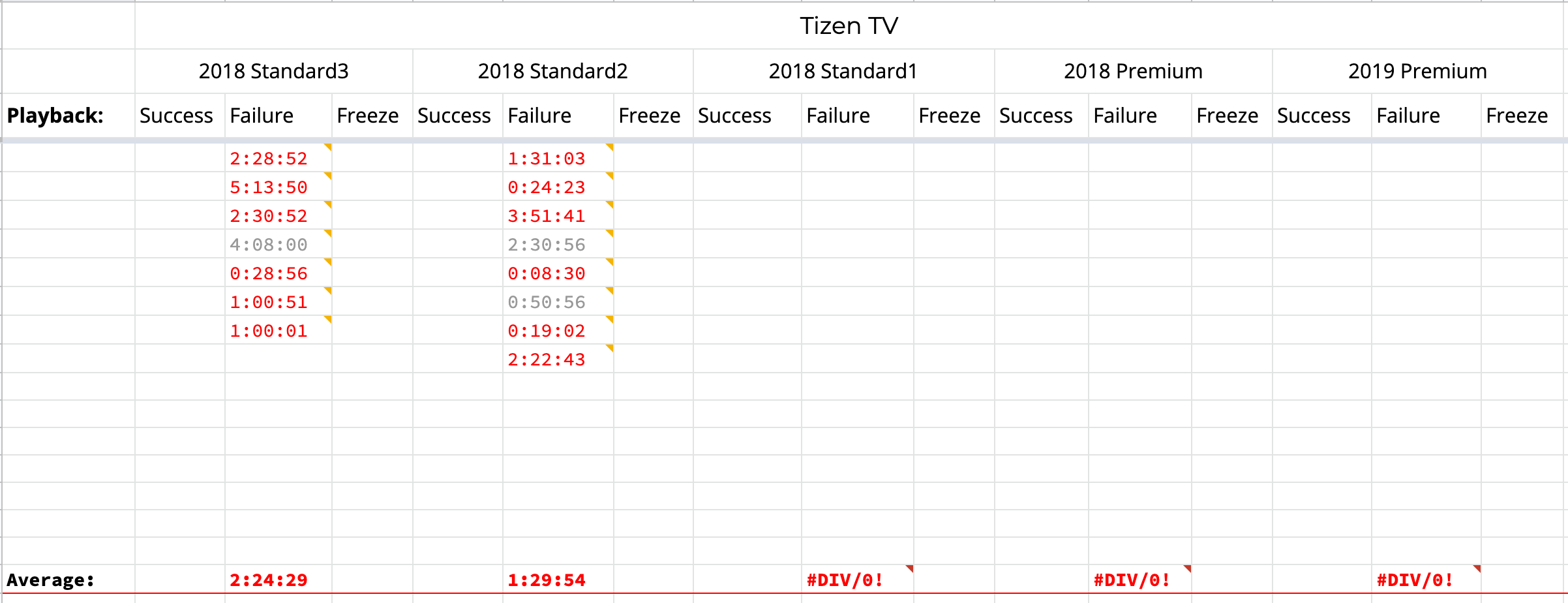
We had the opportunity to conduct long-running tests with the stream from the Demo page: https://akamai-axtest.akamaized.net/routes/lapd-v1-acceptance/www_c4/Manifest.m3u8
We have focused on Standard3 and Standard2 2018 models. Grey records, where we had Error code 1001, all other red records are errors like 3015, 4015 or application crashed. Here are the results:
Test Results for 2.5.4 (Shaka Demo Stream)
NicolasSiver
on 26 Aug 2019
Hello Nicolas,
did you solve this issue? We have the same problem with Shaka player in Tizen using DASH (Container: MPEG-2 TS, no DRM).
Thanks
Petr
 petrmil-nangu
on 22 Oct 2019
petrmil-nangu
on 22 Oct 2019
Hello Petr,
We did not solve. I'm hoping that the Shaka Player team has some ideas to explore to resolve playback on Samsung Tizen TV devices.
Regards,
Nicolas
NicolasSiver
on 26 Oct 2019
Hey guys, I just wanted to chime into this thread and report that we are also seeing issues with other MSE/EME video players including Bitmovin and Video.js on the same Tizen TV models mentioned above. It would certainly lead me to believe that there is an issue with the actual firmware or libraries present on the device and / or the device itself more than anything. We experience constant buffering with Video.js on problematic models (and it's fine everywhere else) and Bitmovin becomes unresponsive after extended playback and the TV restarts after some time. I have a ticket opened with the Video.js team as well if it is of any interest: https://github.com/videojs/http-streaming/issues/674
 kevinscroggins-youi
on 8 Nov 2019
kevinscroggins-youi
on 8 Nov 2019
Hi all, we opened separate ticket to google reporting problem with Shaka player in Tizen using DASH. https://github.com/google/shaka-player/issues/2220
In the same time we tested AV player and after some days we didn't see any problem with playback stability.
petrmil-nangu
on 11 Nov 2019
I played a live stream for a few hours on Chrome for Mac and the DevTools memory tab reported little to no memory leaks (about 44MB usage after a few hours). I also haven't seen any problems on our Tizen 2017, but I'll try again today.
Since Chrome doesn't report a memory leak, it is likely a problem with the native media stack. The fact that a native AV player doesn't leak could just be that MediaSource is leaking but native playback isn't. Since this is happening with other players, there is probably little to nothing we can do.
One workaround you may try is to just call player.detach() followed by player.attach() and re-load the manifest. It will cause playback to stop, but will tear down the media stack and maybe will clean up the leak.
 TheModMaker
on 14 Nov 2019
TheModMaker
on 14 Nov 2019
MSE playback is definitely quite stable on all 2017, 2018 Standard 1 / Premium and 2019 premium TVs in general, but the 2018 Standard 2 / 3 TVs definitely have some sort of memory leak with the underlying MSE implementation on the Tizen platform that is not present on other devices. My personal advice would be to drop support for these Tizen TV model subsets until Samsung officially fixes the issue. For more information on Tizen model groups: https://developer.samsung.com/tv/develop/specifications/tv-model-groups
Symptoms on these problematic 2018 Standard 2 / 3 Tizen TVs ranges from the stream no longer rendering any frames and the buffered range no longer changing, to the entire application freezing and the platform UI becoming extremely unresponsive even after closing the app requiring a hard reset of the TV to the TV restarting or even just shutting off on its own.
On the note of memory leaks, I have noticed some items not being correctly cleaned up between playback sessions, but this should not be an issue as far as playback stability is concerned.
kevinscroggins-youi
on 20 Nov 2019
Also worth noting that the built in Tizen player uses the C++ NaCl MediaPlayer under the hood via the StreamingEngine, so it follows an entirely different playback flow from the MSE APIs. It is possible to follow a similar flow if the platform's native tracks (audio, video, text) are leveraged instead, this is possible with some other MSE players. If native tracks are not used, the MSE APIs still do use the C++ MediaPlayer under the hood, as only a single instance of a video element can be active at a time, using more than one will result in undesired behaviour (ie. no playback in either video element).
kevinscroggins-youi
on 20 Nov 2019
There doesn't seem to be anything we can do from JavaScript about a memory leak in Tizen OS in C++. So I don't think we'll be able to offer any support for the affected devices.
joeyparrish
on 3 Dec 2019
Highly likely you will not be able to solve all problems. But maybe some improvements are possible: for example did you try to test 2.4.6 vs 2.5.3? 2.4.6 overall "performs" better. For us, it did not fail on premium TVs.
NicolasSiver
on 4 Dec 2019
If we can find a specific leak introduced in JavaScript-land in 2.5, that would be great. I'm not saying there's no room for improvement. But we just have no visibility into leaks in C++, even ones that could be influenced by JS in some as-yet-undiscovered way.
joeyparrish
on 4 Dec 2019
@joeyparrish @NicolasSiver we re also experiencing similar issues although we are failing much faster then the times you describe here with TV getting totaly stuck and needing to reset the device.
We will conduct some profiling tests as much as we can, s the profiler in the IDE gets stuck.
Maybe a good experiment is to measure even on chrome with the two mentioned versions - if there is more memory usage in newer version it might point to something as chrome vs TV memory makes a difference.
It seems that using DRM protected streams makes the issue even more apparent and happen faster.
 OrenMe
on 5 May 2020
OrenMe
on 5 May 2020
@OrenMe, that's a great idea. Please let us know how it turns out! We don't have access to Tizen right now while we're in quarantine.
joeyparrish
on 5 May 2020
@OrenMe That definitely makes sense. If it is helpful, there are APIs to obtain the device memory which you can monitor:
tizen.systeminfo.getAvailableMemory();
tizen.systeminfo.getTotalMemory();
Values are reported in bytes I believe. If you want to convert to megabytes:
console.log((value / 1000000).toFixed(2) + " MB");
@joeyparrish apparently my issue is some crazy Tizen IDE issue.
Tizen IDE above 3.5(currently 3.7 is latest) has some incompatibility with Chrome which since v80 deprecated custom element V0.
probably their GUI is suing it or they are runing older version on the TV and people are debugging from the newer version from their desktop and the dev tools are not working for developers wanting to build apps for Tizen.
What people are getting to is this: https://stackoverflow.com/questions/60182668/chrome-devtools-inspector-showing-blank-white-screen-while-debugging-with-samsun which asks devs to run the chrome with custom flags to enable old ShadowDOMV0 and CustomElementsV0.
This causes the TV to hang, probably due to some internal IDE issue.
I got confirmation that this solution is also being suggested by Samsung support via partner channel so it is probably also happening to others so thought I'll mentioned it here.
Removing these runtime flags solves the issue, but then you can't debug :-( so you can either use older chrome version if possible or wait for Samsung to fix it. wither way - this was a crazy journey to discover this.
@NicolasSiver maybe check if you are doing same thing.
OrenMe
on 10 May 2020
Hello @OrenMe
We aware of the issues with the remote debugger, that after some time it could hang the process on the TV. All freeze times that we have collected in the first post we did without connecting to the TV with the remote debugger.
NicolasSiver
on 10 May 2020
I wish I knew that @NicolasSiver, would have saved me some time and nerves:-)
I will continue checking the stability so if we encounter same things I’ll update here.
@kevinscroggins-youi thanks for the input! Will definitely use that for stability checks.
OrenMe
on 10 May 2020
Hello everyone!
I think that we might encounter similar/same issue as you guys.
We've got test equipment with following tizen versions: 2.4 3.0 4.0 5.0 5.5
Now, first observation is that the newer tizen, the more ram memory it uses in idle state, i.e. Tizen 4.0 => 60% of 1GB ram; Tizen 5.0 => 80% of 1GB ram.
Second observations is that, the higher profile/bandwidth, the more memory is consumed. This is ok in general, but we observe ~300MB increase of mem usage, when running 10Mbps@1080p
Third, and most important observation - there is no problem with memory leaks, but memory peaks ;)
I.e. Tizen 5.0, ~700MB mem usage. Add forced 10Mbps@1080p profile and now we have ~ 1100MB ram used (~95%). In this moment, every little memory peak (i.e. background thread wake), can cause OutOfMemory, memory swapping (but where, we have no swap), so everything hangs (in reality, nothing hangs but linux swapper takes over control :) ).
When we use low bitrate stream (~1MB), we have a lot of free RAM, and we cannot reproduce.
@NicolasSiver and others: would you be so kind, and perform some tests, to check if my hipothesis is true? :-)
 aleek
on 24 Aug 2020
aleek
on 24 Aug 2020
Hi everyone,
I think we have the same issue: with a DASH live stream on a Tizen 5.5 smart tv with shaka version 3.0.4 we hit out of memory consistently every 40-50 minutes.
Important to note the out of memory happens even if the stream is paused for the whole time.
The problem seems to be in the parsing of new stream segments and the amount of memory used is proportional to the number of segments in the SegmentTimeline of the dash manifest. In our case is 2811 and for every new manifest loaded about 1MB of memory is used.
I verified with the shaka demo player with a dash live stream with chrome on a pc and I see the memory increasing as well even when the stream is paused. The memory used is much less because in that case the amount of segments is 300 and the memory used is about 100KB for every manifest loaded.
I reckon that the problem can be with the function createUris: this closure references the variables info and context that lock up some memory for every manifest parsed.
 enrico-bardelli
on 7 Oct 2020
enrico-bardelli
on 7 Oct 2020
@enrico-bardelli how did u profile this? did you actually use some profiler for tizen and see closures dangling around or you just deduce this from the code?
OrenMe
on 7 Oct 2020
@OrenMe with the player paused the memory changes are small, so I could use chrome dev tools memory "allocation instrumentation on timeline". With that I could see some data being allocated every time there's a new manifest loaded.
With "record allocation stack" enabled and the debug build of shaka player instead of the production build, I could understand which variables are holding the memory.
Technically speaking this is not a memory leak, since the memory is actually freed when the player is closed and the data structures are cleaned, it just uses more memory than necessary.
enrico-bardelli
on 7 Oct 2020
@enrico-bardelli are you doing this on Tizen itself with the remote devtools or on Mac/desktop chrome?
OrenMe
on 7 Oct 2020
@OrenMe I used tizen studio with the remote dev tools for our smart tv app. I also verified my findings using a normal desktop chrome against the shaka demo website.
enrico-bardelli
on 7 Oct 2020
Thanks @enrico-bardelli, I'm also chasing a memory leak so this is useful.
OrenMe
on 7 Oct 2020
In 3.x I see memory growing continuously in chrome as well as on WebOS ( I assume Tizen as well since playback stops working after about 20 minutes but I didn't profile this ) but in 2.5.17 it is stable playing live DASH + Widevine DRM, seems there is some difference there between the versions. I haven't managed to track down the difference yet though.
 bwallberg
on 3 Nov 2020
bwallberg
on 3 Nov 2020
Related issues
 diogoazevedos
·
5Comments
diogoazevedos
·
5Comments
 luusetsenkoodbichsen
·
3Comments
luusetsenkoodbichsen
·
3Comments
 dakom
·
3Comments
dakom
·
3Comments
 EstebanBP
·
4Comments
diogoazevedos
·
4Comments
EstebanBP
·
4Comments
diogoazevedos
·
4Comments
Most helpful comment
In 3.x I see memory growing continuously in chrome as well as on WebOS ( I assume Tizen as well since playback stops working after about 20 minutes but I didn't profile this ) but in 2.5.17 it is stable playing live DASH + Widevine DRM, seems there is some difference there between the versions. I haven't managed to track down the difference yet though.