Shaka-player: Missing decryption key after succesful license request when using persistentStateRequired
Have you read the FAQ and checked for duplicate open issues?: Yes
What version of Shaka Player are you using?: 2.4.3
Can you reproduce the issue with our latest release version?: Yes
Can you reproduce the issue with the latest code from master?: Yes
Are you using the demo app or your own custom app?: Demo
If custom app, can you reproduce the issue using our demo app?:
What browser and OS are you using?: Firefox 61.0.2 and Chrome 68.0.3440.106 on Mac OS High Sierra
What are the manifest and license server URIs?:
Not able to share at the moment since I don't own the rights to the affected assets. I will try to find a test asset that reproduces the issue.
What did you do?
Play a Widevine DRM protected video multiple times. Set the persistentStateRequired option to true in order to allow device registration.
What did you expect to happen?
Playback to succeed every time
What actually happened?
Playback fails randomly, about 1 out of 40 times (i.e. if you refresh the page multiple times). When playback fails, the license request returns with a 200 status, but the browser fails to decrypt segments with the newly acquired key.
On Chrome you can see the following in chrome://media-internals/ :
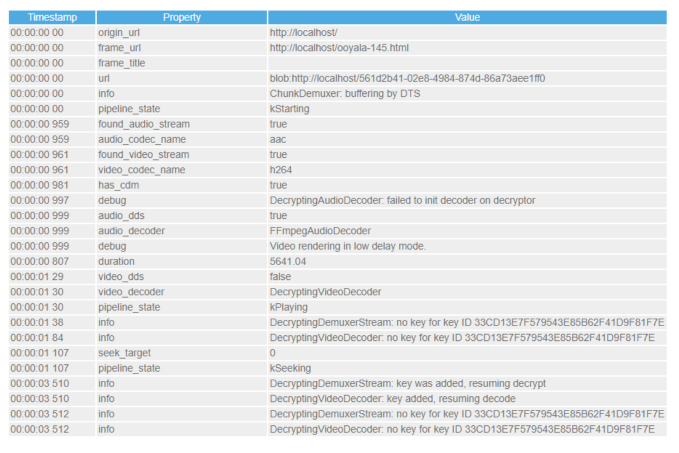
Note the "no key for key ID" entry that is shown after "key added, resuming decode"
On Firefox, segment decoding fails:
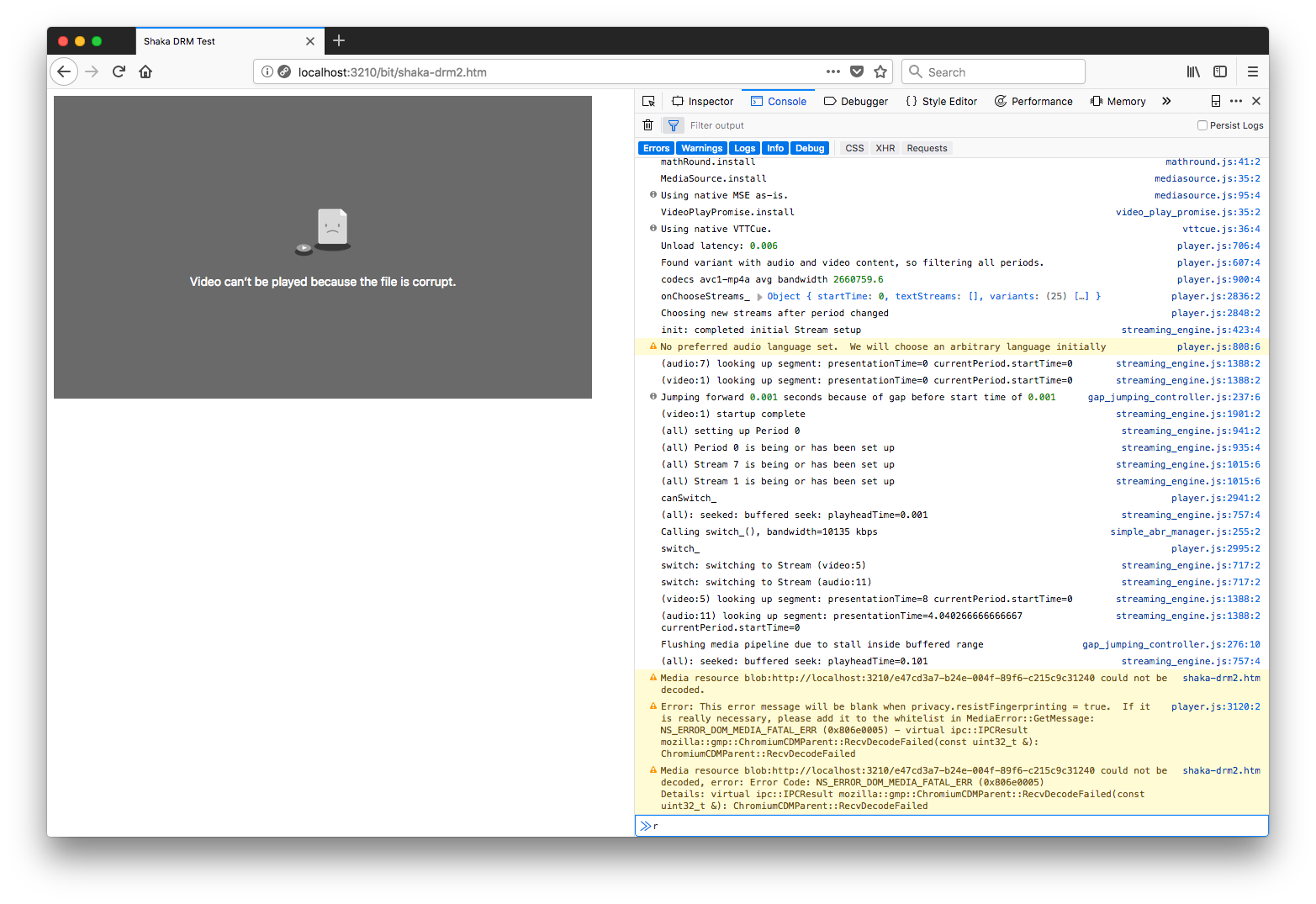
I realize that this is most likely a Widevine, rather than a Shaka issue, but there's no other Widevine-related forum that I have access to. I'm hoping someone can point me to documentation about a known-issue or perhaps suggest a workaround. Thanks
 jpfranco
All 28 comments
Hi, thanks for reporting this issue, and we appreciate if you can send a test file so that we can reproduce it. You can send it to us privately through email: [email protected]. Thank you!
 michellezhuogg
on 23 Aug 2018
michellezhuogg
on 23 Aug 2018
@michellezhuogg thanks for replying. I will request permission to share the asset and I'll email it to you as soon as possible.
jpfranco
on 23 Aug 2018
Correction: The email alias for private URLs is [email protected]
 joeyparrish
on 23 Aug 2018
joeyparrish
on 23 Aug 2018
Thanks @michellezhuogg @joeyparrish, I've sent a test asset to the email above. Please let me know in case you need more info.
jpfranco
on 31 Aug 2018
I have managed to reproduce the bug now twice, but it is very difficult. I am adding console logging of various events to the repro case you sent us, and I will write back later once I can explain what's happening. There seems to be a different set of events for the successful and failing test runs, but I still need more data.
joeyparrish
on 7 Sep 2018
I set it up so that it would reload the page automatically when video.currentTime hit 2.0, so that it would just retry for me until the bug was triggered. It took 200 page refreshes to reproduce this time on Chrome 68 on Linux.
Success event sequence: play, waiting, loadedmetadata, waitingforkey, seek, can play, playing
Failure event sequence: play, waiting, loadedmetadata, waitingforkey, seek, waitingforkey, stalled
For the system to go back into "waitingforkey", there must be something wrong with the key statuses. I'm still digging.
joeyparrish
on 7 Sep 2018
The key statuses are consistent between successful and failed runs. This is very confusing. The browser thinks it is stuck waiting for keys, but it also reports that it has them. This could be a browser or CDM bug. I'm not sure.
joeyparrish
on 7 Sep 2018
We believe this to be a browser or CDM bug. There seems to be some kind of race condition between the CDM and the rest of the browser's media stack.
I will try to modify your repro case to expose this bug with publicly-accessible content, and then file a bug on Chrome.
joeyparrish
on 8 Sep 2018
@joeyparrish thanks for looking into this. We can reproduce a very similar issue with Firefox as well though (see second screenshot above). Do you think that could be a separate problem?
I had suspected a race condition as well since we've noticed that the frequency of the issue and the platforms where it can be reproduced vary between assets. For example, we had assets for which the issue was easy to reproduce on Windows, but not on Mac, and vice versa. For mosts assets I've been able to reproduce the issue on both Chrome and Firefox though.
jpfranco
on 8 Sep 2018
Firefox and Chrome use the same Widevine CDM; so this may be a bug in the CDM or the adapter, which would make sense since those two browsers use them same versions. Even if the bug is higher in the media stack, since they use the same CDM, they just may have made the same mistake.
 TheModMaker
on 10 Sep 2018
TheModMaker
on 10 Sep 2018
@TheModMaker oh ok, got it. Thanks for clarifying.
jpfranco
on 10 Sep 2018
@TheModMaker, can you please turn this into a bug report against Chrome? My hope is that someone on the Chrome CDM team can reproduce it with a debugging build and tell us what's going wrong to get into that state.
joeyparrish
on 10 Sep 2018
@jpfranco I am unable to reproduce this issue with any of our content. Can you post a public asset that we could use in a bug report? Or would you be ok with us forwarding the page you sent us to the Chrome devs who work on this?
TheModMaker
on 11 Sep 2018
@TheModMaker we have permission to share the asset with devs for troubleshooting purposes so long as the url is not publicly accessible. If this can be shared privately then please go ahead, otherwise I will have to ask the customer and get back to you on that.
Unfortunately we don't currently have a public domain asset that reproduces the issue.
jpfranco
on 11 Sep 2018
Ok. I've filled https://crbug.com/883003 for this.
TheModMaker
on 11 Sep 2018
I'm going to make the crbug private so that we can include the content links and repro demos. I will also CC the people who may be able to help track it down. I apologize that this will make the crbug inaccessible outside of Google, but I hope it will allow us to get more expedient debugging help from Chrome team.
joeyparrish
on 11 Sep 2018
Is there any update from the Chrome team? (we don't have access to that system)
 spaddon
on 15 Sep 2018
spaddon
on 15 Sep 2018
They are looking into the issue now, but we don't have any resolution yet. They are looking carefully at possible sources of an internal race condition.
joeyparrish
on 15 Sep 2018
hello, have you received any updates on this issue?
 DenisDashkevich
on 3 Oct 2018
DenisDashkevich
on 3 Oct 2018
Hello, @jpfranco
Could you please share any updates?
 humanamburu
on 22 Oct 2018
humanamburu
on 22 Oct 2018
The issue has been reported as fixed in Chrome 71; I don't know if the fix will appear in Chrome 69 (current stable) or 70.
TheModMaker
on 22 Oct 2018
We have tested on Chrome 71, and so far have not been able to reproduce the issue. Looks promising :)
spaddon
on 24 Oct 2018
@TheModMaker do you know by any chance which is the Widevine CDM version that contains the fix? A customer is reporting that they're still able to reproduce the issue with Chrome 71, so we want to confirm whether the fix has already been included.
Would it also be necessary to open a ticket with Firefox about this, or do they pick up CDM updates regularly? Thanks
jpfranco
on 7 Nov 2018
From the Chrome issue:
We missed the M71 branch cut to land the CDM with this change. This change will be in M72 Chrome.
I don't have a specific CDM version where the fix appears.
Would it also be necessary to open a ticket with Firefox about this, or do they pick up CDM updates regularly? Thanks
I am not familiar with Firefox's CDM updates. It was entirely a fix in the CDM, so Firefox only needs to update to get it. But you should talk with them to determine when the fix will appear.
TheModMaker
on 7 Nov 2018
@TheModMaker sounds good, thanks for clarifying.
jpfranco
on 7 Nov 2018
@jpfranco Do you have any update on the same , we are still facing this issue and not able to communicate to customer on this.
 ashish01july
on 18 Dec 2018
ashish01july
on 18 Dec 2018
@ashish01july, the fix is in Firefox at this point, outside of Shaka Player. You can try again with the latest version of Firefox and report your results here. If it is still broken, please file an issue on https://bugzilla.mozilla.org/ and link to it here for us to follow along and provide additional support.
joeyparrish
on 2 Jan 2019
Closing this stale external (non-Shaka) issue. If you disagree, please reply with @shaka-bot reopen, and it will be automatically reopened.
joeyparrish
on 8 Apr 2020
Related issues
 diogoazevedos
·
4Comments
diogoazevedos
·
4Comments
 SemihGk
·
4Comments
SemihGk
·
4Comments
 gabor
·
3Comments
gabor
·
3Comments
 gkal19
·
6Comments
gkal19
·
6Comments
 bansalvks
·
3Comments
bansalvks
·
3Comments
Most helpful comment
hello, have you received any updates on this issue?