Shaka-player: Support "com.microsoft.playready.recommendation" key system
Apparently there is a new key system for Edge of com.microsoft.playready.recommendation. It sounds like this key system more correctly implements the EME spec and the old key system com.microsoft.playready is no longer recommended. I found this out on dash.js#2658-comment. I have done some initial testing and it does work (at least the query does) and it fixes some of the bugs we have filed against Edge.
Unfortunately, supporting this as well as the old version may be complicated, but it might make it easier to implement #818.
 TheModMaker
All 30 comments
Note that the com.microsoft.playready.recommendation key system string is only supported as of the Windows 10 April 2018 update.
-Sam Wenker with the Microsoft PlayReady team
 swenkeratmicrosoft
on 17 Jul 2018
swenkeratmicrosoft
on 17 Jul 2018
Thanks, Sam! Any documentation or blog post available where we can find out more?
 joeyparrish
on 17 Jul 2018
joeyparrish
on 17 Jul 2018
I am investigating the status of documentation as mentioned in the following comment and will reply to that thread when I have more information.
https://github.com/Dash-Industry-Forum/dash.js/issues/2658#issuecomment-405690840
Thanks,
-Sam Wenker with the Microsoft PlayReady team
swenkeratmicrosoft
on 17 Jul 2018
There is a lot of discussion on #818 that should be considered in this issue.
joeyparrish
on 20 Apr 2020
Hi @joeyparrish I've been reading this and #818 and trying to make sense of what can be a way forward on this.
First - is this something you are interested in Shaka player?
Secondly - if yes for first do you have any ideas or have planned already to do it internally or you are open for contribution?
Third - what is the correct way? using the 'com.microsoft.playready.hardware' or the 'com.microsoft.playready.recommendation'? this part is not clear to me from reading both the tickets.
 OrenMe
on 16 Jun 2020
OrenMe
on 16 Jun 2020
Using com.microsoft.playready.recommendation is strongly recommended. To request Hardware DRM, use the robustness string as indicated in my July 17, 2018 comment in issue #818.
For reference, com.microsoft.playready.hardware is the same as com.microsoft.playready (except for requesting hardware DRM) and thus it uses the legacy EME implementation. That implementation is deprecated, and there are no plans to update it with bugfixes or feature improvements.
I hope this helps,
-Sam Wenker with the Microsoft PlayReady team
swenkeratmicrosoft
on 16 Jun 2020
This greatly helps, @swenkeratmicrosoft
So basically it looks as this key system syntax just needs to be referenced now in shaka so it can be configured and passed along.
@swenkeratmicrosoft have you tried this key system syntax with shaka and it worked?
OrenMe
on 16 Jun 2020
@OrenMe
We have not tried this key system syntax with Shaka in particular. That said, @TheModMaker indicated above that he's done some initial testing - you may wish to ask them if they've gone any further.
I hope this helps,
-Sam Wenker with the Microsoft PlayReady team
swenkeratmicrosoft
on 16 Jun 2020
@TheModMaker do you have some guidelines what will it require to support it?
Do I need to register a new key system uuid or it is same as com.microsoft.playready
It looks like we need to add in content_protection to defaultKeySystems_ and licenseUrlParsers_ and in drm_engine where we call unpackPlayReadyRequest_ for playready, and possibly in two other places but I need to check it on a machine that supports HW DRM.
Question is if the actual robustness level needs specific parsing or it is just a string that will be passed as a config and straight to the requestMediaKeySystemAccess or you intend to create some standard defintion in the drmInfos as today it has a videoRobustness which is defined in the spec?
OrenMe
on 17 Jun 2020
And why not always use com.microsoft.playready.recommendation if it is available and make it a change at the player level to use this or com.microsoft.playready in the same way as in Chromecast
 avelad
on 17 Jun 2020
avelad
on 17 Jun 2020
@avelad is this a suggestion? I’ve started investigating this and would appreciate feedback.
I don’t think using recommendation or not is the issue here, just stated it needs to be added, and if it will be required by application side to configure it or it will always be used internally from now on is an implementation detail.
But note that I don’t see any documentation about backward compatibility so will it always work? Also on old edge and IE11? According to Sam recommendation is available only from a certain windows version.
I think the main decision here is regarding the way robustness is set on shaka api level in drmInfo object which follows the EME spec more closely(I think).
Playready doesn’t have this and it has a string concatenation on the codec string.
So question is how do we want to handle this.
OrenMe
on 17 Jun 2020
I think it would be reasonable to use ".recommendation" any time it's available, but on some PlayReady-enabled devices that aren't running Windows, that may never be added. So the workarounds in DrmEngine for the old PlayReady will need to be kept for "com.microsoft.playready" until we stop supporting that older key system ID and the devices that have it. IE support will end soon, but Tizen, for example, is much more complicated because people replace their TVs so rarely and Samsung doesn't push meaningful firmware updates.
On ChromeCast, the key system ID is "com.chromecast.playready", because it is not identical to what Microsoft shipped in browsers. But we don't require apps to configure it that way. We could do the same here, and not require apps to know about the details of "com.microsoft.playready.recommendation", but select it when possible if the app asks for "com.microsoft.playready".
The Shaka Player team doesn't have time to work on any of this right now, but we would be happy to discuss and help with details if anyone is interested to work on the implementation in DrmEngine.
joeyparrish
on 17 Jun 2020
I added some work in the PR https://github.com/google/shaka-player/pull/2662
avelad
on 18 Jun 2020
@joeyparrish thanks.
How would you go about this?
Always lead with check for com.microsoft.playready.recommendation and if it fails fallback to com.microsoft.playready?
The cast example is pretty simple as you check in fillInDrmInfoDefaults_ if this is cast device and if it is just change it.
In this case you don't really know, so there are too may edge cases, right? or am I overthinking it?
I mean, if someone asked for robustness level 3000 and user agent doesn't support recommendation so first of course requestMediaKeySystemAccess will reject because recommendation is not supported - what now? because we say we will encapsulate regular playready and recommendation we fallback to regular playready? but we know app set robustness level which is not supported, so do we reject automatically?
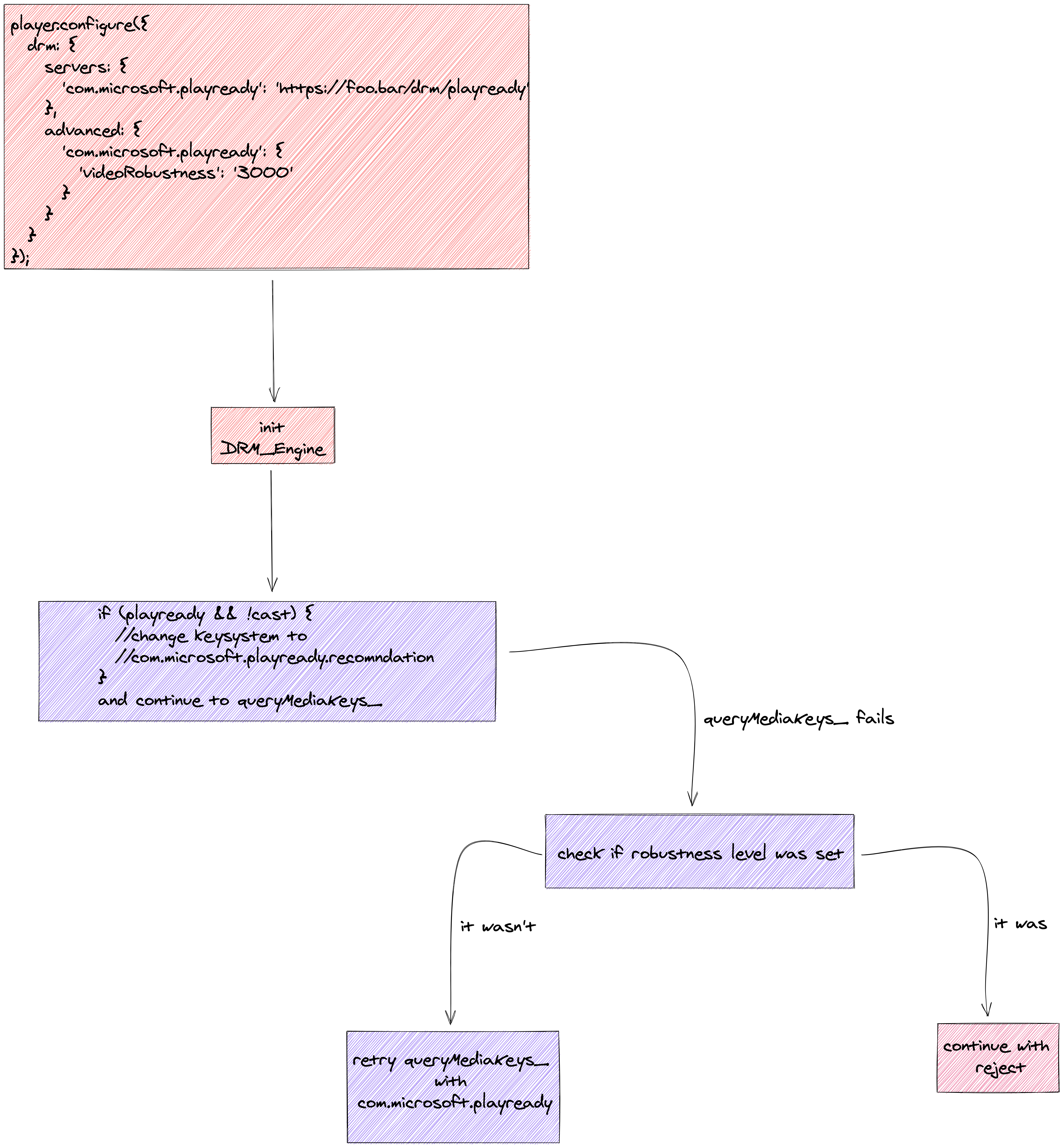
OrenMe
on 18 Jun 2020
thanks @avelad.
So this change #2662 means that now an app can configure drm servers with the com.microsoft.playready.recommendation and we now need to figure out how to detect support for it and add fallback logic?
@swenkeratmicrosoft is there any way to query support? is it how I described in above comment https://github.com/google/shaka-player/issues/1495#issuecomment-645941626?
OrenMe
on 21 Jun 2020
From an EME perspective, RequestMediaKeySystemAccess will tell you whether it's supported or not by rejecting its promise if you pass it an unsupported configuration. I'm afraid that I don't know enough about how Shaka integrates with EME to answer the question beyond that.
-Sam Wenker with the Microsoft PlayReady team
swenkeratmicrosoft
on 22 Jun 2020
I mean, if someone asked for robustness level 3000 and user agent doesn't support recommendation so first of course requestMediaKeySystemAccess will reject because recommendation is not supported - what now? because we say we will encapsulate regular playready and recommendation we fallback to regular playready? but we know app set robustness level which is not supported, so do we reject automatically?
I have found that the current com.microsoft.playready ignores robustness completely, so I think with an appropriate comment to that effect in the code, it would be reasonable to leave robustness as-is when we fall back to com.microsoft.playready.
Cramming in logic for an automatic key-system fallback for PlayReady might be ugly. It might be best to refactor or redesign DrmEngine with this as a new requirement. Thankfully, this is a purely internal component, so we have no need to guarantee API compatibility for it.
joeyparrish
on 29 Jun 2020
Hi @joeyparrish I came across dash.js change today and the lengthy thread there about .recommendation support:
https://github.com/Dash-Industry-Forum/dash.js/issues/2658#issuecomment-406218871
https://github.com/Dash-Industry-Forum/dash.js/pull/2714
And in total coincidence I saw the new PR today on Shaka by @valotvince.
What do you think abut his approach? It comes with what dash.js chose, and I also see @swenkeratmicrosoft was on that discussion so he might have comments about it.
This will basically enable both HW secured playback and possibly offline capabilities.
OrenMe
on 23 Jul 2020
@swenkeratmicrosoft Hello 👋
I struggle to make some demo streams work on my PR #2750 with the com.microsoft.playready.recommendation, and I can't see why...
- https://content.uplynk.com/847859273a4b4a81959d8fea181672a4.mpd?pr.version=2&pr.playenabler=B621D91F-EDCC-4035-8D4B-DC71760D43E9&pr.securitylevel=150
- https://content.uplynk.com/054225d59be2454fabdca3e96912d847.mpd?ad=cleardash&pr.version=2&pr.playenabler=B621D91F-EDCC-4035-8D4B-DC71760D43E9&pr.securitylevel=150
I tried to make the parameters vary to match the one we're supposed to have (pr.version and pr.securitylevel). Is it a DRM-server issue, or a stream issue, ... or something else ?
I have the exact same issue with the streams of my company (we work w/ DRMToday), when trying to update the key session with the license, it makes the following error:
DOMException: Failed to execute 'update' on 'MediaKeySession': Failed to update CDM session. (2154840069)
If you have any input, it would be really appreciated !! :)
Thanks !
Best,
Vincent.
 valotvince
on 28 Jul 2020
valotvince
on 28 Jul 2020
@valotvince
When changing from com.microsoft.playready to com.microsoft.playready.recommendation, the most common cause (by far) of 'update' failing with that error code (2154840069 == 0x80704005 == MF_TYPE_ERR) is a session type mismatch.
Specifically, if the PlayReady server SDK sets the MediaLicense.Type property to LicenseType.Persistent, then the client's MediaKeySessionType must be "persistent-license". Similarly, if the Type is LicenseType.NonPersistent, then MediaKeySessionType must be "temporary".
This is per spec in the update algorithm starting with the text "Process sanitized response, following the stipulation for the first matching condition from the following list:"
https://www.w3.org/TR/encrypted-media/#dom-mediakeysession-update
This is one of many places where the deprecated key system string (com.microsoft.playready) doesn't conform to spec. Thus, if your existing implementation using the deprecated key system string has a session/license mismatch like this, "update" would succeed with the legacy key system string but not with recommendation.
Hope that helps,
-Sam Wenker with the Microsoft PlayReady team
swenkeratmicrosoft
on 28 Jul 2020
Hi @swenkeratmicrosoft,
Awesome thanks, that was it !
There was several issues from requesting the correct MediaKeySystemAccess and creating the session with the correct sessionType.
Best,
Vincent.
valotvince
on 29 Jul 2020
Hi @swenkeratmicrosoft,
I've tried different configurations with our DRMProvider, on the same device for both Edge and Edge Chromium.
EDGE
| MediaLicense.Type Persistent | MediaLicense.Type NonPersistent
-- | -- | --
SL2000, sessionType == persistent-license | OK | OK (only with persistentState to not-allowed)
SL2000, sessionType == temporary | OK | OK (only with persistentState to not-allowed)
SL3000, sessionType == persistent-license | OK | OK (only with persistentState to not-allowed)
SL3000, sessionType == temporary | OK | OK (only with persistentState to not-allowed)
- Edge is able to read content when PlayReady Server SDK enforce MediaLicense Type to NonPersistent ONLY if
persistentStateis set tonot-allowed. PassingoptionaltopersistentStateresults in the MediaKeySystemAccess Configuration to havepersistentStatetorequired
CHROMIUM EDGE
In that case, device is detected as SL2000 on PlayReady Server SDK side. I am still able to request a SL3000 MediaKeySystemAccess ... Everything is in order in the computer, hardware-speaking to decrypt Hardware content (works in Edge), edge://gpu tells me ok for Hardware Playready. I don't really understand what is blocking for reading SL3000 content with the Chromium Edge.
| MediaLicense.Type Persistent | MediaLicense.Type NonPersistent
-- | -- | --
SL2000, sessionType == persistent-license | OK | Session NOK (MF_TYPE_ERR)
SL2000, sessionType == temporary | Session NOK (MF_TYPE_ERR) | OK
SL3000, sessionType == persistent-license | NOK | NOK
SL3000, sessionType == temporary | NOK | NOK
- Chromium Edge is able to read content when PlayReady Server SDK enforce MediaLicense Type to NonPersistent (given the correct sessionType)
- Device should be able to decrypt Hardware DRM but when using Chromium Edge, it is detected as a SL2000. Still Chromium Edge can deliver MediaKeySystemAccess with SL3000 level. To check, I've tested against our own DRMProvider + https://testweb.playready.microsoft.com/Tool/PlayerHAS (with
msg:clientinfoconfig) - The use of distinctiveIdentifier
requiredin Edge Chromium makes the browser kill the tab, with the error code RESULT_CODE_KILLED_BAD_MESSAGE, here's the configuration I used (based on https://github.com/google/shaka-player/issues/818#issuecomment-405695770, we don't encrypt the audio so no need of audioCapabilities):
{
    initDataTypes: ['cenc'],
    sessionTypes:  ['persistent-license'],
    persistentState: 'required',
    distinctiveIdentifier: 'required',
    audioCapabilities: [],
    videoCapabilities: [
      { contentType: 'video/mp4;codecs="avc1.42001E"', robustness: '3000' },
      ...other avc1 codecs
    ],
  }
So, in brief, here are my questions:
- What is the current status of SL3000 support in Edge Chromium ? How the navigator allows access to a SL3000 MediaKeySystem while being said SL2000 ?
- How and when
distinctiveIdentifiershould be used when talking about PlayReady ?
- Why does it kill the tab in Chromium Edge ? Is it known internally ? (found out that issue https://techcommunity.microsoft.com/t5/enterprise/playready-chromium-edge-dash-js-playready-does-not-run-locally/m-p/1296150)
And if you have any other input on what I wrote, it would be really appreciated :)
Anyway, that doesn't really block the way for #2750 so I'll keep working on that one !
Thank you !
valotvince
on 31 Jul 2020
Regarding the Chromium Edge failure:
I literally became concurrently aware of what appears to be an issue with Edge Chromium when using robustness : 3000 yesterday afternoon via a report from an internal partner. :) Basically, the robustness value is being dropped by the browser before it reaches PlayReady, so you're always getting the software drm (2000) implementation because it's the default. I've contacted the appropriate folks on the Edge team, but unfortunately the expert is out of office until 8/6 so there probably won't be any traction before then.
Regarding the non-chromium Edge failure:
Via feedback hub on category Microsoft Edge > Video Playback, traces can be collected which will help us diagnose the issue.
However, we also have a publicly accessible application that allows you to collect traces directly. The zip file at the following link contains the exe along with a readme.txt with instructions. If you're willing to download and run an "untrusted" exe, I'd be interested in having you collect logs that way and share them with me, but I completely understand if you're not comfortable with that.
https://1drv.ms/u/s!AvlguSdksErsk7cBHI6kH8GtEHI9Zg
(The only reason I bring up that option is this: while feedback hub will give me the same information, that mechanism takes a while to work through various teams before I can see it. Feedback hub goes to a team that confirms it's not spam/etc, they'll send it to the Edge team because it's in their category, they'll send it to their video playback expert, and they'll send it on to me if it turns out to be a PlayReady issue rather than a browser issue. With direct tracing, I can bypass the first three if it's PlayReady and bypass the first two if it's browser by sending it directly to the Edge video playback expert.)
Regarding the distinctiveIdentifier issue: I'll have to let Fawkes (who is on the discussion in the link you sent and is at MSFT) dig into that one. PlayReady always uses distinctive identifiers, however, so if specifying "optional" works, there's no real reason to specify "required".
Hope that helps,
-Sam Wenker with the Microsoft PlayReady team
swenkeratmicrosoft
on 31 Jul 2020
Hi @swenkeratmicrosoft,
Thank you for taking the time to answer me. We'll have to wait for hardware in Chromium Edge :)
I've done the traces collecting with my device, you can download them at https://drive.google.com/file/d/1SWaXL1JDIdALa-dJHlEJNJ5PZAZwUYnc/view
Setup of the test:
- MediaLicense.Type to NonPersistent
- sessionType temporary
- persistentState to optional
- videoRobustness to 3000
Edge starts the playback and fails with a DRM error (when updating the keySession with the license data), sometimes ~1 second of video is visible with audio.
Best,
Vincent.
valotvince
on 3 Aug 2020
Via a javascript debugger, could you confirm that the underlying MediaKeys method createSession is definitely creating a temporary session, as in:
mymediakeys.createSession('temporary')
or
mymediakeys.createSession()
I ask because, based on the trace (mf.etl) you shared, PlayReady is still seeing a persistent-license session being requested. It's possible that it's not getting propagated from the browser to PlayReady, but since this is non-chromium Edge it seems unlikely.
(I think that the shaka log will say "Creating new temporary session", but I'm not certain.)
Hope that helps,
-Sam Wenker with the Microsoft PlayReady team
swenkeratmicrosoft
on 5 Aug 2020
@swenkeratmicrosoft 👋
Turns out that requesting a MediaKeySystemAccess with persistentState to optional, returns a mediaKeySystemAccess with a persistentState to required, and that's why Shaka was requesting a persistent session type. I had to force it to not-allowed to allow the playback when using NonPersistent MediaLicense.Type.
I've updated the results accordingly in my previous post.
I'll test again the Chromium Edge soon for SL3000 support.
Thank you !
Best,
Vincent.
valotvince
on 10 Aug 2020
@swenkeratmicrosoft 👋
I hope you're well.
Do you have any internal news about the robustness value being dropped by the browser before reaching the CDM ?
That's quite problematic on our end, since we're not able / we don't have the rights to play HD content without hardware decoding on Edge chromium.
Best,
Vincent.
valotvince
on 2 Sep 2020
It is not really the player's job to enforce robustness or security requirements. If you have specific requirements, you should specify these in your license so the CDM enforces it. Someone could easily edit the JavaScript to remove these robustness values. The robustness values in JavaScript are used to give errors about support early so the app can fallback to something else. If you have minimum security requirements, the CDM should enforcement.
TheModMaker
on 2 Sep 2020
@TheModMaker you're absolutely right ! The CDM always enforces the correct robustness, given by the DRM Provider and by the license, but if we request a MediaKeySystemAccess with no robustness value or with a robustness too low, wouldn't it make an error on the client-side ?
MediaKeySystemAccess HW
CDM / License enforces HW or SW => OK for the playback since we're going to play with the highest robustness anyway
MediaKeySystemAccess SW
CDM / License enforces HW => Decrypting will fail
CDM / License enforces SW => Ok for the playback
valotvince
on 2 Sep 2020
@valotvince
I'm well. I hope you're well as well.
The Edge team has confirmed the bug and have scheduled time to fix it next week. Unfortunately, I can't tell you exactly when the fix will go live - their release schedule is opaque to me.
@TheModMaker
The robustness value specified by the website isn't about enforcement.
For PlayReady, the entire stack initializes in either HW mode or SW mode based on the robustness value. When initialized in SW mode, it doesn't even establish a connection to the HW, the certificate sent to the server when acquiring a license is the SW certificate, the private key associated with that certificate is SW protected, etc. The server can then use that certificate to determine whether it should give a client content that requires HW or not and whether to give it licenses that enforce HW or not. The server won't even send a license that enforces HW to the client when it sees a SW certificate; in fact, it can't; the PlayReady Server SDK blocks this even if it tries.
In other words, MediaKeySystemAccess SW means the client will never even receive a content key for content that requires HW protection (let alone try to decrypt it). Even if you forced the client to send the HW certificate to the server while in SW mode and the server issued you a HW license, the SW doesn't have access to the HW certificate's private key so you still couldn't decrypt the content.
Attacking a website to change the robustness value to make it initialize in SW mode instead of HW has the same impact as physically swapping out your graphics card for an older one that doesn't support HW decryption at all; you'll never see content for which the server requires HW protection.
Hope that helps,
-Sam Wenker with the Microsoft PlayReady team
swenkeratmicrosoft
on 3 Sep 2020
Related issues
 ldayananda
·
5Comments
ldayananda
·
5Comments
 mdownplane
·
4Comments
mdownplane
·
4Comments
 diogoazevedos
·
5Comments
diogoazevedos
·
5Comments
 SemihGk
·
4Comments
SemihGk
·
4Comments
 dakom
·
3Comments
dakom
·
3Comments