Shadowsocksx-ng: 操作系统升级 10.13.2 后,全局模式下 ssh 到任何地方都闪断,PAC 自动模式下正常
System and Shadowsocksx-NG version:
- macOS 10.13.2
- Shadowsocksx-NG 1.5, 1.6, 1.7
Expected behavior:
ssh to any server should work
Actual behavior:
In global mode
ssh -vvv server shows these:
OpenSSH_7.6p1, LibreSSL 2.6.2
debug1: Reading configuration data /Users/name/.ssh/config
debug1: /Users/name/.ssh/config line 6: Applying options for server
debug1: Reading configuration data /etc/ssh/ssh_config
debug1: /etc/ssh/ssh_config line 48: Applying options for *
debug2: ssh_connect_direct: needpriv 0
debug1: Connecting to server port 1999.
debug1: Connection established.
debug1: identity file /Users/name/.ssh/id_rsa type 0
debug1: key_load_public: No such file or directory
debug1: identity file /Users/name/.ssh/id_rsa-cert type -1
debug1: identity file /Users/name/.ssh/id_dsa type 1
debug1: key_load_public: No such file or directory
debug1: identity file /Users/name/.ssh/id_dsa-cert type -1
debug1: key_load_public: No such file or directory
debug1: identity file /Users/name/.ssh/id_ecdsa type -1
debug1: key_load_public: No such file or directory
debug1: identity file /Users/name/.ssh/id_ecdsa-cert type -1
debug1: key_load_public: No such file or directory
debug1: identity file /Users/name/.ssh/id_ed25519 type -1
debug1: key_load_public: No such file or directory
debug1: identity file /Users/name/.ssh/id_ed25519-cert type -1
debug1: Local version string SSH-2.0-OpenSSH_7.6
ssh_exchange_identification: Connection closed by remote host
With PAC auto mode, or ShadowsocksX-NG off, ssh works fine.
Steps to reproduce:
Turn on ShadowsocksX-NG with global mode
then ssh to any site
How often does this happen?
Always
ss-local.log
2017-12-08 10:50:32 INFO: initializing ciphers... aes-256-cfb
2017-12-08 10:50:32 INFO: tcp port reuse enabled
2017-12-08 10:50:32 INFO: listening at 127.0.0.1:1086
2017-12-08 10:50:36 INFO: connect to server:1999
Application log
 sunyj
sunyj
All 7 comments
Me too, but with any ssh client, including on the server itself. This looks like another macOS authentication bug. Please post a bug report to Apple.
I saw this issue after upgrading to 10.13.2. I tracked down the problem to my own incompatible MAC algorithms specified in /etc/ss/sshd_config and /etc/ss/ssh_config. Specifically, the ripemd160 algorithms have been removed.
View available MACs with the command:
ssh -Q mac
 essandess
on 8 Dec 2017
essandess
on 8 Dec 2017
My ssh -Q mac shows these:
hmac-sha1-96
hmac-sha2-256
hmac-sha2-512
hmac-md5
hmac-md5-96
[email protected]
[email protected]
[email protected]
[email protected]
[email protected]
[email protected]
[email protected]
[email protected]
[email protected]
[email protected]
Any suggestion on how to change /etc/ssh/ssh*_config files?
sunyj
on 10 Dec 2017
Any update on this issue?
sunyj
on 12 Jan 2018
Edit: 说错了,才看到你的log里已经有了
debug1: Connection established.
因此不是不可达的问题了。建议放一下server端sshd的log
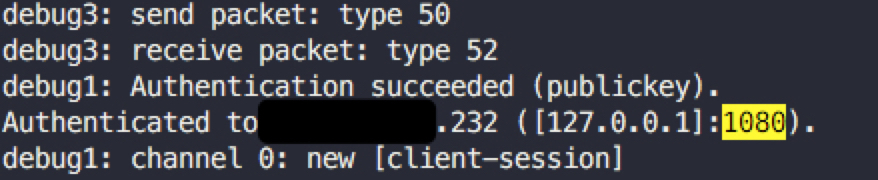
10.13.2的OpenSSH似乎会自动读取系统的代理配置,而不像以前需要手动设置ssh代理参数。于是PAC模式下,OpenSSH不会尝试使用PAC;全局代理模式下,OpenSSH使用了系统全局代理。
我自己使用中,只要一打开全局代理,再启动ssh,ssh明显延迟很高
你的问题有可能是ssh试图通过你的ss服务器连接server,然而你的server对于ss服务器不可达(比如server是局域网ip)
 tete1030
on 15 Jan 2018
tete1030
on 15 Jan 2018
不是终端读了代理配置,是openssh。设置全局代理后不必重启终端,只需要重新运行ssh,ssh就会走代理(这说明终端的环境变量不需要改变)。在log里,只有一处信息提到了使用代理配置,而且这个信息只在认证成功之后才输出:
tete1030
on 15 Jan 2018
搞明白了,不是 ss 的锅,是苹果搞了个新 feature/bug,让 ssh 用系统代理去连接。
解决办法是在 /etc/ssh/ssh_config 里加这么一条:
Host *
    ProxyCommand nc %h %p
我也这么解决的。不过我在全局代理时仍然能连接,其实还是没弄清楚为什么你的不能~
tete1030
on 15 Jan 2018
Related issues
 zxf8665905
·
5Comments
zxf8665905
·
5Comments
 Sharnodra
·
6Comments
Sharnodra
·
6Comments
 likebeta
·
6Comments
likebeta
·
6Comments
 gonejack
·
4Comments
gonejack
·
4Comments
 ilovebamboo
·
4Comments
ilovebamboo
·
4Comments
Most helpful comment
Me too, but with any ssh client, including on the server itself. This looks like another macOS authentication bug. Please post a bug report to Apple.I saw this issue after upgrading to 10.13.2. I tracked down the problem to my own incompatible MAC algorithms specified in
/etc/ss/sshd_configand/etc/ss/ssh_config. Specifically, theripemd160algorithms have been removed.View available MACs with the command: