Shadowsocksx-ng: SS-NG not working
System and Shadowsocksx-NG version:
- macOS 10.13 (17A405)
- Shadowsocksx-NG 1.6.1
Shadowsocks server enable tcp-fast-open feature
Actual behavior:
kcptun not working
ss-local.log
$cat ~/Library/Logs/ss-local.log
2017-10-10 00:50:06 INFO: connect to clients4.google.com:443
2017-10-10 00:50:14 INFO: connect to www.facebook.com:443
2017-10-10 00:53:39 INFO: connect to clients4.google.com:443
2017-10-10 00:53:45 INFO: closed gracefully
2017-10-10 00:53:46 INFO: initializing ciphers... aes-256-cfb
2017-10-10 00:53:46 INFO: listening at 127.0.0.1:1086
2017-10-10 00:54:49 INFO: initializing ciphers... aes-256-cfb
2017-10-10 00:54:49 INFO: listening at 127.0.0.1:1086
2017-10-10 00:54:51 INFO: connect to www.google.com:443
2017-10-10 00:54:52 INFO: connect to mtalk.google.com:443
2017-10-10 00:55:14 INFO: connect to www.facebook.com:443
* kcpserver-log*
2017/10/09 16:44:35 version: 20170930
2017/10/09 16:44:35 listening on: [::]:4000
2017/10/09 16:44:35 target: (hide):9528
2017/10/09 16:44:35 encryption: aes
2017/10/09 16:44:35 nodelay parameters: 1 20 2 1
2017/10/09 16:44:35 sndwnd: 1024 rcvwnd: 1024
2017/10/09 16:44:35 compression: true
2017/10/09 16:44:35 mtu: 1350
2017/10/09 16:44:35 datashard: 10 parityshard: 3
2017/10/09 16:44:35 acknodelay: false
2017/10/09 16:44:35 dscp: 0
2017/10/09 16:44:35 sockbuf: 4194304
2017/10/09 16:44:35 keepalive: 10
2017/10/09 16:44:35 snmplog:
2017/10/09 16:44:35 snmpperiod: 60
2017/10/09 16:44:35 pprof: false
2017/10/09 16:45:17 remote address: (hide):36084
* kcpclient-log*
$./client_darwin_amd64 -c client.json
2017/10/10 00:45:07 version: 20170930
2017/10/10 00:45:07 listening on: [::]:8388
2017/10/10 00:45:07 encryption: aes
2017/10/10 00:45:07 nodelay parameters: 1 20 2 1
2017/10/10 00:45:07 remote address: (*hide*):4000
2017/10/10 00:45:07 sndwnd: 128 rcvwnd: 512
2017/10/10 00:45:07 compression: true
2017/10/10 00:45:07 mtu: 1350
2017/10/10 00:45:07 datashard: 10 parityshard: 3
2017/10/10 00:45:07 acknodelay: false
2017/10/10 00:45:07 dscp: 0
2017/10/10 00:45:07 sockbuf: 4194304
2017/10/10 00:45:07 keepalive: 10
2017/10/10 00:45:07 conn: 1
2017/10/10 00:45:07 autoexpire: 0
2017/10/10 00:45:07 scavengettl: 600
2017/10/10 00:45:07 snmplog:
2017/10/10 00:45:07 snmpperiod: 60
2017/10/10 00:45:07 connection: (hide):52270 -> (hide):4000
* SSNG-server-config**
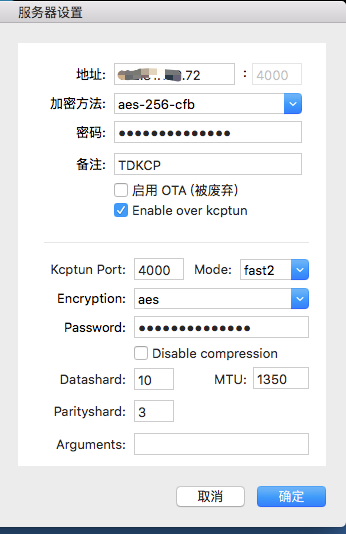
* SSNG-config*
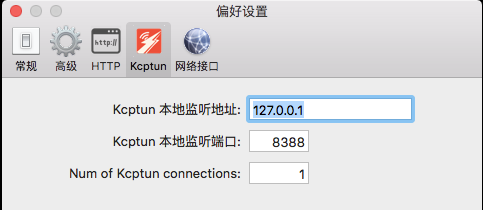
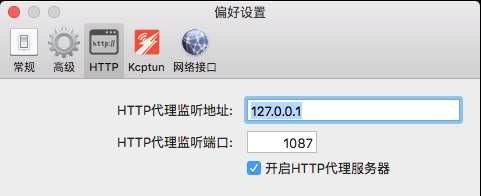
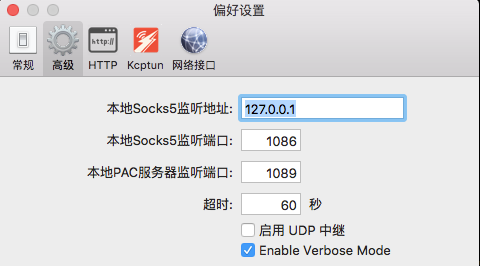
 busyfree
All 4 comments
the same issue. please let the author check it .we need a answer.
 ranjin
on 10 Oct 2017
ranjin
on 10 Oct 2017
ShadowsocksX-NG gives me connection refused error, while Shadowsocks works great.
➜ ~ curl --socks5 127.0.0.1:1086 google.com
curl: (7) Failed to connect to 127.0.0.1 port 1086: Connection refused
➜ ~ curl --socks5 127.0.0.1:1080 google.com
<HTML><HEAD><meta http-equiv="content-type" content="text/html;charset=utf-8">
<TITLE>302 Moved</TITLE></HEAD><BODY>
<H1>302 Moved</H1>
The document has moved
<A HREF="http://www.google.ca/?gfe_rd=cr&dcr=0&ei=nOD7Wf78Aeam8weP7YfgCw">here</A>.
</BODY></HTML>
 itbdw
on 3 Nov 2017
itbdw
on 3 Nov 2017
I had resolved my question, maybe you can open the http port ,like that
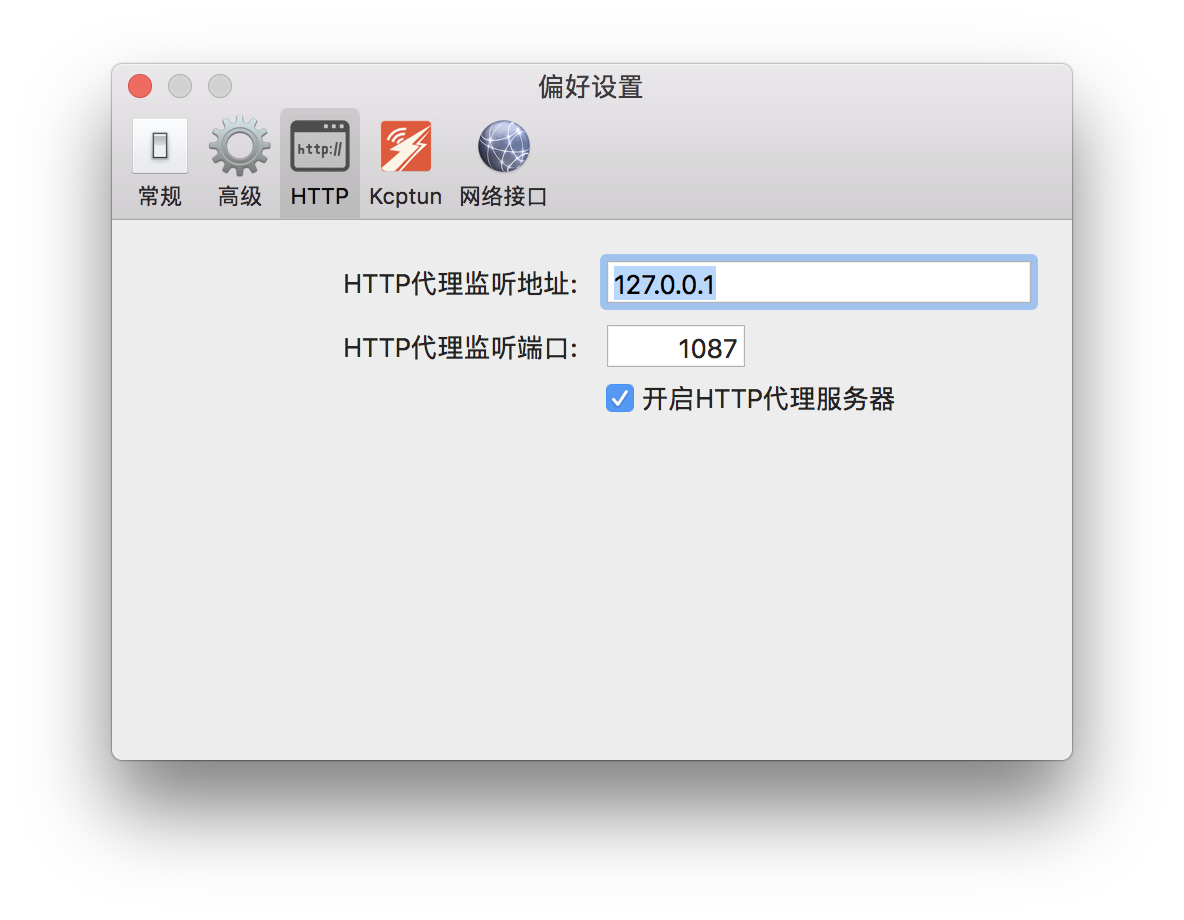
And then set this in your .bashrc
export http_proxy="http://127.0.0.1:1087"
export https_proxy="http://127.0.0.1:1087"
Then, source ~/.bashrc.
I solved it by the way , good luck!
 crown3
on 7 Nov 2017
crown3
on 7 Nov 2017
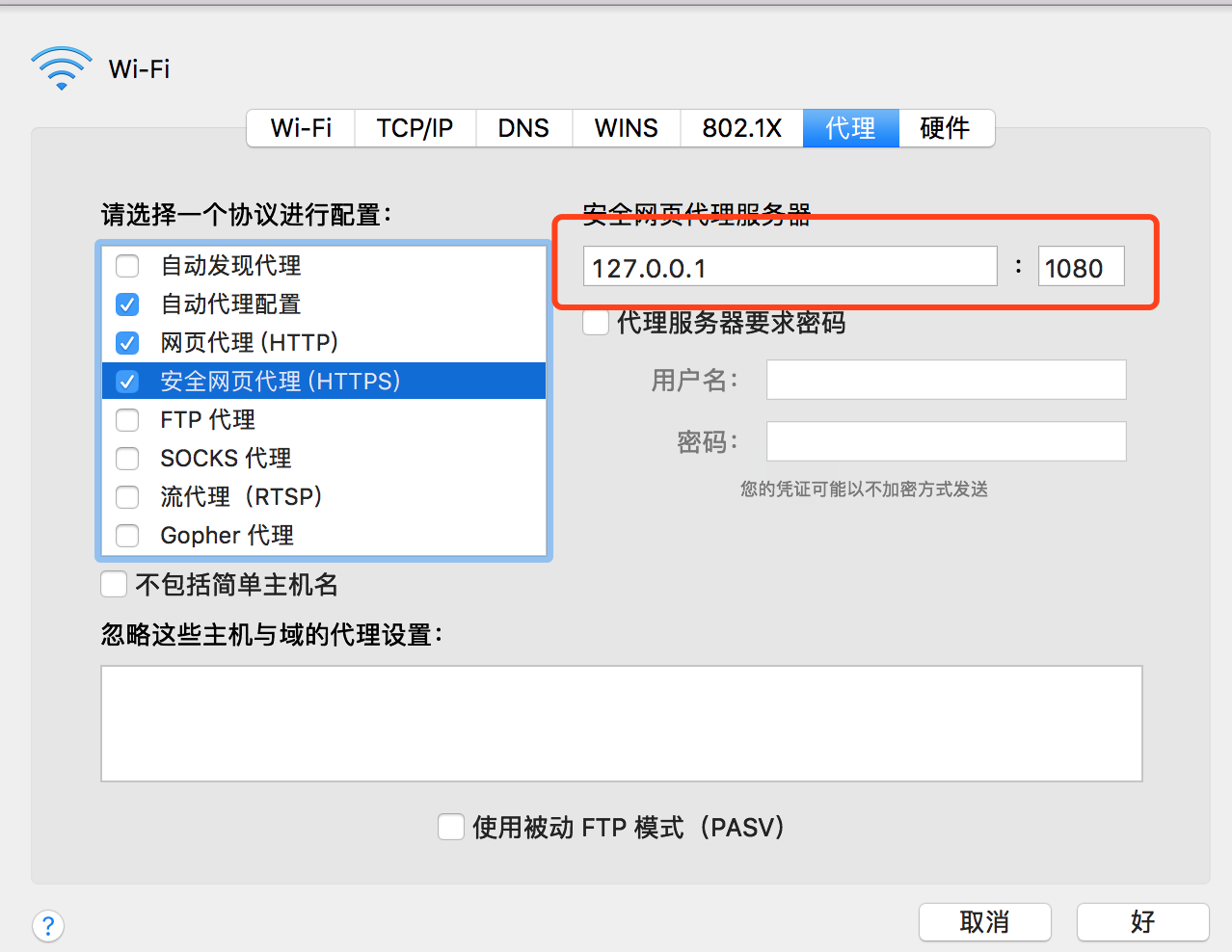
finally i find out how to make it works, you need to set up http & https proxy in net work config before use other http proxy plugin in brower
 yanghaikun
on 12 Nov 2017
yanghaikun
on 12 Nov 2017
Related issues
 zxf8665905
·
5Comments
zxf8665905
·
5Comments
 0u0u0
·
4Comments
0u0u0
·
4Comments
 wyudong
·
6Comments
wyudong
·
6Comments
 ghost
·
5Comments
ghost
·
5Comments
 JuneLeGency
·
6Comments
JuneLeGency
·
6Comments
Most helpful comment
the same issue. please let the author check it .we need a answer.