Shadowsocksx-ng: How Can I edit the PAC url?
System and Shadowsocksx-NG version:
- macOS 10.??.?? (16E????)
- Shadowsocksx-NG 1.5.1(1)
Expected behavior:
I want a specific URL pass through the VPN server. Such as music.163.com.
Actual behavior:
I don't know how to edit the PAC file or something else. Please Help me and thank you so much.
 QWERT1984
All 10 comments
You want to add a specific URL to the PAC, not to modify the PAC URL.
Go to Menu > Edit User Rules For PAC, and append your url to the text field. For example:
||music.163.com
This will make all requests to music.163.com to go through the proxy.
Refer to the content in the dialog for the full syntax reference.
 timothyqiu
on 3 Aug 2017
timothyqiu
on 3 Aug 2017
But I have another problem, I add the url to User Rules, but I cannot surf Facebook now. I choose Proxy Auto configure Mode. I want to bypass the location block with the SS server in China. Thank you so much.
QWERT1984
on 8 Aug 2017
"||music.163.com",
Do not forget quotes and commas.
 chermy
on 4 Jan 2018
chermy
on 4 Jan 2018
The PAC, gfwlist along with user specified list are all located in ~/.ShadowsocksX-NG. You could modify the configuration files manually.
You can also use this "reversed" list: https://github.com/gfwlist/tsilwfg/blob/master/tsilwfg.txt
 li0near
on 24 Jan 2018
li0near
on 24 Jan 2018
When I accessed the config file manually, it just showed a bunch of jumbled numbers.
I'm also trying to add a few sites to the list (Like udacity and sensortower)
“||http://udacity.com”,
“||http://sensortower.com”,
Is this the correct format?
 whr2206
on 21 Mar 2018
whr2206
on 21 Mar 2018
The file located in ~/.ShadowsocksX-NG/gfwlist.js shows:

and we can tell that if you want to use the full URL you need | instead of ||.
 luluman
on 21 Aug 2018
luluman
on 21 Aug 2018
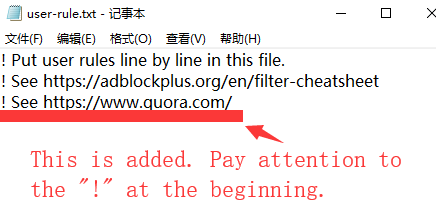
I have fixed.
 Bitate
on 25 Jul 2019
Bitate
on 25 Jul 2019
while you edit pac through GUI, DO NOT add quotes and comma, write rules line by line
for example in GUI you write:
||gtihub.com
||google.com
software will auto convert it, in the file ~/.ShadowsocksX-NG/gfwlist.js you will see
"||gtihub.com",
"||google.com",
at the top of rule
 08822407d
on 15 Jan 2020
08822407d
on 15 Jan 2020
You want to add a specific URL to the PAC, not to modify the PAC URL.
Go to Menu > Edit User Rules For PAC, and append your url to the text field. For example:
||music.163.comThis will make all requests to
music.163.comto go through the proxy.Refer to the content in the dialog for the full syntax reference.
What if I do not want the requests to a URL in PAC to go through the proxy?
Do I need to delete a URL from PAC?
 AChaoZJU
on 22 Nov 2020
AChaoZJU
on 22 Nov 2020
You want to add a specific URL to the PAC, not to modify the PAC URL.
Go to Menu > Edit User Rules For PAC, and append your url to the text field. For example:||music.163.comThis will make all requests to
music.163.comto go through the proxy.
Refer to the content in the dialog for the full syntax reference.What if I do not want the requests to a URL in PAC to go through the proxy?
Do I need to delete a URL from PAC?
Prepend @@ before the address.
 Symbolk
on 15 Dec 2020
Symbolk
on 15 Dec 2020
Related issues
 wyudong
·
6Comments
wyudong
·
6Comments
 bitweng
·
4Comments
bitweng
·
4Comments
 cuidezhu
·
4Comments
cuidezhu
·
4Comments
 ilovebamboo
·
4Comments
ilovebamboo
·
4Comments
 Sharnodra
·
6Comments
Sharnodra
·
6Comments
Most helpful comment
The file located in
~/.ShadowsocksX-NG/gfwlist.jsshows:and we can tell that if you want to use the full URL you need
|instead of||.