Shadowsocksx-ng: 显示当前profile的二维码会调用独显并且在关闭后不会释放导致特别耗能
System and Shadowsocksx-NG version:
- macOS 10.12.5 Beta (16F71b)
- Shadowsocksx-NG 1.5.1
Expected behavior:
关闭 显示当前profile 二维码之后,ssxng不再要求高性能GPU
Actual behavior:
关闭 显示当前profile 二维码之后,ssxng仍然要求高性能GPU

(N/A for feature requests)
Steps to reproduce:
点击 显示当前服务器的二维码,在monitor中能看到 ssxng 要求了高性能GPU。关闭二维码窗口,ssxng仍然要求高性能GPU。
以下是在monitor中的取样
(N/A for feature requests)
How often does this happen?
(N/A for feature requests)
ss-local.log
Please upload the ss-local.log file here the file is in ~/Library/Logs
1) Open 'Advanced Settings -> enable Verbose Mode'
2) Continue run Shadowsocksx-NG for 5 minutes
3) Upload the ~/Library/Logs/ss-local.log here (with or without compress)
Application log
Open the Console.app and search Shadowsocksx-NG
Copy paste the log here
Crash Log
If the app crashes and pop up a crash log, please copy and paste here
 qinyuhang
All 5 comments
Same here. Preventing tools like gfxCardStatus from switching to integrated card. To release discrete card, it is needed to completely quit Shadowsocksx-NG.
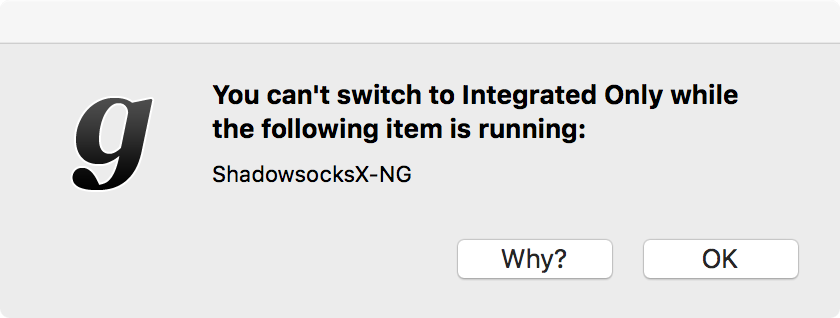
Console log:
###################### Starting Shadowsocksx-NG ######################
default 17:43:55.532223 +0800   ShadowsocksX-NG Call SMLoginItemSetEnabled with [1] success
default 17:43:55.604061 +0800   kernel  [ShadowsocksX-NG pid:68153 mux-aware] starting, non-mux-aware app count 0, switch-state 0 IG FBs 1 EG FBs 0:0 power-state 6 3D idle HDA idle
default 17:43:55.643838 +0800   ShadowsocksX-NG Start ss-local succeeded.
default 17:43:55.671157 +0800   ShadowsocksX-NG Start privoxy succeeded.
default 17:43:55.735783 +0800   ShadowsocksX-NG Stop kcptun succeeded.
default 17:43:55.736253 +0800   ShadowsocksX-NG run shadowsocks helper: /Library/Application Support/ShadowsocksX-NG/proxy_conf_helper
default 17:43:55.762015 +0800   authd   Succeeded authorizing right 'system.services.systemconfiguration.network' by client '/System/Library/Frameworks/SystemConfiguration.framework/Versions/A/Helpers/SCHelper' [68151] for authorization created by '/Library/Application Support/ShadowsocksX-NG/proxy_conf_helper' [68163] (3,0)
default 17:43:55.763432 +0800   authd   Succeeded authorizing right 'system.services.systemconfiguration.network' by client '/System/Library/Frameworks/SystemConfiguration.framework/Versions/A/Helpers/SCHelper' [68151] for authorization created by '/Library/Application Support/ShadowsocksX-NG/proxy_conf_helper' [68163] (3,0)
default 17:43:55.765033 +0800   authd   Succeeded authorizing right 'system.services.systemconfiguration.network' by client '/System/Library/Frameworks/SystemConfiguration.framework/Versions/A/Helpers/SCHelper' [68151] for authorization created by '/Library/Application Support/ShadowsocksX-NG/proxy_conf_helper' [68163] (3,0)
default 17:43:55.765918 +0800   authd   Succeeded authorizing right 'system.services.systemconfiguration.network' by client '/System/Library/Frameworks/SystemConfiguration.framework/Versions/A/Helpers/SCHelper' [68151] for authorization created by '/Library/Application Support/ShadowsocksX-NG/proxy_conf_helper' [68163] (3,0)
default 17:43:55.768361 +0800   ShadowsocksX-NG pac proxy set to off
###################### Show QR Code for current server ######################
default 17:45:25.001611 +0800   kernel  [ShadowsocksX-NG pid:68153 mux-aware] starting, non-mux-aware app count 0, switch-state 0 IG FBs 1 EG FBs 0:0 power-state 6 3D idle HDA idle
default 17:45:25.001680 +0800   kernel  [ShadowsocksX-NG pid:68153 non-mux-aware] starting, non-mux-aware app count 1, switch-state 0 IG FBs 1 EG FBs 0:0 power-state 6 3D idle HDA idle
###################### Stopping Shadowsocksx-NG ######################
default 17:45:43.259780 +0800   ShadowsocksX-NG Stop ss-local succeeded.
default 17:45:43.325027 +0800   ShadowsocksX-NG Stop kcptun succeeded.
default 17:45:43.384014 +0800   ShadowsocksX-NG Stop privoxy succeeded.
default 17:45:43.384341 +0800   ShadowsocksX-NG run shadowsocks helper: /Library/Application Support/ShadowsocksX-NG/proxy_conf_helper
default 17:45:43.432994 +0800   authd   Succeeded authorizing right 'system.services.systemconfiguration.network' by client '/System/Library/Frameworks/SystemConfiguration.framework/Versions/A/Helpers/SCHelper' [68182] for authorization created by '/Library/Application Support/ShadowsocksX-NG/proxy_conf_helper' [68181] (3,0)
default 17:45:43.434821 +0800   authd   Succeeded authorizing right 'system.services.systemconfiguration.network' by client '/System/Library/Frameworks/SystemConfiguration.framework/Versions/A/Helpers/SCHelper' [68182] for authorization created by '/Library/Application Support/ShadowsocksX-NG/proxy_conf_helper' [68181] (3,0)
default 17:45:43.436720 +0800   authd   Succeeded authorizing right 'system.services.systemconfiguration.network' by client '/System/Library/Frameworks/SystemConfiguration.framework/Versions/A/Helpers/SCHelper' [68182] for authorization created by '/Library/Application Support/ShadowsocksX-NG/proxy_conf_helper' [68181] (3,0)
default 17:45:43.437668 +0800   authd   Succeeded authorizing right 'system.services.systemconfiguration.network' by client '/System/Library/Frameworks/SystemConfiguration.framework/Versions/A/Helpers/SCHelper' [68182] for authorization created by '/Library/Application Support/ShadowsocksX-NG/proxy_conf_helper' [68181] (3,0)
default 17:45:43.439933 +0800   ShadowsocksX-NG pac proxy set to off
default 17:45:43.441560 +0800   kernel  [ShadowsocksX-NG pid 68153 mux-aware] exiting, non-mux-aware app count 1, runtime: 0:01:47.841
default 17:45:43.441937 +0800   kernel  [ShadowsocksX-NG pid 68153 mux-aware] exiting, non-mux-aware app count 1, runtime: 0:00:18.441
default 17:45:43.442025 +0800   kernel  [ShadowsocksX-NG pid 68153 non-mux-aware] exiting, non-mux-aware app count 0, runtime: 0:00:18.441
 astrataro
on 5 Aug 2017
astrataro
on 5 Aug 2017
Maybe setting kCIContextUseSoftwareRenderer to true for CIContext will help.
I don't have any device with standalone graphics cards, so I can't try it.
 timothyqiu
on 29 Aug 2017
timothyqiu
on 29 Aug 2017
谁的笔记本有独立显卡可以试一下 @timothyqiu 的方法。
 qiuyuzhou
on 29 Aug 2017
qiuyuzhou
on 29 Aug 2017
Same issue +1
 jccode
on 12 Oct 2017
jccode
on 12 Oct 2017
@timothyqiu UR method works! I create a PR https://github.com/shadowsocks/ShadowsocksX-NG/pull/565
qinyuhang
on 21 Oct 2017
Related issues
 bitweng
·
4Comments
bitweng
·
4Comments
 0u0u0
·
4Comments
0u0u0
·
4Comments
 gnaixx
·
4Comments
gnaixx
·
4Comments
 jayzch
·
5Comments
jayzch
·
5Comments
 zxf8665905
·
5Comments
zxf8665905
·
5Comments
Most helpful comment
@timothyqiu UR method works! I create a PR https://github.com/shadowsocks/ShadowsocksX-NG/pull/565