Shadowsocks-windows: 更新到Shadowsocks-4.0.9后完全不能用了。。。
不知道什么原因。
换回Shadowsocks-4.0.8后,非常流畅。
两台电脑都是如此。系统windows7。
 yelosheng
All 50 comments
请具体描述一下问题,比如错误提示?
 chenshaoju
on 27 Mar 2018
chenshaoju
on 27 Mar 2018
那么“连不上”是表现在什么地方?浏览器有什么显示?
如果你有手机,相同的服务器配置,手机上能用吗?
chenshaoju
on 27 Mar 2018
不管是全局还是pac,访问百度搜索关键字ip,都是本地地址
 DaZiYuan
on 30 Mar 2018
DaZiYuan
on 30 Mar 2018
如果有Firefox,请参考下图独立配置Firefox的代理设置,看看是否还会显示本本地地址。

chenshaoju
on 30 Mar 2018
设置后firefox无法上网。 这个问题是今天才遇到的,也没有更新。感觉突然就失灵了
DaZiYuan
on 30 Mar 2018
Firefox中有无什么显示?
SS的日志提示什么?
chenshaoju
on 30 Mar 2018
 h0wardch3ng
on 30 Mar 2018
h0wardch3ng
on 30 Mar 2018
感觉是windows出问题了,手动修改代理都不成功
DaZiYuan
on 30 Mar 2018
Firefox里显示什么?SS的日志里显示什么?
从一楼到此楼,没有一个人提供以上信息。
chenshaoju
on 30 Mar 2018
@chenshaoju 因为我已经换回老版本,也可以正常使用了。所以没有日志了。不过我可以确认的是更新到4.0.9版本后,ss根本没有去连服务器。因为输入网址,打回车,马上就说网页打不开了。根本没有联网的延时。
yelosheng
on 30 Mar 2018
[2018-03-30 13:08:42] Shadowsocks.Util.SystemProxy.ProxyException: Error query options: 12178 (null)
at Shadowsocks.Util.SystemProxy.Sysproxy.ExecSysproxy(String arguments)
at Shadowsocks.Util.SystemProxy.Sysproxy.SetIEProxy(Boolean enable, Boolean global, String proxyServer, String pacURL)
at Shadowsocks.Controller.SystemProxy.Update(Configuration config, Boolean forceDisable, PACServer pacSrv)
DaZiYuan
on 30 Mar 2018
请先退出SS,然后删除 Shadowsocks.exe 所在目录下的 user-wininet.json ,然后再试。
如果仍然不行,请尝试 https://github.com/shadowsocks/shadowsocks-windows/issues/1487#issuecomment-340370635
chenshaoju
on 30 Mar 2018
@chenshaoju 您好, 删除后user-wininet.json,还是一样的问题
yelosheng
on 30 Mar 2018
@yelosheng 你好,我是回复的 @DaZiYuan 。
@yelosheng 你的SS日志里有什么显示吗?
chenshaoju
on 30 Mar 2018
删除后也不行,我已经判定是操作系统的问题了。等几天重装系统吧。。。
DaZiYuan
on 30 Mar 2018
@DaZiYuan 这个方法也不行吗? https://github.com/shadowsocks/shadowsocks-windows/issues/1487#issuecomment-340370635
也可能和权限有关,某些东西可能拒绝了SS修改系统代理。
chenshaoju
on 30 Mar 2018
系统的代理设置,点击OK都没有响应,我估计是windows10的bug。导致所有代理都设置不了了
DaZiYuan
on 30 Mar 2018
Hmmmm.....好吧。。。
chenshaoju
on 30 Mar 2018
不想recover系统,曲线救国升级到了最新预览版,代理功能正常了。
如果是系统问题导致不能设代理的老铁们可以参考一下。。。
DaZiYuan
on 30 Mar 2018
预览版windows 10会引发各种奇奇怪怪的问题
 celeron533
on 31 Mar 2018
celeron533
on 31 Mar 2018
也是没有办法,我之前那个明显是系统问题, 打开系统代理设置窗口,点击保存按钮没有任何反应窗口也不关闭。
DaZiYuan
on 31 Mar 2018
@chenshaoju 日志来了,麻烦您看一下:
[2018-04-02 14:23:45] System.Reflection.TargetInvocationException: 调用的目标发生了异常。 ---> System.EntryPointNotFoundException: 无法在 DLL“libsscrypto.dll”中找到名为“md5_ret”的入口点。
在 Shadowsocks.Encryption.MbedTLS.md5_ret(Byte[] input, UInt32 ilen, Byte[] output)
在 Shadowsocks.Encryption.MbedTLS.MD5(Byte[] input)
在 Shadowsocks.Encryption.Stream.StreamEncryptor.LegacyDeriveKey(Byte[] password, Byte[] key, Int32 keylen)
在 Shadowsocks.Encryption.Stream.StreamEncryptor.InitKey(String password)
在 Shadowsocks.Encryption.Stream.StreamEncryptor..ctor(String method, String password)
在 Shadowsocks.Encryption.Stream.StreamOpenSSLEncryptor..ctor(String method, String password)
--- 内部异常堆栈跟踪的结尾 ---
在 System.RuntimeMethodHandle.InvokeMethod(Object target, Object[] arguments, Signature sig, Boolean constructor)
在 System.Reflection.RuntimeConstructorInfo.Invoke(BindingFlags invokeAttr, Binder binder, Object[] parameters, CultureInfo culture)
在 Shadowsocks.Encryption.EncryptorFactory.GetEncryptor(String method, String password)
在 Shadowsocks.Controller.TCPHandler.CreateRemote()
在 Shadowsocks.Controller.TCPHandler.StartConnect()
[2018-04-02 14:23:57] System.Reflection.TargetInvocationException: 调用的目标发生了异常。 ---> System.EntryPointNotFoundException: 无法在 DLL“libsscrypto.dll”中找到名为“md5_ret”的入口点。
在 Shadowsocks.Encryption.MbedTLS.md5_ret(Byte[] input, UInt32 ilen, Byte[] output)
在 Shadowsocks.Encryption.MbedTLS.MD5(Byte[] input)
在 Shadowsocks.Encryption.Stream.StreamEncryptor.LegacyDeriveKey(Byte[] password, Byte[] key, Int32 keylen)
在 Shadowsocks.Encryption.Stream.StreamEncryptor.InitKey(String password)
在 Shadowsocks.Encryption.Stream.StreamEncryptor..ctor(String method, String password)
在 Shadowsocks.Encryption.Stream.StreamOpenSSLEncryptor..ctor(String method, String password)
--- 内部异常堆栈跟踪的结尾 ---
在 System.RuntimeMethodHandle.InvokeMethod(Object target, Object[] arguments, Signature sig, Boolean constructor)
在 System.Reflection.RuntimeConstructorInfo.Invoke(BindingFlags invokeAttr, Binder binder, Object[] parameters, CultureInfo culture)
在 Shadowsocks.Encryption.EncryptorFactory.GetEncryptor(String method, String password)
在 Shadowsocks.Controller.TCPHandler.CreateRemote()
在 Shadowsocks.Controller.TCPHandler.StartConnect()
[2018-04-02 14:23:57] System.Reflection.TargetInvocationException: 调用的目标发生了异常。 ---> System.EntryPointNotFoundException: 无法在 DLL“libsscrypto.dll”中找到名为“md5_ret”的入口点。
在 Shadowsocks.Encryption.MbedTLS.md5_ret(Byte[] input, UInt32 ilen, Byte[] output)
在 Shadowsocks.Encryption.MbedTLS.MD5(Byte[] input)
在 Shadowsocks.Encryption.Stream.StreamEncryptor.LegacyDeriveKey(Byte[] password, Byte[] key, Int32 keylen)
在 Shadowsocks.Encryption.Stream.StreamEncryptor.InitKey(String password)
在 Shadowsocks.Encryption.Stream.StreamEncryptor..ctor(String method, String password)
在 Shadowsocks.Encryption.Stream.StreamOpenSSLEncryptor..ctor(String method, String password)
--- 内部异常堆栈跟踪的结尾 ---
在 System.RuntimeMethodHandle.InvokeMethod(Object target, Object[] arguments, Signature sig, Boolean constructor)
在 System.Reflection.RuntimeConstructorInfo.Invoke(BindingFlags invokeAttr, Binder binder, Object[] parameters, CultureInfo culture)
在 Shadowsocks.Encryption.EncryptorFactory.GetEncryptor(String method, String password)
在 Shadowsocks.Controller.TCPHandler.CreateRemote()
在 Shadowsocks.Controller.TCPHandler.StartConnect()
yelosheng
on 2 Apr 2018
请先退出SS,然后删除 Shadowsocks.exe 所在目录下的 ss_temp_win 目录,然后再启动SS看看是否可以使用了。
如果仍然不行,请安装 32位版(x86) 的 Microsoft Visual C++ 2015 Redistributable https://www.microsoft.com/en-us/download/details.aspx?id=53840 。
EDIT:你用的什么加密算法?
chenshaoju
on 2 Apr 2018
@chenshaoju 我换回4.0.8版本的ss就一切OK了
[2018-04-02 14:33:59] Shadowsocks started
[2018-04-02 14:33:59]
Registered Encryptor Info
aes-128-cfb=>StreamOpenSSLEncryptor
aes-192-cfb=>StreamOpenSSLEncryptor
aes-256-cfb=>StreamOpenSSLEncryptor
aes-128-ctr=>StreamOpenSSLEncryptor
aes-192-ctr=>StreamOpenSSLEncryptor
aes-256-ctr=>StreamOpenSSLEncryptor
bf-cfb=>StreamOpenSSLEncryptor
camellia-128-cfb=>StreamOpenSSLEncryptor
camellia-192-cfb=>StreamOpenSSLEncryptor
camellia-256-cfb=>StreamOpenSSLEncryptor
rc4-md5=>StreamOpenSSLEncryptor
salsa20=>StreamSodiumEncryptor
chacha20=>StreamSodiumEncryptor
chacha20-ietf=>StreamSodiumEncryptor
aes-128-gcm=>AEADOpenSSLEncryptor
aes-192-gcm=>AEADOpenSSLEncryptor
aes-256-gcm=>AEADOpenSSLEncryptor
chacha20-ietf-poly1305=>AEADOpenSSLEncryptor
我就先用着4.0.8吧,懒得折腾了。。。
yelosheng
on 2 Apr 2018
2018-04-02 14:23:45] System.Reflection.TargetInvocationException:
调用的目标发生了异常。 ---> System.EntryPointNotFoundException: 无法在
DLL“libsscrypto.dll”中找到名为“md5_ret”的入口点。
1725 升级了加密库,看看会不会是这个的问题
Chen Shaoju notifications@github.com 于 2018年4月2日周一 14:31写道:
请先退出SS,然后删除 Shadowsocks.exe 所在目录下的 ss_temp_win 目录,然后再启动SS看看是否可以使用了。
如果仍然不行,请安装32位版(x86)的 Microsoft Visual C++ 2015 Redistributable
https://www.microsoft.com/en-us/download/details.aspx?id=53840 。—
You are receiving this because you are subscribed to this thread.
Reply to this email directly, view it on GitHub
https://github.com/shadowsocks/shadowsocks-windows/issues/1774#issuecomment-377866138,
or mute the thread
https://github.com/notifications/unsubscribe-auth/AQVHEvLat4GB5E1_qMSM6_40LyM-eIdbks5tkcXYgaJpZM4S8M0L
.
 ghost
on 2 Apr 2018
ghost
on 2 Apr 2018
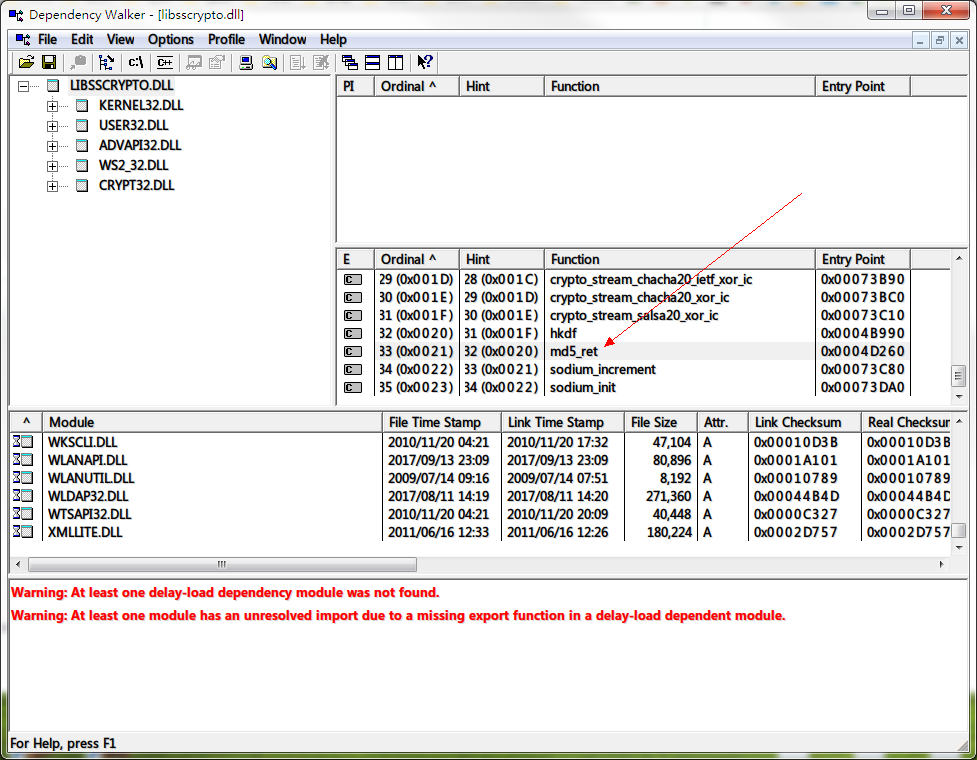
我尝试调试了一下 libsscrypto.dll ,有一个叫“md5_ret”的入口。
但是他的这个错误提示意味着两种可能,要么 libsscrypto.dll 版本不对,要么运行时有问题。
chenshaoju
on 2 Apr 2018
i experience the exactly same question. Looking forward to a solution.
 entropysnow
on 3 Apr 2018
entropysnow
on 3 Apr 2018
@entropysnow Please try exit Shadowsocks, delete the ss_win_temp folder in Shadowsocks.exe current folder, And start Shadowsocks again.
If still not working, Please make sure you have installed Microsoft Visual C++ 2015 Redistributable (x86 or 32bit). https://www.microsoft.com/en-us/download/details.aspx?id=53840
chenshaoju
on 3 Apr 2018
Some of the anti-virus software will report a false positive. Try to disable the anti virus if you trust SS
celeron533
on 4 Apr 2018
@chenshaoju thanks for your advice. Tried, but no joy. the log still says the same as above. I just go back to 4.0.8 and everything is good now.
entropysnow
on 6 Apr 2018
@entropysnowIt looks like some 3rd-party software, Like anti-virus software, Blocked the access.
Do you have using anti-virus software?
chenshaoju
on 6 Apr 2018
@chenshaoju Only the defender that comes with Win10. Nothing else
entropysnow
on 9 Apr 2018
It may be related to the VS compilation environment
Download src
Compiled (Microsoft Visual Studio 2017 community)
It worked.
But I did not install the Microsoft Visual C++ 2015 Redistributable.
 error523
on 11 Apr 2018
error523
on 11 Apr 2018
我也出现了同样的问题,安装了也 Microsoft Visual C++ 2015 Redistributable x86 并没有解决问题。
然后我尝试安装了 x64 的,发现不行,又重新安装 x86 的,这时问题被神奇地解决了
 MidTin
on 17 Apr 2018
MidTin
on 17 Apr 2018
新版本完全不行啊。。。。4.0以上的版本全部报错。
startup:System.IndexOutOfRangeException
已经回退到3.x的最高版本了。3.x最高版本可用 2.5.8也能用
 sgf
on 23 May 2018
sgf
on 23 May 2018
你的问题是 https://github.com/shadowsocks/shadowsocks-windows/issues/906#issuecomment-391190359 吗?如果是,请移步 https://github.com/shadowsocks/shadowsocks-windows/issues/1487#issuecomment-340370635
chenshaoju
on 23 May 2018
我也遇到了同样的问题,用不了几分钟就自动掉线,提示目标计算机拒绝,需要重新关闭和开启
请问题主最后找到解决方案了吗
 losvincent
on 18 Oct 2018
losvincent
on 18 Oct 2018
@losvincent 这意味着你的服务器端口被墙了,请尝试套一个Simple-obfs或者GoQuite看看。
chenshaoju
on 18 Oct 2018
@losvincent 这意味着你的服务器端口被墙了,请尝试套一个Simple-obfs或者GoQuite看看。
@chenshaoju 谢谢您的回复
情况是关闭,重新连接,可以使用,但是没过七八分钟就掉了,日志显示目标计算机拒绝
需要再次重新连接反复,这样能使用是不是说明端口还活着呀
losvincent
on 18 Oct 2018
@losvincent 如果相同的配置在其他计算机或者手机上使用正常,该问题可能和TCP/IP或Winsocks有关,请尝试以管理员身份启动命令提示符或者PowerShell,然后执行:
netsh interface ipv4 reset
netsh interface ipv6 reset
netsh interface tcp reset
netsh winsock reset
一行一回车,四行执行完毕后重新启动计算机再看看。如果你的计算机是手动指定IP的,重启后可能需要再手动设置一次。如果是自动分配(DHCP)则无此问题。
重启后看看效果是否有改善。
chenshaoju
on 18 Oct 2018
谢谢@chenshaoju,就是这几天开始出现的(和TPE海底电缆故障会不会有关系?但是同样账号旁边同事电脑又正常)
昨天和今天都操作过这个,还是无效。目前是随机,有时候掉线后提示是目标计算机拒绝,有时候是连接方没有反应。
同样的SS账号在另外电脑则一直正常没有掉,分析不出原因
losvincent
on 18 Oct 2018
我怀疑是不是你所在的网络存在某种干扰之类的,这个很难判定,只能说之前有个类似的案例: https://github.com/shadowsocks/shadowsocks-windows/issues/1854
chenshaoju
on 18 Oct 2018
我怀疑是不是你所在的网络存在某种干扰之类的,这个很难判定,只能说之前有个类似的案例: #1854
windows防火墙,avast完全关闭,也是这样,所以感觉不是防火墙的问题似乎。我再看看和测试一下吧,谢谢
losvincent
on 19 Oct 2018
@chenshaoju 谢谢一直耐心帮忙,我卸载avast后一切正常了,然后看到其他人反馈也是 Avast kills ss_privoxy
奇怪的是禁用avast全部服务,无效,必须卸载,我打算邮件avast官方咨询一下
losvincent
on 19 Oct 2018
今天神奇地解决了。
因为日志里报
无法在 DLL“libsscrypto.dll”中找到名为“md5_ret”的入口点
这个错误,我就想可能是libsscrypto.dll文件的问题,于是我在自己电脑里搜索了一下,找到以前装过的隔壁家“ShadowsocksR”目录下也有这个文件,不过两者大小不一样,我就试试看把它拷过来覆盖了Shadowsocks的这个文件。
问题就神秘地解决了!
yelosheng
on 29 Nov 2018
这是因为你没有安装 Microsoft Visual C++ 2015 Redistributable (x86) :https://www.microsoft.com/en-us/download/details.aspx?id=53840
chenshaoju
on 29 Nov 2018
谢谢分享,你那边是也安装了avast吗,我现在换360国际版了,直接没这个问题了,是avast搞的鬼
发件人: yelosheng
发送时间: 2018-11-29 10:24
收件人: shadowsocks/shadowsocks-windows
抄送: 为主的祥助; Mention
主题: Re: [shadowsocks/shadowsocks-windows] 更新到Shadowsocks-4.0.9后完全不能用了。。。 (#1774)
今天神奇地解决了。
因为日志里报
无法在 DLL“libsscrypto.dll”中找到名为“md5_ret”的入口点
这个错误,我就想可能是libsscrypto.dll文件的问题,于是我在自己电脑里搜索了一下,找到以前装过的隔壁家“ShadowsocksR”目录下也有这个文件,不过两者大小不一样,我就试试看把它拷过来覆盖了Shadowsocks的这个文件。
问题就神秘地解决了!
—
You are receiving this because you were mentioned.
Reply to this email directly, view it on GitHub, or mute the thread.
losvincent
on 29 Nov 2018
 akirasen
on 9 Oct 2019
akirasen
on 9 Oct 2019
你这个是非面板的,可试试可视化面板管理v2ray的,还可以创建子帐号
losvincent
on 9 Oct 2019
你这个是非面板的,可试试可视化面板管理v2ray的,还可以创建子帐号
就自己用一下 没那么复杂
akirasen
on 9 Oct 2019
Related issues
 xieyang784
·
3Comments
xieyang784
·
3Comments
 hztgz
·
3Comments
hztgz
·
3Comments
 DonClaud
·
4Comments
DonClaud
·
4Comments
 spectereye
·
4Comments
spectereye
·
4Comments
 imba-tjd
·
3Comments
imba-tjd
·
3Comments
Most helpful comment
@chenshaoju 因为我已经换回老版本,也可以正常使用了。所以没有日志了。不过我可以确认的是更新到4.0.9版本后,ss根本没有去连服务器。因为输入网址,打回车,马上就说网页打不开了。根本没有联网的延时。