Shadowsocks-windows: win10更新1703后SS异常
Please read Wiki carefully, especially https://github.com/shadowsocks/shadowsocks-windows/wiki/Troubleshooting.
Please answer these questions before submitting your issue. Thanks!
Version(release version or AppVeyor link)
4.04
Environment(Operating system, .NET Framework, etc)
win10
Steps you have tried
System.Reflection.TargetInvocationException: 操作过程中出现异常,结果无效。 有关异常的详细信息,请查看 InnerException。 ---> System.Net.WebException: 无法连接到远程服务器 ---> System.Net.Sockets.SocketException: 由于连接方在一段时间后没有正确答复或连接的主机没有反应,连接尝试失败。 127.0.0.1:1080
在 System.Net.Sockets.Socket.EndConnect(IAsyncResult asyncResult)
在 System.Net.ServicePoint.ConnectSocketInternal(Boolean connectFailure, Socket s4, Socket s6, Socket& socket, IPAddress& address, ConnectSocketState state, IAsyncResult asyncResult, Exception& exception)
--- 内部异常堆栈跟踪的结尾 ---
在 System.Net.HttpWebRequest.EndGetResponse(IAsyncResult asyncResult)
在 System.Net.WebClient.GetWebResponse(WebRequest request, IAsyncResult result)
在 System.Net.WebClient.DownloadBitsResponseCallback(IAsyncResult result)
--- 内部异常堆栈跟踪的结尾 ---
在 System.ComponentModel.AsyncCompletedEventArgs.RaiseExceptionIfNecessary()
在 Shadowsocks.Controller.UpdateChecker.http_DownloadStringCompleted(Object sender, DownloadStringCompletedEventArgs e)
Config and error log in detail (with all sensitive info masked)
 austinxv
All 21 comments
系统版本?我这最新的Win10 15063没事
 huming2207
on 17 Jul 2017
huming2207
on 17 Jul 2017
笔记本更新系统前一直正常使用,更新后连不上报错如上所示,手机正常。
austinxv
on 17 Jul 2017
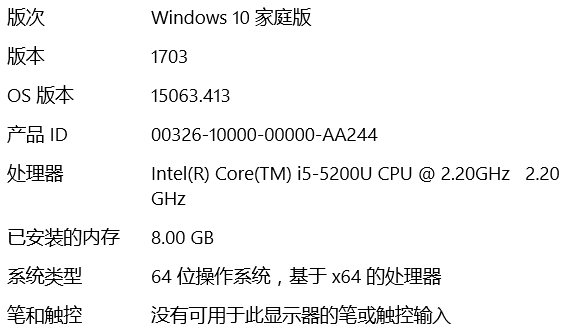
@austinxv 文件管理器-》关于Windows 版本多少?能不能给截图?
huming2207
on 17 Jul 2017
好的,等会上图,现不在桌面前。
austinxv
on 17 Jul 2017
austinxv
on 17 Jul 2017
我win10 x64 1703。你可以试试把SS里的配置文件全删了,重新打开Shadowsocks.exe
 DanielEcho
on 17 Jul 2017
DanielEcho
on 17 Jul 2017
我试过这个方法,没用。
austinxv
on 17 Jul 2017
您好同样碰到这个问题,请问目前有解决方案么
 cczeta
on 18 Jul 2017
cczeta
on 18 Jul 2017
@cczeta 我最后是回滚到win10更新前的老版本,目前没发现其它解决方案
austinxv
on 18 Jul 2017
全新安装的1703 没有发现异常
2017-07-19 0:33 GMT+08:00 austinxv notifications@github.com:
@cczeta https://github.com/cczeta 我最后是回滚到win10更新前的老版本,目前没发现其它解决方案
—
You are receiving this because you are subscribed to this thread.
Reply to this email directly, view it on GitHub
https://github.com/shadowsocks/shadowsocks-windows/issues/1241#issuecomment-316121464,
or mute the thread
https://github.com/notifications/unsubscribe-auth/ATcdVqe_rvHfmXAq-t3-oIxK_ZN_gzUOks5sPN5wgaJpZM4OZS_4
.
 linshuboy
on 18 Jul 2017
linshuboy
on 18 Jul 2017
之前有人提到PPPoE认证连接名称如果是中文的话,会有问题
 celeron533
on 19 Jul 2017
celeron533
on 19 Jul 2017
1.下载 Microsoft .NET Framework Repair Tool
https://www.microsoft.com/en-us/download/details.aspx?id=30135
执行修复过程,如果修复失败,则选择完全卸载 .NET Framework
2.下载 Microsoft .NET Framework 4.7
https://www.microsoft.com/zh-CN/download/details.aspx?id=55167
并重新安装。
 chenshaoju
on 19 Jul 2017
chenshaoju
on 19 Jul 2017
@chenshaoju 非常感谢,目前测试发现问题已解决。
cczeta
on 19 Jul 2017
@ cczeta 你这个问题的原因最终确定是什么,解决办法是什么,请分享下
 cell13
on 7 Oct 2017
cell13
on 7 Oct 2017
我是直接把win10回滚到更新前。
2017年10月8日 01:58,"cell13" notifications@github.com写道:
@ cczeta 你这个问题的原因最终确定是什么,解决办法是什么,请分享下
—
You are receiving this because you were mentioned.
Reply to this email directly, view it on GitHub
https://github.com/shadowsocks/shadowsocks-windows/issues/1241#issuecomment-334954557,
or mute the thread
https://github.com/notifications/unsubscribe-auth/Abp8L4litmym3T9lTa_SN8JygWABIgqZks5sp7vUgaJpZM4OZS_4
.
austinxv
on 10 Oct 2017
win10根本就不能卸载framework啊
 DaZiYuan
on 30 Mar 2018
DaZiYuan
on 30 Mar 2018
@DaZiYuan 但是Win10这个神奇的垃圾系统会在系统更新的时候搞爆任何它能搞爆的东西
huming2207
on 30 Mar 2018
执行了修复程序也没用。。。手动设置系统代理都保存不了。 天坑系统啊
DaZiYuan
on 30 Mar 2018
估计你的客户端是新版本了,我的客户端还是以前的老版本。
代码抄写狮 notifications@github.com 于 2018年3月30日周五 11:28写道:
执行了修复程序也没用。。。手动设置系统代理都保存不了。 天坑系统啊
—
You are receiving this because you were mentioned.
Reply to this email directly, view it on GitHub
https://github.com/shadowsocks/shadowsocks-windows/issues/1241#issuecomment-377435699,
or mute the thread
https://github.com/notifications/unsubscribe-auth/Abp8L44TvL_XwoZJAPX62Se6OD_06bFUks5tjaZ1gaJpZM4OZS_4
.
austinxv
on 31 Mar 2018
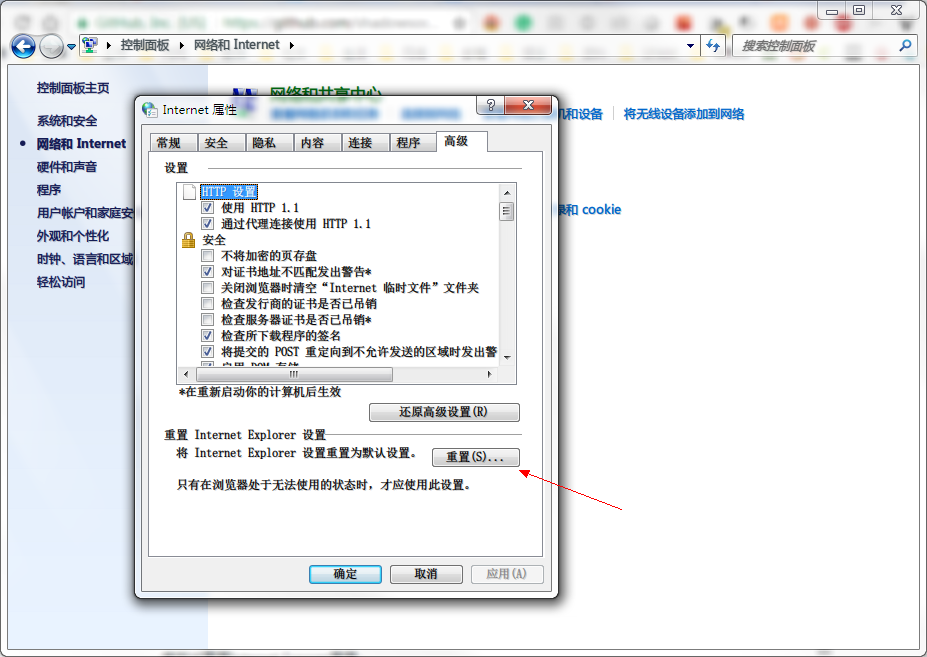
@DaZiYuan 很高的可能性和某些安全软件,或者浏览器注册表键值有关。
请尝试重置Internet Explorer看看:
chenshaoju
on 1 Apr 2018
已经升级win10预览版,可以设了。。
DaZiYuan
on 1 Apr 2018
Related issues
 ugksoft
·
3Comments
ugksoft
·
3Comments
 Galaxy0419
·
3Comments
Galaxy0419
·
3Comments
 xmha97
·
3Comments
xmha97
·
3Comments
 Mygod
·
3Comments
Mygod
·
3Comments
 imba-tjd
·
3Comments
imba-tjd
·
3Comments
Most helpful comment
1.下载 Microsoft .NET Framework Repair Tool
https://www.microsoft.com/en-us/download/details.aspx?id=30135
执行修复过程,如果修复失败,则选择完全卸载 .NET Framework
2.下载 Microsoft .NET Framework 4.7
https://www.microsoft.com/zh-CN/download/details.aspx?id=55167
并重新安装。